GlobalMarket
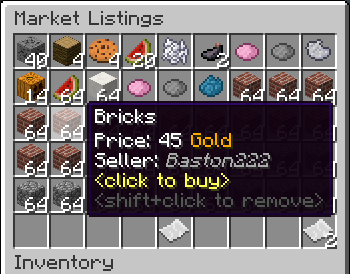
GlobalMarket is a global market system. It allows players to buy and sell items via a convenient in-game interface. It's similar WoW's Auction House or Runescape's Grand Exchange. I created this plugin awhile ago (back in the days of WebAuction, it's what inspired me) for private use, but I've decided to release it to the public. This plugin requires Vault and ProtocolLib, other than that, just drop it in plugins (make sure you have Vault plus a supported economy plugin installed) and start trading!
Features
- Players can put any item up for sale using a dead simple in-game GUI system (see below)
- Uses ProtocolLib for proper item serialization that supports Bukkit, Spigot, and Cauldron
- Real time interface, all trades show up immediately without having to 'refresh' or close the GUI
- No maintenance or admin interaction required
Mailbox system that allows you to set up market areas or auction houses(not currently in 2.0.0)A built in price guide that compiles average prices from previous transactions(not currently in 2.0.0)
Latest Dev Build
Development builds of this project can be acquired at the following continuous integration server.
These builds have not been approved by the BukkitDev staff. Use them at your own risk.
http://build.survivorserver.com/job/GlobalMarket%202.0.0/
Changelog
Usage
- The Interface
- This is a display of all current listings, you click an item to buy it. You can shift+click to remove a listing if you own it, or if you have the "globalmarket.listingsadmin" permission. Listings automatically expire after 1 week (configurable). You can use
/marketto access the menu.

- Stock
- When you purchase an item it will be sent to your stock. Stock is an entirely optional system but is suggested to be enabled, as disabling it will disable certain other features like
/market send. The stock system can hold a configurable amount of stacks of items in a configurable amount of slots. Once you place an item in your stock, you can list it to be sold to other players. Players can also send items to other players' stock via/market sendif they have the "globalmarket.command.send" permission.

- Server Listings
- You can create 'infinite listings' that do not expire and can't be bought out. Create them with
/market createinf <price> <[amount]>. There's a dedicated section to server listings in the Market menu. You'll need the "globalmarket.command.createserverlisting" permission to do this. Or you can disable this system all-together in the config.
Commands
| Command | Description | Permission |
|---|---|---|
| /market | Opens the Market menu. | globalmarket.use |
| /market ? | Shows command help. | <no permission> |
| /market send <player> <[amount]> | Sends the item you're holding to <player>'s stock. Amount is optional. | globalmarket.command.send |
| /market createinf <price> <[amount]> | Creates a server listing. Amount is optional. | globalmarket.command.createserverlisting |
| /market reload | Reloads config.yml | globalmarket.command.reload |
Permissions
- globalmarket.use - base permission, required to use /market
- globalmarket.listingsadmin - ability to remove all listings
- globalmarket.command.send - ability to use /market send
- globalmarket.command.createserverlisting - ability to use /market createinf
- globalmarket.command.reload - ability to use /market reload
Config
All config values have comments that explain what they do in config.yml, how convenient for me!
If you wish to blacklist items from being used on the Market, there is blacklist.json. You can add material values with meta values:
- APPLE:0 - blacklist apples
- INK_SAC:-1 - blacklist all dies
If you're running Cauldron, you can do things like:
- oredict:ingotSteel - blacklist any item with an OreDictionary value matching ingotSteel
- extracells:storage.component:-1 - blacklist all ExtraCells storage cells
Locale
Virtually every string in the plugin is editable via the "en_US.json" file, inside the plugin's JAR. It's pretty straightforward to edit. Don't replace or edit the %s or %1$s's, these are variables. For example, "Item sold: %s" would appear as "Item sold: Cobblestone" in-game. You can add/edit colors by typing & plus a color code. So light green (the color code is a) would be &a. You can find color codes here: http://ess.khhq.net/mc/
You can also create an entirely different language set, name it something like ch_CN.json, stick it in the server's JAR, and change the appropriate config value in config.yml to use it.
Source
https://github.com/Dasfaust/GlobalMarket
That's all for now. Sorry if things are unclear, I'll be updating this page with more information periodically. If you're stuck just add a reply and I'll do my best to help!
Comments


-

xdasfaust Owner
-
View User Profile
-
Send Message
Posted May 27, 2013@Kami675
Same for me
-
View User Profile
-
Send Message
Posted May 27, 2013@xdasfaust
Any estimation on when the new build will be released I can't really use it until the dupe bug is fixed it kinda ruins it =/
-
View User Profile
-
Send Message
Posted May 26, 2013Hello. This is a fantastic plugin by the way.
I just had a quick question. When players on my server type /market they see everything but: /market mail, /market mailbox, and /market stall. I was wondering if it was possible for them to see these commands or not. They do have the permission for it and they can use them as well but they can't see it when the do /market.
Thanks for the help.
-
View User Profile
-
Send Message
Posted May 26, 2013@bird0021
Any particular reason why you need to reload history.yml?
The plugin works on MCPC+ (using FTB mods), I've never tried BukkitForge though, but it should work!
-
View User Profile
-
Send Message
Posted May 26, 2013can add reload history.yml ? Would this work with blocks added by a mod such as Industrial Craft? (Using bukkitforge?),can add?
-
View User Profile
-
Send Message
Posted May 26, 2013Honestly, this is one of the best plugins I have found on Dev Bukkit. Amazing. Keep up the good work!
-
View User Profile
-
Send Message
Posted May 24, 2013I can't sell coal, gold, iron etc.. but anyways plugin is great :)
edit oh I can now.. but sometimes i've got weird bug and items are shuffling in EQ.. when i move an item to my hand , then it goes back to EQ :O
-
View User Profile
-
Send Message
Posted May 24, 2013@mobilephone2003
+1 ^_^
-
View User Profile
-
Send Message
Posted May 24, 2013Damn, no multiworld support.
-
View User Profile
-
Send Message
Posted May 23, 2013@xdasfaust
ok thx bro any EST on the nxt update?
-
View User Profile
-
Send Message
Posted May 23, 2013@Faldonboy
I tested the dupe and was able to craft things with the items. This is probably a bug in Craftbukkit, since I'm cancelling the event properly. I used @Shadenhand's suggestion, and it worked out nicely, the bug should be fixed in the latest dev build.
@fox243
I doubt I'll do anything like that, at least for the foreseeable future.
@Dacrazykilla
It's on the todo list ;)
-
View User Profile
-
Send Message
Posted May 23, 2013All it needs now is a separate tab for an admin shop and it would be perfect
-
View User Profile
-
Send Message
Posted May 23, 2013Be for i say anything i just want to say this is a great idea and a even better plugin.
Will this plugin ever have multiworld Support? in terms of the sales be limited per world. so pvp's sales don't show up in survival's
-
View User Profile
-
Send Message
Posted May 23, 2013@xdasfaust
ohhhhh, ok thats what it is, thanks XD
-
View User Profile
-
Send Message
Posted May 23, 2013@Shadenhand
Mine aren't phantom objects, they can be placed, eaten and used like normal items and are still there if you relog.
-
View User Profile
-
Send Message
Posted May 23, 2013@Zarkiel7
Are you using a stall sign? If so, does it have text on the 4th line?
@MightL1ne
I'll have to do some tests, but I don't think there is anything I can do about that.
@Shadenhand
That's probably a good idea.
-
View User Profile
-
Send Message
Posted May 23, 2013I checked the dup glitch but they're phantom objects, if you go to place them, or use them they vanish. it's caused by client side lag guys. not a plugin glitch.
edit: though in retrospect this could be an issue with tools, and weapons... maybe consider doing an inventory check post interact and removing anything with the market style lore?
-
View User Profile
-
Send Message
Posted May 23, 2013@xdasfaust
Getting the same problem as FaldonBoy. If I shift+right click and press escape quickly it will duplicate the item and one will be in my inventory and one still in the auction =/ fairly easy to dupe and no errors in the console either
-
View User Profile
-
Send Message
Posted May 21, 2013There is a glitch in the market that if you click your inventory they market will randomly buy the first 2-3 item and send it to the player who clicked on their inventory. Please check this out
-
View User Profile
-
Send Message
Posted May 21, 2013Any way you can stop creative players from adding to the market?