
EnderStorage
Annoyed by huge storage systems?
Here comes the solution!
Introducing the EnderStorage plugin.
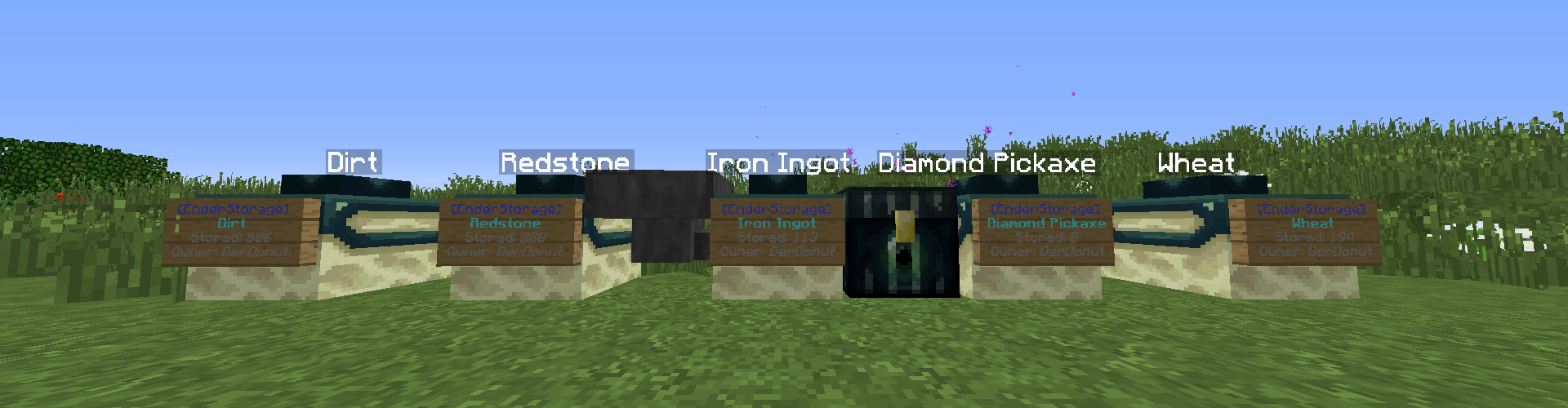
- This plugin allows you to store almost infinite items in a single block.
- The content of the blocks can be displayed in various ways.
- Protect your storage from other players.
- Use the EnderStorage Tool manage your storage system.
- Use Ender Chests to store items from everywhere in the world.
- Use hoppers to connect automated farms to your storage system.
Crafting
The plugin adds two new Items into the game: The EnderStorage and the EnderStorage Tool.The craft recipe of both items can be changed in the configuration, read the Configuration section to read more about this.
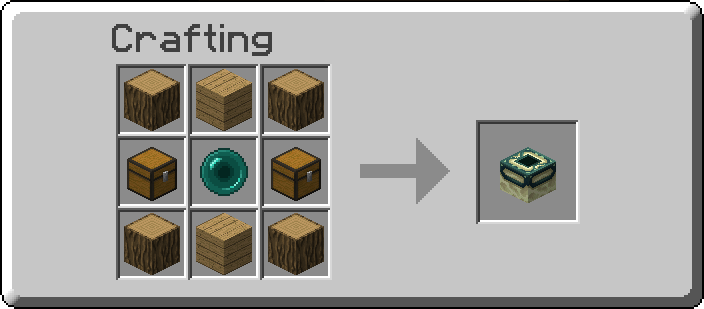
The default recipe for the EnderStorage block looks like this:
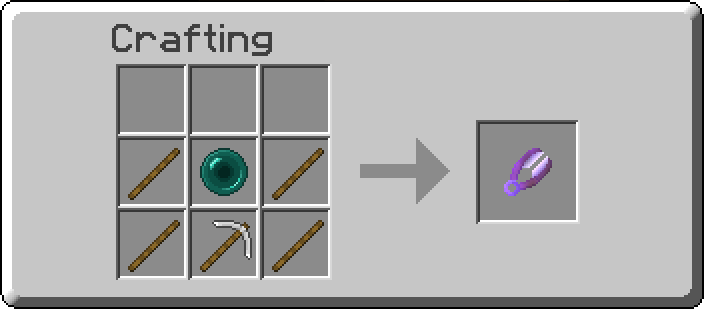
And the crafting of the EnderStorage Tool works as following:
Usage
The player can directly interact with the EnderStorage in four different ways:
- Left Click: Deposite complete item stack which the player holds in his hand.
- Left Click while sneaking: Deposite all fitting items of the players inventory into the storage.
- Right Click: Extract one item.
- Right Click while sneaking: Extract a whole stack of items.
If you sneak while looking at the EnderStorage the content will be displayed in the Actionbar.
The EnderStorage Tool has three different modes.
You can switch between them by right clicking into the air.
- Mine Mode: Dropps the EnderStorage when right clicking on it. (This is the only way to remove EnderStorages)
- Inspect Mode: Shows information about the clicked storage.
- Protect Mode: Toggles the protection function to make an EnderStorage only modifyable and useable by its owner.
- Lock Mode: Toggles the lock function. If an EnderStorage is locked, it will save the item type when empty.
Additionally to always have an overview over the storages you can place signs at the EnderStorage to display its content.
Also, hoppers are able to push items into the EnderStorage. (If the storage isn't protected)
If a player puts items in his ender chest and he also has an EnderStorage which stores the same item, it will be put into the storage.
Commands
- /storage help redirects you to this site.
- /storage recipes shows you the crafting recipes edited by the owner.
Limitations
Items which can't be stored are:
- Enchanted Books
- Items which have custom names/a custom lore
- Items which took damage
Configuration
storageSize: 64 Defines the maximum amount of stacks stored in an EnderStorage.
allowInfoSigns: true Defines if signs placed on EnderStorages will display their content.
allowHopperInteraction: true Defines if hopper are able to insert items into an EnderStorage.
allowEnderChestInteraction: true Defines if the ender chest of the storage owner inserts items into his EnderStorages.
textHeight: 0.75 Defines the position of the floating text inside an EnderStorage.
textColor: "&f" Defines the Color of the floating text. (Bukkit Formatting Codes)
recipe: Defines the recipes...
storage: ...of the EnderStorage block.
shape: The shape of the recipe (Imagine it is an Crafting table)
1stRow: "ABA"
2ndRow: "CDC"
3rdRow: "ABA"
indigrents: Defines the indigrents.
A: LOG
B: WOOD
C: CHEST
D: ENDER_PEARL
E: null
...
tool: (The same as recipe.storage just for the EnderStorage Tool)
shape:
…
Let me know if there are bugs or you don't understand the usage.
Otherwise I hope you enjoy my plugin.
Comments


-

Forge_User_41837648 Owner
-
View User Profile
-
Send Message
Posted Mar 1, 2020Additionally to always have an overview over the storages you can place signs at the EnderStorage to display its content.
Not working ? on 1.15.2
can not put sign on storage.
-
View User Profile
-
Send Message
Posted Jul 12, 2019Is it working in 1.12.2?
-
View User Profile
-
Send Message
Posted Jul 14, 2019In reply to Forge_User_05964807:
It currently doesn't work in 1.12
But thanks to you I am going to update it the next days :)
Regards
-
View User Profile
-
Send Message
Posted Jan 22, 2019First just let me say I love your plugin it is very easy to use and I love the amout of items you can store per block, that being said there are a couple of bugs in the system. Firstly it was causing my server to continually crash and when I was able to finally remove the plugin the names of the items that were in the chests are still just floating there in empty space, and finally there is no way to remove the chests if you forget to remove one before you delete the plugin ,if you can fix these issues I would love to reintsall your plugin for regular use.
-
View User Profile
-
Send Message
Posted Jan 23, 2019Hey AnubisMarc9878,
First of all, thank you for using my plugin and also for sharing your thoughts with me. I'am planning to update the plugin soon, add some new features and also take a look at why your server was crashing. And I guess this crashing was also the reason why you still see the content labels in midair. But I will fix this too.
For now I can just give you the command which removes all the labels from the old chests:
/kill @e[type=ArmorStand,r=(insert radius here if there are armor stands on your server which will be removed too otherwise)]
Again thank you for your feedback and stay tuned for new updates
Best regards, DerDonut
Edit: Could you tell me which version of the plugin you used?
-
View User Profile
-
Send Message
Posted Jan 23, 2019In reply to Forge_User_41837648:
-
View User Profile
-
Send Message
Posted Jan 23, 2019In reply to AnubisMarc9878: