EnchantmentSigns
EnchantmentSigns
Introduction
EnchantmentSigns is a plugin that takes a sign and makes it an enchantment table. The plugin is very easy to use. The signs have 4 options of enchantments. Enchantments for Swords, Axes, Armor, and Bows. You can enchant these items to any level you want. Once a sign is successfully made you just hold the proper weapon for the sign and right click it to enchant the item. To learn how to make a sign scroll down.
Installation
You can install EnchantmentSigns just like any other plugin. Drag and drop it into your plugins folder then start your server! There is no configuration at the moment but might be added in a later update.
Future Features
- Economy option
- Instead of random enchantments add ability to enchant certain enchantments by putting (EnchantmentName) On line 2
Commands
- /enchantmentsigns - This command shows you how to make an enchantment sign while in-game
How to make a sign
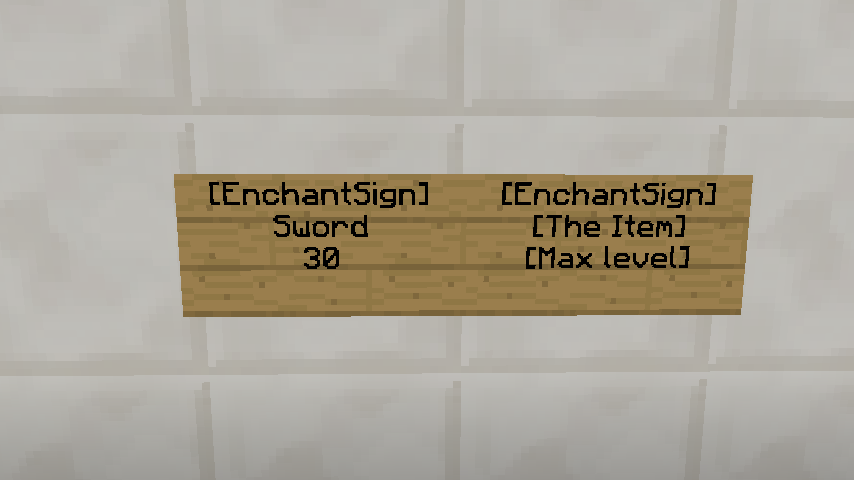
To make a sign is fairly simple. You just need to do 3 things.
- Set the first line to [EnchantSign]
- Set the second line to which ever item you want to enchant. Ex. Sword, Axe, Armor, or Bow
- Set the third line to the maximum level you want.
Example:
- Line 1: [EnchantSign]
- Line 2: Sword
- Line 3: 30

Official Server

Server Website: Daze-MC


-

_ForgeUser15507795 Owner
Comments