Dynmap-WorldGuard
Latest stable and unstable builds
Source Code
Wiki
For support, visit our Discord!
Supported versions:
- Dynmap v3.0 or later
- WorldGuard 7.0.0 or later
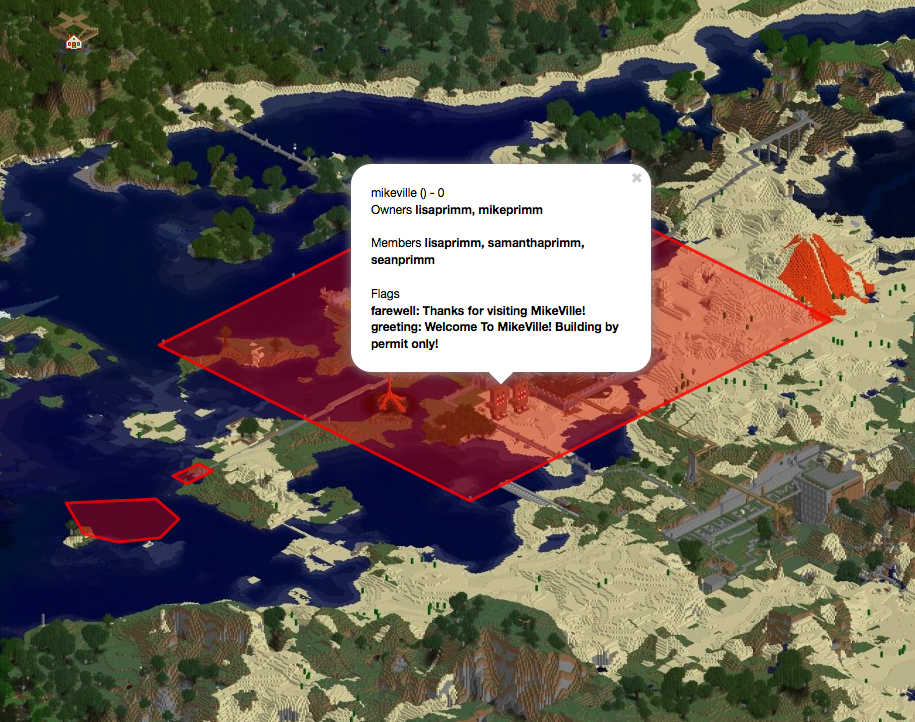
Dynmap-WorldGuard provides a simple way to add visibility of WorldGuard regions to Dynmap's maps. The plugin depends on the presence of both Dynmap and WorldGuard, and interacts directly with the WorldGuard API. Updates to zones are automatically updated (on a settable period - default is once per 5 minutes (300 seconds)). By default, the plugin will be active after simply installing it (by unzipping the distribution into the plugins/ directory and restarting the server.
Visibility of regions can be controlled via the 'visibleregions' and 'hiddenregions' settings. Besides listing the names of the regions to be made visible or hidden, entries with the format 'world:<worldname>' can be used to make all regions on a given world visible or hidden.
Also, the display of the region outlines can be restricted to a minimum zoom-in level, via the 'minzoom' setting. When non-zero, this setting causes the region outlines to only be displayed at or beyond the given zoom-in level.

Configuration:
After the first load, there will be a config.yml file in the plugins/Dynmap-WorldGuard directory. Details of the default configuration, and all the provided settings, can be found here
Disclosure
This plugin utilizes bStats.org plugin metrics system, which means that the following information is collected and sent to bstats.org:
- A unique identifier
- The server's version of Java
- Whether the server is in offline or online mode
- The plugin's version
- The server's version
- The OS version/name and architecture
- The core count for the CPU
- The number of players online
- The Metrics version
Comments


-

Mikeprimm Owner
-
View User Profile
-
Send Message
Posted Jun 25, 2012I like this plugin! !)
-
View User Profile
-
Send Message
Posted Jun 2, 2012so i switched to hires and now i get this http://tinyurl.com/dynregion . region should follow nether fence but its bit too low.. how to fix this?
-
View User Profile
-
Send Message
Posted May 26, 2012@mattekure
I've found that regions the come later in the regions.yml doc get drawn on top of earlier regions. Also, the file is ordered alphabetically. So for example if you have a region called 'Aardvark' and a sub-region called 'Monkey', you would be able to click on both the region and the sub-region. However if you were to have a region called 'Numbers' and a sub-region called 'Ant', the sub-region would be drawn under the main region and you wouldn't be able to click it. I'm not sure if there is a work around for this behaviour.
-
View User Profile
-
Send Message
Posted Apr 18, 2012@Jaarmitage
Exactly that. The lack of reload option makes this a bit unfriendly to work with :/
@MrNix
That looks like it might be related to the issue I was having here:
http://forums.bukkit.org/threads/misc-info-dynmap-worldguard-v0-16-add-worldguard-regions-to-dynmap-maps-1-2-4-r1-0.46338/page-5#post-1011785
I don't think this was fixed yet.
-
View User Profile
-
Send Message
Posted Apr 11, 2012Trying to update visibleregions in my config, but will it only take effect on a full server restart? /dynmap reload just resets my config back to how it was on startup.
I don't mess with the Dynmap-WG config much, but it seems it should be able to re-read the config when Dynmap is reloaded, if possible of course.
-
View User Profile
-
Send Message
Posted Mar 30, 2012Hey I'm really happy with this plugin, only option i would like is the ability to set the surface level (Y). On our creative world the surface level is 22 and the region appear to be floating as i assume they are set to level 64. Have a look for yourself Our dynamic map, and thank for your work great plugin!
-
View User Profile
-
Send Message
Posted Mar 26, 2012Any word on if we can expect an update anytime soon for this? Whenever I install it, regions don't show (using default config), and it disables the function of the dynmap itself (can't switch worlds, to 3d mode, etc).
-
View User Profile
-
Send Message
Posted Mar 19, 2012An update would be cool. Thanks :)
-
View User Profile
-
Send Message
Posted Mar 13, 2012update for 1.2?
-
View User Profile
-
Send Message
Posted Mar 8, 2012I'm running DynMap 0.34 on my home server. If I go to the URL using the computer name (i.e. mcserver:8123) and check the WorldGuard layer on, I don't see the regions show up. I do see players and markers even though the checkboxes appear to be unchecked. If I go to the map using the IP address (i.e. 192.168.2.5:8123), the WorldGuard layer works fine and the checkboxes also show correctly. Note that people using my external IP also see the map correctly.
-
View User Profile
-
Send Message
Posted Feb 21, 2012Group color doesent work now. (I am using bPermissions)
Thanks for help ;D
-
View User Profile
-
Send Message
Posted Feb 15, 2012I really wish there was some way to designate region nicknames. The actual name is, more common than not, really ugly. Have you considered adding a field to the custstyle area to allow for this? What are your thoughts on it?
-
View User Profile
-
Send Message
Posted Jan 29, 2012Is this working for anyone on build RB1.1? It isn't for me.
-
View User Profile
-
Send Message
Posted Jan 24, 2012ownerstyle doesn´t work with groups :(
-
View User Profile
-
Send Message
Posted Jan 14, 2012Thanks Mike. I'm having one problem, the popup ballon for the region on the map is small and blank. I haven't touched the config for this.
I'm running dynmap .28-675 and dynmap-worldguard 0.13, viewing the map from IE9.
-
View User Profile
-
Send Message
Posted Dec 20, 2011I'm having a problem with areas inside other areas. I can get the information about the outer one, but not on the inner one. Its like the outer one is on top of the inner one so I cant click under it.
-
View User Profile
-
Send Message
Posted Dec 6, 2011@mikeprimm
Hmm... That's not in the config.yml that v0.11 produced. Here is what it made even after removing the plugin and the config file. http://pastebin.com/zUUvUrfm
I usually just go by what the config file shows. Guess I'll actually look at the config portion link you have up there and copy/paste the config file.
-
View User Profile
-
Send Message
Posted Dec 5, 2011@Pythros
Yep - that's what the hiddenregions: list in the config.yml allows you to do. The value of that is just a string list of the IDs of the regions you want to hide (.e.g [ hidden1, hidden2, hidden3 ] )
-
View User Profile
-
Send Message
Posted Dec 4, 2011Is it possible to have an option to hide certain regions? I have some "secret" locations underground that I want players to find on their own, but showing it on the map defeats this purpose.
Is this something that I need to state in the config.yml or shall I place a ticket to request this feature?
-
View User Profile
-
Send Message
Posted Nov 23, 2011@mikeprimm
Yes I do :S I'll try re-installing it
EDIT : it works now, dunno why it didn't work