DeathChest
DeathChest v1.13
Features
DeathChest is a Plugin for controlling the death of a Player. Each Player can set his DeathChest somewhere in a world. If he dies, his inventory will be transferred to this chest. You can also set packages of worlds for which the Inventory will be transferred to. A Player can therefore only place one DeathChest in one World-Package.
For example: Player a has the save inventory in world c and world d. His DeathChest is located in world c. He dies in world d. His inventory will be transferred to the DeathChest in World c.
There is also the possibility to place a chest at the death of a Player. The DeathChest created by the player will always be preferred to the SpawnChest on his death location. The SpawnChest can be activated by giving the Player the Permission: deathchest.spawnchest
There is an alternative to the SpawnChest: The Grave Yard signs. When a player dies, a sign is spawned at his death location. If the player destroys it again, his Items and part of his exp will be dropped. It can be changed between Grave Yard Signs and SpawnChests, changeing the option in the config.yml.
If you want weather SpawnChests nor Grave Yard Signs, just set the Config option to: plugin.General.useDeathSpawnType: 'none'
There are also several config-options to limit the transfer to the DeathChest.
HOWTO:
How do I actually create a DeathChest?
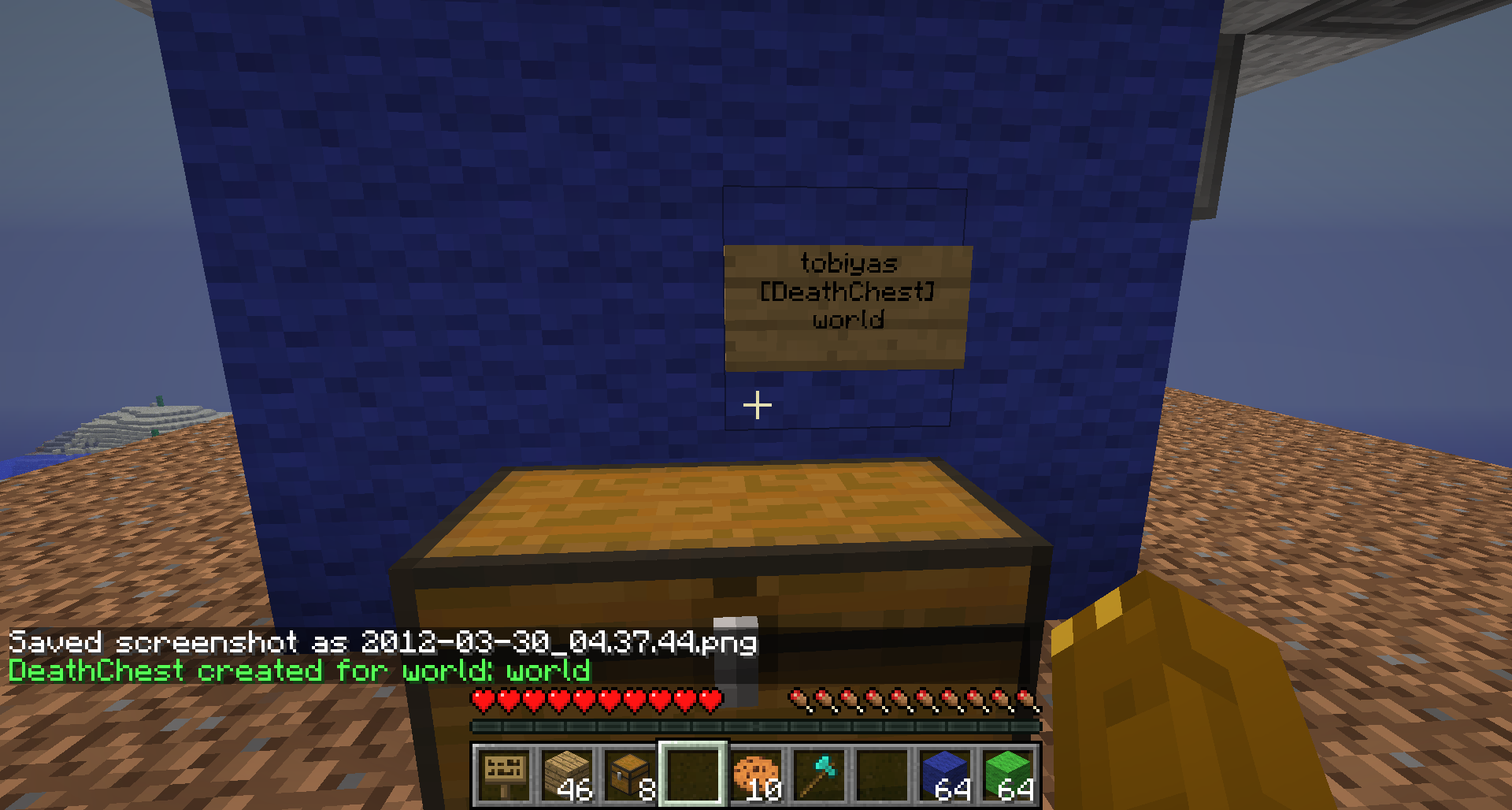
This is simple. You just have to create a Sign above a Chest or a DoubleChest with the Letters: "deathchest" (not case sensitive) in any line of a Chest. After placing this sign, the DeathChest will be created and the first line will be filled with your name, the third line will be filled with the worldname the chest is in. (creating a DeathChest needs the Permission: deathchest.signedchest.create, saving your Inventory after you died to this chest needs the Permission: deathchest.signchest.saveto or just simply: deathchest.signchest.use (includes the permission to build, too))
With the Permission: deathchest.signchest.create.other a player can create a DeathChest of another person. Therefore line 0 has to be: "deathchest", line 1 has to be the Name of the Player.
A little guide is located at the Images: link
Commands
Detailed information can be found under Pages -> Commands link
- /dchelp: a short overview over the commands in DeathChest
- /dcreload: reloads the configuration of DeathChest
- /dcversion: displays the Version of DeathChest
- /dcpermcheck: checks all permissions of you and display them
- /dcport: ports to your DeathChest (Still Experimental)
- /dcgravelist [PlayerName]: lists all your GraveYard Signs and the time till witter
- /dcgraveport [Number] [PlayerName]: ports yourself to the GraveStone of Player with the given number
- /dcremove [WorldName] [PlayerName]: removes the DeathChest of 'Player' From 'World'
Config
Config help can be found under: Pages -> Config link
Permissions
Description for Permissions in Pages -> Permissions link ATTENTION! PERMISSIONS CHANGE WITH 1.04
Dependencies (Plugins)
Hard Dependencies:
- none
Soft Dependencies:
- one of the following PermissionPlugins: Vault, PermissionsEx, GroupManager, PermissionsBukkit
- WorldGuard: for Config-Option to check if player may place Chest on this position
- LWC : for Config-Options to check and set Player-Protection to Chests
- SecureChests : for alternate use instead of LWC
- Lockette: for alternate use instead of LWC
- BattleNight: for checking if player is in battle
Other
- If someone finds a Bug or requests a new Feature, just write it in the comments or create a ticket. I will then try to answer and fix / implement it if it seems usefull
Known Bugs
- none to know
Planed for next Version (1.14)
- Nothing new yet
- Bugfixes if found
Comments


-

Forge_User_39967924 Owner
-
View User Profile
-
Send Message
Posted Mar 6, 2013I just got the same error as anotherfahlman
-
View User Profile
-
Send Message
Posted Mar 4, 2013I receive an error when stopping the server.
Error log
-
View User Profile
-
Send Message
Posted Mar 2, 2013I can't post a sign with deathchest because of Lockette plugin.. how can i fix this?
-
View User Profile
-
Send Message
Posted Feb 21, 2013Ahh, ok will check into that "RTFM" i guess :)
-
View User Profile
-
Send Message
Posted Feb 21, 2013@Trevout Haha didn't think of that... Thanks very much!
@Melekaiah I'll try to get to it on the weekend due to not much time at the moment.
@ohjays As I know "/dcgraveport [Number] [Playername]" does the magic. (Check permissions)
-
View User Profile
-
Send Message
Posted Feb 11, 2013Hi, Just seeking confirmation that this works with the latest craftbukkit build?
Thanks!
-
View User Profile
-
Send Message
Posted Feb 9, 2013wasnt this superceeded by a new plugin since this and the other one aint being updated?
-
View User Profile
-
Send Message
Posted Jan 29, 2013Could see potential in this. Should be updated.
-
View User Profile
-
Send Message
Posted Jan 21, 2013I have the deathchest set up in a central location, is there a way for users to teleport back to their actual death location ?
-
View User Profile
-
Send Message
Posted Jan 19, 2013hay great plugin but when creepers kill me the sing breaks so i can recollect my items :.c but the bedrock still there
-
View User Profile
-
Send Message
Posted Jan 16, 2013Hey, getting this error on shutdown (using latest dev): http://pastebin.com/84g4ZiPd
-
View User Profile
-
Send Message
Posted Jan 11, 2013@redzero36
What permission plugin are you using?
From above:
Soft Dependencies: one of the following PermissionPlugins: Vault, PermissionsEx, GroupManager, PermissionsBukkit
-
View User Profile
-
Send Message
Posted Jan 11, 2013@JeterLP
It's licensed under GPLv3 and it's source can be found here on GitHub so you can fork it and update it and make a pull request.
-
View User Profile
-
Send Message
Posted Jan 7, 2013can someone help me with the permission. I have deathchest.*: default: true deathchest.signchest.use: default: true deathchest.signchest.create: default: true deathchest.signchest.saveto: default: true
in my permission.yml file but when I look at the console it says that deathchest has no permission-system hooked.
-
View User Profile
-
Send Message
Posted Jan 6, 2013Can I update it?
-
View User Profile
-
Send Message
Posted Jan 6, 2013Hi, nice plugin but how i can change the language in the Chat after i died or i create a deathchest.
Pls create a menu for change the language or messages.
ty :D!!!
your plugin is great!
-
View User Profile
-
Send Message
Posted Dec 30, 2012@zrocweb
Disregard. everything seems to be working smoothly in 1.4.6 with the exception of one error. Can't register command /dc
Other than that. smooth sailing..
-
View User Profile
-
Send Message
Posted Dec 19, 2012Grave(tomb) Stones don't seem to be working either in 1.4.5. No matter what ya try they just don't place. Have to use the chest.
-
View User Profile
-
Send Message
Posted Dec 18, 2012The only thing I see NOT happening in 1.4.5 (bukkit dev build 1.4.5 R01 - 2478+) is the following is not getting registered when enabling>
2012-12-18 17:11:47 [INFO] [DeathChest] ERROR: Could not register command /dc.
-
View User Profile
-
Send Message
Posted Dec 18, 2012Can you add one more item to the list. The ability to place the chest and sign upon death if a player has no build perms. Currently testing on my server now under a player without build perms (other tests as well for my plugins and others).
Currently, if a new player logs on and is wondering around the world and dies I would like to give him the option to go back and collect his things (it's not much but it's a part of his initial survival until he ranks up to the next class that would allow him to build and other things). I currently have an area in my spawn where only default players are allowed to access and instead of having to give them the kits or items again (would get abused, over and over) and without having to put restrictions on those gives, I want to add the "/back" command (not a current perm for a new player, but would be ran from a cmdblock so will work) to go back to his gravestone as well as where he was which could be hundreds of miles away from the spawn....