CreateYourOwnMenus
Hiding scripts is no longer possible from Minecraft 1.16 due to changes in item lore formatting
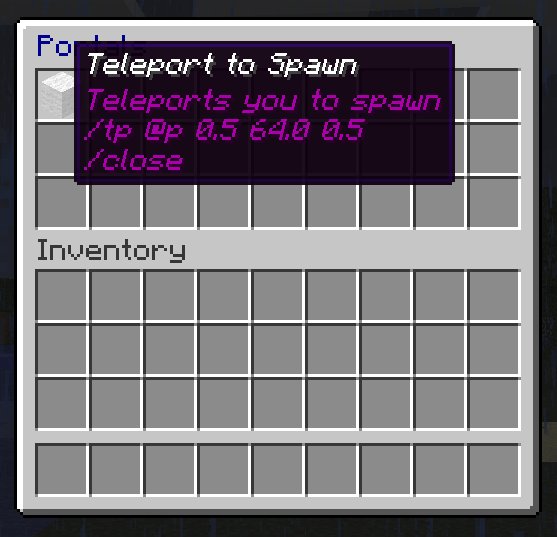
As the name suggests, this plugin allows you to create your own menus. The menus are based on inventories, with each slot holding a clickable menu item. When a player clicks on a menu item, it performs all of the commands listed in the item's lore (the text underneath its name) in a similar manner to command blocks. You can design the menu in-game by selecting any item, naming it in an anvil, modifying its lore using a command, and using commands to create and open a menu for editing to place it anywhere in the inventory that you wish. You can modify your menus any time you want.
Thanks to TheMobCave for providing the video tutorial. Please like and subscribe!
The video tutorial was of CreateYourOwnMenus v0.2, so the latest version has even more features! One major change is that the /menu script command now has sub-commands. E.g. /menu script add [text] instead of /menu script [text]. As well as: insert, delete, replace, clear, show and hide.
Screenshots
See the gallery for screenshots.
User Reviews
"This looks amazing and would make my role playing server a lot easier for players so they don't have to remember a lot of commands." - Ccamm
"This looks amazing! I'm sure that we'll be able to use this in my new server project." - parrothead1337
"This plugin allow so much things :o" - TheNemesisA5
Features
- Use commands to manage all of your menus
- Use any in-game item as a menu item
- Edit menus in-game using inventories
- Open menus using commands, command blocks or other menus
- Activate any menu item simply by clicking it in an open menu
- Alternatively, activate menu items by holding in hand and right-clicking (can be used to open menus and more)
- Modify the lore of any item using commands /menu script clear and /menu script [comment/command] commands
- Add, remove, modify and share menus using their .yml files in the "plugins/CreateYourOwnMenus/menus" folder
- Optionally run the command as the player instead of console by using the /sudo command E.g. /sudo @p kill
- Show/hide menu script commands using the /menu script show and /menu script hide commands
- Delay execute of commands in a script using the /delay [ticks] menu script command
- Use {curly braces} to add dynamic arguments to commands (prompts the clicking player)
- If you have Vault installed you can use /requirecurrency to check if a player has a given amount of currency
- Translate into other languages using LanguageAPI
What it does not do
- This is not intended to include a full-fledged scripting language. It simply executes commands in series and is interrupted on failure. For more complex actions, conditions and program flow you should be using a plugin like Skript to run scripts on menu item clicks.
- It cannot run commands as a player with "elevated permissions". There is currently no safe way to do this within the Bukkit API without introducing errors, compatibility issues and/or require updates every build of Minecraft, CraftBukkit or even Bukkit. You can work around this by granting the permissions, performing the actions and then revoking them again, or by calling out to another plugin that supports this. I do not intend to add this feature until there is a safe way to achieve it.
Plugin Suggestions
This is a list of plugins that work well with CreateYourOwnMenus.
- Use the MicroJump plugin for BungeeCord /server command support for BungeeCord users
- Use the Skript plugin to open menus on player joining, or various other events, and create advanced scripts that you can run when clicking a menu item
- Use the Vault plugin to provide currency support using the /requirecurrency menu script command
Commands and Permissions
A full list of commands and permissions is available on the Commands and Permissions page.
Detailed command help is available in-game by typing /menu
Sharing
Find and share pre-created menus on our forums!
Scripting
A basic scripting guide is available on the Basic Command Scripting thread.
Other tutorials and guides are available on the forum
Security Considerations
The menu scripts always run as console. By default, this is not a problem as only operators have the ability to create menu items and modify menus, however if you give other players permissions to do this, be aware that it will also give them the ability to effectively run any command they wish as console.
Development
Sources are available on GitHub: https://github.com/XHawk87/CreateYourOwnMenus
Ideas
- Add internationalisation support
- Add a "cyom.menu.edit.[menu id]" permission to allow editing of a specific menu only
- Add "cyom.script.allow.all" permission to allow adding any command to a menu script, except those specifically denied (Default op)
- Add "cyom.script.allow.[command name]" permission to allow adding specific commands to menu scripts (child of cyom.script.allow.all)
- Add /menu script import [file] and /menu script export [file] for quickly importing or exporting the lore of a menu item to a simple text file
- Add "cyom.slot.lock.#" to lock specific inventory slots in a player's inventory and treat it as a menu
- Modify /menu grab command to place items into the same slots in a player's inventory where applicable, displacing other items, and otherwise finding any free slot
- Trigger a menu item when it is used to attack or break blocks with
- Add /use special command to allow the item to be used as a normal item (this cannot be used after a delay or prompt)
- Organise menus into folders, and accessed in the form "folder.menu"
- Store menu items in a format that is easier to edit manually, marking lines as hidden without the section symbols all over it
- Provide a faux creative mode for non-op creative players so that server owners can grant creative abilities to non-op players without introducing security risks
- Command support for tab-autocompletion
- Add escape character for {input prompts} so you can still use datatags
Bugs
- Items in locked slots are still dropped on death instead of remaining in their slots
- Items with the /consume command will only be removed if the stack size is 1
Deprecated Features
- To reduce the number of special menu item commands, the /GiveChest, /TakeChest and /CountChest commands will be removed and less complex and easier to understand Skript alternatives will be provided in their place
Help
This plugin uses Java 7
If you get the followed error on starting up the server with this plugin installed "Unsupported major.minor version 51.0". This means you are using an out of date version of Java. If you don't know how to upgrade, please contact your server hosting provider and ask them for help in upgrading to Java 7, or contact Oracle customer support. Mac OS X users require JDK 7 instead of JRE 7.
Very wide text boxes on menu items
Due to a Minecraft client formatting error, the invisible characters on the first line can cause the lore text box width to be increased despite taking up no space when there is visible text on the same line. This can be mitigated when hidden by keeping the first line empty using /menu script insert 0 &a. When commands are shown, it may become difficult to read them.
Non-op Creative Players spawning menu items without permission
Warning: A new security loop-hole has been discovered in the Minecraft server. It is possible for players with certain modified clients to create items for themselves that contain any lore that they want so long as they are in Creative Mode. This does not require operator status or permissions, only Creative Mode. If you have Non-operator creative players on your server be advised that if they use a modified client, it is possible for them to create any menu item that they want without needing permissions.
You can alleviate this somewhat by adding commands to the "blacklist-commands:" section in the config.yml. This will stop anyone but operators from using menu items with those commands on them. E.g.
blacklist-commands:
  - op
  - stop
  - kick
  - grantperms etc etc
Another option is to keep those players in Survival mode, but use other plugins to give them creative-like powers such as infinite resources, fast breaking and flight.
Ghost items appearing on clicking a menu item
If you are experiencing ghost items in 1.7.2 using this plugin, it is due to the client-side Minecraft bug (https://mojang.atlassian.net/browse/MC-41165). This only affects 1.7.2 and is fixed in 1.7.4. The bug is not dangerous as it is not a real item. Any attempts to move the item out of the inventory, place it, or fill the same slot will result in it disappearing. Since this is a client-side only bug, it is recommended that players be urged to update from 1.7.2 to 1.7.4 as soon as possible. Note: it is possible to play on CB 1.7.2 R0.1 beta using a Minecraft 1.7.4 client.
After restart, my menus all have weird characters wherever there were hidden commands or colours
This is a text-encoding issue caused by the some CraftBukkit servers attempting to read menu files in the wrong text encoding by default. You can fix this by telling Java to use UTF-8 by default for CraftBukkit.
For users of McMyAdmin, MultiCraft and other server launchers, there should be an option to specify text-encoding in your settings and switch to UTF-8. If not, you should have a way to add optional command line arguments, and follow the advice below for a startup script.
If you are using a startup script you will have something along the lines of:
java -Xmx1024m -jar CraftBukkit.jar
You need to add the following option somewhere after java and before -jar. E.g.
java -Xmx1024m -Dfile.encoding=UTF8 -jar CraftBukkit.jar
After updating CraftBukkit (build #3009+), my Skript custom commands aren't working from menu items
Changes in CraftBukkit build #3009 (1.7.2-R0.3-SNAPSHOT) have updated the Bukkit plugin command system that broke Skripts custom command handler. This prevented Skript from receiving commands that had been directly dispatched by other plugins. This issue was fixed in Skript 2.1.1+, so downloading the latest version of Skript should correct the problem.
It says @a or @w instead of the player's name
If a @a or @w target selector is the last character in a command, it is not currently replaced correctly. This will be fixed in the next dev build. In the meantime, attempt to ensure there is a non-whitespace character after the last target selector.
Every time I click an item in my inventory it activates it like it was a menu item
You may have inadvertently locked all of your inventory slots by misuse of the '*' permission node. This will grant you all permissions, including 'cyom.slot.lock.*' which is used for locking inventory slots so that they can be used as menus. The best solution for this is to stop using the '*' node and instead only grant yourself the specific extra permissions that you need. However if you insist on using the '*' node you will need to grant yourself the negative permission '-cyom.slot.lock.*' in order to prevent your slots from getting locked.
Every time I restart my server, all changes I made to my menus are undone
There is a time-related bug with previous builds of CYOM that prevent file saving. To fix this you must update to the latest dev build: http://dev.bukkit.org/bukkit-plugins/createyourownmenus/files/18-create-your-own-menus-v0-5-8-dev/
I can't use {NBT data tags} in my commands
Unfortunately, we already have a use for the {curly braces} as dynamic arguments that predate their use in Minecraft, so you can't use NBT data tags in your menu commands. However, you can get around this in a couple of ways:
Any items that you need to be given to a player with data tags can be pre-created and placed in a menu, then you can use the /menu grab command to give them to the player. Since you can grab multiple items at once, and edit the menu visually, it makes for a rather convenient way of setting up item kits on a server.
You can also use a custom scripting plugin like Skript to set up a custom command to run the commands for you. Using Skript in this way allows a great deal more flexibility for your menu scripts by adding logic, variables, persistence and program flow, and if you need help with them they have a lot of friendly people on their forums who are always happy to help.
Donations
If you'd like to contribute towards the continued development, support and maintenance of this project, please consider joining me on Patreon, and making a one-time or recurring pledge.
Support Channel
If you need help you can leave a comment below and I will get back to you as soon as I can. You can also join the Gitter chatroom using the following link, but please read the tutorial first. https://matrix.to/#/#xhawk87s-bukkit-plugins:gitter.im
I am happy to give support, but repeatedly answering the same question that is explained in bold red on the plugin page is highly tedious. Don't be lazy, read first, then ask questions. It's the polite thing to do
Comments

-

XHawk87 Owner
-
View User Profile
-
Send Message
Posted Jan 20, 2014@rumanoid
This appears to be a text-encoding issue. To fix this problem it is recommended to set your server to use UTF-8 text encoding, this can either be done using your server launcher/wrapper or added to your startup script as a command line option (java -Dfile.encoding=UTF8 -jar Craftbukkit.jar)
There will be updates coming soon to increase compatibility with servers using non-standard text encoding, and prevent text encoding issues across all platforms and when copying files between different platforms.
-
View User Profile
-
Send Message
Posted Jan 20, 2014I must first say, this is a very nice plugin, but I am encountering some problems. I running a server on a Ubuntu 10.04 Server, with a modded bukkit/MCPC+ thingy. the plugin loads without errors, but when I create a menu with color codes,(such as the title) after a server reload/menu reload the color codes mess up. I am using Java 7. I also used Lores plugin to color the name of the item.
Screenshot Modpack Startup of the Server
-
View User Profile
-
Send Message
Posted Jan 18, 2014@Thuzle
I haven't experienced what you are referring to, but cursor movement is entirely controlled on the client-side. I believe Minecraft will centre your cursor when you open a new inventory. If your menu items are opening other menus, or forcing closed and reopening the same menu, this may cause the cursor to re-centre.
-
View User Profile
-
Send Message
Posted Jan 18, 2014@XHawk87 The menus return your cursor to center every time you use a menu item. Is there a way to stop that from happening?
-
View User Profile
-
Send Message
Posted Jan 15, 2014@XHawk87
Great, Thanks!
-
View User Profile
-
Send Message
Posted Jan 15, 2014Not sure what the hell happened, but I logged onto my server today and all my menu's are broken and look completly fucked up. https://dl.dropboxusercontent.com/u/47840868/2014-01-15_15.39.17.png This is a bit ridiculous as it fucked up my entire servers operation.
-
View User Profile
-
Send Message
Posted Jan 14, 2014@NYbeast
/consume will consume 1 of the menu item after clicking
/close will close the menu after clicking
To open a menu when a player first joins it is recommended to use a plugin such as Skript to create an event.
E.g. Replacing start_menu with the ID of your menu.
-
View User Profile
-
Send Message
Posted Jan 14, 2014Hello, is there a way that it can close the GUI and possibly remove the item after selection? And is it possible to give this option when players first join a server?
Thank you.
-
View User Profile
-
Send Message
Posted Jan 12, 2014@Lostcraft
Actually, you can. Just add this option "-Dfile.encoding=UTF-8" to your startup bat for your server, or add it to the shortcut.
E.g. java -Dfile.encoding=UTF-8 <other options> jar Craftbukkit.jar
P.S. If you are using the windows exe file for the server, there is no reason you can't use the linux Jar on windows and mac os too
-
View User Profile
-
Send Message
Posted Jan 11, 2014I'm running windows 7 (as is probably a lot of people that use your plugin) so I can't change my computer's text encoding. However, I tried saving my menu file as UTF-8, but I still got the same problem.
EDIT: I also get this error in console when I attempt to start up the server: pastebin
-
View User Profile
-
Send Message
Posted Jan 11, 2014@Lostcraft
Add /close to menu script to close the menu
It looks like a text-encoding issue. I recommend setting your server to use UTF-8 if it is not already, as this is the standard java and web standard for text encoding and it can handle the section symbol correctly, as well as a wide variety of accented latin characters and other symbols.
-
View User Profile
-
Send Message
Posted Jan 11, 2014This happened after a server restart:
This is my config file (I orginally used &'s for color codes, I guess it automatically got converted to the section symbols):
Pastebin
-
View User Profile
-
Send Message
Posted Jan 11, 2014Edit: Is there a way to make it so that the menu automatically closes after a user clicks an item?
I FUCKING LOVE YOU. I FUCKING LOVE YOU. I FUCKING LOVE YOU. I FUCKING LOVE YOU. I FUCKING LOVE YOU. I FUCKING LOVE YOU. I FUCKING LOVE YOU. HOLY SHIT.
Thanks, Avengah
P.S - Sorry for the language
-
View User Profile
-
Send Message
Posted Jan 4, 2014@XHawk87
Thanks very much, i found out how to fix it. :D But i need help with something, how can i put a MENU item to a kit? Please help...
-
View User Profile
-
Send Message
Posted Jan 4, 2014@ValonCraft
It thinks you're trying to open a menu for a player called "(Menu)", this is most likely because the /menu open command can take two parameters.
The first is the name of the player to open the menu for, the second is the ID of the menu to open for them. The ID and the display name are separate things.
The ID is the short name of a menu, used only in commands and never displayed to users. It cannot contain spaces or colours. The display name is the title of the menu, it can contain spaces and colours and is displayed to users.
By default, commands in menu scripts are executed as the console, not as the clicking player. So it expects you to provide both parameters, the player name and the menu ID. If you want the menu to open for the clicking player, you can use the @p symbol. Wherever this appears in a menu script command, it will be replaced with the name of the player clicking the menu. So if I click a menu item with the following script:
/menu open @p test_menu
It will be executed as:
/menu open XHawk87 test_menu
And open the menu for me.
-
View User Profile
-
Send Message
Posted Jan 4, 2014HELP! I made put a menu on a menu (THE SERVERS MENU), but i can't open the menu i want! It says "(MENU) is not online." Help me please!
-
View User Profile
-
Send Message
Posted Jan 3, 2014@tonkku
It is most likely that your new server is using a different text-encoding to the old server. You should ensure that your new server is using UTF-8 text encoding, and also ensure that all of your text files are converted to this format.
-
View User Profile
-
Send Message
Posted Jan 3, 2014I moved my server from windows to ubuntu. Now all those § marks are ? in a box. What happened?
-
View User Profile
-
Send Message
Posted Dec 31, 2013I just stopped by to see if there were any updates to the plugin and saw that the testimonial I gave had horrid English. If you want to, I edited my comment from way back when to make grammatical sense so that you can change it. Sorry about that!
-
View User Profile
-
Send Message
Posted Dec 30, 2013@nerdcubedfanservers
Actually, all players are unlocked by default, even ops, as by default CYOM should have absolutely no effect on a live server at first install. It is assumed that if a server owner wants slots to be locked, they will configure them to be locked for certain users.
If you find that your slots are locked initially, it is because you are using the '*' permission node to grant yourself every permission that exists, for every plugin, even if these are permissions that you do not want. There is a warning built into CYOM to inform users about this issue if it is detected that they have every permission node.
When permissions are registered by plugin developers, they default to "op", meaning ops get this permission by default and no-one else. If it is a permission that you may not necessarily want, we change it to default to "none", meaning no-one gets this permission automatically, in order to protect ops. If it is a permission that an op should have, we would leave it to default to "op". When you grant the '*' node, you get every permission, even the ones we are trying to protect you from getting automatically as you may not want them. This is why it is not recommended to use the '*' node, and why most permissions managing plugins that provide the wildcard feature warn you not to use it like that.
The text corruption you are seeing is most likely the result of a mismatch between your server's default text encoding, and the text encoding of the menu files. To ensure full compatibility, it is recommended to set your server to use UTF-8 text encoding, the Java and internet standard for text encoding, to make it compatible with all latin-based alphabets as well as the Section Symbol (§) that Minecraft uses for formatting codes.
I am already working on an update to make the menu files easier to read and edit manually, as you can see under Development -> Ideas above. This will involve removing the section symbols from the hidden commands in item lore on saving and placing commands into a separate section for ease of editing. This will also involve converting all section symbols into ampersands on saving, and converted back again upon loading so that Minecraft clients can understand them. This should eliminate any text encoding issues that are caused by the use of formatting codes, however it is still recommended to switch to using the standard UTF-8 text encoding for compatibility with other plugins and the full range of latin-based characters and symbols.
Glad you are making good use of my plugin.