Core Updates
What is Core Updates?
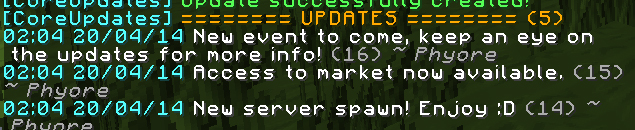
Using Core Updates you can easily manage news updates which are designed to be sent to your server players. By connecting to a MySQL database you can store the updates somewhere which can also be access by a page on your website!
Commands
- /updates - Shows a list of updates
- /coreupdates reload - Reload the config
- /coreupdates update <dbhost|dbport|dbuser|dbpass|dbname|limit> <value> - Updates the config with the specified
- /coreupdates create/new <update> - Create a new update, will be added to the database
- /coreupdates delete/remove <update number> - Delete an update from the database
Maybe more...
Permissions (as of v0.4)
- coreupdates.*:
- description: Gives access to Core Update commands
- children:
- coreupdates.reload
- coreupdates.updates
- coreupdates.reload:
- description: Allows the reloading of the config
- coreupdates.updateconfig:
- description: Allows updating of the config file from in game
- coreupdates.updates.*:
- description: Allows the use of all commands to do with the updates, viewing, creating, deleting, etc
- children:
- coreupdates.updates.view
- coreupdates.updates.create
- coreupdates.updates.delete
- coreupdates.updates.view:
- description: Allows the viewing of the updates from the database
- coreupdates.updates.create:
- description: Allows the creation of updates from in game
- coreupdates.updates.delete:
- description: Allows the deletion of updates from in game
Features to come
- Webpage to view the updates (Maybe?)
Config Help!
- Database:
- dbhost - This is your database host ip/domain
- dbport - Database port (Usually 3306)
- dbuser - Your username for the database
- dbpass - You password for the database
- dbname - Name of the database
- Updates:
- limit: 5 - Total amount of updates you want to display to a user who uses /updates
Metrics
This plugin uses Metrics to keep track of how many servers vs how many players are running it. You can find out more about it here.


-

Forge_User_16875927 Owner
Comments