
Color Portals
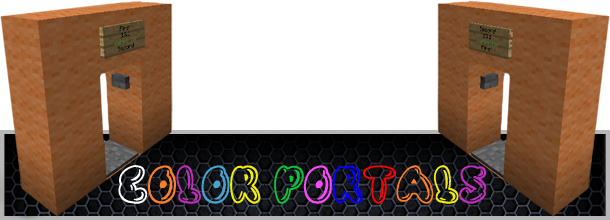





Color Portals lets users create portals in game with little effort and no commands to type!
Using wool, a sign, a pressure plate, and a button, players can create their own portals!
Features:
- No commands necessary to set up portals.
- Portals link automatically. No running back and forth setting locations.
- MultiVerse/MultiWorld compatible. Teleport between worlds with ease.
- No permissions required. (But are supported)
- No configuration required. (But many options are supported)
- Plug and Play.
Download now and try it out for yourself!
Optional Commands:
- /portal info or /cp info - Use while standing in or looking at a portal to get more information on the portal and where it warps to.
- /portal list or /cp list - Displays how many portals are registered on the server.
Color Portals is by far the easiest to use portal plugin to date and is also the most fun. People on your server will not be able to get enough!

I have put many hours of work into this plugin and it is my hope than anyone who enjoys the features it brings to their server will donate.


Comments


-

_ForgeUser8285083 Owner
-
View User Profile
-
Send Message
Posted Dec 24, 2012@walliecraft
I will add that option in the next update
-
View User Profile
-
Send Message
Posted Dec 24, 2012can you please add so you dont need to press the buttom. only presureplate and if it dont have, add support for mutiworlds!
-
View User Profile
-
Send Message
Posted Dec 23, 2012@marubal21
What feature are you referencing?
-
View User Profile
-
Send Message
Posted Dec 23, 2012@SnowGears
If you would be able to add this feature in the next release it would be great as the portal plugin i have been using has finally broken and does not seem it will be updated anymore. thank you in advance.
-
View User Profile
-
Send Message
Posted Dec 22, 2012@DerPragmat
I wrote this plugin myself so I dont know what other portals plugin you are referring to. Try using the latest recommended build of bukkit ( you are using a beta build ) and make sure this is not being caused by another plugin.
-
View User Profile
-
Send Message
Posted Dec 22, 2012@haduke
Okay thanks for letting me know.
EDIT: I just tried this out with 1.4.6 dev build and everything worked fine. What exactly didn't work for you?
-
View User Profile
-
Send Message
Posted Dec 22, 2012This doesn't work with the new bukkit build for 1.4.6 Just thought you should know so you could try and update it.
-
View User Profile
-
Send Message
Posted Dec 21, 2012Do you share code with the "Portals" plugin? Both plugins have the same problem for me. Whenever I restart my server all existing channels are simply gone. The blocks and signs are stil existent, but the channels itself are simply not there, meaning I have to remake every portal. The portals.yml is empty too. It appears the plugin doesnt write data to portals.yml
I'm using CB 1.4.5.R0-2
-
View User Profile
-
Send Message
Posted Dec 21, 2012@MonoCrime
Set the config variable to true and then give any of the permission nodes to a specific group.
-
View User Profile
-
Send Message
Posted Dec 21, 2012anybody can tell how to enable permission?
-
View User Profile
-
Send Message
Posted Dec 20, 2012@Tibam
Hmmmm... This is odd. Is your server running the latest recommended version of craftbukkit?
-
View User Profile
-
Send Message
Posted Dec 20, 2012Hi, Love the addon but for anyone other than OP its saying you dont have permission. I have tried adding - colorportals.use into groupmanager and setting all permissions to false in the config. But making no difference.
Can you suggest what is wrong pls?
-
View User Profile
-
Send Message
Posted Dec 20, 2012I like this plugin so sooo much, Finnaly a teleportation plugin that fits to my server. I thank you so much !!! :D Kind Regards from deadspaceXD
-
View User Profile
-
Send Message
Posted Dec 14, 2012@FearTheCreeper19
i like puch button.
-
View User Profile
-
Send Message
Posted Dec 14, 2012is it posable for you to make it so people only have to step on the pressure plate and it will teleport them it would make it allot easier and better
-
View User Profile
-
Send Message
Posted Dec 13, 2012@TheCoryGuy
Thanks. Im glad you like it.
-
View User Profile
-
Send Message
Posted Dec 13, 2012@marubal21
This would cause me to rewrite the whole base code of my plugin. What I could possibly do for the next update is redefine what block each color correlates to.
Example: the default config could be:
blue: blue wool
green: green wool
etc...
but then you could change it to something like,
blue: diamond block
green: emerald block
etc...
I will have to think about this though. I like the simplicity of the plugin as it is now but if more people want this feature I would be happy to add it.
-
View User Profile
-
Send Message
Posted Dec 13, 2012Sold
-
View User Profile
-
Send Message
Posted Dec 13, 2012can u add a something to the config file, where if i wanted to use another type of item rather wool i can set it? example if i wanted to use diamond or emerald blocks rather then wool, i could set it in the config file and in turn that allows for less portals? rather than esay to make wool portals all over the place?
-
View User Profile
-
Send Message
Posted Dec 12, 2012@fliuxus
Fixed the issue. Just submitted version 1.2. Thanks for your patience guys. Everything should work perfectly now.