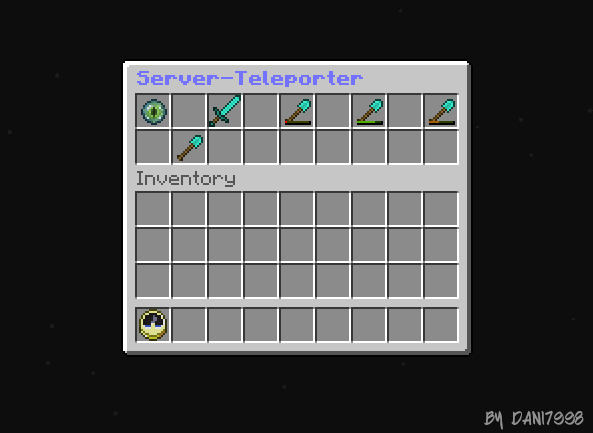
ClockCommand
Functions: One can have an inventory with a clock Command Itemen. What if a man they ausfüren anklick ausgewälten Command for the player. It is then easy for people to put their home in the clock and then when they click on it they will teleport to their home.
Commands: /cc - Reload Config
Installation: Put the ClockCommand.jar in your plugins folder and start the server. then stop it again, it should have created a file folders called ClockCommand. Go to this ortner and open the file config.yml in this whole you can easily adjust the plugin. Here's how: In the plugin 'navigation-id:' you can specify where the item with the open inventory Attention! Only item ids no names. below the plugin 'inventory-name:' you can specify the name of the inventory. In total Plugin colors are supported with the character '&' + color code on the spot of the color displays. Plunkt under the 'Commands' hir can add items. Items: I now show you an example so you müst make it in every item.
(item-command: includes a consoles command. This means that you simply can spend a consoles command for a player. You can access it easily used in which one writes to the Command line: "item-command: <server>/command". For normal "item-command: <player>/command" or "item-command: / command".) that you can use only in version 2
    ItemName:
      item-name: 'ItemDisplayName'
      item-command: /command
      item-id: ItemId
      item-id-number: ItemDurability (0)
then you can start the server again and the plugin should run.

Config:
CC:
  config:
    navigation-id: 347
    inventory-name: '&9&lServer-Teleporter'
  Commands:
    Hub:
      item-name: '&9&lHUB'
      item-command: /spawn
      item-id: 120
    pvp:
      item-name: '&7&lPVP'
      item-command: /warp pvp
      item-id: 267
Bugs/Erros: If errors / bugs are writing them as comment Please consoles with error back when available below.
Comments

-

_ForgeUser9029903 Owner
-
View User Profile
-
Send Message
Posted Feb 2, 2018What are the permissions?
-
View User Profile
-
Send Message
Posted Nov 26, 2015@baqizidi
should that be
-
View User Profile
-
Send Message
Posted Oct 23, 2015@dani7998 Support 1.64?
-
View User Profile
-
Send Message
Posted May 5, 2015<<reply 2537189>
@WolfChan
Ok Where is the problem?
-
View User Profile
-
Send Message
Posted Apr 13, 2015Please update 1.8.3
-
View User Profile
-
Send Message
Posted Mar 24, 2015@PureGaming177
I could on the latest version Spigot no mistake notice. What do they have a program for Permissions? A picture from the error would also help with a list of plugins. Not the other Already accesses to this item.
-
View User Profile
-
Send Message
Posted Mar 24, 2015@whalewatcher
Sorry that it took so long, until I said in reply. Please Invite your config on http://pastebin.com/.
-
View User Profile
-
Send Message
Posted Feb 28, 2015I need help! It works fine, but when others (un-opped) try to use it, it says: "You are not allowed to interact with this!" . And there are no permissions! Help!
-
View User Profile
-
Send Message
Posted Feb 15, 2015I tryed to do everything but for some reason it just wont add it in clock, this is what i tried to do CC: config: navigation-id: 347 inventory-name: '&4&lFaction's' Commands: Hub: item-name: '&6&lHUB' item-command: <player>/spawn item-id: 399 item-id-number: 0 Shop: item-name: '&1&lSHOP' item-command: /warp Shop item-id: 266 item-id-number: 2 Dianite: item-name: '&4&lDIANITE' item-command: /warp dianite item-id: 35:14 item-id-number: 4 Mianite: item-name: '&2&lMIANITE' item-command: /warp mianite item-id: 35:5 item-id-number: 6 Ianite: item-name: '&5&lIANITE' item-command: /warp ianite item-id: 35:10 item-id-number: 8 Quest's: item-name: '&7&lQUEST'S' item-command: /warp quest's item-id: 340 item-id-number: 10 Info: item-name: '&b&lINFO' item-command: /warp info item-id: 386 item-id-number: 12 Light: item-name: '&e&lLIGHT' item-command: /warp light item-id: 35:4 item-id-number: 14 Shadow's: item-name: '&0&lSHADOW'S' item-command: /warp shadow's item-id: 35:15 item-id-number: 16 Rank's: item-name: '&3&lRANK'S' item-command: /warp rank's item-id: 264 item-id-number: 18
-
View User Profile
-
Send Message
Posted Apr 6, 2014@AzureBlure
ok, I added to it. thanks for the idea
-
View User Profile
-
Send Message
Posted Apr 5, 2014Variables like <server> ? So that the console can run a command for a player? Please add :)
Azure_Blure
-
View User Profile
-
Send Message
Posted Mar 5, 2014@SquareSquare2
thanks for report, I'll fix it
-
View User Profile
-
Send Message
Posted Feb 21, 2014Error Found
When You Press Shift And Click On Another Item Next To The clock It will go Through The Inventory And Wont Go away only With Command /cc Reoad