ClassSign
ClassSign
Features
- Create signs that, when punched, will fill your inventory/armor with pre-defined items based on classes.
- Define your own classes!
- As an op, disable/enable signs on the fly.
- Choose to clear the shown inventory, or whole inventory, before giving items, or not at all.
- Choose to overwrite the currently worn armor, or not.
- Give either items, armor, or both!
- Make it so that a sign can only be used once! These settings persist through reload, so players will not be able to use signs they've previously used after a server reload.
- Clear a user's sign usage history!
Summary
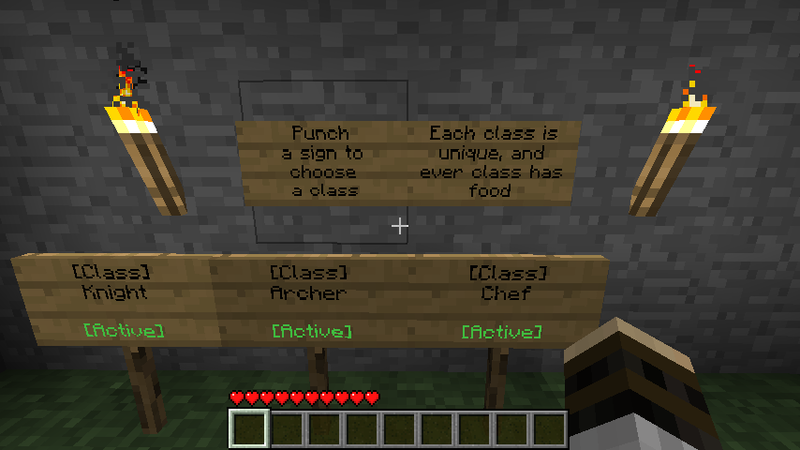
This plugin allows you to create signs which will allow you to fill your inventory with pre-configured items based on a class system. It will also allow you to replace Armor with pre-defined items. Anybody with the correct permissions (or if permissions isn't found - an op) can disable/enable signs on the fly, by right clicking the sign. To use the sign, punch it (left click).
You can also create a one-use sign, which can only be used by each player once.
Note: This plugin will also create a file called signs.dat in it's configuration folder. Do not edit this file, or delete it
If you have the correct permissions (or if you're an op), you can place class signs like so:
[Class]
<class_name>
<blank>
<blank>
To create a One-Use sign, use this template:
[Class]
<class_name>
[One-Use]
<blank>
If done correctly, the 4th line should change to a green [Active] tag.
Read the Configuration section below to find out how to define classes.
Screenshots
See images tab.
To-Do
- (possibly) change permission group when a sign is used?
- Add economy support.
- Add Permissions node to protect certain players from one use sign mode. If you have any suggestions, post them below and I may choose to implement it!
Settings
The configuration file properties.yml will be created with default values as shown below:
classes:
    Chef:
        items: 39:10,40:10,281:10
    Knight:
        items: 267,320:5
        armor: 306,307,308,309
    Archer:
        items: 261,262:50,297:4
        armor: 298,299,300,301
    Armored:
        armor: 302,303,304,305
    Builder:
        items: 44:64,44@2:64,44@3:64,44@4:64,44@5:64
overwriteArmor: true
emptyInventory: false
emptyWholeInventory: false
- classes - this is where all the class definition takes place. Following the default guidelines, you can specify your own class. Please note, when indenting, use FOUR SPACES (not tabs).
- Chef, Knight, Archer, Armored - these are sample classes, each with different item/armor definitions. For example, the Chef gets 10 brown mushrooms, 10 red mushrooms, and 10 wooden bowls. The Chef gets no armor (and if overwriteArmor is on, their armor is removed). The Knight gets an Iron sword and 5 cooked porkchops. The Knight also gets a full set of Iron armor. The Armored class gets a full set of Chainmail Armor. The Armored class gets no items (but if emptyInventory is on, the inventory is still cleared.) To define items/armor, use the Block IDs that can be found using www.minecraftwiki.net and searching the block name. To define an amount, use a colon, then the amount. Do NOT use amounts on Armor definitions. Armor definitions MUST be in this order: Helmet, Chestplate, Leggings, Boots. If you want to omit an Armor part, define a 0 (zero) (e.g. 0,303,304,305 will give full chainmail, except a helmet.) overwriteArmor - when set to true, the player's previous armor is removed, and then the new armor (if applicable) is given. Otherwise, the given armor will fill any "gaps." (e.g. if a player is already wearing a leather helmet, and selects the Armored class, they will keep their leather helmet, and be given Chainmail chestplate, leggings and boots.) The Builder class gets 64 of every possible slab. This shows how to use Data Values in items.
- emptyInventory - when set to true, the bottom 9 inventory slots (the ones always on show) will be cleared before items are given. Otherwise, items are given on top of this.
- checkVersion - when set to true, the plugin will perform a simple version check at every load/reload, and will report to the console when an update is available. When set to false, this check is disabled.
- emptyWholeInventory - when set to true, the player's whole inventory is cleared. This option OVERRIDES emptyInventory. If emptyInventory is set to false, but this is set to true, the whole inventory will still empty.
Permissions
These permission nodes will work with either Permissions 2.x, or Bukkit SuperPerms. When using SuperPerms, any admin permissions - and enable/disable permissions - will default to an op check, any other nodes will default to true for everyone.
- classign.user.place - allows the player/group to place Class Signs.
- classign.user.use - allows the player/group to use a sign.
- classign.admin.toggle - allows the player/group to toggle a sign between active and inactive by right-clicking.
- classign.admin.clearuser - allows the player/group to use the command that clears a user's sign usage history.
- classign.admin.add - allows the player/group to add a class using commands.
- classign.admin.remove - allows the player/group to remove a class using commands.
- classign.admin.items - allows the player/group to change the item output of a class using commands.
- classign.admin.armor - allows the player/group to change the armor output of a class using commands.
Commands
For all commands listed below, you can either use /cs, /classsign, or /classign.
- /cs clearuser <username>
This command clears the specified user's sign usage history, allowing him/her to re-use signs they've used before, even if one use sign mode is enabled.
Requires Permission: classign.admin.clearuser
- /cs class add <class name>
This command adds the specified class to the config file. It will not let you add a duplicate class.
Requires Permission: classign.admin.add
- /cs class remove <class name>
This command removes the specified class from the config file. This is irreversible. It will not let you remove a non-existant class.
Requires Permission: classign.admin.remove
- /cs class items/armor <class name> <values>
This command lets you change the item or armor output of a class. Please note, you *must* follow the same rules as in the configuration file. For items, you must define them with no spaces inbetween, just commas. For armor, you must not define an amount, and you must have 4 values, in top to bottom order.
Requires Permission: classign.admin.items OR classsign.admin.armor - depending on which command
Comments


-

_ForgeUser6936550 Owner
-
View User Profile
-
Send Message
Posted Aug 15, 2012Can a sign give a user a potion effect (Speed, Strength, Fire Resistance)?
-
View User Profile
-
Send Message
Posted Aug 1, 2012Great Plugin, extremely useful for our type of server. A little suggestion if you don't mind, I'm not sure if it's possible but can you make it so that you can set a price on each class? So if someone buys the class, they can punch it and get the loadout, If they don't buy it, when they punch it, they don't get any loadouts, once you buy it though, you can always use it. Another suggestion is that if it's possible to make a permission where a rank can only use a specific class. Thank you.
-
View User Profile
-
Send Message
Posted Jul 30, 2012@Johnsonboys123
Found the answer - after you place a sign, you have to reload the server to get the signs in the signs.dat file and then it should work.
-
View User Profile
-
Send Message
Posted Jul 24, 2012is there any way to add enchantments to the config, or while editing it from ingame, add a "/cs class items/armor (class name) hand" this would add what is in hand to the config easier than finding the data values.
Edit: oops, didnt see in title thisis for 1.2.3... sorry
-
View User Profile
-
Send Message
Posted Jul 7, 2012To all those who need help with Colour wools and potion.
Potions. <potion id>@<potion type>:<quantity> 373@44:64
Colour wool <Wool id>@<Wool colour>:<quantity> 35@2:64
BUt i'm having a problem with potions. I can't seem to get splash potions to work. Only the consumeable ones. 373@16453:64 only gives me the consumeable ones, not the splash ones. How do i go about fixing this?
-
View User Profile
-
Send Message
Posted Jun 29, 2012I made the sign and it had the green active but when i punch it i do not get the class I assigned it to and I tried it with all the default classes. What am I doing wrong?
-
View User Profile
-
Send Message
Posted Jun 24, 2012this is a wonderful plugin...the only suggestion that i have for it is for there to be a command that does the same thing as the signs. something like "/cs classgive <username> <class>" and it would also have to follow the config. so if you did use that command then it would clear the hotbar or the whole inventory as specified in the configuration. also usually plugins like this dont support custom made objects using spout...but if this doesnt is ther someway that you could make it do that?
-
View User Profile
-
Send Message
Posted Jun 18, 2012Nevermind, I fixed it! Sorry for the pointless comment!
-
View User Profile
-
Send Message
Posted Jun 16, 2012This is absoloutely beautiful, all it needs though is permissions:
"classes: Chef: items: 39:10,40:10,281:10 permissions: permission.example.use"
Something like that, and it would be the perfect class plugin, that's currently what I am in need of.
-
View User Profile
-
Send Message
Posted May 26, 2012How do you give a class enchanted weapons or armor?
-
View User Profile
-
Send Message
Posted May 26, 2012Is it possible for you to add support for putting potions into the classes because it will always give you a basic potion (a bottle of water). For example: I want to give my priest class 10 healing potions so it would be /cs class items priest 737 005:10 but instead it just gives me 737 which is just a water bottle.
I also discovered a bug: when you give a class some armor but no helmet they will wear the shoes on their legs, the trousers around their middle and the breastplate on their head
-
View User Profile
-
Send Message
Posted May 22, 2012@ChrizC
So do you have some sort of solution ? Or is it screwed ?
-
View User Profile
-
Send Message
Posted May 20, 2012@ChrizC
Exactly. This is for making a Class System for SPout's Guns+
-
View User Profile
-
Send Message
Posted May 20, 2012@Kadravor
You're trying to apply a data value of 1070 to the item 318... which is flint. What exactly are you trying to do?
-
View User Profile
-
Send Message
Posted May 19, 2012When i type 318@1070, i get something like 23 ingame... How should i write it to make it 1070 ?
-
View User Profile
-
Send Message
Posted May 2, 2012can i do for example a permission classign.admin.add.Builder e.t.c?
-
View User Profile
-
Send Message
Posted Apr 28, 2012Excellent plugin! Just what I needed! But as previously said it seems that there is no support for enchanted Items, and therefore no potions or colored wool.
Could you add this on the To-do list?
Thanks a lot, enjoying your work right now ^^
EDIT: My bad, colored wool works. But is there a way to give enchanted items or potions? Can't find any way...
-
View User Profile
-
Send Message
Posted Apr 19, 2012how could i install it i dont know anything about permissions can u give me the whole permission thing??because its so awesome!!!!
THANKS
-
View User Profile
-
Send Message
Posted Apr 16, 2012A few things: 1. Is this still active? 2. I have 2.0 but I can't seem to add custom classes that work. I follow the template but when I create a sign nothing happens like it does with the "Original" Classes such as Knight. 3. Using in-game commands doesn't seem to work, I don't get any errors though. 4. Setting empty inventory or whole inventory doesn't work.
This is what I type: /classsign add class farmer
I am Admin/Op/Owner and have set permissions: classsign.*: true Like I said, no error messages, just nothing seems to be happening. The "Original" Classes: Knight, Chef, Builder, Archer work fine as signs. Just can't make custom classes. The only file I have is Classsign.Properties.yml and is set out like this: classes: Chef: items: 39:10,40:10,281:10 Knight: items: 267,320:5 armor: 306,307,308,309 Archer: items: 261,262:50,297:4 armor: 298,299,300,301 emptyWholeInventory: false overwriteArmor: true checkVersion: true oneUseSigns: true emptyInventory: false
-
View User Profile
-
Send Message
Posted Apr 11, 2012@ChrizC
Add to this classes prefixes at chat =d