
ChestShop (iConomyChestShop)
Acrobot released his first Android game, would you mind giving it a go?
ChestShop



A simple, yet very powerful system for making physical shops using signs and chests.
It's never been that easy to create shops! With features like shop protection and anti-lag protection, you won't have to worry about your server's economy anymore!
"Just works"! ChestShop supports almost all economy plugins by using Vault!
(Versions above 3.9.2 also support economy plugins using the Reserve API)
Some known compatible and incompatible economy plugins.
Please check if there are newer development builds before reporting issues!
If you are upgrading from a previous version of ChestShop please make sure to always read the warnings in the file's changelog!
The plugin by default submits anonymous stats about your server (player count, plugin/server version and type) to a public statistics websites (mcstats.org and bstats.org) in order to provide the developers with usage information. If you wish to opt out, you can do so in the PluginMetrics/config.yml and bstats/config.yml files. It also features an auto-update feature, which can be turned off in the config.
 Frequently Asked Questions
 Permissions
 User-made tutorials
 Download the latest stable version
 Download the latest development version
- Download 1.12.2 version
- Download 1.8.8 version
- Download older versions
 API for plugin developers
 Source code on GitHub
 Crowdin Localization Project
- Thread on Bukkit forums
- IRC chat (#chestshop on irc.esper.net)
- Discord Channel Joining through that invite auto subscribes you to important update notifications, if you don't want that use this invite.
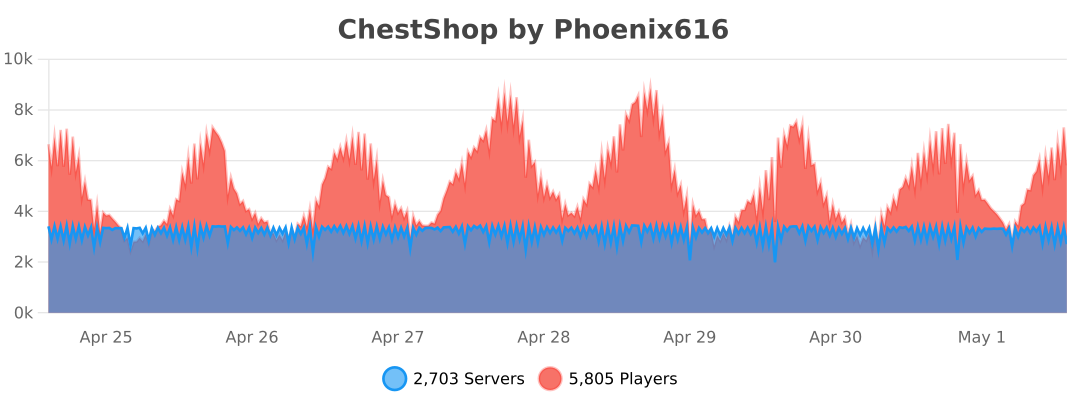
![[IMG]](https://raw.githubusercontent.com/iconic/open-iconic/master/png/graph-2x.png) bStats metrics
bStats metrics
 Additional modules for ChestShop:
 ChestShop LegacyIds - allows usage of numeric and old pre 1.13 string IDs on signs
 Notification module - to use with Notifications plugin (outdated)
 Towny module - to use with Towny plugin
 ChestShop Notifier - records all sales, even when the player is offline (Maintained by Phoenix616)
- ChestShopTools - Enchantment info signs and empty shop notifier (Maintained by Phoenix616)
- Adda - Item display icons above the chest, transaction limit, Discord alerts, per-player shop limit! (User-made)
- ChestIcon - Icons for Chests, just like the Showcase plugin! (User-made, broken on newer versions)
- Libelula Auto Shop - easy creation of admin shops, using Essentials (User-made)
 ChestShopLimiter+ - limits the number of shops per player (User-made, abandoned)
 ChestShopListing - Stores shops and transactions in SQL; adds related features including in-game search (User-made)
![[IMG]](https://raw.githubusercontent.com/iconic/open-iconic/master/png/check-2x.png) ChestShopConfirmation - confirmation screen before buying (User-made)
ChestShopConfirmation - confirmation screen before buying (User-made) SearchChestShop - search for shops selling certain items (User-made)
 BoltChestShop - Add support for Bolt container protections (Made by the Bolt author)
Using shops
It's easy! Just right-click the sign to buy, left-click to sell. (You can configure the buttons in the config file!)
How to create a shop
Player shop
| Place a chest on the ground | |
| Place a sign 1 block away from the chest (for example, above it) | |
| On the sign, write: | 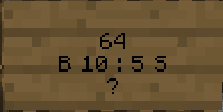 |
| Leave the first line empty. It will be automatically filled with your name by the plugin (if you have the permission ChestShop.admin then you can create shops with the names of other players) | |
| Second line is the amount of items to buy or sell | |
|
Third line is a combination of buy and sell prices. You need to have a price indicator (like 'B' - price that will apply to items BOUGHT by PLAYERS - or 'S' - the SELL price) near the price - the prices are separated by a colon (:) |
Some of the possible price combinations: "B 5:5 S", "B 5", "S free" |
|
The forth line will hold the id/name of the item. Write ? on the sign and the item will be autofilled with the one from the chest or you can click on the sign with the item afterwards. Optionally you can put the actual name on it. You can find out the name of the item you're holding by doing /iteminfo |
|
| Resulting Shop | 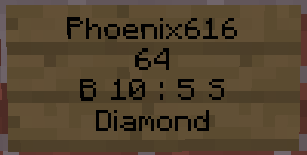 |
| A person can buy 64 diamonds for 10 dollars and sell them back for 5 dollars from Phoenix616 |
If you want you can also take a look at this video tutorial.
Admin Shop - shop with unlimited items
Firstly, you've got to be sure that you've the ChestShop.admin permission or that you are an OP. To make an Admin Shop, simply put "Admin Shop" (configurable in config.yml) on the first line of the sign when creating the shop. Admin Shops do not require a chest!
Translations
- /iteminfo - Get information about the item in your hand
- /iteminfo <id/name> - Get information about the item with the given id or name
- /shopinfo - Get information about the looked-at shop
- /csgive <itemcode> [<amount>] [<player>] - Give item with a unique ChestShop code to a player
- /cstoggle - Toggle buy and sell notificiation messages
- /chestshop version - Display the ChestShop version
- /chestshop reload - Reload the ChestShop config and translation messages. (This might not reload some features)
- /csaccess - Toggles ability to buy/sell on shops while having admin/access permissions and normally being ignored
Permission nodes
| Description | ||
|---|---|---|
| ChestShop.shop.* | shop creation and buying/selling - it contains: | |
| ChestShop.shop.create.* |
create all types of shops |
|
| ChestShop.shop.buy | buy any item from shop | |
| ChestShop.shop.sell | sell any item to shop | |
| ChestShop.mod | open any shop chest | |
| ChestShop.admin | open any shop chest, destroy stores, create (admin) shops |
A full list of permission nodes
Configurations
Useful tips by players
| How not to get bankrupt | A customisable price table |
| Alternative price table |
Compatibility
ChestShop directly hooks into the following plugins to provide additional functionality:
- AuthMe (and forks like AuthMe Reloaded)
- WorldGuard
- Residence
- LWC (and forks like LWCX and Modern-LWC)
- Lockette
- LockettePro
- Deadbolt
- SimpleChestLock
- OddItem
- Heroes
- ShowItem
Metrics
This resource sends metrics data to McStats and bStats. You can opt-out of metrics for all plugins on your server by changing the settings in the PluginMetrics/config.yml and the bStats/config.yml file if you don't want any data to be send.
More info
Even more information can be found in the old plugin thread on the forums.
Got an error or suggestion?
Simply submit a ticket here!
If you have a Github account and have coding knowledge you can also directly open an issue on Github. (You can also fund them via IssueHunt!)
If you just need general help feel free to ask in the comments or join the #chestshop channel on Spigot's IRC network (irc.spi.gt, webchat)
Has ChestShop helped you or your server?
If you want to thank the team in a more materialistic way, feel free to donate or buy Phoeni616 a beer! :)
%2526business%253dandrzejp%2540dysleksja.pl%2526bn%253dPP-DonationsBF%253abtn_donateCC_LG.gif%253aNonHosted%2526cancel_return%253dhttp%253a%252f%252fdev.bukkit.org%252fserver-mods%252fchestshop%252f%2526lc%253dUS%2526item_name%253dChestShop%2b(iConomyChestShop)%2b(from%2bBukkit.org)%2526cmd%253d_donations%2526rm%253d1%2526no_shipping%253d1%2526currency_code%253dUSD)
A shout-out to Acrobot's friend:
We believe that the music he makes is really stunning - you can decide it for yourself!
If you have an issue then please open a ticket on GitHub or post on SpigotMC.org for faster replies to questions!
Comments


-

Phoenix616 Owner
-

AcrobotPL Author
-

dmulloy2 Maintainer
-
View User Profile
-
Send Message
Posted Mar 29, 2012@kcorb90 "You cannot buy here" really means that your 3rd sign line is wrong. It should be like:
B 5
S 5
B 5:5 S
Maybe you are getting a different error? If so, can you post it? (Exact words, please)
-
View User Profile
-
Send Message
Posted Mar 29, 2012@UnitedFactions Yeah, it's better now :) I will try fixing that now, but please give me some time to do so :)
@kcorb90
http://dev.bukkit.org/server-mods/chestshop/pages/faq/
-
View User Profile
-
Send Message
Posted Mar 29, 2012I never had problems with this plugin and ive been using it for a long time now. I read the directions and I know what im doing, but as op and anyone else I cannot buy from Adminshops even though it says "Shop Succesfully Created" and with player shops it says you cannot buy here.
-
View User Profile
-
Send Message
Posted Mar 29, 2012@Acrobot Acrobat! Great to hear your feeling better? ANy time you can fix the chestshop issue with worldguard loading before chestshop? or whatever it is that the FLAG gets removed after a reboot? :) THanks!
-
View User Profile
-
Send Message
Posted Mar 29, 2012@Redstoner_Pro ... Did you even read what I said, or did you just ignore it? I CAN'T MOVE IT OUT OF THE .JAR, because that's the way bukkit reads plugins.
-
View User Profile
-
Send Message
Posted Mar 29, 2012@Acrobot
Worked thanks.
-
View User Profile
-
Send Message
Posted Mar 29, 2012@Acrobot
So instead of hiding it in the jar. Move the setting to the config file like all other plugins do.
default-perm: op or default-perm: default. Is this really that hard to do... Ive got over 30 plugins that can do this... I dont see why you cannot.
Plus with the setting being in the .jar, make ridiculous steps to update this.. every time u release an update... ill have to go back into the jar and rechange that setting AGAIN. do you see why i say that u didnt fully think out your process.......
-
View User Profile
-
Send Message
Posted Mar 29, 2012@JoneKone Well, "Forever Project" is still a project :P No, but really, it's like 50% done, and it was 0% done week ago :)
-
View User Profile
-
Send Message
Posted Mar 28, 2012Yey great job on CS Acrobot
Recomented for 1.2.4 is out and In soon 1.3 will be out.. How about your Forever Project?
CS 4?
-
View User Profile
-
Send Message
Posted Mar 28, 2012@mantegudo Hey, did you try redownloading ChestShop and LWC?
@Cory_ Sorry, not at the moment, but bank support is planned.
@Hangar Thanks :)
@wesley4220336 ...
You can already do that, just look for SHOP_INTERACT_INTERVAL in config
-
View User Profile
-
Send Message
Posted Mar 28, 2012Ok Thanks!
-
View User Profile
-
Send Message
Posted Mar 28, 2012@Acrobot
Hello, ChestShop presented this error today:
Fix if it's on your plugin :P, thanks Acrobot! :D
-
View User Profile
-
Send Message
Posted Mar 28, 2012Could you also plan for a CraftConomy support with bank accounts and users added to the account will be able to create signs on the 1st line?
It works with regular money accounts, just be easier with 'Bank Accounts' as it would be used for Towns. (If Oped)
-
View User Profile
-
Send Message
Posted Mar 27, 2012@Acrobot
Re: ragers: I think if you're going to cater to any crowd, you should choose the one that can actually figure out how to implement a permissions plugin, not those that can't or refuse to try for whatever personal reasons. The fact is that with the barrier to entry (to setting up a server) being so very low, too many people have servers that really should not. Ignore the rage from these people when they can't figure out how to install or configure a plugin. They will be the first to dump their server when they get frustrated anyway.
/2 cents off
-
View User Profile
-
Send Message
Posted Mar 27, 2012We are timing out because people are spamming selling items. Any thing you can add that will alow then only to sell soo much in 1 - 10 sec.
Thanks.
-
View User Profile
-
Send Message
Posted Mar 27, 2012@Redstoner_Pro It isn't hidden. It's a part of how Bukkit registers plugin. For more, you can read it here:
http://wiki.bukkit.org/Plugin_YAML
Due to the way SuperPerms works, I can't test if you're running any permission plugin or not.
Basically, if I didn't give the permission to create and use shops by default, people without permission plugin WOULDN'T be able to use this plugin.
Believe me, I'm not happy with that too. I am properly using the default permissions system and I'm being raged on, because of how other plugins DON'T obey the standard.
You can change this freely. A .jar file is basically a ZIP. Just open it with WinRAR/7Zip, go to plugin.yml and change "default: true" to "default: ops". It's not that hard.
I will probably change it though, because most of the servers still assign the nodes as usual. If I'm being raged on again after that change, I'll pass.
-
View User Profile
-
Send Message
Posted Mar 27, 2012I see so many people having an issue with the permissions on all types of perm plugins, even myself with bperms have issues with the shop create node. Why would you change to the fact that everyone can create a shop by default. And then, hide the setting for it in the .jar file. There should be an option in the config file for this, and 90% of servers that use this plugin, limit the creation of shops by new players. Why not go back to how every other plugin works, Default to OP unless WE as the server owners specify it in a config file. now instead of having to just give permissions to who we want to use the shop, we now also have to set negative perms for the groups we don't want to make them. just sounds like not a lot of though was put into that change. I have an overlapping rank system and assigning negative permission node overwrite a few of the other groups nodes. Now could you please fix this BUG, as it the option is not properly implemented without an option to change this.
-
View User Profile
-
Send Message
Posted Mar 27, 2012Hey i am using groupmanager as a permission plugin, witch way shpuld i use to give permission to create a chest shop, and which one so players can buy, sell
-
View User Profile
-
Send Message
Posted Mar 27, 2012@Taeila_Fae In bPermissions, you should add "^ChestShop.shop.create"
@steve0145
Just open ChestShop.jar and change "default: true" to "default: ops" in bukkit.yml
-
View User Profile
-
Send Message
Posted Mar 26, 2012I am having the same thing I am using Group Manager and I have tried all different ways and everybody on the server can still create shops