
ChestShop (iConomyChestShop)
Acrobot released his first Android game, would you mind giving it a go?
ChestShop



A simple, yet very powerful system for making physical shops using signs and chests.
It's never been that easy to create shops! With features like shop protection and anti-lag protection, you won't have to worry about your server's economy anymore!
"Just works"! ChestShop supports almost all economy plugins by using Vault!
(Versions above 3.9.2 also support economy plugins using the Reserve API)
Some known compatible and incompatible economy plugins.
Please check if there are newer development builds before reporting issues!
If you are upgrading from a previous version of ChestShop please make sure to always read the warnings in the file's changelog!
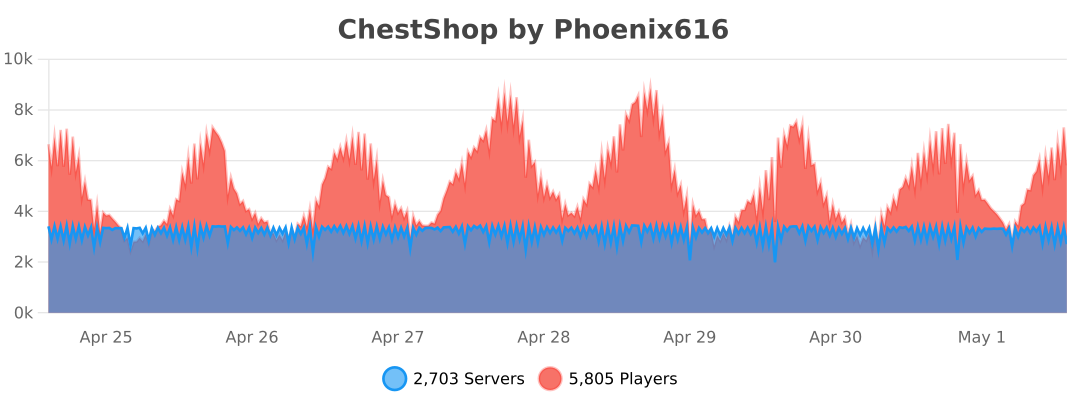
The plugin by default submits anonymous stats about your server (player count, plugin/server version and type) to a public statistics websites (mcstats.org and bstats.org) in order to provide the developers with usage information. If you wish to opt out, you can do so in the PluginMetrics/config.yml and bstats/config.yml files. It also features an auto-update feature, which can be turned off in the config.
 Frequently Asked Questions
 Permissions
 User-made tutorials
 Download the latest stable version
 Download the latest development version
- Download 1.12.2 version
- Download 1.8.8 version
- Download older versions
 API for plugin developers
 Source code on GitHub
 Crowdin Localization Project
- Thread on Bukkit forums
- IRC chat (#chestshop on irc.esper.net)
- Discord Channel Joining through that invite auto subscribes you to important update notifications, if you don't want that use this invite.
![[IMG]](https://raw.githubusercontent.com/iconic/open-iconic/master/png/graph-2x.png) bStats metrics
bStats metrics
 Additional modules for ChestShop:
 ChestShop LegacyIds - allows usage of numeric and old pre 1.13 string IDs on signs
 Notification module - to use with Notifications plugin (outdated)
 Towny module - to use with Towny plugin
 ChestShop Notifier - records all sales, even when the player is offline (Maintained by Phoenix616)
- ChestShopTools - Enchantment info signs and empty shop notifier (Maintained by Phoenix616)
- Adda - Item display icons above the chest, transaction limit, Discord alerts, per-player shop limit! (User-made)
- ChestIcon - Icons for Chests, just like the Showcase plugin! (User-made, broken on newer versions)
- Libelula Auto Shop - easy creation of admin shops, using Essentials (User-made)
 ChestShopLimiter+ - limits the number of shops per player (User-made, abandoned)
 ChestShopListing - Stores shops and transactions in SQL; adds related features including in-game search (User-made)
![[IMG]](https://raw.githubusercontent.com/iconic/open-iconic/master/png/check-2x.png) ChestShopConfirmation - confirmation screen before buying (User-made)
ChestShopConfirmation - confirmation screen before buying (User-made) SearchChestShop - search for shops selling certain items (User-made)
 BoltChestShop - Add support for Bolt container protections (Made by the Bolt author)
Using shops
It's easy! Just right-click the sign to buy, left-click to sell. (You can configure the buttons in the config file!)
How to create a shop
Player shop
| Place a chest on the ground | |
| Place a sign 1 block away from the chest (for example, above it) | |
| On the sign, write: | 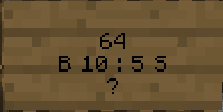 |
| Leave the first line empty. It will be automatically filled with your name by the plugin (if you have the permission ChestShop.admin then you can create shops with the names of other players) | |
| Second line is the amount of items to buy or sell | |
|
Third line is a combination of buy and sell prices. You need to have a price indicator (like 'B' - price that will apply to items BOUGHT by PLAYERS - or 'S' - the SELL price) near the price - the prices are separated by a colon (:) |
Some of the possible price combinations: "B 5:5 S", "B 5", "S free" |
|
The forth line will hold the id/name of the item. Write ? on the sign and the item will be autofilled with the one from the chest or you can click on the sign with the item afterwards. Optionally you can put the actual name on it. You can find out the name of the item you're holding by doing /iteminfo |
|
| Resulting Shop | 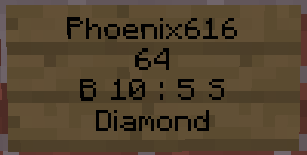 |
| A person can buy 64 diamonds for 10 dollars and sell them back for 5 dollars from Phoenix616 |
If you want you can also take a look at this video tutorial.
Admin Shop - shop with unlimited items
Firstly, you've got to be sure that you've the ChestShop.admin permission or that you are an OP. To make an Admin Shop, simply put "Admin Shop" (configurable in config.yml) on the first line of the sign when creating the shop. Admin Shops do not require a chest!
Translations
- /iteminfo - Get information about the item in your hand
- /iteminfo <id/name> - Get information about the item with the given id or name
- /shopinfo - Get information about the looked-at shop
- /csgive <itemcode> [<amount>] [<player>] - Give item with a unique ChestShop code to a player
- /cstoggle - Toggle buy and sell notificiation messages
- /chestshop version - Display the ChestShop version
- /chestshop reload - Reload the ChestShop config and translation messages. (This might not reload some features)
- /csaccess - Toggles ability to buy/sell on shops while having admin/access permissions and normally being ignored
Permission nodes
| Description | ||
|---|---|---|
| ChestShop.shop.* | shop creation and buying/selling - it contains: | |
| ChestShop.shop.create.* |
create all types of shops |
|
| ChestShop.shop.buy | buy any item from shop | |
| ChestShop.shop.sell | sell any item to shop | |
| ChestShop.mod | open any shop chest | |
| ChestShop.admin | open any shop chest, destroy stores, create (admin) shops |
A full list of permission nodes
Configurations
Useful tips by players
| How not to get bankrupt | A customisable price table |
| Alternative price table |
Compatibility
ChestShop directly hooks into the following plugins to provide additional functionality:
- AuthMe (and forks like AuthMe Reloaded)
- WorldGuard
- Residence
- LWC (and forks like LWCX and Modern-LWC)
- Lockette
- LockettePro
- Deadbolt
- SimpleChestLock
- OddItem
- Heroes
- ShowItem
Metrics
This resource sends metrics data to McStats and bStats. You can opt-out of metrics for all plugins on your server by changing the settings in the PluginMetrics/config.yml and the bStats/config.yml file if you don't want any data to be send.
More info
Even more information can be found in the old plugin thread on the forums.
Got an error or suggestion?
Simply submit a ticket here!
If you have a Github account and have coding knowledge you can also directly open an issue on Github. (You can also fund them via IssueHunt!)
If you just need general help feel free to ask in the comments or join the #chestshop channel on Spigot's IRC network (irc.spi.gt, webchat)
Has ChestShop helped you or your server?
If you want to thank the team in a more materialistic way, feel free to donate or buy Phoeni616 a beer! :)
%2526business%253dandrzejp%2540dysleksja.pl%2526bn%253dPP-DonationsBF%253abtn_donateCC_LG.gif%253aNonHosted%2526cancel_return%253dhttp%253a%252f%252fdev.bukkit.org%252fserver-mods%252fchestshop%252f%2526lc%253dUS%2526item_name%253dChestShop%2b(iConomyChestShop)%2b(from%2bBukkit.org)%2526cmd%253d_donations%2526rm%253d1%2526no_shipping%253d1%2526currency_code%253dUSD)
A shout-out to Acrobot's friend:
We believe that the music he makes is really stunning - you can decide it for yourself!
If you have an issue then please open a ticket on GitHub or post on SpigotMC.org for faster replies to questions!
Comments


-

Phoenix616 Owner
-

AcrobotPL Author
-

dmulloy2 Maintainer
-
View User Profile
-
Send Message
Posted Dec 12, 2011@patey5
i have too this message using PEX... *sight*
-
View User Profile
-
Send Message
Posted Dec 12, 2011@Acrobot
[Shop] you don't have permission to access this chest!
towny and worldguard integration are both off. shops cant be created anywhere.
no other settings have been changed since i updated from 3.2 to 3.29
is there something i need to change for 3.29 that i missed?
-
View User Profile
-
Send Message
Posted Dec 12, 2011@patey5 What is the exact error? Are you sure it isn't connected to LWC?
@123vinny456 The problem is - Bukkit isn't yet 1.0.0 capable (I mean - it works, but there is no API yet) Also, there is a problem - how should we indicate on sign that the item is enchanted?
-
View User Profile
-
Send Message
Posted Dec 11, 2011with worldguard support disabled it says my users have no permission to create shops :/
-
View User Profile
-
Send Message
Posted Dec 11, 2011Any why you can add enchantment support? when my users try to sell items that have enchants on them when the person buys it the enchant is gone??? can you fix this
-
View User Profile
-
Send Message
Posted Dec 11, 2011my config:
-
View User Profile
-
Send Message
Posted Dec 11, 2011@Acrobot
uh...i want it to be worldguard? thats the issue- its not working, the exact error is it claims users dont have access to their own chests but i can create the shop in the players name and it works :S
-
View User Profile
-
Send Message
Posted Dec 11, 2011@Zidkon
I'm having the same problem. Our users can create shops even though they don't have ChestShop.shop.create in bPermissions with GroupManager
-
View User Profile
-
Send Message
Posted Dec 11, 2011@Qx2 You can configure iConomy to do that. Just go into config and change your currency to "item"
@Zidkon That actually means that it works correctly with superperms. Superperms allow plugins to define default permissions. To change that, just do
^ChestShop.shop.create
http://dev.bukkit.org/server-mods/chestshop/tickets/20-permissions-error/
@patey5 Try checking the config if you have WorldGuard integration turned on - if so, turn it off.
-
View User Profile
-
Send Message
Posted Dec 11, 2011Can you add an option to instead iconomy could buy / sell a Gold Nugget?
-
View User Profile
-
Send Message
Posted Dec 10, 2011all permissions are done correctly, it was working but i switched to worldgaurd only instead of towny only and now it claims users dont have permission to create shops :S
-
View User Profile
-
Send Message
Posted Dec 10, 2011The plugin doesn't work correctly for CB 1577 with bPermissions (superperms).
All my users on my server can create Shops even if they don't have the permission ChestShop.shop.create.
-
View User Profile
-
Send Message
Posted Dec 9, 2011@SilentStray Your sign's 3rd line is wrong :/ It should be either:
-
View User Profile
-
Send Message
Posted Dec 9, 2011Would it be possible to implement a setting that makes it impossible for users to create shops in worldguard regions they don't own?
EDIT: Nevermind, found the config setting :)
-
View User Profile
-
Send Message
Posted Dec 8, 2011Im getting a "[SHOP] you can't buy here!" message when i or any other player trys to buy from a shop.
-
View User Profile
-
Send Message
Posted Dec 7, 2011@PunJedi
@jbing12040
I'd say that you just have to do /iteminfo :)
-
View User Profile
-
Send Message
Posted Dec 7, 2011@jbing12040
Try using the Data Id instead of the whole word.
Use this link to use a rough potion generator. http://www.nexisonline.net/potions.php
The advantage is, you can see the id's for the potion combo.
Also, some folks have started an ID list for potions but with some 16 thousands potential combos, Id suggest finding a few popular ones, getting the ID's for them, and just sell what you can for the moment.
-
View User Profile
-
Send Message
Posted Dec 7, 2011How do we sell potions? there is not enough characters on a line of a sign to be able to put the full name of them...
-
View User Profile
-
Send Message
Posted Dec 7, 2011@SilentStray I really don't know. Probably with the new system I'll make something with it :P
-
View User Profile
-
Send Message
Posted Dec 7, 2011@Acrobot
Good luck with school and don't let us bog you down XD.
Anyways, I was wondering how enchanted items will be dealt with.