
ChestShop (iConomyChestShop)
Acrobot released his first Android game, would you mind giving it a go?
ChestShop



A simple, yet very powerful system for making physical shops using signs and chests.
It's never been that easy to create shops! With features like shop protection and anti-lag protection, you won't have to worry about your server's economy anymore!
"Just works"! ChestShop supports almost all economy plugins by using Vault!
(Versions above 3.9.2 also support economy plugins using the Reserve API)
Some known compatible and incompatible economy plugins.
Please check if there are newer development builds before reporting issues!
If you are upgrading from a previous version of ChestShop please make sure to always read the warnings in the file's changelog!
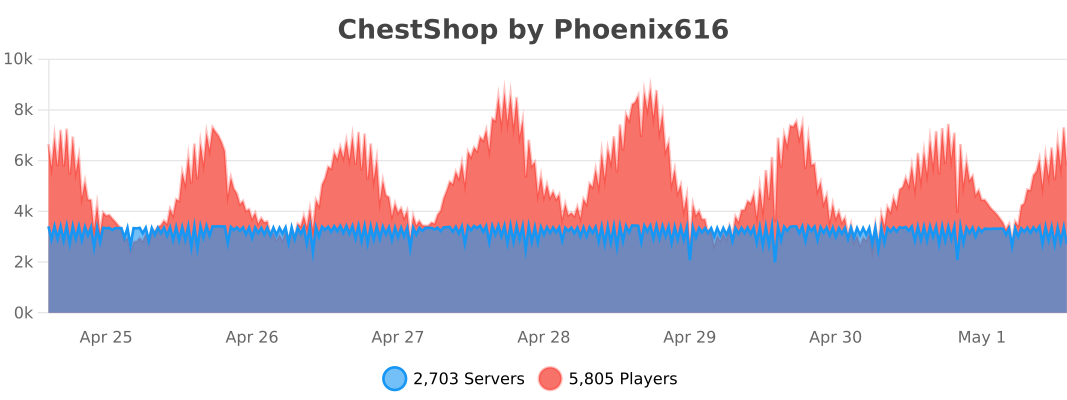
The plugin by default submits anonymous stats about your server (player count, plugin/server version and type) to a public statistics websites (mcstats.org and bstats.org) in order to provide the developers with usage information. If you wish to opt out, you can do so in the PluginMetrics/config.yml and bstats/config.yml files. It also features an auto-update feature, which can be turned off in the config.
 Frequently Asked Questions
 Permissions
 User-made tutorials
 Download the latest stable version
 Download the latest development version
- Download 1.12.2 version
- Download 1.8.8 version
- Download older versions
 API for plugin developers
 Source code on GitHub
 Crowdin Localization Project
- Thread on Bukkit forums
- IRC chat (#chestshop on irc.esper.net)
- Discord Channel Joining through that invite auto subscribes you to important update notifications, if you don't want that use this invite.
![[IMG]](https://raw.githubusercontent.com/iconic/open-iconic/master/png/graph-2x.png) bStats metrics
bStats metrics
 Additional modules for ChestShop:
 ChestShop LegacyIds - allows usage of numeric and old pre 1.13 string IDs on signs
 Notification module - to use with Notifications plugin (outdated)
 Towny module - to use with Towny plugin
 ChestShop Notifier - records all sales, even when the player is offline (Maintained by Phoenix616)
- ChestShopTools - Enchantment info signs and empty shop notifier (Maintained by Phoenix616)
- Adda - Item display icons above the chest, transaction limit, Discord alerts, per-player shop limit! (User-made)
- ChestIcon - Icons for Chests, just like the Showcase plugin! (User-made, broken on newer versions)
- Libelula Auto Shop - easy creation of admin shops, using Essentials (User-made)
 ChestShopLimiter+ - limits the number of shops per player (User-made, abandoned)
 ChestShopListing - Stores shops and transactions in SQL; adds related features including in-game search (User-made)
![[IMG]](https://raw.githubusercontent.com/iconic/open-iconic/master/png/check-2x.png) ChestShopConfirmation - confirmation screen before buying (User-made)
ChestShopConfirmation - confirmation screen before buying (User-made) SearchChestShop - search for shops selling certain items (User-made)
 BoltChestShop - Add support for Bolt container protections (Made by the Bolt author)
Using shops
It's easy! Just right-click the sign to buy, left-click to sell. (You can configure the buttons in the config file!)
How to create a shop
Player shop
| Place a chest on the ground | |
| Place a sign 1 block away from the chest (for example, above it) | |
| On the sign, write: | 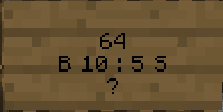 |
| Leave the first line empty. It will be automatically filled with your name by the plugin (if you have the permission ChestShop.admin then you can create shops with the names of other players) | |
| Second line is the amount of items to buy or sell | |
|
Third line is a combination of buy and sell prices. You need to have a price indicator (like 'B' - price that will apply to items BOUGHT by PLAYERS - or 'S' - the SELL price) near the price - the prices are separated by a colon (:) |
Some of the possible price combinations: "B 5:5 S", "B 5", "S free" |
|
The forth line will hold the id/name of the item. Write ? on the sign and the item will be autofilled with the one from the chest or you can click on the sign with the item afterwards. Optionally you can put the actual name on it. You can find out the name of the item you're holding by doing /iteminfo |
|
| Resulting Shop | 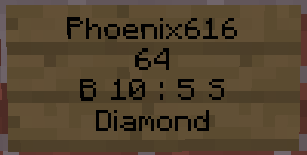 |
| A person can buy 64 diamonds for 10 dollars and sell them back for 5 dollars from Phoenix616 |
If you want you can also take a look at this video tutorial.
Admin Shop - shop with unlimited items
Firstly, you've got to be sure that you've the ChestShop.admin permission or that you are an OP. To make an Admin Shop, simply put "Admin Shop" (configurable in config.yml) on the first line of the sign when creating the shop. Admin Shops do not require a chest!
Translations
- /iteminfo - Get information about the item in your hand
- /iteminfo <id/name> - Get information about the item with the given id or name
- /shopinfo - Get information about the looked-at shop
- /csgive <itemcode> [<amount>] [<player>] - Give item with a unique ChestShop code to a player
- /cstoggle - Toggle buy and sell notificiation messages
- /chestshop version - Display the ChestShop version
- /chestshop reload - Reload the ChestShop config and translation messages. (This might not reload some features)
- /csaccess - Toggles ability to buy/sell on shops while having admin/access permissions and normally being ignored
Permission nodes
| Description | ||
|---|---|---|
| ChestShop.shop.* | shop creation and buying/selling - it contains: | |
| ChestShop.shop.create.* |
create all types of shops |
|
| ChestShop.shop.buy | buy any item from shop | |
| ChestShop.shop.sell | sell any item to shop | |
| ChestShop.mod | open any shop chest | |
| ChestShop.admin | open any shop chest, destroy stores, create (admin) shops |
A full list of permission nodes
Configurations
Useful tips by players
| How not to get bankrupt | A customisable price table |
| Alternative price table |
Compatibility
ChestShop directly hooks into the following plugins to provide additional functionality:
- AuthMe (and forks like AuthMe Reloaded)
- WorldGuard
- Residence
- LWC (and forks like LWCX and Modern-LWC)
- Lockette
- LockettePro
- Deadbolt
- SimpleChestLock
- OddItem
- Heroes
- ShowItem
Metrics
This resource sends metrics data to McStats and bStats. You can opt-out of metrics for all plugins on your server by changing the settings in the PluginMetrics/config.yml and the bStats/config.yml file if you don't want any data to be send.
More info
Even more information can be found in the old plugin thread on the forums.
Got an error or suggestion?
Simply submit a ticket here!
If you have a Github account and have coding knowledge you can also directly open an issue on Github. (You can also fund them via IssueHunt!)
If you just need general help feel free to ask in the comments or join the #chestshop channel on Spigot's IRC network (irc.spi.gt, webchat)
Has ChestShop helped you or your server?
If you want to thank the team in a more materialistic way, feel free to donate or buy Phoeni616 a beer! :)
%2526business%253dandrzejp%2540dysleksja.pl%2526bn%253dPP-DonationsBF%253abtn_donateCC_LG.gif%253aNonHosted%2526cancel_return%253dhttp%253a%252f%252fdev.bukkit.org%252fserver-mods%252fchestshop%252f%2526lc%253dUS%2526item_name%253dChestShop%2b(iConomyChestShop)%2b(from%2bBukkit.org)%2526cmd%253d_donations%2526rm%253d1%2526no_shipping%253d1%2526currency_code%253dUSD)
A shout-out to Acrobot's friend:
We believe that the music he makes is really stunning - you can decide it for yourself!
If you have an issue then please open a ticket on GitHub or post on SpigotMC.org for faster replies to questions!
Comments


-

Phoenix616 Owner
-

AcrobotPL Author
-

dmulloy2 Maintainer
-
View User Profile
-
Send Message
Posted Dec 30, 2013Plugin treats ALL signs as a chestshop signs. HUGE bug that needs fixed. Using latest version. I really like this plugin and would rather not have to switch please fix! thanks!
-
View User Profile
-
Send Message
Posted Dec 30, 2013@KJ_Shipp Unfortunately, there is no way to create bank ChestShops. It's kinda sad, however many economy plugins implement banks in different ways, so there is no "proper" way to achieve what we want :/
As for the bank names - I'm not sure if $Server will automatically use the bank account - the config option is supposed to take only player accounts.
Thanks for the kind words!
-
View User Profile
-
Send Message
Posted Dec 30, 2013Hello Acrobot,
I have been using your plugin for quite some time but I'm now having a problem. I am trying to set up BOSEconomy alongside ChestShop. Problems I am getting are it makes a new "player" account when I assign a bank's account name. i.e. line 1: $AdminShop will create a player account in BOSE named $AdminShop instead of using the previously created bank. How do I create a Bank ChestShop?
Secondly, I attach my bank "Server" to ChestShop for taxes and it doesn't gain any money during a purchase. Am I not imputing the proper info?
CraftBukkit version: 1.7.2-R0.3-20131221.081113-1 ChestShop version: 3.7.2 BOSEconomy version: v0.7.8.1 Vault version: 1.2.29 GroupManager version: 2.12.2
Thank you for any help and a kickass plugin!
-
View User Profile
-
Send Message
Posted Dec 27, 2013@DeMaggo I see that you have resolved the problem, however if you are still wondering - your Vault version was outdated.
@elawlapple You need to use Vault for Essentials.
-
View User Profile
-
Send Message
Posted Dec 27, 2013Hi, I recently installed this plugin and I'm running latest version of Essentials. On Line 1 of the Config I put:
However, even after reloading both plugins, server etc. When ever I create a shop somebody uses, when selling an item I get the message:
"Shop owner doesn't have enough money!" (Even though they do)
"You don't have enough money!" (Even though they do)
Or if I sell to an Admin Shop I get the message:
"You sold (ITEM NAME) to Admin Shop for ."
Is there a way I can get it to work with Essentials?
-
View User Profile
-
Send Message
Posted Dec 27, 2013Greetings Acrobot,
€: Solved. Apparently, the coadmin updated things without further notice.
we use Chestshop on our server for multiple purposes. Without any obvious reason, the events from the serviceprovider can no longer be passed properly to your plugin since about 5 days now. We use the latest version of Chestshop.
-
View User Profile
-
Send Message
Posted Dec 25, 2013@ThoLav Kind of, but Vault is not required. iConomy / BOSEconomy work fine without it.
-
View User Profile
-
Send Message
Posted Dec 25, 2013@Acrobot
I, think you should change dependency from optional to required!
-
View User Profile
-
Send Message
Posted Dec 25, 2013@Mikkiey Exactly as @ThoLav says - if you don't have Vault installed, your balance won't change.
@brewno2k Hmm, that would seem like something's wrong with CraftBukkit. Could you check it using the latest dev version?
@TWSSYesterday Thanks for reporting that :)
@NobleStrike About random signs - update your plugin, please. I fixed it the next day after the broken version was posted.
About the 123 item - please create a ticket for it.
-
View User Profile
-
Send Message
Posted Dec 24, 2013While the plugen works great there are issues with item 123 and log reports of breaking of random signs.... Not chestshop signs. please fix
-
View User Profile
-
Send Message
Posted Dec 24, 2013@brewno2k
ve been using this for a while now and never ran into this problem I am also using 1.7.2 bukkit mabe if you can copy your server to your home machine and test to see if it could bee a plugin causeing the problem
-
View User Profile
-
Send Message
Posted Dec 24, 2013After installing Bukkit 1.7.2 beta 0.2 new created signs won't work for chestshop. The old ones work! No errors in console... I even create a sign exactly as the ones that work, and no chestshop is created. Zip. Nada. when you hit the signs, they dont buy/sell. But when you hit the old signs, they buy and sell normally.
-
View User Profile
-
Send Message
Posted Dec 24, 2013@ThoLav
Hi,
do you have vault installed?
-
View User Profile
-
Send Message
Posted Dec 24, 2013Hello! I am currently starting my own server and using this plugin for my own shop. Everything seems to be running correct im getting the right messages when i buy and sell things. its just that my balance hasnt gone up at all. it still says 0$ even tho i have sold enough for money. i also cant buy due to the lack that i dont have any money. anyone know where this problem might be coming from??
-
View User Profile
-
Send Message
Posted Dec 24, 2013@AmmunitionGalil12
Hi,
hold the item to sell in your hand and type /iinfo. Now use the shown id on your ChestShopSign. That's it.
-
View User Profile
-
Send Message
Posted Dec 24, 2013Can someone please help me. I dont know how to sell own made fireworks.
-
View User Profile
-
Send Message
Posted Dec 24, 2013@Durand1w Hmm, firstly it's weird that they are showing IDs and not names. They won't get updated for 1.7, but they should work just fine.
@lubby123 Did you get any errors in the console on startup or while placing the sign?
@SirFloofy Unfortunately, that is a known error - and I cannot do anything about it. I tried talking to WorldGuard developers, however now for almost a year the fix for the disappearing regions is still in development. Sorry! (Also, that's why it's still marked as experimental in the config)
@speedlegs Sure! Just PM me the link to your translation, preferably on pastebin.com
-
View User Profile
-
Send Message
Posted Dec 24, 2013if you want i can add the dutch translation for the plugin
-
View User Profile
-
Send Message
Posted Dec 23, 2013Every server restart, all of my WG regions lose their chestshop allow flag. Is there a known cause behind this?
version ChestShop
[08:56:35 INFO]: ChestShop version 3.7.2
version WorldGuard
[08:56:44 INFO]: WorldGuard version 5.8.1
[08:57:14 INFO]: Vault version 1.2.27-b349
[08:57:22 INFO]: Essentials version Dev2.12.4
-
View User Profile
-
Send Message
Posted Dec 23, 2013Help, I am running 1.7.2 Craftbukkt (DEV Build) and I made a sign thing, and it doesn't work, it just says the sign...