Catapult Stick
What is Catapult Stick?
Catapult Stick is a plugin mainly meant to be used in role-play scenarios. Catapult Stick allows you to bind certain configurations to a tool, select a block or creature and then launch that projectile like a catapult would.I created the plugin with the original intent to allow for faction sieges on the server I help run, though it can have a variety of uses. The plugin gives you a number of options to control the launch of projectiles such as power, velocity and damage. It is important to note that the destruction caused by the projectile’s explosions should override other protection plugins so be warned.
Getting Started
Catapult Stick is a relatively easy plugin to use and very easy to get started with. To get started, follow these few simple steps:
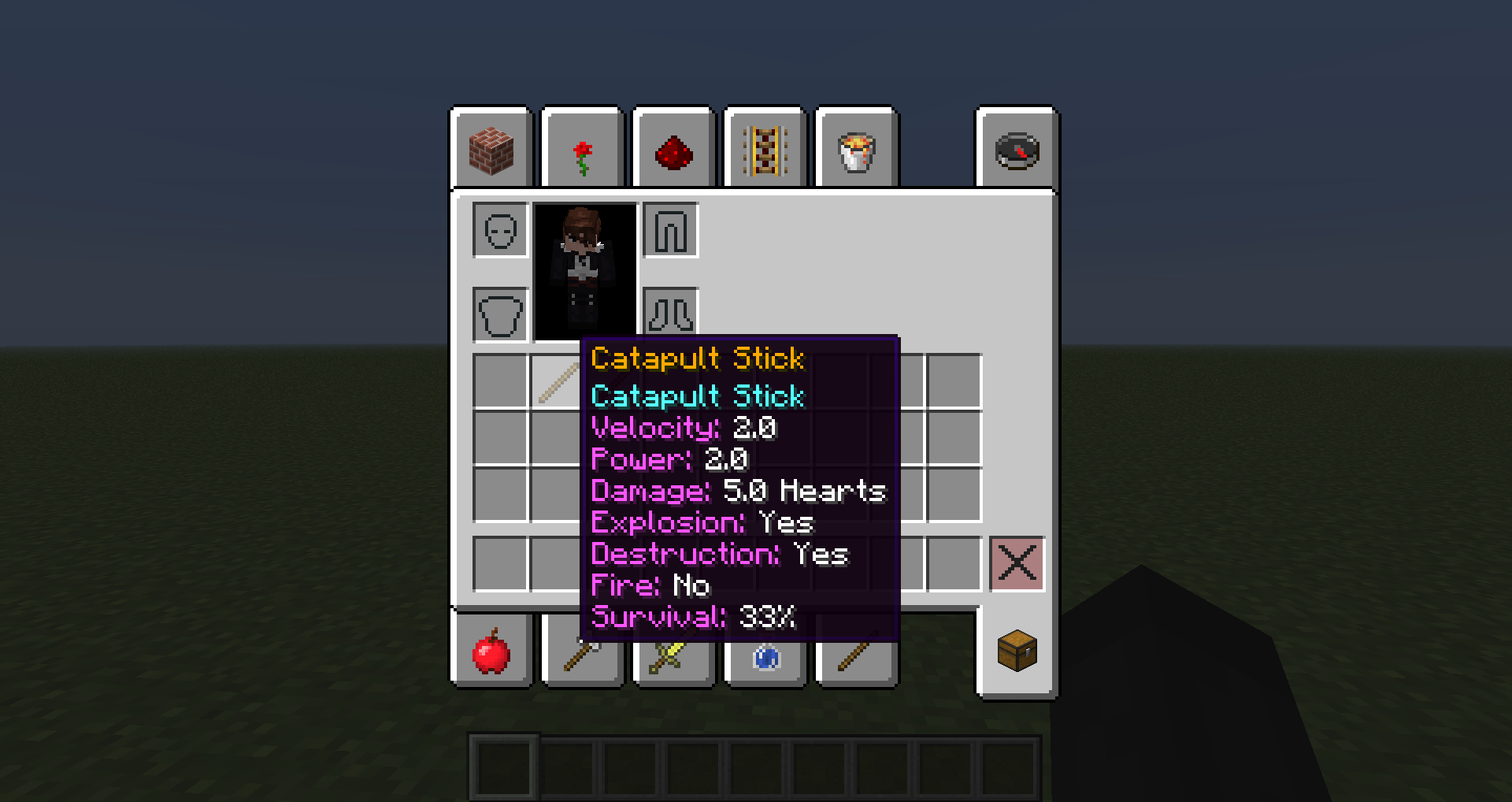
- First off, simply use the command /catapult tool,t. This will place a Catapult Stick with default statistics/configurations into your inventory.
- Next up, approach a block or living entity and right click it using the Catapult Stick.
- Now, look towards the direction you want to fire the projectile at. Remember that looking 45 degrees above the horizon will provide maximum distance. You should also make sure the block or entity is not obstructed or the catapult will count as misfiring.
- Finally, left click into the air and away your projectile will go.
- Enjoy blowing up TESTIFICATE villages and then check out the statistics section to learn more about configuring your different tools.
Using Statistics
Catapult Statistics or stats is what allows you to unleash the pull potential of the Catapult Stick plugin. There are numerous statistics, each which unleash all sorts of possibilities into your Minecraft server. It is important to note that your current stats do not affect the projectiles that you launch. Rather, the statistics are only used to be bound onto the tool you receive using the /catapult tool,t command. Review your current statistics using /catapult stats,st and reset them to the defaults using /catapult reset,r. Now I will go over all the statistics and what they do.
- Name
- This field is the name of the tool and doesn't really affect the way projectiles are launched. However, it can be useful if you have multiple Catapult Sticks in your inventory and you want to be able to differentiate between them with ease. The name may include spaces as well as colours. To add colour, use the '&' character followed by a letter from the Minecraft Formatting Codes. The default name bound to your Catapult Statistics is "Catapult Stick" which is coloured gold.
- Velocity
- This field is the velocity of the projectile launched by the tool. Velocity can be any decimal value over 0 and the default velocity is 2.0. However, you should be warned of numbers that are high. If the projectile is moving too quickly it will often misfire, bounce sporadically off walls and miss targets completely.
- Power
- This field is the power of the explosion caused by the projectile on impact. Like velocity, power can be any decimal value over 0 and its default value is also 2.0. The default value is okay but will not deal much damage to stone based blocks. However, do not raise the value too high as large values will cause large explosions leading to server lag as well as irreparable damage.
- Damage
- This field is the damage the projectile causes to living entities when it hits them. Unlike velocity and power, damage may only be a whole number and its default value is 10. It is important to note that this value is not damage in hearts but rather damage in whole hearts. Therefore, the default damage a projectile will cause is 5 hearts worth. Through rigorous testing I have noticed a few things. When a projectile hits a non-player living entity, the entity will almost get "stuck" onto the projectile resulting it in taking constant damage from the damage field. Hit players on the other hand react differently getting pushed back but not "sucked in".
- Explosion
- This field determines whether or not an explosion will occur when the projectile impacts. By default this field is left enabled. Disabling this field will also disable destruction and fire caused, despite what their fields may otherwise say. Despite how hilarious it might be, living entities that you fire will not explode on impact. If explosion is toggled off, the projectile will still deal damage to living entities it collides with.
- Destruction
- This field determines whether or not destruction is caused by the projectiles explosion. Like an explosion by default this field is also enabled. If you do not want to cause damage to peoples buildings it is best to turn this field off.
- Fire
- This field determines whether or not fire is caused by the projectiles explosion. Unlike the explosion and destruction fields, this is toggled off by default. Even if destruction is disabled, fire can still be spread around the explosion area.
- Survival
- This field may sound a bit confusing as I could not think of a better name for it. This field affects the chance that a block projectile will survive its impact. By default it is 33% meaning that there is a 1/3 chance that the block projectile will remain after impacting its target. It is important to note that even if a block passes this test, it may still be destroyed by the resulting impact explosion.
Commands
| Label | Arguments | Description | |
|---|---|---|---|
| /catapult | stats,st | No arguments required | Shows you the stats that will be bound to the next Catapult Stick you give yourself using /catapult tool,t. |
| /catapult | tool,t | No arguments required | Gives you a Catapult Stick with the configurations for your current statistics. |
| /catapult | reset,r | No arguments required | Resets your stats to default settings. |
| /catapult | message,m | No arguments required | Toggles whether or not you receive information based on the usage of your Catapult Stick. |
| /catapult | name,n | Name | Changes the name of the tool. You can add spaces to the name as well as colours with Minecraft Formatting Codes and the '&' character. |
| /catapult | velocity,v | Decimal over 0 | Sets the velocity of the projectile. It is suggested you keep values close to the default or results may become unpredictable |
| /catapult | power,p | Decimal over 0 | Sets the power of the projectiles impact explosion. Be wary of high value which can cause major lag and irreparable damage. |
| /catapult | damage,da | Integer over 0 | Sets the damage the projectile causes to any living entities it hits. Hearts of damage = damage / 2. |
| /catapult | explosion,e | Yes or No answer | Sets whether or not the impact of the projectile will cause an explosion. |
| /catapult | destruction,de | Yes or No answer | Sets whether or not the explosion caused by a projectile impacting will do damage to the terrain. |
| /catapult | fire,f | Yes or No answer | Sets whether or not the explosion of the projectile will create fire. |
| /catapult | survival,su | Integer between 0 and 100 | Sets the percent chance of a block projectile surviving its impact. A value of 100 means the block always survives. |
Permissions
This plugin has few permissions which are not very specific. This is mostly because the plugin could easily be abused by regular players and is meant more for mods/admins/operators to use.
- CatapultStick.canUseCommands
- A user with this permission will be able to use all the commands in the plugin.
- CatapultStick.canUseTool
- A user with this permission will be able to use any Catapult Stick they can get their hands on. If you really want to, you might be able to give this permission to a non-staff user and then give them a Catapult Stick to use.
Comments


-

_ForgeUser10482784 Owner
-
View User Profile
-
Send Message
Posted Jul 14, 2015-
View User Profile
-
Send Message
Posted Aug 12, 2013M...Could you make it work like this: You would have to actually build a pre-defined catapult and the blocks you put in the "launcher" will get launched, with different types of catapult builds. That would be awesome.
-
View User Profile
-
Send Message
Posted Jun 5, 2013@wcgb
Yes.
-
View User Profile
-
Send Message
Posted Jun 1, 2013does this work in 1.5.2
-
View User Profile
-
Send Message
Posted Apr 17, 2013@GameAnarchy
Alright. Thanks for the suggestion.
-
View User Profile
-
Send Message
Posted Apr 15, 2013Great Plugin, though if you would add permissions to be able to get a stick, and the rest of the commands it would be even better.
-
View User Profile
-
Send Message
Posted Mar 29, 2013@chakyl
Thank you.
-
View User Profile
-
Send Message
Posted Mar 29, 2013Oh.... Oh my god.... This is absolutely amazing!