
Cannons
What can it do?
Cannons is a highly configurable plugin which allows you to fire block build cannons. It is possible to aim and load different amounts of gunpowder to hit targets at different ranges. The power of redstone makes it possible to set the gun to auto load and activate the rapid fire mode. Choose your projectile from a broad spectrum of cannonballs and smash the enemy.
With Cannons 2.0 you are also able to design your own cannons using .schematic files and give each cannon their own settings, as well as different types of projectiles.
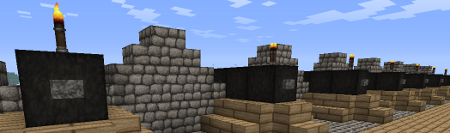
Features
- Build a cannon out blocks
- Design your own cannon and save it as .schematic
- Design and fire different projectiles to smash your enemy
- Use redstone to fire guns from distance
- Rapid fire with auto-load possible
- Destroyed blocks can be restored with CreeperHeal (if 'custom' option is true)
- Cannons will stay load and aligned due to the database
- Movement plugins (e.g. Movecraft) are supported if a cannon has a sign to store a tag
- API for ships plugins (e.g. iSails) to use cannons on ships without signs.
Videos
by ServerMiner
by wickedbrother
Out-dated showcase 1
Out-dated showcase 2
Recommended plugins
- ObsidianDestroyer
- WorldGuard (flag protection: '/region flag NAME other-explosion deny')
- CreeperHeal (set 'custom explosion' for your world to repair cannon damage)
Installation
- Install WorldEdit first (don't forget this)
- Copy the cannons.jar into your Bukkit's "plugins" directory, then run the server.
Dependencies
This plugin requires:
Metrics
This plugin utilises Hidendra's plugin metrics system, which means that the following information is collected and sent to mcstats.org:
- A unique identifier
- The server's version of Java
- Whether the server is in offline or online mode
- The plugin's version
- The server's version
- The OS version/name and architecture
- The core count for the CPU
- The number of players online
- The Metrics version If you wish to disable this feature (/me cries), you can do so by opt-ing out, which you can do in the config file under /plugins/PluginMetrics/
Information for Cannons 2.x
Tutorial:
Additional information:
Cannon Designs
- Share your designs with other people: Cannon Designs
Known Bugs
- The cannon ball (snowball) becomes invisible after 60 blocks but hits the target.
- Voxelsniper will delete Buttons/Torches when you load the gun (be careful when you click the barrel)
Need Help?
Credits
- Raser4000
- DreTax
- JlJlJl
- and many more
%2526business%253dgruber_peter%2540gmx.at%2526bn%253dPP-DonationsBF%253abtn_donateCC_LG.gif%253aNonHosted%2526cancel_return%253dhttp%253a%252f%252fdev.bukkit.org%252fserver-mods%252fblock-cannons-v1-1%252f%2526lc%253dUS%2526item_name%253dCannons%2b(from%2bBukkit.org)%2526cmd%253d_donations%2526rm%253d1%2526no_shipping%253d1%2526currency_code%253dUSD)
Comments

-

DerPavlov Owner
-

_ForgeUser7183506 Tester
-
_ForgeUser8603593 Author
-

Robotnikrobotnik Documenter
-
View User Profile
-
Send Message
Posted Jul 23, 2013-
View User Profile
-
Send Message
Posted Jul 23, 2013the default cannon with cobblestone projectile can't destroy other cobblestone,stone,brick etc. blocks
-
View User Profile
-
Send Message
Posted Jul 23, 2013i can't find the max length of the cannon on the config.yml file
-
View User Profile
-
Send Message
Posted Jul 21, 2013Thanks
-
View User Profile
-
Send Message
Posted Jul 21, 2013@Gman104020 This plugin has no additional griefing features :). However not all protections plugins handle explosion events correctly if the entity is null. I use Worldguard with the 'otherexplosions' flag. Works pretty well for me.
-
View User Profile
-
Send Message
Posted Jul 20, 2013@DerPavlov
Yep I just deleted the data folder to regenerate it and it solved the problem, thanks :)
-
View User Profile
-
Send Message
Posted Jul 20, 2013is there a way to disable the griefing feature of this plugin
-
View User Profile
-
Send Message
Posted Jul 20, 2013@jdawgerj515 This is a very old config file of cannons. In the new version you have several files for cannon designs, projectiles and a main config.
-
View User Profile
-
Send Message
Posted Jul 20, 2013@gaddi21 About the aiming mode. You must be close the the firing trigger (torch), else it will disable the aiming mode. However i increase now the range of the aiming mode, because it was a little bit too close.
You can test this file
-
View User Profile
-
Send Message
Posted Jul 19, 2013@DerPavlov
No worries man, I didn't mean anything by it. Was just trying to be informative :) And thanks, sounds good.
-
View User Profile
-
Send Message
Posted Jul 19, 2013@Drazhar753 I have to say, the tutorial must be updated I know that. But I had no time to do that. To turn the range display of there is no possibility at the moment. I will add some.
@jdawgerj515 I will check the files later when I have more time
-
View User Profile
-
Send Message
Posted Jul 18, 2013here is the files
-
View User Profile
-
Send Message
Posted Jul 18, 2013@DerPavlov
Here is the config file you requested: http://pastie.org/8152465
The permissions plugin is Group Manager (Buggy but works just fine) Here is the groups.yml file for GM: http://pastie.org/8152468
I can tell you right now that the permissions is not the issue. I have OP override enabled so it should have worked for me but just in case I gave Soldier permission group the new node of "cannons.build" which I didn't have before.
-
View User Profile
-
Send Message
Posted Jul 18, 2013@DerPavlov
Is there any way to turn off the projectile distance text? I tried deleting it but it remakes it. I remade the gravel projectile and it fires 20 shots at once, that scatter, and naturally the chat box is spammed with the distances of each shot.
-
View User Profile
-
Send Message
Posted Jul 17, 2013@DerPavlov
It doesn't seem to have worked, tried what you said, also replaced the file and still nothing. I gave myself all the permissions to make sure, I don't understand the new config either. The old one used to show the block type the cannon was made of etc and allowed you to change it, as well as a list of the projectiles. I checked the projectiles config but there was only 'cobblestone.yml'
Edit: Ok so it is actually working, I just wasn't aware the length was now 3. So how does one go about changing things such as block type, I'd like the cannons to require to be made of Iron Blocks as opposed to wool.
Edit2: Ok so after following the tutorial I've created my own type of cannon, which is good. However one problem I ran into that you may want to update is that in the tutorial it shows 'redstone wire' as part of creating the cannon, however that didnt work and caused my custom schematic to not load. Upon loading the classic schematic, that had redstone repeaters, sure enough using those worked. So just saying the pictures were a little misleading, but glad to have it worked out now.
-
View User Profile
-
Send Message
Posted Jul 17, 2013-
View User Profile
-
Send Message
Posted Jul 17, 2013Is this working with 1.6.2?
Because I type /cannons and it brings up the usual commands and whatnot but cannons don't actually work. Tried deleting the config and creating a new one but it created it with half of the info missing : /
2013-07-18 00:31:19 [INFO] [Cannons] Loading projectile configs 2013-07-18 00:31:19 [INFO] [Cannons] Loading cannon designs 2013-07-18 00:31:19 [SEVERE] [Cannons] Schematic not loadable 2013-07-18 00:31:19 [SEVERE] [Cannons] Error while loading schematic plugins/Cannons/designs/classic.schematic :java.lang.NullPointerException; does file exist: true
Is what appears in the server log. I may have to reinstall from scratch, I'll try that soon, can't atm. But I'm assuming that it isn't compatible.
-
View User Profile
-
Send Message
Posted Jul 17, 2013@tt_the_king The actual firing angle is 'default vertical' + 'adjusted vertical'. So it should fire in the sky, even if it says 0deg. Does it fire with an certain angle?
-
View User Profile
-
Send Message
Posted Jul 17, 2013Hello
I'm trying to set up this plugin.
Everyting works fine, except the "defaultVerticalAngle" property isn't beeing used.
Everytime I build the cannon, the vertical angle starts at 0.
Here are the settings.
-
View User Profile
-
Send Message
Posted Jul 17, 2013@ariodsenuke There is an way, but it is not described in the documentation of worldedit. Use the ingame command to figure out how it is written. It should be a flag called 'other', which deny all explosions from other sources.
http://dev.bukkit.org/bukkit-plugins/worldguard-explosion-flags/pages/explosion-types/
@MozartMozart1000 Like already mentioned you have to make your own cannon. Load the cannon .schematic with worldedit and modify it. More can be found here:
http://dev.bukkit.org/bukkit-plugins/cannons/pages/installation-and-configuration/cannons-2-0-and-up/creating/