
Cannons
What can it do?
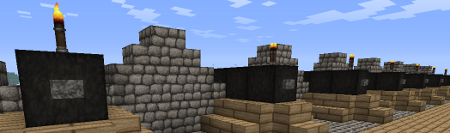
Cannons is a highly configurable plugin which allows you to fire block build cannons. It is possible to aim and load different amounts of gunpowder to hit targets at different ranges. The power of redstone makes it possible to set the gun to auto load and activate the rapid fire mode. Choose your projectile from a broad spectrum of cannonballs and smash the enemy.
With Cannons 2.0 you are also able to design your own cannons using .schematic files and give each cannon their own settings, as well as different types of projectiles.
Features
- Build a cannon out blocks
- Design your own cannon and save it as .schematic
- Design and fire different projectiles to smash your enemy
- Use redstone to fire guns from distance
- Rapid fire with auto-load possible
- Destroyed blocks can be restored with CreeperHeal (if 'custom' option is true)
- Cannons will stay load and aligned due to the database
- Movement plugins (e.g. Movecraft) are supported if a cannon has a sign to store a tag
- API for ships plugins (e.g. iSails) to use cannons on ships without signs.
Videos
by ServerMiner
by wickedbrother
Out-dated showcase 1
Out-dated showcase 2
Recommended plugins
- ObsidianDestroyer
- WorldGuard (flag protection: '/region flag NAME other-explosion deny')
- CreeperHeal (set 'custom explosion' for your world to repair cannon damage)
Installation
- Install WorldEdit first (don't forget this)
- Copy the cannons.jar into your Bukkit's "plugins" directory, then run the server.
Dependencies
This plugin requires:
Metrics
This plugin utilises Hidendra's plugin metrics system, which means that the following information is collected and sent to mcstats.org:
- A unique identifier
- The server's version of Java
- Whether the server is in offline or online mode
- The plugin's version
- The server's version
- The OS version/name and architecture
- The core count for the CPU
- The number of players online
- The Metrics version If you wish to disable this feature (/me cries), you can do so by opt-ing out, which you can do in the config file under /plugins/PluginMetrics/
Information for Cannons 2.x
Tutorial:
Additional information:
Cannon Designs
- Share your designs with other people: Cannon Designs
Known Bugs
- The cannon ball (snowball) becomes invisible after 60 blocks but hits the target.
- Voxelsniper will delete Buttons/Torches when you load the gun (be careful when you click the barrel)
Need Help?
Credits
- Raser4000
- DreTax
- JlJlJl
- and many more
%2526business%253dgruber_peter%2540gmx.at%2526bn%253dPP-DonationsBF%253abtn_donateCC_LG.gif%253aNonHosted%2526cancel_return%253dhttp%253a%252f%252fdev.bukkit.org%252fserver-mods%252fblock-cannons-v1-1%252f%2526lc%253dUS%2526item_name%253dCannons%2b(from%2bBukkit.org)%2526cmd%253d_donations%2526rm%253d1%2526no_shipping%253d1%2526currency_code%253dUSD)
Comments

-

DerPavlov Owner
-

_ForgeUser7183506 Tester
-
_ForgeUser8603593 Author
-

Robotnikrobotnik Documenter
-
View User Profile
-
Send Message
Posted Apr 20, 2013@DerPavlov
Can you add an option, which if set to true, shows the cannon shooter the name of the block that he just hit with the cannon ball? That would be perfect for long range or "blind" shooting.
Also, what's the progress with 2.0 A3? When are we going to see a full release, or at least a beta?
-
View User Profile
-
Send Message
Posted Apr 20, 2013@dmaskell92 Maybe you have to click the cannon once after copying with WorldEdit. Since cannons are based on blocks it should work. However, be careful with signs on the cannon. It can be that the plugin assumes that all cannons are actually only one cannon, which is moving.
At the moment, if one block of the cannon is destroyed, the cannon is removed from the plugin. The remaining blocks are normal minecraft blocks, which are no longer protected. I really like ship to ship combat and want that it looks good. Hopefully you can help me with that. I will implement an option for protection in the config, so you can adjust the explosion resistance of a cannon.
The explosion resistance will be based on the surrounding blocks. If you break blocks in the area around the cannon, it will be destroyed.
-
View User Profile
-
Send Message
Posted Apr 19, 2013That May work, however is there a reason it wont blow up? Is it protected so the cannon you fire won't blow up? The cannon says destroyed but actually no blocks are missing. It's quite weird actually, but making the blocks fall could work, same result in reality. It blows huge holes in the ship but the cannons just hover in the air, untouched. I have tested placing cannons close together aswell, no luck. I plan to use some plugin, maybe world edit to roll the cannons back once destroyed, will they work when they are pasted in?
-
View User Profile
-
Send Message
Posted Apr 18, 2013@dmaskell92 You mean when you destroy one block of the cannon, all blocks drop? I can implement this as an option.
@robotnikthingy Cannons 2.0 is a alpha version of the new cannon detection algorithm. In older versions the cannon style was hard coded. In the new version, you can make your own cannon with worldEdit. A2 has only a few bug fixes.
-
View User Profile
-
Send Message
Posted Apr 18, 2013@DerPavlov
Nope, it works with tnt.
-
View User Profile
-
Send Message
Posted Apr 18, 2013Just curious, what what changed in the version of cannons just uploaded?
-
View User Profile
-
Send Message
Posted Apr 18, 2013Just tried it, said the cannon was destroyed this time, but it doesn't actually blow up. I am using cobblestone, would a different projectile produce the results I'm looking for?
-
View User Profile
-
Send Message
Posted Apr 18, 2013@dmaskell92 A cannon can destroy another, but the you need a very good hit. But you are right it looks odd if only the cannon remains.
-
View User Profile
-
Send Message
Posted Apr 18, 2013Hello I downloaded this plugin some time ago, not sure if you updated it. I have a problem, can you make one cannon destroy another? When having a pirate ship war, the only thing that will not explode is the cannons. I look forward to what you have to say.
-
View User Profile
-
Send Message
Posted Apr 18, 2013@YourWifeMyKids These quantum mechanics blocks may be a bukkit problem. At least there is nothing I can do against it. Does the same problem appear with TNT?
-
View User Profile
-
Send Message
Posted Apr 18, 2013@DerPavlov
Removed all my plugins and re-tested, still nothing.
So I went to the victim ship to shoot at the attacking ship to see if anything happens to it and I accidentally right-clicked on the block next to the hit cannon and it disappeared. I started clicking on all of them until the blocks hit by the explosion disappeared and the only ones left were the untouched blocks. It's like those blocks existed and didn't in the same time.
You can still jump on those blocks but once you try to put something on them or right-click them, they disappear. The distance between the cannon and the ship is 170 blocks and the height is 200 blocks. I also have view-distance=15 in server.properties. Maybe it's a chunk update bug?
-
View User Profile
-
Send Message
Posted Apr 18, 2013@s0501402 This mod requires a bukkit server. However I have my own local server for testing.
@YourWifeMyKids WorldEdit is fine, it will not interfere. The penetration should expand the projectile trajectory on impact. So the projectile hits and travels 3 block further and destroy everything on its path. Sometimes the algorithm does not break the first block (my fault), but makes a big hole in the interior of the ship. Please check also the interior of your ship. However I will investigate this problem later.
-
View User Profile
-
Send Message
Posted Apr 18, 2013Can I play this mod in singleplayer? (modloader)
-
View User Profile
-
Send Message
Posted Apr 18, 2013@DerPavlov
Tested it again with 0 pen. Out of 4 shots, 1 managed to make an explosion. Could it be that the cannonball bugs when it hits a block's edge, since my V shaped wall is full of them? I also have WorldEdit, if that matters.
-
View User Profile
-
Send Message
Posted Apr 18, 2013@YourWifeMyKids I have programmed the penetration thing, so if something is not working on this part, you can blame me :) . However the explosion thing is default minecraft/bukkit code. Try to set the penetration to 0 and increase the explosion power, to 5. But be careful, it may blow up a big part of the ship.
Cannons are also explosion resistant, and are only destroyed if the explosion is near the cannon. Else the buttons and wool would blow up instantly.
-
View User Profile
-
Send Message
Posted Apr 18, 2013@DerPavlov
Yes, 1.9.4 for 1.4.7.
No protection plugin or anything. It works perfectly on the ground and normal walls, but when it comes to a "V" shaped wall, it bugs. It might also be a height bug, since this is at 200.
-
View User Profile
-
Send Message
Posted Apr 18, 2013@DerPavlov
It worked too
-
View User Profile
-
Send Message
Posted Apr 18, 2013@NewbieCorvo Can you please try also this one? https://dl.dropboxusercontent.com/u/16404245/CustomLanguage%20UTF8%20Bom.yml
-
View User Profile
-
Send Message
Posted Apr 18, 2013@DerPavlov
https://dl.dropboxusercontent.com/u/16404245/CustomLanguage%20UTF8.yml worked! Thanks a bunch, now I can use it properly :D
-
View User Profile
-
Send Message
Posted Apr 18, 2013@NewbieCorvo Try one of these:
https://dl.dropboxusercontent.com/u/16404245/CustomLanguage%20ANSI.yml
https://dl.dropboxusercontent.com/u/16404245/CustomLanguage%20UTF8%20Bom.yml
https://dl.dropboxusercontent.com/u/16404245/CustomLanguage%20UTF8.yml
Please tell me, which one has worked.