
Cannons
What can it do?
Cannons is a highly configurable plugin which allows you to fire block build cannons. It is possible to aim and load different amounts of gunpowder to hit targets at different ranges. The power of redstone makes it possible to set the gun to auto load and activate the rapid fire mode. Choose your projectile from a broad spectrum of cannonballs and smash the enemy.
With Cannons 2.0 you are also able to design your own cannons using .schematic files and give each cannon their own settings, as well as different types of projectiles.
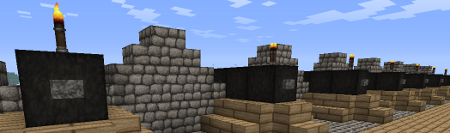
Features
- Build a cannon out blocks
- Design your own cannon and save it as .schematic
- Design and fire different projectiles to smash your enemy
- Use redstone to fire guns from distance
- Rapid fire with auto-load possible
- Destroyed blocks can be restored with CreeperHeal (if 'custom' option is true)
- Cannons will stay load and aligned due to the database
- Movement plugins (e.g. Movecraft) are supported if a cannon has a sign to store a tag
- API for ships plugins (e.g. iSails) to use cannons on ships without signs.
Videos
by ServerMiner
by wickedbrother
Out-dated showcase 1
Out-dated showcase 2
Recommended plugins
- ObsidianDestroyer
- WorldGuard (flag protection: '/region flag NAME other-explosion deny')
- CreeperHeal (set 'custom explosion' for your world to repair cannon damage)
Installation
- Install WorldEdit first (don't forget this)
- Copy the cannons.jar into your Bukkit's "plugins" directory, then run the server.
Dependencies
This plugin requires:
Metrics
This plugin utilises Hidendra's plugin metrics system, which means that the following information is collected and sent to mcstats.org:
- A unique identifier
- The server's version of Java
- Whether the server is in offline or online mode
- The plugin's version
- The server's version
- The OS version/name and architecture
- The core count for the CPU
- The number of players online
- The Metrics version If you wish to disable this feature (/me cries), you can do so by opt-ing out, which you can do in the config file under /plugins/PluginMetrics/
Information for Cannons 2.x
Tutorial:
Additional information:
Cannon Designs
- Share your designs with other people: Cannon Designs
Known Bugs
- The cannon ball (snowball) becomes invisible after 60 blocks but hits the target.
- Voxelsniper will delete Buttons/Torches when you load the gun (be careful when you click the barrel)
Need Help?
Credits
- Raser4000
- DreTax
- JlJlJl
- and many more
%2526business%253dgruber_peter%2540gmx.at%2526bn%253dPP-DonationsBF%253abtn_donateCC_LG.gif%253aNonHosted%2526cancel_return%253dhttp%253a%252f%252fdev.bukkit.org%252fserver-mods%252fblock-cannons-v1-1%252f%2526lc%253dUS%2526item_name%253dCannons%2b(from%2bBukkit.org)%2526cmd%253d_donations%2526rm%253d1%2526no_shipping%253d1%2526currency_code%253dUSD)
Comments

-

DerPavlov Owner
-

_ForgeUser7183506 Tester
-
_ForgeUser8603593 Author
-

Robotnikrobotnik Documenter
-
View User Profile
-
Send Message
Posted Jul 12, 2014Having problems with projectiles!
I've created another projectile, that aims to set the target area on fire. I also have an average projectile, the cannonball. When I try to put the cannonball projectile in (cobblestone) it says I've put the fire projectile in! The fire projectile is glowstone, when I put glowstone in, nothing happens.
Please help!
-
View User Profile
-
Send Message
Posted Jul 9, 2014@Wukkit Hi, nice review, I really like it. A few things to improve it:
I would like to add your video as tutorial.
-
View User Profile
-
Send Message
Posted Jul 8, 2014Hey there, I did a small Bukkit plugin review for you plugin, its a great piece of work! You can find the review here - https:www.youtube.com/watch?v=y70EmVgGG5k Whether you wish to feature it or not is up to you! :) Thanks for your work, be sure to keep it up! - Wukkit
-
View User Profile
-
Send Message
Posted Jul 8, 2014@GodsDead I have started a wiki on github. I would be happy if anyone can help me make a nice page. If you send me your files with a picture I will put them on this page.
https://github.com/DerPavlov/Cannons/wiki
@ThatPolishKid Permissions.yml does not support wildcarts (e.g. cannons.*) so you have to copy all the permissions into that file. However I never worked with the bukkit system. I recommend PermissionsEx, because it is easier than coping permissions.
http://dev.bukkit.org/bukkit-plugins/cannons/pages/permissions/
-
View User Profile
-
Send Message
Posted Jul 8, 2014@DerPavlov now, how do i do without PermissionsEx? i just want a quick simple permission placed into the Permissions.yml
-
View User Profile
-
Send Message
Posted Jul 8, 2014Is there a forum or wiki or resource page where people share cannon designs and configs? This plugin is amazingly versatile but I haven't created anything new and feel like im wasting its potential! in need for some inspiration!
-
View User Profile
-
Send Message
Posted Jul 8, 2014@ThatPolishKid Hi you can grant yourself cannons.* to give all permissions for cannons (also admin rights). But more info you can find here:
Permission tutorial:
http://dev.bukkit.org/bukkit-plugins/cannons/pages/permissions/
Example permissions for PermissionsEx:
http://pastebin.com/XVz0A4GS
Please note that canons.limitA/B form cannons.player.limtA/B has been moved for the upcoming version.
-
View User Profile
-
Send Message
Posted Jul 7, 2014hi, love this plugin... but can you be more specfic in how to give myself permissions? i run a private server for my friends and i, and we are doing a Kingdom Wars type server so i need to be able to give us all full commands for this plugin without being OPs, to prevent us from cheating now, my OPs list is empty my permissions has the following cannons.ThatPolishKid99.
that is a copy and paste, including the period...but when i go in to the server, it doesn't work, it says i don't have permissions to build cannon i have WorldEdit, default config. what am i doing wrong here?!
-
View User Profile
-
Send Message
Posted Jul 7, 2014@Benjireed I assume you have WorldEdit. Without it, Cannons can't load .schematics.
If there are any errors in the log, please forward them per pm.
If your are not op on your server you are probably missing the permission to build a cannon. If you activate the debug mode in the config.yml of Cannons you should see it in the log when you build a cannon. You can also grant yourself the permission 'cannons.*'
Tutorial:
http://dev.bukkit.org/bukkit-plugins/cannons/pages/tutorial/
-
View User Profile
-
Send Message
Posted Jul 7, 2014I make a cannon out of black wool 3 blocks long, with a button on each end and a torch on one end, and nothing happens. I'm using the default config.
-
View User Profile
-
Send Message
Posted Jul 6, 2014@Typical_Name Take the clock in your hand and click on the cannon to enable the aiming mode. Then you can switch the item and do different things. To disable click again with the clock or move away. Aiming is done by holding SHIFT and looking in the desired direction.
But I have to check with the flint and steel item. If it is not possible to fire with without flint and steel in autoaiming than it would be a bug.
You could change the permission for cannons but I think I will include also an option to deactivate that.
About the muzzle loading: I could easily implement it as the closest face to the firing location. In my designs that would be the button. Let me know if that would be fine for you.
@pepper82 It is compatible to Towny,Factions,Worldguard, .... For creeperheal you have to use 'custom explosions', else it would not regenerate your stuff. Please make an test before you blow up your city and let me know if something is not working.
-
View User Profile
-
Send Message
Posted Jul 5, 2014Is this compatible with towny? Can I destroy towny towns and have them rebuild using creeperheal?
-
View User Profile
-
Send Message
Posted Jul 5, 2014@DerPavlov
Oh, the temperature varies based on the biome? That's brilliant, I didn't even think of that.
Also, speaking of auto-aiming, I can't seem to get it to work for my cannons - if I'm holding the clock, I can't fire the cannon (because I've set it so that the player needs flint and steel to light the fuse). Is this working as designed? (If it's not WAD, and you decide to change it, can you include an option to disable auto-aiming for each cannon, if there isn't one already? I only want more modern cannons to be able to use auto-aiming, which actually works nicely with not being able to auto-aim the flint-and-steel ones.)
Also, is there a way to make it so that the ramrod has to be used from the muzzle, rather than the back of the cannon? It feels kind of silly to shove the cannonball in from the back of the cannon. (Speaking of muzzles, when is muzzle-loading coming out? That config option has been sitting there for ages and I've been looking forward to the feature.)
-
View User Profile
-
Send Message
Posted Jul 5, 2014@king27 Can you give me more information what is not working? Are there any errors in the log. And do you have WorldEdit? Without WorldEdit Cannon will not start.
@Typical_Name The starting value for the cannon angles is always the middle of min and max values. But if you want I can also make an option to set the starting value.
I forgot to mention that the updateSpeed is only for the Autoaiming mode. To activate the autoaiming mode you have to click the cannon with a clock. Then the cannon will aim in the direction you are looking if you hold SHIFT. However if you want really slow cannon aiming I can add it to the manual aiming too.
EDIT: I changed it, in the upcoming version it will apply for autoaiming and manual aiming.
The temperature of the cannon is based on the ambient temperature of the biome. If you build your cannon in a snow biome (around 0°C) it will stay cooler than a cannon in the desert/nether (up to 50°C). I really tried to generate here useful number in °C which fits to the biome. 23°C would be normal room temperature.
Heat dissipation is (actualTemp - ambientTemp)*exp(time/coolingTimeCoefficient). You can find the actual formular on github line 1847 - getTemperature():
https://github.com/DerPavlov/Cannons/blob/master/src/main/java/at/pavlov/cannons/cannon/Cannon.java
-
View User Profile
-
Send Message
Posted Jul 5, 2014this work not
-
View User Profile
-
Send Message
Posted Jul 4, 2014@DerPavlov
Is there a way I can make it be just the default angle the cannons are produced at, rather than an offset?
angleUpdateSpeed still not working. Perhaps it only works when I restart the server (rather than just doing /cannons reload)? This is config: http://pastebin.com/1fyiDmNg
Also, another question: How does the speed of heat dissipation work for cannons? It seems to me that heat is lost quickly when the cannon is very hot but very slowly when the cannon is relatively cool (relative to its maximum heat). Is there a way I can even out the dissipation rate? EDIT: Specifically, the dissipation rate is so slow once the cannon is relatively cool that it appears that the cannon entirely stops losing heat once it hits 23.7 (out of 100) - this number seems to vary based on the number of blocks surrounding the cannon (23.7 is when the cannon is surrounded by air). Oddly, it also seems that my cannons are hot even right after I've built them, and if I try to cool them off using a cooling block, they simply heat back up. This is problematic - is there a way I can have the base heat value for my cannons be 0, rather than 23.7?
-
View User Profile
-
Send Message
Posted Jul 4, 2014@Typical_Name Default vertical means that the cannon would fire with this angle, even when the angle is zero. So basically an offset.
Your starting angle will always be the middle between min and max. If you set your cannon to 50-90° then it will start with 60°.
The update speed is working on my server. Please check if it is written probably (angleUpdateSpeed: 10). If it is not working you can send me your config file.
-
View User Profile
-
Send Message
Posted Jul 4, 2014I have slight problem: According to my configs, my iron cannons should start at a 15-degree vertical angle when they are built. However, when I build them ingame, they still have a 0-degree angle and must be moved manually. How can I fix this?
EDIT: It appears that the cannon is actually firing at the angle I have set, but it does not display the angle it is actually firing at when I try to angle it (ie, if I set the default angle to 15, it will say 0 when I am actually at 15). Is there a way I can change this?
EDIT2: Another problem; changing the angleupdatespeed doesn't seem to do anything. The angle changes just as fast at angleupdatespeed=0.1 as it does on angleupdatespeed=100.0.
-
View User Profile
-
Send Message
Posted Jun 27, 2014@GodsDead Yes you can simple add the new parts to your designs. Best generate new config files by renaming your cannons folder. Then you can use your homepage (didn't know that) to see the new parts.
-
View User Profile
-
Send Message
Posted Jun 26, 2014@DerPavlov
Cool, I ment manually, I tend to run a new config through http://www.diffnow.com/ to see whats been added :)