
Cannons
What can it do?
Cannons is a highly configurable plugin which allows you to fire block build cannons. It is possible to aim and load different amounts of gunpowder to hit targets at different ranges. The power of redstone makes it possible to set the gun to auto load and activate the rapid fire mode. Choose your projectile from a broad spectrum of cannonballs and smash the enemy.
With Cannons 2.0 you are also able to design your own cannons using .schematic files and give each cannon their own settings, as well as different types of projectiles.
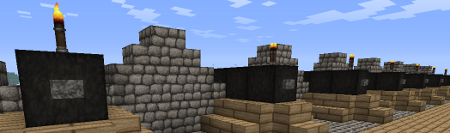
Features
- Build a cannon out blocks
- Design your own cannon and save it as .schematic
- Design and fire different projectiles to smash your enemy
- Use redstone to fire guns from distance
- Rapid fire with auto-load possible
- Destroyed blocks can be restored with CreeperHeal (if 'custom' option is true)
- Cannons will stay load and aligned due to the database
- Movement plugins (e.g. Movecraft) are supported if a cannon has a sign to store a tag
- API for ships plugins (e.g. iSails) to use cannons on ships without signs.
Videos
by ServerMiner
by wickedbrother
Out-dated showcase 1
Out-dated showcase 2
Recommended plugins
- ObsidianDestroyer
- WorldGuard (flag protection: '/region flag NAME other-explosion deny')
- CreeperHeal (set 'custom explosion' for your world to repair cannon damage)
Installation
- Install WorldEdit first (don't forget this)
- Copy the cannons.jar into your Bukkit's "plugins" directory, then run the server.
Dependencies
This plugin requires:
Metrics
This plugin utilises Hidendra's plugin metrics system, which means that the following information is collected and sent to mcstats.org:
- A unique identifier
- The server's version of Java
- Whether the server is in offline or online mode
- The plugin's version
- The server's version
- The OS version/name and architecture
- The core count for the CPU
- The number of players online
- The Metrics version If you wish to disable this feature (/me cries), you can do so by opt-ing out, which you can do in the config file under /plugins/PluginMetrics/
Information for Cannons 2.x
Tutorial:
Additional information:
Cannon Designs
- Share your designs with other people: Cannon Designs
Known Bugs
- The cannon ball (snowball) becomes invisible after 60 blocks but hits the target.
- Voxelsniper will delete Buttons/Torches when you load the gun (be careful when you click the barrel)
Need Help?
Credits
- Raser4000
- DreTax
- JlJlJl
- and many more
%2526business%253dgruber_peter%2540gmx.at%2526bn%253dPP-DonationsBF%253abtn_donateCC_LG.gif%253aNonHosted%2526cancel_return%253dhttp%253a%252f%252fdev.bukkit.org%252fserver-mods%252fblock-cannons-v1-1%252f%2526lc%253dUS%2526item_name%253dCannons%2b(from%2bBukkit.org)%2526cmd%253d_donations%2526rm%253d1%2526no_shipping%253d1%2526currency_code%253dUSD)
Comments

-

DerPavlov Owner
-

_ForgeUser7183506 Tester
-
_ForgeUser8603593 Author
-

Robotnikrobotnik Documenter
-
View User Profile
-
Send Message
Posted Mar 8, 2014@DerPavlov
I'm using the last version.
-
View User Profile
-
Send Message
Posted Mar 8, 2014@TwistedTail There is also a typo in 'ammunition'. I fixed both and than I was able to load gunpowder.
EDIT: In an older version I had a typo for the option to turn off gunpowder. Therefore it was not possible to fire a cannon without. I would recommend to update.
-
View User Profile
-
Send Message
Posted Mar 7, 2014@DerPavlov
Yeah it work but now when i edit it and reload the plugin anything happens (ex: i choose than the cannon doesn't use gunpowder, but it keeps asking for it). Is s very normal problem for me (i have a computer with w8.1), i had it with other plugin. Can you send me a template of a cannon and/or a proyectile. It would work better for me.
-
View User Profile
-
Send Message
Posted Mar 7, 2014@TwistedTail There was only an additional space in front of 'realistic behavior' in the .yml file. Remove it and it should work.
-
View User Profile
-
Send Message
Posted Mar 5, 2014@DerPavlov
Here it is. https://mega.co.nz/#F!hpRGAQrQ!Abrvt1nemKplsP63LF9npg
Edit: Now it worked (an error in the cannon's yml) but now it doesn't want to load the gunpowder.
-
View User Profile
-
Send Message
Posted Mar 5, 2014@TwistedTail Can you send me the shematic and the .yml file. I will look over it.
-
View User Profile
-
Send Message
Posted Mar 4, 2014I have a problem. I created a cannon and the .schematic too, I put both in the design's folder but it doesn't work, also, it disables all the cannons with the plugin.
-
View User Profile
-
Send Message
Posted Mar 1, 2014@Mosshadow95 I like that idea, I will contact the movecraft developer if this is possible
Like this :)
http://dev.bukkit.org/media/images/39/595/2012-03-20_19.18.09.png
-
View User Profile
-
Send Message
Posted Feb 27, 2014This is a neat plugin. Is it possible to integrate this with move craft in a way that lets you define a separate part of the vehicle as turret that moves with the vehicle but turns independently? It would be great for an actual battleship.
-
View User Profile
-
Send Message
Posted Feb 20, 2014@FlOppythp Can you remember which kind of error it was. If possible send me the error log.
-
View User Profile
-
Send Message
Posted Feb 17, 2014Can you please update the documentation to 2.1?
-
View User Profile
-
Send Message
Posted Feb 6, 2014@DerPavlov
Still nothing... I really don't get this. I'm going to redownload all my plugins and retry, could you find anything in the logs?
Edit: Did that, deleted all plugins exept Worldedit and Cannons, still not working. When I build a cannon and click the torch, nothing happens, and there are no prompts to tell me the angle...
Thanks -Bab
EDIT2: Finally got it, don't know why but the cannon file was corrupt. It was loaded into bukkit but seemed a false positive. Deleted every plugin an redownloaded everything. Works now.
-
View User Profile
-
Send Message
Posted Feb 5, 2014@Babibab When you copy the cannon from the schematic you will have a lever on the back side of the cannon. If you change the lever to a stone button it should work.
The reason for the lever is that you can set a firing redstone signal. Else the cannon would fire on every button clicked.
-
View User Profile
-
Send Message
Posted Feb 5, 2014@DerPavlov
Hey,
The cannon is built correctly, to make sure of that, I used the ones pulled from your schematics and copied directly in the game.
When I right-click the torch, nothing happens, It's just a torch on 3 wool blocks. Using /pl shows the plugin green and thus enabled, looking up on the console has me getting "Cannons is enabled"
Basically, the game doesnt recognize the blocks as being a cannon, they are just what they seem, how is it supposed to?
I did enable the debug mode, this pastebin contains the entries I got from starting up the server right after enabling the mode.
http://pastebin.com/c6XnJamE
Thanks, My plugin list is fairly short, but I'm not using worldguard, could that have anything to do with it?
-
View User Profile
-
Send Message
Posted Feb 4, 2014@Babibab If your cannon is built correctly (buttons on both sides, torch on top) then it should be no problem as OP. Further you can turn on the debug mode in the config file and check the server log file.
http://dev.bukkit.org/bukkit-plugins/cannons/pages/tutorial/
-
View User Profile
-
Send Message
Posted Feb 4, 2014Hi,
Very nice plugin, looks to be quite a gamechanger.
I must be very stupid, but I can't get it to work, I've got it loaded, appearing green on the /pl, but when I lay down a cannon (properly built) and click the torch, nothing happens...
I'm using the latest Beta build from bukkit. And am OP on the server, so i should be able too...
Any ideas?
Thanks, Babibab
-
View User Profile
-
Send Message
Posted Feb 2, 2014this plugin is amazing especially with airships however is there a way to have cannons data storing off if you out false for limits to ensur4e faster speed as if a ship moves it treats it differently and causes some lag
-
View User Profile
-
Send Message
Posted Jan 26, 2014@OutCraft At the moment I have no jenkins, but it looks very interesting. However I have not idea how to host it.
@ricturd I hope this helps:
http://dev.bukkit.org/bukkit-plugins/cannons/pages/tutorial/
But you can also make your own mortar.
@MrDragonio Very cool, I like it.
-
View User Profile
-
Send Message
Posted Jan 25, 2014Hey look what i made for you :)
-
View User Profile
-
Send Message
Posted Jan 24, 2014I have a question. Why isn't information on how to build a Mortar found in the console by typing /cannons build ?? If there isn't any, PLEASE tell me how to add information about it!!!!!!!!!