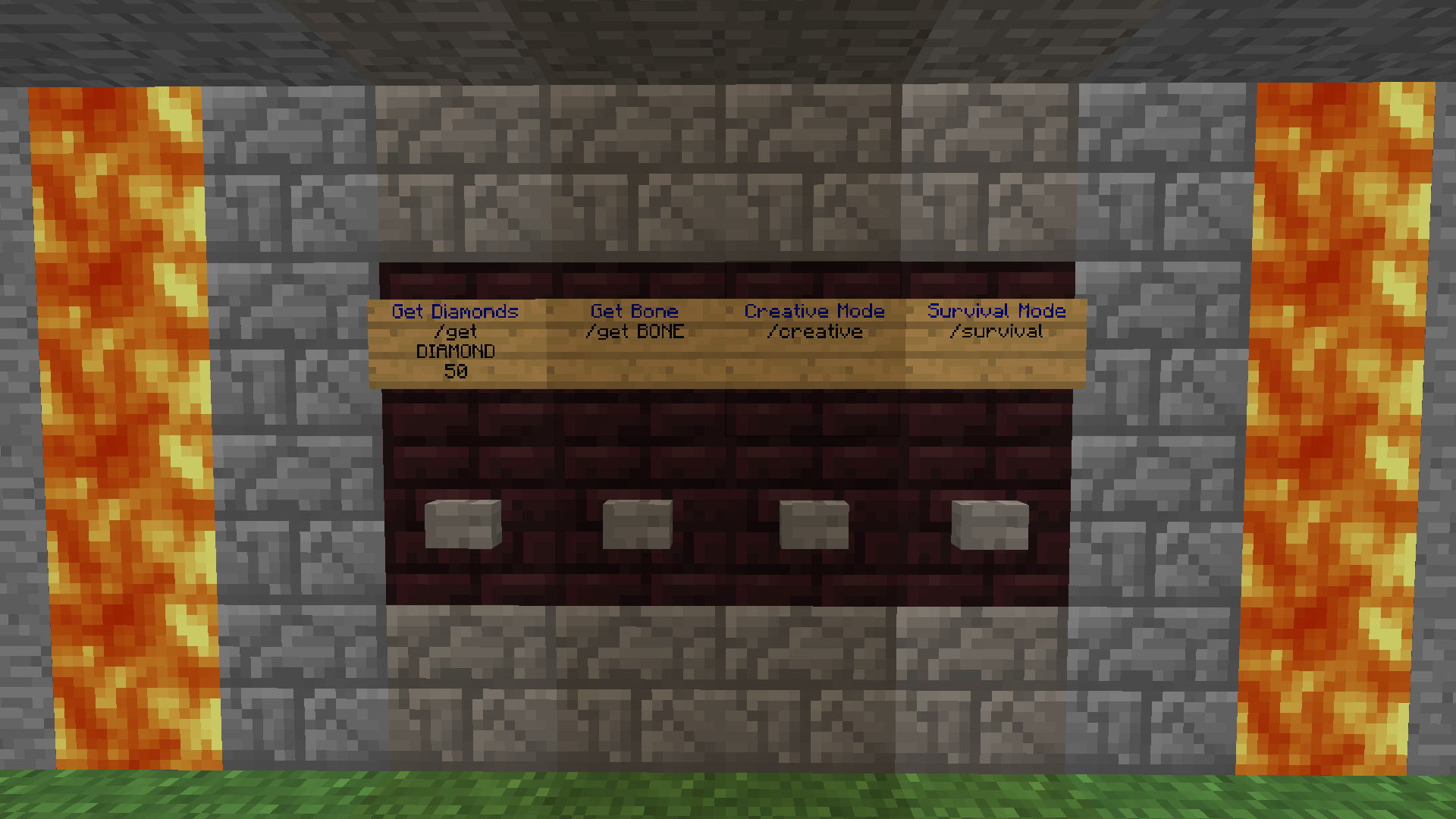
ButtonCommands

ButtonCommands
- Version 1.9 -
- # Main Page
- Documentation
- Commands & Permissions Page
- Variables & Color Codes Page
- Config File Page
- White-List Config File Page
- Alias Config File Page
- Source code
Features
- Execute one or multiple commands after a button has been pressed.
- Execute normal commands.
- Execute console commands,using the console command sender.
- Execute redstone triggered commands.
- Execute alias commands, which lets you specify multiple normal or console commands to be ran.
- Command white-list. White-list all or only selected commands. Not for normal button commands.
- Variables. Get inserted before the command gets ran.
- A few somewhat useful commands.
Buttons in relevant positions to command-signs will execute the commands on the signs.
Long version (kind of important): Documentation
This plugin doesn't hook into NMS or CraftBukkit, only the Bukkit API, so it should work on most upcoming Bukkit versions. If there's no big red line somewhere in this description saying it's broken, it isn't yet.
FAQ
Q: Why don't redstone commands work?
A: You or your server is doing it wrong. These three ways work as long as you haven't touched any weird settings and don't use any weird plugins: Three ways of setting up redstone command signs
Q: Why don't something else work?
A: Please check the Known caveats on the latest file (files).
Comments


-

HON95 Owner
-
View User Profile
-
Send Message
Posted May 11, 2012@HON95
I have tryed it, nothing happend =( But my biggest problem is still, that the permissions(PEX) won't work
-
View User Profile
-
Send Message
Posted May 11, 2012@inergy
I just tested it. It's working. So I'm not quite sure why it isn't working for you.
BTW, it need to be a wall sign. If you're using a wire or repeater, point it directly towards the sign, not the block it's on. If you're using a torch, it needs to be under the sign.
-
View User Profile
-
Send Message
Posted May 10, 2012@HON95: I too am unable to use redstone to activate the commands.
1) disabled white-list in config (set everything to "true" just in case) 2) create a sign (tried both on a block or standing on top of a block) 3) gave direct redstone to sign (tried all variations like side/back/under/torches,etc) 4) line 1: test .. line 2: /r /time day
Nothing happens. When placed it says "Redstone console command sign created", but nothing happens when powered.
Was really hoping to use this mod specifically for the redstone feature, so I'm kinda bummed that its not working. Any ideas?
EDIT: I downloaded it today too, just to be safe I had the latest version.
-
View User Profile
-
Send Message
Posted May 10, 2012@HON95 @inergy i have got the same problems =(
-
View User Profile
-
Send Message
Posted May 7, 2012A new and hopefully fixed v1.5 has been uploaded. Just saying.
-
View User Profile
-
Send Message
Posted May 7, 2012@CreeperCraft2012
I moved your error to a paste and deleted your comment because of lag. Edit: ... because of spam. Not lag -.-
Hmm... What java version are you using? The other plugin in the error (Creative Colours) doesn't work because it is outdated.
-
View User Profile
-
Send Message
Posted May 7, 2012@ARavinMadMonkey
I found two messed up permissions, but I'm not sure if those were the ones that didn't work. One of them was "buttoncmds.use.normal". So was it just normal command signs, and possibly alias custom permissions, that didn't work?
PS, sent you a somewhat fixed version if you want to check if it works now.
-
View User Profile
-
Send Message
Posted May 7, 2012As you will probably only see the spam of an error below this and not see my problem. Permissions do not work, when I give someone "buttoncommands.*" it just says "You are not allowed to use command signs" Should probably say I am using PEX with Vault as well.
-
View User Profile
-
Send Message
Posted May 6, 2012For some reason, when I give someone any permissions it just says "You are not allowed to use command signs!" Even using "buttoncommands.*" permission node. Is that something to do with this plugin? If so, how do I fix it?
-
View User Profile
-
Send Message
Posted May 5, 2012@domingo15
The slash is because the plugin looks for a sign near the button. If one is found and the second line starts with "/", the trailing command will get executed.
BTW, the sign can also be placed behind the block the button is on. Then maybe a nice sign above the button to tell what it does.
And I've never touched anything database related (I really don't have the time).
-
View User Profile
-
Send Message
Posted May 5, 2012@HON95
thats why players can put the sign anywhere they want, maybe 2 blocks away from the button and by the looks of the picture on top, the button only interact with the block next to it. Also, having the sign "/" command on the sign seems odd, maybe just the name like what is written on your picture "Creative Mode".
Maybe a single commands like, /bc link [command] or [/command] /bc unlink I think two commands would do all this trick.
-
View User Profile
-
Send Message
Posted May 5, 2012@domingo15
Then you would have to use commands and stuff to link it, and it would be annoying (IMO anyways) to not know which buttons are cmd ones and which ones are not.
-
View User Profile
-
Send Message
Posted May 5, 2012@HON95
can't the command just be linked on the button itself rather than having signs near the button?
-
View User Profile
-
Send Message
Posted Apr 23, 2012@IIGoldII
Done.
-
View User Profile
-
Send Message
Posted Apr 22, 2012@HON95
Could you change the version compatibility to 1.2.5 on the sidebar? Because it still says 1.4 is for 1.1 R6. I think that's why Charles said you should update it :P
-
View User Profile
-
Send Message
Posted Apr 21, 2012@CharlesWCrete
As in update it because something is outdated or broken, or upgrade it and add new features? I might put some work into it tonight though, since it is like 1 - 3 months since the last version :/
-
View User Profile
-
Send Message
Posted Apr 18, 2012UPDATE THIS PLEASE!
UPDATE THIS PLEASE! UPDATE THIS PLEASE! UPDATE THIS PLEASE!
Please!
-
View User Profile
-
Send Message
Posted Apr 14, 2012@Atteluxy
Current version: Nope. You can alternatively use the Bukkits builtin aliases.
Next version: Yes.
-
View User Profile
-
Send Message
Posted Apr 14, 2012Some of my commands are too long, because the whole command is just one word. Is there a way to do it?
-
View User Profile
-
Send Message
Posted Apr 12, 2012@peacefulvillage
Ohh... I think I know the problem. Maybe. Did you add the command to the white-list.yml or disable the cmd white-list? I guess I forgot to update this page :P