
BukkitColors

This plugin allow you to see all chat color codes/formatting codes for the people who are sick of having to pull up their browser constantly while trying to do things in-server. Have Essentials? You don't need this plugin! Use /info Colors or /einfo Colors, they give the same information as this plugin! An example of what it looks like shown below.
MAKE SURE TO UPDATE! The latest update adds support to USE these color codes! Its in version 1.4.1, so we gotta wait for it to be approved. Big thanks to AlreadyCoded for helping me with it(link to profile in update description)
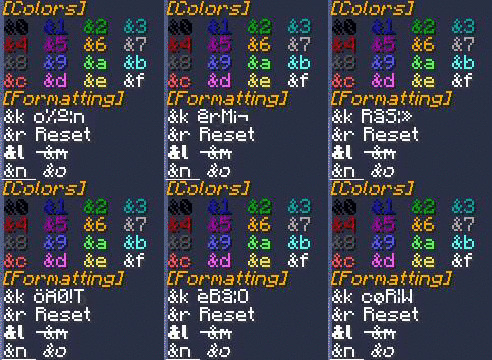
Commands
- /colors [args] - Currently the one and only command. Permission to use given by default, but can be taken away.
- Currently valid arguments: [Red, Blue, Green, Purple, Pink, Gray/Grey, White, Black, Yellow, Gold]
- Aliases: [color, colours, colour]
Permissions
- bcolors.use - Allows use of /colors. Given to all users by default.
- bcolors.book - Allows use of /colors book to get a book with all color codes inside. Given to all users by default. [Added in v1.6]
- bcolors.chat.colors - Allows use of the color codes in chat.
- bcolors.chat.format - Allows use of the format codes in chat.
- bcolors.admin - Users with this permission will get a message about BukkitColors upon join. Given to OP users by default. Can be disabled in config [Added in v1.5]
Looking for a little more?
This is my first fully put-together plugin, and first released plugin, so I appreciate all the input I can get. Yes, this is not the most original plugin, but I do plan to add more things to this plugin as said above and it is good practice for me, and some might benefit from it.
Comments


-

_ForgeUser7711222 Owner
-
View User Profile
-
Send Message
Posted Apr 9, 2014I got nothing to say, this plugin is awesome
-
View User Profile
-
Send Message
Posted Dec 5, 2013@ryan_the_leach
That could be interesting. I'll put that on my list, and see what I might be able to currently do about it or at least keep it in mind if things like it ARE further supported by Bukkit.
@ofnature
Thanks for this support!(: Keeps me coding(:
-
View User Profile
-
Send Message
Posted Dec 5, 2013A cool idea for if the new JSON abilities are ever exposed in bukkit, let the color codes be clickable so they autofill into the chat box when you click them
-
View User Profile
-
Send Message
Posted Dec 5, 2013@chrisman0091
Thank you for your hard work =)
-
View User Profile
-
Send Message
Posted Nov 29, 2013Also, guys, sorry for no updates in almost a week! I'm currently on break, so I should be releasing one here SOON! One of the reasons its taking so long is because I'm currently working on a feature that I haven't yet tried, so there is lots of things to go through. Expect some cool new features in the next update, maybe involving maps? :3 Stay cool!
-
View User Profile
-
Send Message
Posted Nov 29, 2013@InceptedInception
Haha feel free to PM me any time(:
-
View User Profile
-
Send Message
Posted Nov 27, 2013Maybe you can guide me! :D
-
View User Profile
-
Send Message
Posted Nov 24, 2013@InceptedInception
Thanks for the support(: Haha, maybe you could somebody soon! Took my a while to get where I am, and I'm not too far, but I'm happy where I am :3
-
View User Profile
-
Send Message
Posted Nov 23, 2013Wow! Keep it up! I hope that I can make a Successful plugin someday xP!
-
View User Profile
-
Send Message
Posted Nov 14, 2013@Baamoink
Thanks, loving the support(: I figured some people might come to me with something like it after I saw someone else with the same plugin, and just felt like explaining myself a bit more. I can see where he is coming from though!(:
-
View User Profile
-
Send Message
Posted Nov 13, 2013Don't take any notice of Dogwarrior1Dev, all developers have to start somewhere. As long as a developer doesn't blatantly rip off someone elses code (copy+paste), there's nothing to worry about!
Good job on the plug-in :)
-
View User Profile
-
Send Message
Posted Nov 12, 2013@Dogwarrior1Dev
It is similar, yes. There are a few plugins which do this, and I saw yours slightly after posting mine. The main reason I am doing this is for practice, and yours does have more features like the book which is neat.
I hope you don't think I'm copying you, but I also don't plan to implement a book version/other version currently, and we still have differences such as the formatting is much different and I have individual commands for each color. Doesn't hurt giving people choices!(:
-
View User Profile
-
Send Message
Posted Nov 12, 2013This plugin seems very similar to my plugin ListChatColors, except my plugin has more features than this one :/
-
View User Profile
-
Send Message
Posted Nov 12, 2013Will be uploading version 1.3 sometime tomorrow. I've cleaned up the code generally, along with adding a message upon joining for people with OP or the permission bcolors.admin. Also updated/fixed up the plugin.yml.
-
View User Profile
-
Send Message
Posted Nov 12, 2013Just uploaded version 1.2, awaiting approval. Changelog:
New
Changes/Fixes
Config no longer generates, as it is not yet used. Having it causes no harm though, so feel free to keep or delete it.
-
View User Profile
-
Send Message
Posted Nov 10, 2013@LHammonds
Yep, I know. I state that in the first paragraph, "What this plugin does"(: While most people use Essentials, there are still the few who don't that would like a plugin for it, and its good practice for me!
@LagadoMC
I'll add that in 1.1, thanks!
-
View User Profile
-
Send Message
Posted Nov 10, 2013If you are using Essentials Chat, this already exists in the base installation. Type "/news colors" or maybe its "/info colors"
-
View User Profile
-
Send Message
Posted Nov 10, 2013Our server already has a self-made version of this, but I do have a suggestion: on many servers you will see people speaking both British and American English. To avoid confusion it is helpful when commands allow both spellings: /colors and /colours.