Bukkit Webby
Important news !
I'm looking for developpers to help me maintain and continue the Bukkit Webby support. I'm not playing minecraft anymore, so I'll only try to maintain the Bukkit compatibility (ie: make it work with the last version). A good Java knowledge is required, and some CSS / HTML / Javascripts (AJAX) basics.Welcome to Bukkit Webby main page
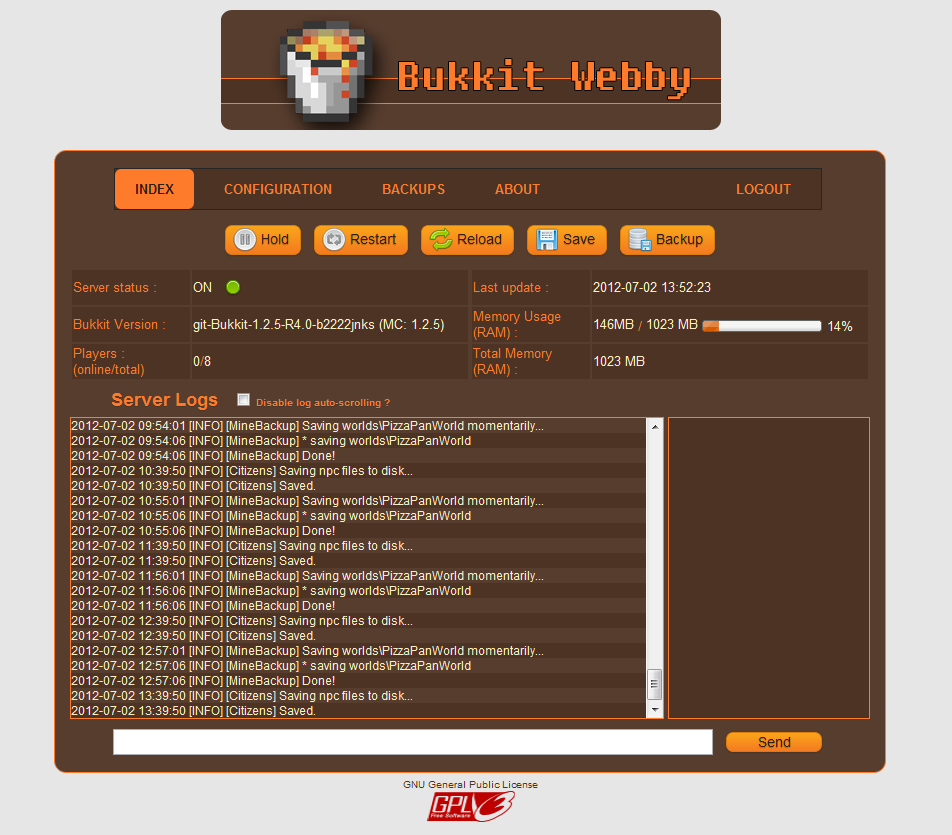
Bukkit Webby is a lightweight web administration that is easy and fast to setup It's made of two components :- WebbyBukkitPlugin is a Bukkit Plugin that interacts with Bukkit, read your server log, find all online users, etc.
- WebbyRTK is a RTK module that interacts with RemoteToolkit and run the webserver. Even if Bukkit has been shutdown, the webserver will persists and allow you to restart Bukkit.
Current Features :
- Server administration based on Bukkit Remote Toolkit (Start / Stop / Restart / Reload)
- Online configuration files
- Online server log
- Backup management (manual backup, automated restore)
- Easy installation : drop the jars and files as any bukkit plugins, setup port, login and password for webby and RTK, and you are done !
- NO APACHE NEEDED !
- Plugins management
- User interactions (Kick, Ban, Tell...)
- ...
How to install ?
Youtube video (less than 2 min) : Bukkit Webby Installation Tutorial Please watch this video once before reporting installations problems. Detailed steps : (If you start from a fresh Bukkit, you will need to run craftbukkit.jar once to generate all required configuration files used by BukkitWebby !!)- Download the last version (BukkitWebby.jar) that contains the two components required to launch BukkitWebby.
- Download Remote Toolkit and install it (more informations available on the forum).
- Copy the content of the BukkitWebby.jar to your Bukkit root folder (directories should match).
- Edit config.yml in plugins/BukkitWebby to change the ports and user account
- You may need to setup your firewall to allow the specified ports
- Don't run craftbukkit.jar. Instead, use the RTK wrapper (see the above link for more informations depending on your operation system).
- You should see in the log that BukkitWebby and WebbyRTK are both enabled.
- Go to http://[your-server-ip]:[port]. On your local computer, with the default configuration, it will be http://localhost:25567/index
- Login. You are done ! :)
Important informations about ports
Two ports are used by BukkitWebby. That means you need 4 ports (these 2, one for Bukkit, and one for RemoteToolkit). All these ports MUST BE DIFFERENTS For example, Bukkit can be run on the port 25565 (players will then connect using the serverip:25565 in Minecraft), BukkitWebby and RTKBukkit will use the localPort 25564. The Webserver will be accessible on 25567, and RemoteToolkit will respond to any commands sent to 25560.Default configuration
#Webby options
webby:
    #Webserver port used to listen to web connections (Ex: http://localhost:25567/login) (default = 25567)
    port: 25567
    #Local port used by the Webby RTKModule to communicate with the Webby Bukkit Plugin (default = 25564)
    localPort : 25564
    #Administration login
    login: admin
    password: admin
    #Timeout in minutes before a user has to relog after inactivity (default = 10 minutes)
    sessionTimeout: 10
rtk:
    #RemoteToolkit port (Same as in remote.properties, default = 25561)
    port: 25561
    #Host. You shouldn't have to change this. (Default = localhost)
    host: localhost
    #RemoteToolkit login (See the rtoolkit.sh or .bat files, default = user)
    login: user
    #RemoteToolkit password  (See the rtoolkit.sh or .bat files, default = pass)
    password: pass
Want to see/contribute to the code?
BukkitWebby on GITHubComments


-

Forge_User_68916764 Owner
-
View User Profile
-
Send Message
Posted May 31, 2012@SnyTe
I know right! You're such a terrible plugin dev :P
Obviously I'm just kidding, although I do have a suggestion/request if at all possible. It would be exceptionally useful if there was some sort of desktop client for BukkitWebby that runs off of the same UI as the webUI. In school, I can't access the webUI because the web address is technically an IP address and it is blocked here. That would be wonderful if it was possible
-
View User Profile
-
Send Message
Posted May 29, 2012Oh wow that totally breaks the plugin :P
-
View User Profile
-
Send Message
Posted May 29, 2012I found a typo! (I'm quite proud :P)
I clicked the save button at the top of the page, and the console said it was saving all 'words'. Just thought you might want to know :P
-
View User Profile
-
Send Message
Posted May 16, 2012Unfortunatly i'm not the one who made this plugin, my knowlegde of it is limited. I only fixed it to work for 1.2.5.
But the html files is in the plugins/bukkitwebby folder and you can modify that to your liking, you can probably set up a login method there. Also the full source is available, not fixed for 1.2.5 though, but the change is minor.
PHP codes does not just work by itself though not sure what need to be done to make that work in this.
-
View User Profile
-
Send Message
Posted May 16, 2012have you tried to make the login using php and MySQL? I tried to look at the html and js scripts of the login but cant seem to find the script that verifies the username and password are correct.
-
View User Profile
-
Send Message
Posted May 15, 2012Not that i'm aware of no.
-
View User Profile
-
Send Message
Posted May 14, 2012I have a question. Is there currently a way to add more than 1 user?
-
View User Profile
-
Send Message
Posted Apr 16, 2012Thanks for the link. But it still doesnt show the textbox unless i put it into a seperate html document using IFrames. Is their a way to fix this? Thanks again.
-
View User Profile
-
Send Message
Posted Apr 15, 2012Sounds like you installed the old unfixed version for 1.1.
This one should work http://dl.dropbox.com/u/46749435/BukkitWebby.zip
-
View User Profile
-
Send Message
Posted Apr 14, 2012I have tried this plugin with my server. I have installed it exactly how the instructions say and i have gone to http://localhost:25567 and it came up with the correct page. When i get to the page there is no command box to type in commands. When i click the restart, start, and other buttons that controll the server, they work and restart or start the server. When the server is off i cannot start it using bukkitwebby though. Can you please help me fix this? Thanks.
-
View User Profile
-
Send Message
Posted Mar 27, 2012Hello, your plugin does it provide an API? Can you give it?
-
View User Profile
-
Send Message
Posted Mar 22, 2012Yes, i'm using rtoolkit.sh instead of craftbukkit,sh. The toolkit is running perfectly, I can telnet in, and also restart the server from my iphone app Adminium.
-
View User Profile
-
Send Message
Posted Mar 19, 2012Even when starting it the wrong way that will show.
As pointed out in the instruction above here
Don't run craftbukkit.jar. Instead, use the RTK wrapper.
The remote toolkit includes a rtoolkit.bat and .sh file run one of those instead
-
View User Profile
-
Send Message
Posted Mar 19, 2012Yes
11:22:06 [INFO] [RemoteToolkitPlugin] Enabling RemoteToolkitPlugin v0.6
-
View User Profile
-
Send Message
Posted Mar 19, 2012Did you install and run remote toolkit?
-
View User Profile
-
Send Message
Posted Mar 19, 2012I've installed, but nothing is listening on the default port 25567. When i go there, of course nothing is found. Any suggestions?
11:22:00 [INFO] Starting Minequery server on *:25566
11:22:00 [INFO] [BukkitWebby] Loading BukkitWebby v0.0.1
11:22:00 [INFO] [Minequery] Loading Minequery v1.5
11:22:00 [INFO] [FoundDiamonds] Loading FoundDiamonds v3.1.8.2
11:22:00 [INFO] [MobHealth] Loading MobHealth v4.2
11:22:00 [INFO] [CreeperMess] Loading CreeperMess v1.2
11:22:00 [INFO] [RemoteToolkitPlugin] Loading RemoteToolkitPlugin v0.6
11:22:00 [INFO] [dynmap] Loading dynmap v0.35-991
11:22:00 [INFO] [JSONAPI] Loading JSONAPI v3.4.5
11:22:00 [INFO] Preparing level "survivethis"
11:22:00 [INFO] Default game type: 0
11:22:00 [INFO] Preparing start region for level 0 (Seed: -1951431928583351647)
11:22:01 [INFO] Preparing spawn area: 16%
11:22:02 [INFO] Preparing spawn area: 57%
11:22:03 [INFO] Preparing start region for level 1 (Seed: -1951431928583351647)
11:22:04 [INFO] Preparing spawn area: 8%
11:22:05 [INFO] Preparing spawn area: 97%
11:22:05 [INFO] Preparing start region for level 2 (Seed: -1951431928583351647)
11:22:05 [INFO] [BukkitWebby] Enabling BukkitWebby v0.0.1
11:22:05 [INFO] [BukkitWebby] Loading...
11:22:05 [INFO] [BukkitWebby] Successfully loaded !
11:22:05 [INFO] [Minequery] Enabling Minequery v1.5
11:22:05 [INFO] [BukkitWebby] Webby Socket (BukkitPlugin) is listening on port : 25564
11:22:05 [INFO] [FoundDiamonds] Enabling FoundDiamonds v3.1.8.2
11:22:05 [INFO] [FoundDiamonds] Enabled
11:22:05 [INFO] [MobHealth] Enabling MobHealth v4.2
11:22:06 [INFO] [MobHealth] Permissions Disabled.
11:22:06 [INFO] [MobHealth] Spout Enabled.
11:22:06 [INFO] [MobHealth] Player Notifications Enabled.
11:22:06 [INFO] [MobHealth] Monster Notifications Enabled.
11:22:06 [INFO] [MobHealth] Animals Notifications Enabled.
11:22:06 [INFO] [MobHealth] Online.
11:22:06 [INFO] [CreeperMess] Enabling CreeperMess v1.2
11:22:06 [INFO] [CreeperMess v1.2] Enabled!
11:22:06 [INFO] [RemoteToolkitPlugin] Enabling RemoteToolkitPlugin v0.6
11:22:06 [INFO] Memory max: 259522560 bytes
11:22:06 [INFO] Memory total: 259522560 bytes
11:22:06 [INFO] Remote Toolkit Plugin V0.6 enabled!
11:22:06 [INFO] [dynmap] Enabling dynmap v0.35-991
11:22:06 [INFO] [dynmap] Using Bukkit Permissions (superperms) for access control
11:22:09 [INFO] [dynmap] Loaded 19 shaders.
11:22:11 [INFO] [dynmap] Loaded 82 perspectives.
11:22:11 [INFO] [dynmap] Loaded 12 lightings.
11:22:11 [INFO] [dynmap] Web server started on address 0.0.0.0:8123
11:22:11 [INFO] [dynmap] version 0.35-991 is enabled - core version 0.35-143
11:22:11 [INFO] [dynmap] Loaded 3 maps of world 'survivethis'.
11:22:11 [INFO] [dynmap] Loaded 2 maps of world 'survivethis_nether'.
11:22:11 [INFO] [dynmap] Loaded 2 maps of world 'survivethis_the_end'.
11:22:11 [INFO] [dynmap] Enabled
11:22:11 [INFO] [JSONAPI] Enabling JSONAPI v3.4.5
11:22:12 [INFO] [JSONAPI] Logging to file: false
11:22:12 [INFO] [JSONAPI] Logging to console: true
11:22:12 [INFO] [JSONAPI] IP Whitelist = None, all requests are allowed.
11:22:12 [INFO] [JSONAPI] You don't have Vault installed, you cannot use permission methods!
11:22:12 [INFO] [JSONAPI] Waiting 2.000 seconds to load methods so that all the other plugins load...
11:22:12 [INFO] [JSONAPI] Any requests in this time will not work...
11:22:12 [INFO] Server permissions file permissions.yml is empty, ignoring it
11:22:12 [INFO] Done (11.979s)! For help, type "help" or "?"
11:22:14 [INFO] [JSONAPI] Permission methods cannot be loaded because it depends on a plugin that is not installed: 'Vault'
11:22:14 [INFO] [JSONAPI] 112 methods loaded in 6 namespaces.
11:22:14 [INFO] [JSONAPI] JSON Server listening on 20059
11:22:14 [INFO] [JSONAPI] JSON Stream Server listening on 20060
11:22:14 [INFO] [JSONAPI] JSON WebSocket Stream Server listening on 20061
11:22:14 [INFO] [JSONAPI] Active and listening for requests.
-
View User Profile
-
Send Message
Posted Mar 18, 2012And here is a fix
All seems to be working fine
http://dl.dropbox.com/u/46749435/BukkitWebby.zip
-
View User Profile
-
Send Message
Posted Mar 16, 2012Like the plugin scheme, thought it was a nice replacement for MilkAdmin, but noticed it didn't work 1.2.3 while reading. lol
Looking forward to the next update!
-
View User Profile
-
Send Message
Posted Mar 16, 2012I've added the sources in the files section. Feel free to edit them. If you have questions, you can still use the comments in this project page, or send me a mail (see profile).
-
View User Profile
-
Send Message
Posted Mar 15, 2012Could you release the source or do an update cause it's broken in 1.2