Bukkit Webby
Important news !
I'm looking for developpers to help me maintain and continue the Bukkit Webby support. I'm not playing minecraft anymore, so I'll only try to maintain the Bukkit compatibility (ie: make it work with the last version). A good Java knowledge is required, and some CSS / HTML / Javascripts (AJAX) basics.Welcome to Bukkit Webby main page
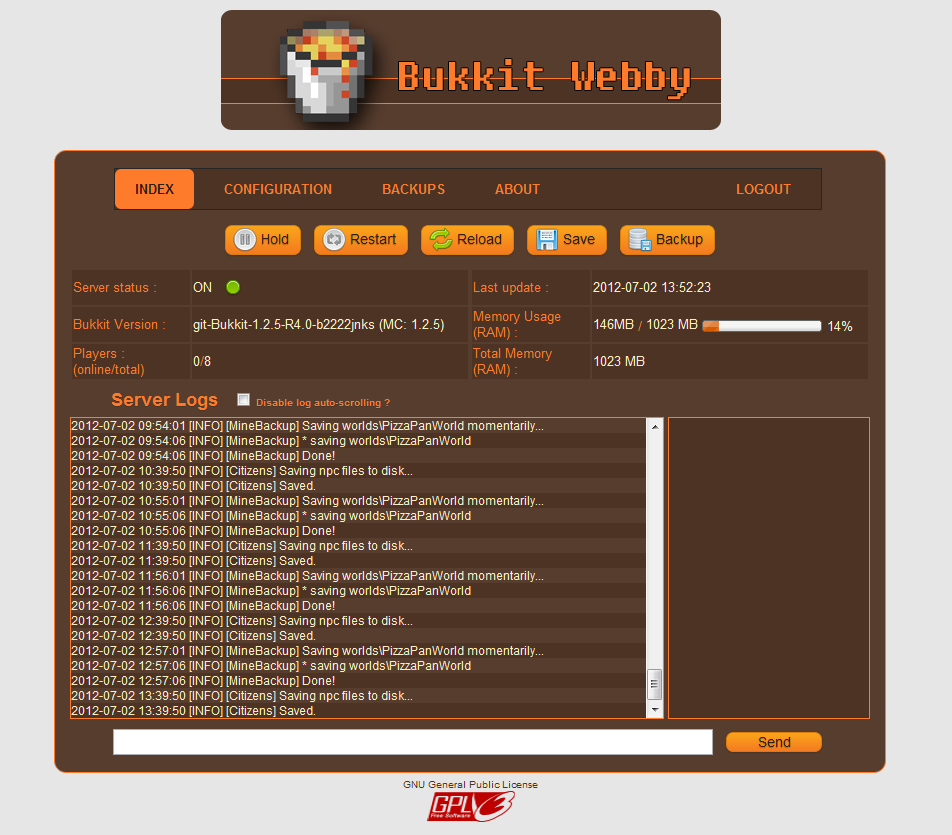
Bukkit Webby is a lightweight web administration that is easy and fast to setup It's made of two components :- WebbyBukkitPlugin is a Bukkit Plugin that interacts with Bukkit, read your server log, find all online users, etc.
- WebbyRTK is a RTK module that interacts with RemoteToolkit and run the webserver. Even if Bukkit has been shutdown, the webserver will persists and allow you to restart Bukkit.
Current Features :
- Server administration based on Bukkit Remote Toolkit (Start / Stop / Restart / Reload)
- Online configuration files
- Online server log
- Backup management (manual backup, automated restore)
- Easy installation : drop the jars and files as any bukkit plugins, setup port, login and password for webby and RTK, and you are done !
- NO APACHE NEEDED !
- Plugins management
- User interactions (Kick, Ban, Tell...)
- ...
How to install ?
Youtube video (less than 2 min) : Bukkit Webby Installation Tutorial Please watch this video once before reporting installations problems. Detailed steps : (If you start from a fresh Bukkit, you will need to run craftbukkit.jar once to generate all required configuration files used by BukkitWebby !!)- Download the last version (BukkitWebby.jar) that contains the two components required to launch BukkitWebby.
- Download Remote Toolkit and install it (more informations available on the forum).
- Copy the content of the BukkitWebby.jar to your Bukkit root folder (directories should match).
- Edit config.yml in plugins/BukkitWebby to change the ports and user account
- You may need to setup your firewall to allow the specified ports
- Don't run craftbukkit.jar. Instead, use the RTK wrapper (see the above link for more informations depending on your operation system).
- You should see in the log that BukkitWebby and WebbyRTK are both enabled.
- Go to http://[your-server-ip]:[port]. On your local computer, with the default configuration, it will be http://localhost:25567/index
- Login. You are done ! :)
Important informations about ports
Two ports are used by BukkitWebby. That means you need 4 ports (these 2, one for Bukkit, and one for RemoteToolkit). All these ports MUST BE DIFFERENTS For example, Bukkit can be run on the port 25565 (players will then connect using the serverip:25565 in Minecraft), BukkitWebby and RTKBukkit will use the localPort 25564. The Webserver will be accessible on 25567, and RemoteToolkit will respond to any commands sent to 25560.Default configuration
#Webby options
webby:
    #Webserver port used to listen to web connections (Ex: http://localhost:25567/login) (default = 25567)
    port: 25567
    #Local port used by the Webby RTKModule to communicate with the Webby Bukkit Plugin (default = 25564)
    localPort : 25564
    #Administration login
    login: admin
    password: admin
    #Timeout in minutes before a user has to relog after inactivity (default = 10 minutes)
    sessionTimeout: 10
rtk:
    #RemoteToolkit port (Same as in remote.properties, default = 25561)
    port: 25561
    #Host. You shouldn't have to change this. (Default = localhost)
    host: localhost
    #RemoteToolkit login (See the rtoolkit.sh or .bat files, default = user)
    login: user
    #RemoteToolkit password  (See the rtoolkit.sh or .bat files, default = pass)
    password: pass
Want to see/contribute to the code?
BukkitWebby on GITHubComments


-

Forge_User_68916764 Owner
-
View User Profile
-
Send Message
Posted Jul 11, 2017I compiled an update built against 1.12 with updated dependencies as well as the most recent version of the RemoteToolkit API, however I can't guarantee they'll work since I can't get a spigot server running properly on my current network. You may also run into issues if you try to use the heal button on players, since one of the methods it uses is deprecated and I've not yet figured out a workaround.
To quote rakion99: "These builds have not been approved by the BukkitDev staff. Use them at your own risk."
Download
-
View User Profile
-
Send Message
Posted May 31, 2016i will use this for my server again so i will update it to work on 1.9.4, i will try my best on it :D but i dont know alot of java so maybe not all will work
EDIT:
if some one want to test:
These builds have not been approved by the BukkitDev staff. Use them at your own risk.
Download
-
View User Profile
-
Send Message
Posted Mar 29, 2016@Elementwing4962
I heard it has been discontinued.
-
View User Profile
-
Send Message
Posted Aug 15, 2015if you want you can hire me :)
-
View User Profile
-
Send Message
Posted Jan 25, 2015Hello. I am wondering, will this plugin be updated to 1.8?
-
View User Profile
-
Send Message
Posted Dec 28, 2014Im having a error please help check it out: https://github.com/KombatPvP1st/BukkitWebby/issues/1
-
View User Profile
-
Send Message
Posted Dec 24, 2014Hi,
I was wondering does this work with 1.8, if not will you be updating any time soon?
-
View User Profile
-
Send Message
Posted Nov 30, 2014Is there a way to use BukkitWebby, without using the RTK wrapper? Like just use it as a plugin?
-
View User Profile
-
Send Message
Posted Sep 7, 2014@ThaPengwin
Help is always welcome. You can get the last version in github : https://github.com/KyneSilverhide/BukkitWebby
-
View User Profile
-
Send Message
Posted Sep 7, 2014Hey, I might help you out with developing this plugin. I'm very good with Java (3+ years of experience) and I also know HTML, CSS & PHP very well. The first thing I'd do once I get my hands on it is redesign the web interface and make it beautiful.
-
View User Profile
-
Send Message
Posted Aug 23, 2014@kyne1987
ok, thanks. is there plan to update to 1.7.9-r0.2?
-
View User Profile
-
Send Message
Posted Jul 19, 2014@madtomic
There is no RTKController.jar... not in BukkitWebby, and not in the RTK API. Or maybe you have download the RTK client, but this has no use here.
-
View User Profile
-
Send Message
Posted Jul 18, 2014what is RTKController.jar used for?
-
View User Profile
-
Send Message
Posted Jun 29, 2014Hi, I have posted an issue ticket #21. Please can you help me with the problem? I can't use your plugin until this problem is solved. Thanks.
-
View User Profile
-
Send Message
Posted Apr 5, 2014ive tried yours and im getting this
http://i.imgur.com/0bfvMA4.png
-
View User Profile
-
Send Message
Posted Mar 30, 2014@pilot8585
It worked for me, here is a pastebin of my config: http://pastebin.com/Patjxims
-
View User Profile
-
Send Message
Posted Mar 22, 2014Webby still isnt finding the logs. ive tried adding logmode: new and old at the bottom of the webby sectionin config.yml and its still not showing a stream
-
View User Profile
-
Send Message
Posted Feb 28, 2014@ThaPengwin
Your help is more than welcome ! You can have a look at the Github to clone the code. I've tried to put documentation in the code, but I could also explain to you the main concepts.
-
View User Profile
-
Send Message
Posted Feb 27, 2014Heya, kyne1987. I'd love to continue your plugin, and improve it tons. I'm quite good at Java and I'm almost professional at web development.
-
View User Profile
-
Send Message
Posted Feb 26, 2014@LegndPowerdNube
Oops :)
You can fix it by creating a new valuer in the config.yml file. in the "webby" section, just add logMode : NEW
BukkitWebby is just complaining that no actual value has been set, so it's using a default one that may or may not work at all based on the minecraft version (if version > 1.7.X, use NEW, OLD otherwise)