Bukkit Webby
Important news !
I'm looking for developpers to help me maintain and continue the Bukkit Webby support. I'm not playing minecraft anymore, so I'll only try to maintain the Bukkit compatibility (ie: make it work with the last version). A good Java knowledge is required, and some CSS / HTML / Javascripts (AJAX) basics.Welcome to Bukkit Webby main page
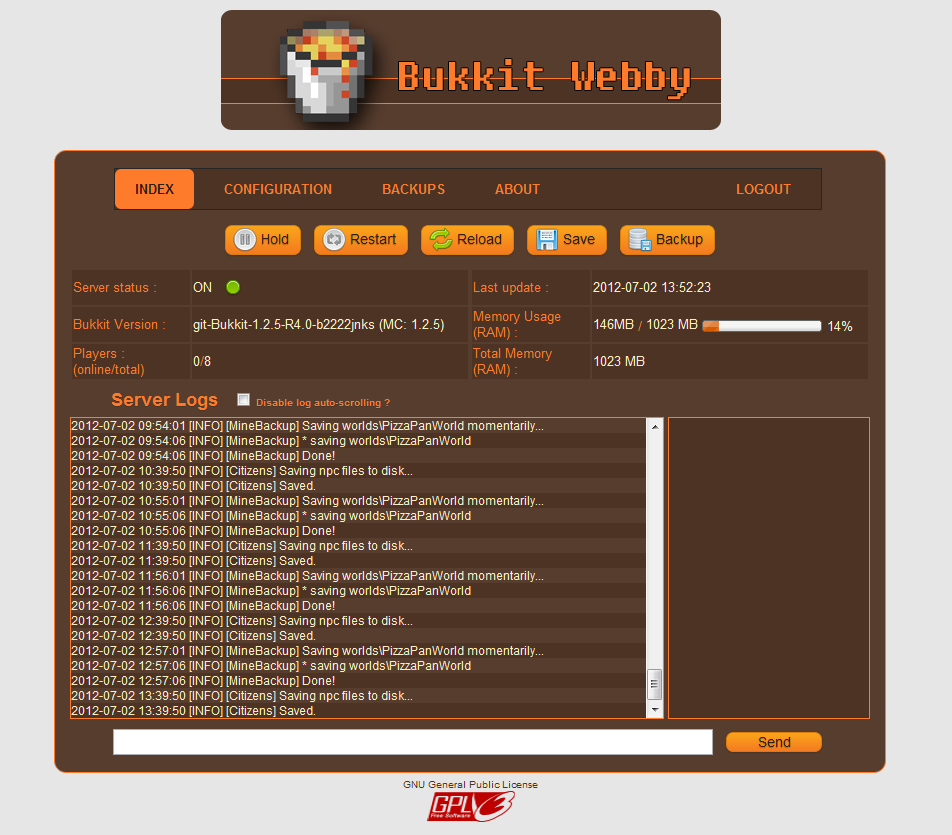
Bukkit Webby is a lightweight web administration that is easy and fast to setup It's made of two components :- WebbyBukkitPlugin is a Bukkit Plugin that interacts with Bukkit, read your server log, find all online users, etc.
- WebbyRTK is a RTK module that interacts with RemoteToolkit and run the webserver. Even if Bukkit has been shutdown, the webserver will persists and allow you to restart Bukkit.
Current Features :
- Server administration based on Bukkit Remote Toolkit (Start / Stop / Restart / Reload)
- Online configuration files
- Online server log
- Backup management (manual backup, automated restore)
- Easy installation : drop the jars and files as any bukkit plugins, setup port, login and password for webby and RTK, and you are done !
- NO APACHE NEEDED !
- Plugins management
- User interactions (Kick, Ban, Tell...)
- ...
How to install ?
Youtube video (less than 2 min) : Bukkit Webby Installation Tutorial Please watch this video once before reporting installations problems. Detailed steps : (If you start from a fresh Bukkit, you will need to run craftbukkit.jar once to generate all required configuration files used by BukkitWebby !!)- Download the last version (BukkitWebby.jar) that contains the two components required to launch BukkitWebby.
- Download Remote Toolkit and install it (more informations available on the forum).
- Copy the content of the BukkitWebby.jar to your Bukkit root folder (directories should match).
- Edit config.yml in plugins/BukkitWebby to change the ports and user account
- You may need to setup your firewall to allow the specified ports
- Don't run craftbukkit.jar. Instead, use the RTK wrapper (see the above link for more informations depending on your operation system).
- You should see in the log that BukkitWebby and WebbyRTK are both enabled.
- Go to http://[your-server-ip]:[port]. On your local computer, with the default configuration, it will be http://localhost:25567/index
- Login. You are done ! :)
Important informations about ports
Two ports are used by BukkitWebby. That means you need 4 ports (these 2, one for Bukkit, and one for RemoteToolkit). All these ports MUST BE DIFFERENTS For example, Bukkit can be run on the port 25565 (players will then connect using the serverip:25565 in Minecraft), BukkitWebby and RTKBukkit will use the localPort 25564. The Webserver will be accessible on 25567, and RemoteToolkit will respond to any commands sent to 25560.Default configuration
#Webby options
webby:
    #Webserver port used to listen to web connections (Ex: http://localhost:25567/login) (default = 25567)
    port: 25567
    #Local port used by the Webby RTKModule to communicate with the Webby Bukkit Plugin (default = 25564)
    localPort : 25564
    #Administration login
    login: admin
    password: admin
    #Timeout in minutes before a user has to relog after inactivity (default = 10 minutes)
    sessionTimeout: 10
rtk:
    #RemoteToolkit port (Same as in remote.properties, default = 25561)
    port: 25561
    #Host. You shouldn't have to change this. (Default = localhost)
    host: localhost
    #RemoteToolkit login (See the rtoolkit.sh or .bat files, default = user)
    login: user
    #RemoteToolkit password  (See the rtoolkit.sh or .bat files, default = pass)
    password: pass
Want to see/contribute to the code?
BukkitWebby on GITHubComments


-

Forge_User_68916764 Owner
-
View User Profile
-
Send Message
Posted Feb 26, 2014What does this mean?
http://pastie.org/8793610
All the WARNING messages for BukkitWebby.
-
View User Profile
-
Send Message
Posted Feb 23, 2014I've included the fix to support the new logs.
-
View User Profile
-
Send Message
Posted Jan 25, 2014Maybe the ability to install plugins remotely, and if you do add that, add it to the 1.5.2 version too(I need it for my bukkit server)
-
View User Profile
-
Send Message
Posted Jan 21, 2014I made a small update to this plugin. Due to 1.7.2's log file changes, BukkitWebby couldn't find the server.log file that no longer exists. I have pointed it at the latest.log file which is the new system.
https://dl.dropboxusercontent.com/u/23028683/Java/RTKWebby172.jar
-
View User Profile
-
Send Message
Posted Dec 23, 2013pk pas donne moi le code github a cette adresse arnaud.dupont.16@logox.fr voici mon skype ! arnauddupont161
-
View User Profile
-
Send Message
Posted Dec 23, 2013@LogoxOfficiel16
Je suis français aussi ;) J'utilise encore Bukkit Webby de temps en temps, pour mon propre serveur Minecraft. Ca marche même avec Tekkit ou FTB si on utilise BukkitForge ou équivalent.
Si tu veux je peux voir pour réenvoyer le code sur Github, car il n'est plus trop à jour j'ai mon propre GIT privé en parallèle)
-
View User Profile
-
Send Message
Posted Dec 23, 2013hi, this project may be idle but it works very well. I may be back this project to edit html, php, css and other ... and I'm french.
-
View User Profile
-
Send Message
Posted Oct 18, 2013Really nice control pannel! I can execute command via PC and mobile phone!
But not support some code and other languages on server logs.
Hope you back and continue developing someday. :)
-
View User Profile
-
Send Message
Posted Sep 26, 2013command that can be run to disable the command blocks
-
View User Profile
-
Send Message
Posted Sep 20, 2013@kyne1987
Hi,
please is possible to make then in config.yml a setting for setting the path to the html folder, that I can move the dynmap from your folder and set the webpage to another directory and have there a separate folders for each plugin? While I don't know how should I make the web page and link there another folders witch aren't in the same folder structure. I have set your folder as the webpage, while your folder can't be moved.
Thanks.
-
View User Profile
-
Send Message
Posted Sep 18, 2013@alfista
Well, all worlds are backuped in one zip file, if you use Bukkit. I've just added support for basic SMP, where there is only one world, but with a different name/syntax.
As for dynmap, don't put it in the Bukkit html folder. Each file in this folder will be scanned and put in a cache. You'll have to use a different folder, sorry :)
And then, for the colors, you can, if you know a bit of css, and the basics of Photoshop or Gimp to recolor images.
@LogoxOfficiel16
I'm not familiar with the lastest features of minecraft. Is it a command that can be run to disable the command blocks? Or is it a property in the configuration file?
@TheAcastus
Auto-restart can be setup with RTK. For the plugins folder, it could be done... but as I said, I'm not adding features for now.
-
View User Profile
-
Send Message
Posted Sep 15, 2013you could put the blocks commands true or false?
-
View User Profile
-
Send Message
Posted Sep 2, 2013Hello, can you add settings for auto restarts and backups and add backup options - include plugins folder?
-
View User Profile
-
Send Message
Posted Aug 28, 2013Hi,
is there a possibility to have the old backup system, that backup all worlds in one zip file? I have a another backup plugin and set it so that your web portal can see this backups.
I have a second problem. I have added to your HTML directory some my html codes to make from it my full web page, but I don't have change your code. I only call you index.html page and added there a subdir from Dynmap. After that I have problems with RTK and loading. I need more and more memory for your plugin. Do you check what is in HTML directory and after that you add a memory for your plugin? Please can you check it?... I need know for you plugin about 2GB of ram and start 3-5mins ...
And last. Is there a possibility to change the colors of your site? Have you a preferences for that or if you can built a preferences page for customizing the pages.
Thanks.
-
View User Profile
-
Send Message
Posted Aug 20, 2013@kyne1987
Ohh I see... I think I misunderstood the man of the wget ^^'
Thanks a lot :)
-
View User Profile
-
Send Message
Posted Aug 19, 2013@TheRealBix
Yep, that's why you should add -q also :)
-
View User Profile
-
Send Message
Posted Aug 18, 2013@kyne1987
Ok so the backup works, but there's always this "backupRemote[...]" file
You can check this here
http://pastebin.com/EZzgC4wN
-
View User Profile
-
Send Message
Posted Aug 18, 2013@TheRealBix
You have to make sure everything is between quotes. Try : wget -q "http://stuff.com:port/backupRemote?login=mylogin&password=mypassword" Then check your server log to see if anything was received.
-
View User Profile
-
Send Message
Posted Aug 16, 2013Hi there !
You've done a great job :)
I have just a problem with your command :
@daily wget -q "http://my.bukkitserver.com:25567/backupRemote?login=YOUR_LOGIN&YOUR_PASS$
When i do :
wget localhost:port/backupRemote?login=***&***$
or
wget "localhost:port/backupRemote?login=***&***$"
it does nothing (it just downloads everything after the "/")
Can you help me ?
-
View User Profile
-
Send Message
Posted Aug 12, 2013Yep it should be :)
There's a new version with some new small features, but I've once again messed up the config.xml file :p