
ArtGenerator
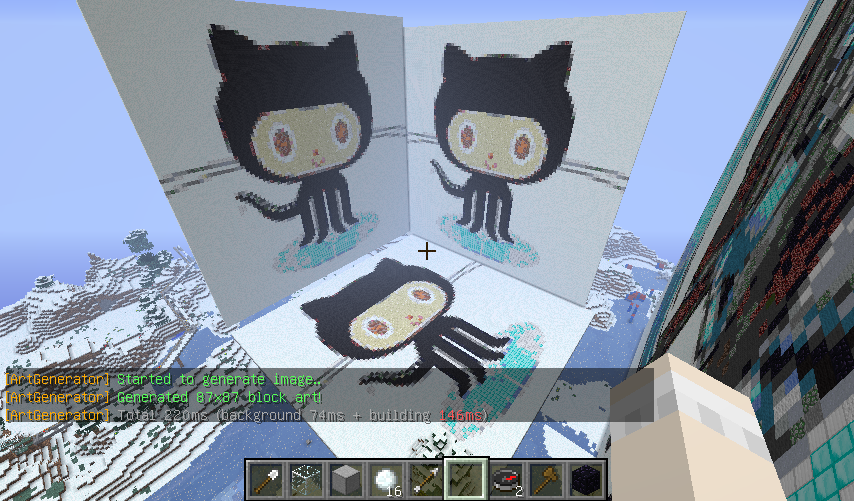
ArtGenerator
version 1.0
Description:
You can generate block(dot) art from Image URL or FileName on game command!
Features:
- Very easy to use!
- Very fast to generate!
- Support Permission!
- Multi-Threading!
Planned updates:
- Configure using blocks
Please give me ideas!
Installation:
- Put the ArtGenerator.jar into your plugin folder and reload/restart your server.
- Open config.yml and make any changes you want, then use "/artgenerator reload" command.
- If you want to use local image, move to /plugins/ArtGenerator/image/ directory. (no spaces in file name)
Permissions:
- artgenerator.generate
Allow using /artgenerator generate command! (default: op) - artgenerator.reload
Allow reloading configuration file! (default: op)
Commands:
/artgenerator Aliases: /artgen, /art, /ag
- /artgenerator generate(gen) <URL, FileName> (up|down)
To generate block(dot) art from URL/File (permission: artgenerator.generate) - /artgenerator reload
To reload config.yml (permission: artgenerator.reload)
Bugs and Feature Requests:
Use the Tickets tab to submit any bug reports or feature requests.
Or Post them in this thread.
Links:
Comments

-

_ForgeUser8810853 Owner
-
View User Profile
-
Send Message
Posted Feb 13, 2014@LaoTheLizard
World edit.
-
View User Profile
-
Send Message
Posted Jan 14, 2014Be very careful! Every pixel is one block, so a 2000x200 image will be ENORMOUS! Use this for low resolution pixel art only!
-
View User Profile
-
Send Message
Posted Nov 11, 2013Simple and great. But hasn't command "undo".
-
View User Profile
-
Send Message
Posted Aug 30, 2013Does this work with 1.6.2? I really want to use it.
-
View User Profile
-
Send Message
Posted Jul 3, 2013This plugin is so cool! Its probably my favorite :)
Keep up the good work!
-
View User Profile
-
Send Message
Posted Feb 2, 2013hey every time i tride to make a pix art picture in minecraft it said file not found and its in the images folder please halp by makeing a video or something :)
-
View User Profile
-
Send Message
Posted Dec 14, 2012Umm... I accidently made an art with an area of 375000 blocks...
-
View User Profile
-
Send Message
Posted Dec 11, 2012I really like the output of this plugin and the way it interprets which block most correctly represents each pixel.
Is there a way to do the orientation rotation like is shown in the picture above? I was trying to add an image of Santa Claus to our 'Christmas coaster ride' and BOOSH it bisected the coaster, crashed the trains, and tore off giant Rudolf's blinking antlers which was satisfying from a destructive perspective, but not from a decoration perspective. :)
If there is some way to control which direction it builds when you run the command, that would be really helpful. Thank you for this plugin!
-
View User Profile
-
Send Message
Posted Nov 30, 2012Undo would be nice and also can you make it so you run /artgenerator generate <url> then give the user a message "The size will be xx by xx" so that I know if it's going to make something massive xD
-
View User Profile
-
Send Message
Posted Nov 28, 2012I use this and i make a picture over the complett world.. i cant undo this can u make that we can delete or undo the pictures.. ?
-
View User Profile
-
Send Message
Posted Nov 24, 2012@Vashor6
I didn't know that plugin. Thank you.
-
View User Profile
-
Send Message
Posted Nov 24, 2012There's a plugin that did this as well called Copycat
that hasn't been updated in some time so I assume it's dead. It would be nice to see some of the features be implemented into your new plugin such as the undo function and scaling.
-
View User Profile
-
Send Message
Posted Nov 23, 2012@harryjamesuk
version 1.0 has been approved, yay :D
-
View User Profile
-
Send Message
Posted Nov 23, 2012Aww :'( This has no downloads.
I'll test it out for you ;)
Will download soon :D