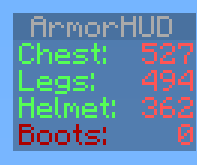
ArmorHUD
ArmorHUD
Description
ArmorHUD is a plugin that provides on screen information of your armor durability. This plugin has a soft dependency for Vault. If you do not wish to use permissions set the permission-system option in the Config file to none. This allows everyone on your server to use ArmorHUD.
Setup
- Download the .jar
- Copy it to your plugins folder
- Start the server
- Optional: Set up permissions
Permissions
| Permission | Description |
|---|---|
| armorhud.use | Gives the player permission to use ArmorHUD |
| armorhud.reload | Gives the player permission to use the /armorhud reload command |
Commands
| Command | Description |
|---|---|
| /armorhud on | Activate the ArmorHUD |
| /armorhud off | Deactivate the ArmorHUD |
| /armorhud alert | Activate the ArmorHUD in Alert mode, only armor below 10% durability will show up |
| /armorhud auto | Activate the ArmorHUD in Automatic mode, the HUD will only show up if you are wearing any armor |
| /armorhud reload | Reloads both ArmorHUD config files. Operator status or armorhud.reload permission required for access to this command |
Config
-config.yml
| Config option | Parameters | Description |
|---|---|---|
| compatibility-mode: | true/false | Set this to true to allow this plugin to work alongside with other scoreboard plugins not using the sidebar slot |
| permission-system: | none/bukkit/vault | Set this to vault or bukkit to use a permission system. If set to none (default) all players will be allowed to use ArmorHUD |
| startup-mode: | 'off'/'on'/alert/auto | You can determin here what mode should be the default ArmorHUD mode for connecting players. Use apostrophes if you use the 'off' or 'on' parameter |
| startup-message: | true/false | This allows you to disable messages from ArmorHUD on player joins when you have ArmorHUD configured to start for connecting players (startup-mode). |
| percentage: | true/false | Set this to true to display armor durability in percentages |
| fixed-position: | true/false | Set this to true to display the hud values in a fixed position (img) |
| blocked-worlds: | worldname1, worldname2, etc. | Any worlds listed here will prevent ArmorHUD from working there |
Language Config
-language.yml
| Helmet: | <Custom helmet name> |
| Chest: | <Custom chest name> |
| Legs: | <Custom legs name> |
| Boots: | <Custom boots name> |
YouTube
Plugin showcase of ArmorHUD v1.0.
MCStats Metrics
MCStats collects data such as which bukkit or ArmorHUD version you are running. You can find more info here: http://mcstats.org/learn-more/. Do you want to opt-out? Go to the PluginMetrics folder. In the config.yml there set opt-out to true.

Feedback
Any feedback is appreciated. Please make sure to use the Ticket System if you are reporting a bug. Thanks!
If you enjoy this plugin feel free to show your appreciation:
 :')
:')
Comments


-

_ForgeUser9835524 Owner
-
_ForgeUser7721650 Author
-
View User Profile
-
Send Message
Posted Sep 3, 2013How do you make it so it stays up forever?
-
View User Profile
-
Send Message
Posted Sep 2, 2013@kurwajegomac
Not possible. It's sorted client side.
-
View User Profile
-
Send Message
Posted Sep 2, 2013@riebie
How to set armor to show up in the order of 1 helmet 2. chest 3 legs 4 boots
-
View User Profile
-
Send Message
Posted Aug 30, 2013@yukai8671
Will changing the language config not be enough for you?
-
View User Profile
-
Send Message
Posted Aug 30, 2013Hello, I really like this plugin so I want to translate it into Traditional Chinese. Can I do that?
-
View User Profile
-
Send Message
Posted Aug 26, 2013@riebie
yea. cause the color difference will catch the players eye rather then be ignored over time
-
View User Profile
-
Send Message
Posted Aug 26, 2013@technolians That might be nice, I'll consider it. Might become a different % though.
-
View User Profile
-
Send Message
Posted Aug 25, 2013hey just a suggestion cause itll be neat. when the armor's durability (or percent) is below 50%, the armor text turns yellow instead of staying green
-
View User Profile
-
Send Message
Posted Aug 22, 2013@chopstick121 Yeah ArmorHUD will conflict with other plugins using the same sidebar slot. Not much that can be done about that. Thank the wonderful scoreboard api.
One way around your issue could be having the arena in a separate world. Then list that world in blocked-worlds in this plugin. ArmorHUD will then automatically deactivate when entering that world (arena) and not conflict with whatever mobarena does with the scoreboard.
-
View User Profile
-
Send Message
Posted Aug 22, 2013@riebie yes
-
View User Profile
-
Send Message
Posted Aug 20, 2013@riebie
http://dev.bukkit.org/bukkit-plugins/armorhud/tickets/4-inventory-checking/
-
View User Profile
-
Send Message
Posted Aug 20, 2013@chopstick121 Does it use the sidebar slot?
-
View User Profile
-
Send Message
Posted Aug 20, 2013if i have mobarena scoreboard does it block it?
-
View User Profile
-
Send Message
Posted Aug 18, 2013@sanegaming That's nothing from my end. Something client side or resource pack related?
-
View User Profile
-
Send Message
Posted Aug 18, 2013Why is it so transparent? I can hardly read the text?
-
View User Profile
-
Send Message
Posted Aug 17, 2013@deaddude22 Poop.. fixing.
EDIT: Fixed in v1.7.2.
-
View User Profile
-
Send Message
Posted Aug 17, 2013@riebie
Problem on first start up that the language.yml didn't automatically generate and just appeared as "null: 0" in the armorhud scoreboard.
EDIT: when doing the command /armorhud reload the aromorhud has to reactivated manually and does not automatically reappear.
Also when having the startup message disabled it will still show when entering the game.
-
View User Profile
-
Send Message
Posted Aug 16, 2013@chopstick121 Should be pretty lightweight for the server, try it out?
@deaddude22 Now :P
Uploaded v1.7.1 now awaiting file approval.
Change log v1.7.1
-
View User Profile
-
Send Message
Posted Aug 15, 2013does this create lags on the server
-
View User Profile
-
Send Message
Posted Aug 8, 2013@riebie
Whens the next update going to come out?