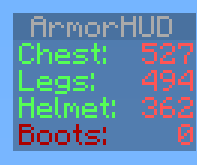
ArmorHUD
ArmorHUD
Description
ArmorHUD is a plugin that provides on screen information of your armor durability. This plugin has a soft dependency for Vault. If you do not wish to use permissions set the permission-system option in the Config file to none. This allows everyone on your server to use ArmorHUD.
Setup
- Download the .jar
- Copy it to your plugins folder
- Start the server
- Optional: Set up permissions
Permissions
| Permission | Description |
|---|---|
| armorhud.use | Gives the player permission to use ArmorHUD |
| armorhud.reload | Gives the player permission to use the /armorhud reload command |
Commands
| Command | Description |
|---|---|
| /armorhud on | Activate the ArmorHUD |
| /armorhud off | Deactivate the ArmorHUD |
| /armorhud alert | Activate the ArmorHUD in Alert mode, only armor below 10% durability will show up |
| /armorhud auto | Activate the ArmorHUD in Automatic mode, the HUD will only show up if you are wearing any armor |
| /armorhud reload | Reloads both ArmorHUD config files. Operator status or armorhud.reload permission required for access to this command |
Config
-config.yml
| Config option | Parameters | Description |
|---|---|---|
| compatibility-mode: | true/false | Set this to true to allow this plugin to work alongside with other scoreboard plugins not using the sidebar slot |
| permission-system: | none/bukkit/vault | Set this to vault or bukkit to use a permission system. If set to none (default) all players will be allowed to use ArmorHUD |
| startup-mode: | 'off'/'on'/alert/auto | You can determin here what mode should be the default ArmorHUD mode for connecting players. Use apostrophes if you use the 'off' or 'on' parameter |
| startup-message: | true/false | This allows you to disable messages from ArmorHUD on player joins when you have ArmorHUD configured to start for connecting players (startup-mode). |
| percentage: | true/false | Set this to true to display armor durability in percentages |
| fixed-position: | true/false | Set this to true to display the hud values in a fixed position (img) |
| blocked-worlds: | worldname1, worldname2, etc. | Any worlds listed here will prevent ArmorHUD from working there |
Language Config
-language.yml
| Helmet: | <Custom helmet name> |
| Chest: | <Custom chest name> |
| Legs: | <Custom legs name> |
| Boots: | <Custom boots name> |
YouTube
Plugin showcase of ArmorHUD v1.0.
MCStats Metrics
MCStats collects data such as which bukkit or ArmorHUD version you are running. You can find more info here: http://mcstats.org/learn-more/. Do you want to opt-out? Go to the PluginMetrics folder. In the config.yml there set opt-out to true.

Feedback
Any feedback is appreciated. Please make sure to use the Ticket System if you are reporting a bug. Thanks!
If you enjoy this plugin feel free to show your appreciation:
 :')
:')
Comments


-

_ForgeUser9835524 Owner
-
_ForgeUser7721650 Author
-
View User Profile
-
Send Message
Posted Jun 29, 2013@Shelmak
Yes, wait for v1.3 to be approved.
-
View User Profile
-
Send Message
Posted Jun 29, 2013@riebie
But... where is located my language.yml? I opened your plugin with winrar and there isn't any locale or language.yml...
Edit: Maybe it is on 1.3 new version?
-
View User Profile
-
Send Message
Posted Jun 29, 2013Released v1.3 Includes a bug fix for when using /hat on anything without durability and a language config that allows you to customize the armor names displayed on the HUD.
@Shelmak In your case your language.yml should be altered to look like this.
Enjoy =)
-
View User Profile
-
Send Message
Posted Jun 28, 2013how much ram would this plugin take up on a server with about 5 people on at once?
-
View User Profile
-
Send Message
Posted Jun 28, 2013@Shelmak Will do
-
View User Profile
-
Send Message
Posted Jun 28, 2013Umm.. I like to traduct to spanish this plugin, but I'm not developper... there isn't a locale file into the package and I have no idea how to translate them... Can you add a way to translate the variables please?
-
View User Profile
-
Send Message
Posted Jun 25, 2013Released v1.2. This version comes with a compatibility mode for other scoreboard plugins not using the sidebar slot. Please submit a ticket if you run into any issues with this. Also added an option in the config to display armor durability in percentages.
-
View User Profile
-
Send Message
Posted Jun 23, 2013@riebie
Again: you can send the raw packets, so it will be compatible.
-
View User Profile
-
Send Message
Posted Jun 22, 2013@Bodyash
I've seen it, don't think I can use it. Using the main scoreboard for this plugin would result in the armor info rapidly switching between each person online with the hud on lol. If I stick to the scoreboard API I'd need to create new scoreboards which results in the loss of scoreboards used by other plugins.
-
View User Profile
-
Send Message
Posted Jun 22, 2013@riebie
http://dev.bukkit.org/bukkit-plugins/health-bar/pages/compatibility/
-
View User Profile
-
Send Message
Posted Jun 22, 2013@ManBeastPigDev
No spout needed.
-
View User Profile
-
Send Message
Posted Jun 22, 2013no spout needed?
-
View User Profile
-
Send Message
Posted Jun 22, 2013@riebie
Send the raw packets and it would work.
-
View User Profile
-
Send Message
Posted Jun 22, 2013Hmmm belay my comment on that compatibility mode. Looks like it'll be impossible for me to only use the main scoreboard. I'll try and come up with a different solution.
-
View User Profile
-
Send Message
Posted Jun 22, 2013@Lildirt
You won't be able to use this plugin simultaneously with any other plugin using the same sidebar display slot.
Next update (v1.2) will have a compatibility mode option that can work together with other plugins using the below_name or player_list display slots, such as Health Bar. It doesn't look like this compatibility mode will be able to have "warning" colors though. :'(
That's due to not being able to unregister scores without making a new objective or a new scoreboard. If I make a new objective the hud will flash on each update. If I make a new scoreboard it won't be compatible with any other scoreboard plugins. -.- I'm open to suggestions for that, if not I'll probably release v1.2 with an uncolored compatibility mode option.
Oh, that percentage option will be in v1.2 as well.
-
View User Profile
-
Send Message
Posted Jun 22, 2013Alright. Seems cool. Wouldn't it conflict a little with plugins using the Scoreboard, say during a minigame, or something?
-
View User Profile
-
Send Message
Posted Jun 21, 2013@MrCreeperSpy
No to both questions.
Looks great!
-
View User Profile
-
Send Message
Posted Jun 21, 2013Would be nice if i can change ArmorHUD to be left or right of screen. Please add a feature like that.
-
View User Profile
-
Send Message
Posted Jun 21, 2013Simple Effective Thankyou
-
View User Profile
-
Send Message
Posted Jun 21, 2013Great plugin! :D