Ancient Gates
Introduction
This plugin can allow those with permission, to create gates. These gates will teleport any player, entity (incl. passenger) or vehicle (incl. passenger) that enters that gate to the designated location and/or execute a command. This is a very easy to use, easy to maintain transportation plugin! As a bonus, the gates can look any way you like (vertical or horizontal), with a selection of portal materials.
To get started, try the in game command: /gate
Commands & Permissions
AncientGates commands and permission nodes are simple and intuitive.
Click here for commands and permission nodes...
Configuration Settings
AncientGates configuration options are fairly extensive.
Click here for configuration (/gate setconf) settings...
BungeeCord Support
AncientGates fully supports BungeeCord server-server player, entity and vehicle teleportation.
Click here for further information and full setup instructions...
FAQ
AncientGates has seen a fair few questions in its time. Here are some of the more frequent ones.
Click here for Frequently Asked Questions...
Featured Video
I recently came across this video, showcasing the latest features. It has been put together by Vikaar1.
I've seen several Youtube videos since taking over maintenance of this plugin.
Click here to see more, including translations...
Development Builds
Go to the AncientGates Jenkins build server
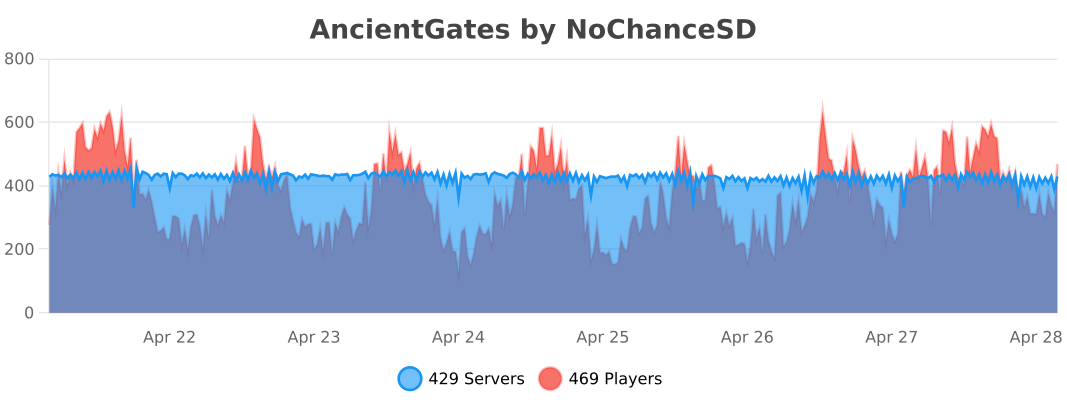
Metrics
You can (globally) opt out the stat collection via /plugins/bStats/config.yml if you wish.
Comments


-

ChanceSD Owner
-

_ForgeUser8600817 Former Author
-
View User Profile
-
Send Message
Posted Jul 28, 2013how to change portal material to water?
-
View User Profile
-
Send Message
Posted Jul 28, 2013@peewi96 peewi96 thanks for the reply
Mate which config files, because there are many config files on a single server. Sorry if I screw pastebin up too, I have never used it.
Firstly you are correct I have issued the "gate open" command from both hub and also the game server and recieve the same result for both.
Secondly to connect to my server, my actual server name is spycraft.mooo.com, however I connect directly to the IP which is also place in the Bungee, I gather this is what you mean. So for instance my Bungee address is spycraft.mooo.com for other players to join, but the acutal bungee server IP is 123.123.123.123 for example, I create another server in MC with the IP (123.123.123.123) and join off that.
I have had this working perfectly before I has me totally confused, I have tried numerous ways to create a gate but with the same two results.
I have absolutley no problems creating gates in the same server, it works perfectly
I have tried creating gates from both servers (hub and games) using the following:
-
View User Profile
-
Send Message
Posted Jul 28, 2013Thanks a ton man.
-
View User Profile
-
Send Message
Posted Jul 28, 2013@cris12821
Thanks for the screenshot, I was able to see what the issue was.
The latest development build (from the development builds link above) - Build #60 fixes this issue =).
-
View User Profile
-
Send Message
Posted Jul 28, 2013One gate is fixed. the other, is a Green wool gate with brick around it.
http://imageshack.us/photo/my-images/856/w5rn.png/
-
View User Profile
-
Send Message
Posted Jul 28, 2013@Ubique1964
I assume that first off, you are issuing the "/gate open" command on the hub server?
Second of all, you are connecting via BungeeCord and not directly to the servers?
Could you PM me a pastebin.com of all you config files for each server.
-
View User Profile
-
Send Message
Posted Jul 28, 2013@cris12821
What materials do you have around the base of the gate? It seems to be miscalculating it as a horizontal gate. Should be able to fix it so long as I know the materials.
-
View User Profile
-
Send Message
Posted Jul 28, 2013hi guys I keep getting erros when setting it up for Bungee, here is what I do!
then I open the gate, but I either get the message that the gate goes no where or the gate with the ID does not exist. I do not have multiverse portals installed, only the multivers core
Could someone please post a tutorial or an explaination on how to exactly set up gates between two servers.
At the moment I dont think this is working with MC1.6.2 I have tried many combinations, have been kicked from my own server on multiple occassions and teleported within a few blocks rather than being teleported where I am suppose to be. I have been trying this for the past 9 hours and have not created one bloody gate the way it should be.
I have noticed that my previous gates are still working but the gates are no longer recognised.by the current plugin
EDIT: Just uninstalled Mutlivers completely and still teh same problem
-
View User Profile
-
Send Message
Posted Jul 27, 2013Heres a question for you. I just switched from craft inc. It was given me problems. And i sorta like this one better anyway.
Some gates work. but now i do a 3x3 gate and it simply does an end portal on the floor where the gate it.
I just had it working. Now it does that. I tried changing the portal type and such. but nothing.
Please help A.S.A.P
-
View User Profile
-
Send Message
Posted Jul 27, 2013@Mr_Wired
Ok, double check you don't have the econbypass permission node and ensure that you have set 'useEconomy' to true in config (conf.json).
Check that the gate cost has been set with the '/gate info' command.
And check that Vault supports your economy plugin.
-
View User Profile
-
Send Message
Posted Jul 26, 2013I de-op'd myself and it still didn't take money away from me =/ I have vault, essentials, permissionsEx as well.
-
View User Profile
-
Send Message
Posted Jul 26, 2013@Mr_Wired
If you are an op, by default you will bypass gate costs. Look at the econbypass permission node and set it as a minus node if you don't wish for ops to bypass gate costs.
-
View User Profile
-
Send Message
Posted Jul 26, 2013The setcost command won't take money away from me. Is it just to activate the gate or what?
-
View User Profile
-
Send Message
Posted Jul 25, 2013@semirotta
Yes. The official 1.7.1 is based off the dev copy you had.
-
View User Profile
-
Send Message
Posted Jul 25, 2013Can I use the new 1.7.1 version? Since I had the issue before for not recognizing the portal cords with the other version (had to take DEV version instead)
-
View User Profile
-
Send Message
Posted Jul 21, 2013@Izoren174
I shall look into this for you, the code may perhaps need tweaking slightly.
EDIT: It seems to be an actual Bukkit issue BUKKIT-2471. Someone has made a code change for Bukkit to pull in to fix this problem github.com/Bukkit/CraftBukkit/pull/1179. I shall keep an eye on these. The links are more for my own sake, I'll have a closer look tomorrow.
UPDATE: If people wish to teleport their horses across worlds, then I suggest they vote for this issue to be fixed BUKKIT-2471. You can do this by creating an account and then pressing the vote link for the issue.
-
View User Profile
-
Send Message
Posted Jul 21, 2013When we are on a horse and we pass through portals, there is no problem ( if it's the same world). Is it normal, when portals are in differents world, that horses cannot go through ? Always need to relog-in to view it.
-
View User Profile
-
Send Message
Posted Jul 21, 2013@Stryker76
This seems a very odd error, but I would imagine closely related to your transfer delay.
Have you set connection-throttle to -1 in your bukkit.yml?
-
View User Profile
-
Send Message
Posted Jul 21, 2013Thanks for the improved BungeeCord support, seems to work well, but there seems to be a bit of a delay in the actual transfer to the other server, sometimes up to 2 seconds.
Also, with 1.7.1 I'm getting a lot of this, and the player get's disconnected.
-
View User Profile
-
Send Message
Posted Jul 21, 2013@ryanthemagi
I shall look into adding a bounce-back feature. There is currently no way to reload the config from within the game, though I will be adding a "/gate setconf" command to the next update to alter the config from within the game.