
AMChat
Source: https://github.com/xyberviri/com.xyberviri.amchat

Add a low-tech chat system with AmChat, instead of using “General” talk to your neighbors on 65.000rhz. Construct a fixed radio transmitter and transmit at even greater distances. AmChat even lets you encrypt your transmissions so that only players on the same frequency and code can read each others text. Add iron, gold or diamond block to change your fixed radio into a transponder (multi user support).
AmChat works as a stand alone system or add it to any chat system that honors the "iscancelled" flag on the player chat event.
Out of the box, local chat will reach 32 blocks, while radio chat reaches 96 blocks, if that’s not far enough you can build a fixed radio transmitter and add antennas to increase your chat distance. If you want your radio to display its information simply place a sign on the side and it will be updated with the data for that radio.
Fixed radio transmitters
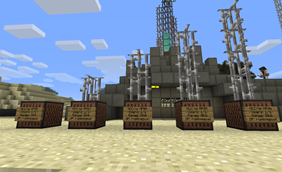
Place a JukeBox while in Sneak mode to create a radio, you must be at or above sea level.
Transponders support more players
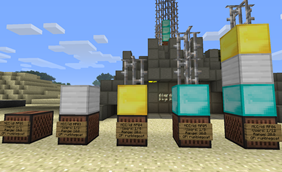
Add Iron, Gold or Diamond blocks to increase the number of supported users
Players communicate by distance, one player might be able to hear only one side of the conversation, some players might not even be able to communicate with people they can hear.

The following permissions need to be added at minimum for bare functionality:
amchat.radio.personal.* All /am commands (except /am list)
amchat.radio.fixed.* All /xm commands (except /xm list)
Version:0.3.2
Features: ..turn personal radio on/off ..tune to a frequency between 32-512 rHz ..use a code between 1-999, to encrypt your chat, 0 to disables ..turn mic on/off ..filter chat that is encrypted and otherwise unreadable. ..set a frequency cutoff so you receive chat from <your_frequency>+-<cutoff> ..set a frequency default freq. to set when joining server 32 by default ..set the default radio state, when a player joins your server for the first time (on by default) ..tune your radio using the in game item(compass) ..create radio towers that let you talk to your friends at greater distances (hold shift and place a juke box) ..Place a sign on the juke box to see basic stats about the radio. (no codes or anything just place a blank sign on the jukebox) ..player settings save between restarts to yml file. ..server consol has full visibility of all chat and all players can always hear the consol. ..permission nodes to override configuration restrictions (chat/radio distance, settings) ..optionally require a physical item to use the radio ..destroy radios by simply destroying the jukebox. Installation: Drop the AMChat.jar in the plugin folder and start your server, if you want the recommended defaults nothing else is needed. To place a radio you need to hold shift(be in sneak mode) and place a juke box. Radio's will be assigned an ID by the MineCraft Communications Department. Will AMChat work with my other chat plugins? If your chat plugin honors the event.isCancelled() flag for your PlayerChatEvent events, then your other chat plugin should work with AMChat. Commands Permission Nodes config.yml Source Developer Info TODO List Manual on Google Docs Feedback? Feel free to leave some comments about my mod below. Issues? Please use the ticket system. Suggestions? Please also leave these below.
Add a low-tech chat system with AmChat, instead of using “General” talk to your neighbors on 65.000rhz. Construct a fixed radio transmitter and transmit at even greater distances. AmChat even lets you encrypt your transmissions so that only players on the same frequency and code can read each others text. Add iron, gold or diamond block to change your fixed radio into a transponder (multi user support).
AmChat works as a stand alone system or add it to any chat system that honors the "iscancelled" flag on the player chat event.
Out of the box, local chat will reach 32 blocks, while radio chat reaches 96 blocks, if that’s not far enough you can build a fixed radio transmitter and add antennas to increase your chat distance. If you want your radio to display its information simply place a sign on the side and it will be updated with the data for that radio.
Fixed radio transmitters
Place a JukeBox while in Sneak mode to create a radio, you must be at or above sea level.
Transponders support more players
Add Iron, Gold or Diamond blocks to increase the number of supported users
Players communicate by distance, one player might be able to hear only one side of the conversation, some players might not even be able to communicate with people they can hear.
The following permissions need to be added at minimum for bare functionality:
amchat.radio.personal.* All /am commands (except /am list)
amchat.radio.fixed.* All /xm commands (except /xm list)
Version:0.3.2
Features: ..turn personal radio on/off ..tune to a frequency between 32-512 rHz ..use a code between 1-999, to encrypt your chat, 0 to disables ..turn mic on/off ..filter chat that is encrypted and otherwise unreadable. ..set a frequency cutoff so you receive chat from <your_frequency>+-<cutoff> ..set a frequency default freq. to set when joining server 32 by default ..set the default radio state, when a player joins your server for the first time (on by default) ..tune your radio using the in game item(compass) ..create radio towers that let you talk to your friends at greater distances (hold shift and place a juke box) ..Place a sign on the juke box to see basic stats about the radio. (no codes or anything just place a blank sign on the jukebox) ..player settings save between restarts to yml file. ..server consol has full visibility of all chat and all players can always hear the consol. ..permission nodes to override configuration restrictions (chat/radio distance, settings) ..optionally require a physical item to use the radio ..destroy radios by simply destroying the jukebox. Installation: Drop the AMChat.jar in the plugin folder and start your server, if you want the recommended defaults nothing else is needed. To place a radio you need to hold shift(be in sneak mode) and place a juke box. Radio's will be assigned an ID by the MineCraft Communications Department. Will AMChat work with my other chat plugins? If your chat plugin honors the event.isCancelled() flag for your PlayerChatEvent events, then your other chat plugin should work with AMChat. Commands Permission Nodes config.yml Source Developer Info TODO List Manual on Google Docs Feedback? Feel free to leave some comments about my mod below. Issues? Please use the ticket system. Suggestions? Please also leave these below.
Comments


-

Xyberviri Owner
-
View User Profile
-
Send Message
Posted Apr 29, 2012@Xyberviri
But the problem is that I still get two messages in chat. Doesn't really matter, Using herochat instead.
How do I make a radio tower? o.O
-
View User Profile
-
Send Message
Posted Apr 29, 2012@Ferkswe
Awsome :D, I belive that means this is working as intended with the new event system, AMChat now creates a new event when a chat even shold be "owned" by AMChat. When your mic is open and your radio is on then you chat event is going to go over amchat.
It looks like its by design and can be safely overlooked, you would have to increase the warning level up to WARNING so those message go away but that would limit allot of messages going to your consol.
@Ferkswe
Ill see if i can make a work around because i see how this could be used with other plugins like realistic chat.
-
View User Profile
-
Send Message
Posted Apr 29, 2012@Xyberviri
Well in that case, Realisticchat doesn't honor "iscancelled" as it duplicates all radio messages. I can add that it does work with HeroChat.
-
View User Profile
-
Send Message
Posted Apr 29, 2012Im working on a quick start guide.
If you want this to work with other plugins you can set the following setting in config.yml "manage-local: false"
That should make AMChat leave any non "radio chat" chatevents alone.
This is for 0.3.2 beta, It should work i just need to test it, any plugin that honors the "iscancelled" flag in the chat event should be compatible with AMChat
-
View User Profile
-
Send Message
Posted Apr 29, 2012Quick update. When Not speaking on the AMChat radio with "manage-local: false" it works fine as far as I can see. When speaking on the radio however, the message get's duplicated and this pops up in console. I assume that means it's not working. 00:10:14 [INFO] FerkSwe: asdasd 00:10:14 [INFO] <FerkSwe: r=50.0> asdasd 00:10:14 [INFO] [RealisticChat] () FerkSwe -> FerkSwe: asdasd 00:10:14 [INFO] FerkSwe: ☺asdasd 00:10:14 [INFO] ignoring chat event cancelled by other plugin: org.bukkit.event .player.PlayerChatEvent@45048e35
-
View User Profile
-
Send Message
Posted Apr 29, 2012Hey, so I've almost figured this out now. I set Radio-item-required to true assuming that this would require you to hold the item to speak on the radio, which it didn't. It just requires you to have it in your inventory. Could you maybe change that? Or make it a config option? So that you must have the radio item in hand to speak on the radio. If you dont have the item in your hand it will be in regular chat.
@mzx987
Just about to test that, I'll keep you updated.
-
View User Profile
-
Send Message
Posted Apr 29, 2012Just a question:
Does this work with Realistic Chat?
-
View User Profile
-
Send Message
Posted Apr 29, 2012Do you think you could throw together some quick-start guide? I have no clue how this plugin works atm.
-
View User Profile
-
Send Message
Posted Apr 28, 2012@Ferkswe
Im working on a update that will leave local chat alone and make it so "AMChat" is handled in another event. This will help with other chat plugins, if the radio has the mic set to on it will send over AMChat and use the rules in the config.yml file.
That also includes check if you want AMChat to handle local chat which currently is still breaking some other plugins.
-
View User Profile
-
Send Message
Posted Apr 25, 2012Im working on overhauling this plugin to use the events system and breakup the way chat is done
-
View User Profile
-
Send Message
Posted Apr 25, 2012Could you possibly make a little lighter version of this? So it doesn't override my chat plugin. I still want pretty prefixes and all that junk. The parts that I am interested in in this plugin are the long range radios for communicating between bases in Rp. What I dont want is a frequency for localchat and OOC chats. Could that be done?
Thanks! FerkSwe
-
View User Profile
-
Send Message
Posted Apr 20, 2012No trouble at all, i like false positives lets me know im at least coding right
-
View User Profile
-
Send Message
Posted Apr 20, 2012After starting from scratch with fresh config files, I managed to get everything working. There was probably just a formatting error somewhere that I didn't notice. Anyway, sorry for causing you any unnecessary trouble, and keep up the great work!
-
View User Profile
-
Send Message
Posted Apr 18, 2012<<reply 660161>>
I was unable to duplicate the problem, im currently using Craftbukkit1.2.5-R1.0 (#2149) I have PermissionsBukkit 1.6 installed, the only other thing i though it could be is i have vault installed so i renamed the jar file so it doesn't load and i was unable to duplicate the issue. I'm going to redownload from bukkit.org and see if it might just be that upload is bad. right now i dont have anyone as a Admin and no one runs /op except for the server account.
I have included the groups part of my config.yml for permissionsbukkit 1.6
groups:
Default:
permissions:
BOSEconomy.common.*: true
Signshop.Signs.*: true
Signshop.CopyPaste true
amchat.radio.personal.*: true
amchat.radio.fixed.*: true
towny.town.*: true
permissions.build true
Regulars:
permissions:
inheritance:
- 'Default'
Moderators:
permissions:
BOSEconomy.admin.*: true
Signshop.Admin.*: true
towny.admin true
inheritance:
- 'Regulars'
Administrators:
permissions:
*.*: true
inheritance:
- 'Moderators'
The administrators runs as /op all the time so i doesn't use any permissions. However i didn't use that account when I did any testing on this.
These are the plugins on the main server for this plugin, i dont need Vault to use my plugin so i renamed that incase it was picking up the permissions or handling the bridging some how. 0.3.1b should have a file date/time of 4/8 2:29
-rw-r--r-- 1 --- --- 43453 2012-04-08 02:29 AMChat.jar
-rw-r--r-- 1 --- --- 180172 2012-03-01 17:27 BOSEconomy.jar
-rw-r--r-- 1 --- --- 20385 2012-02-29 21:34 PermissionsBukkit-1.6.jar
-rw-r--r-- 1 --- --- 44682 2012-02-28 10:55 Questioner.jar
-rw-r--r-- 1 --- --- 42760 2012-03-29 04:28 Register.jar
-rw-r--r-- 1 --- --- 109090 2012-04-03 16:45 SignShop.jar
-rw-r--r-- 1 --- --- 527985 2012-04-03 17:49 Towny.jar
-rw-r--r-- 1 --- --- 206222 2012-04-14 17:32 Vault.old
-rw-r--r-- 1 --- --- 45355 2012-03-29 08:46 WorldBorder.jar
-
View User Profile
-
Send Message
Posted Apr 18, 2012@skinklover Yup thats the right format and i also use permissionsbukkit,
amchat.radio.personal.*: true
amchat.radio.fixed.*: true
I'm checking to see if its a problem on my server and if so i should be able to trouble shoot it.
-
View User Profile
-
Send Message
Posted Apr 18, 2012I've been trying to set up the permissions for this plugin (very nice, btw), but it seems to just default to OP only, and ignore the permissions. Is there something I'm missing? I'm using PermissionsBukkit, and have a group like this: user: permissions: amchat.radio.personal.*: true amchat.radio.fixed.*: true but no users are able to execute any /am or /xm commands
-
View User Profile
-
Send Message
Posted Apr 9, 2012@kaisersouseREAL This was heavily inspired by ham radio's broadcasting. In fact this started out with the idea of having a radio station. If i could make music play with out needing a radio block i would let operators put in discs so that players could listen to the radio. But i haven't figured out how to trigger that with out needing spout or having to have a Radio block appear some where near the player.
-
View User Profile
-
Send Message
Posted Apr 9, 2012CQ CQ CQ
Thanks for making this. Very ham-like. :)
73 de KB1T - - (not posting my entire callsign haha)
-
View User Profile
-
Send Message
Posted Apr 8, 2012@daredevilk
I have updated the config.yml page here, im still working on figuring out whats up with plugins that dont overwrite the contents and have a ton of text.
-
View User Profile
-
Send Message
Posted Apr 8, 2012Great updates :D
One thing, Could you update the config file? I think I understand the new one but just to check. Oh and maybe add a way to turn off the text info when you login?
This plugin is still awesome.