
Advanced Lucky Block

Before installing, make sure that you've read all of the instructions down below and that your server version matches that of the plugin.
This plugin simply adds lucky blocks to your server. If you're not familiar with the actual lucky block mod, you may need to watch it on Youtube since it's very popular. Lucky blocks are blocks that, by default, act like sponges and spawn random drops when they are broken. Depending on the luck the block possess, it's more probable that you receive good or bad stuff. Numerous different drops can be anything from lucky armor, potions, lucky swords, chests, monsters, traps, etc.
This plugin is highly customizable which means that you can control which drops may spawn and when. Reading through files that the plugin generates on installations will give you a good idea of how the plugin works.
• How to get the block
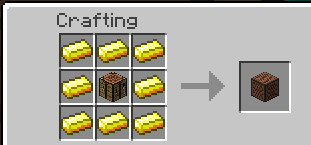
You may notice that regular sponges won't do anything as you would expect. You can either get the block through crafting by surrounding a dropper with 8 gold ingots, which is the same recipe as in the original mod; or by simply using /lb give command which takes additional arguments allowing you to specify things like luck value.
Currently, you can have up to 1048 lucky blocks placed at the same time. Placing more will just delete the newly placed block. The reason behind this limitation is that the loading mechanism takes a considerable amount of time if you have too many lucky blocks placed which definitely causes the server to lag on reload. This is however probably going to be changed in a later version when a more effective way of loading is implemented. Suggestions about how this can be achieved are appreciated.
• Important to mention
If you're running an outdated Minecraft server, you can look up for older versions of the plugin and find the one that supports your server. Notice that different versions of the plugin may work on the same server but I'm not responsible for any eventual errors and bugs so it's always recommended to use the right version to avoid unexpected bugs and glitches.
• Features
- Highly customizable.
- Craftable.
- Option to make lucky blocks spawn naturally in the world.
- You can create and add your custom lucky blocks (a tutorial about this might be implemented later).
- All data is stored inside files, so loading the server won't cause any data loss.
- Play sounds, spawn particles when lucky blocks are placed/destroyed.
- Lucky blocks with better luck yield better drops and vice versa.
- You can add as many drops as you wish (until your server runs out of memory).
- Silk touch enchantment support.
- When the block is broken with a tool that has fortune enchantment, a dropped luck block with higher luck will spawn (consumes too much durability of the held item).
- Can be placed by dispensers.
- Can be pushed by pistons.
- Slime blocks next to pistons can push lucky blocks in the air (WIP).
- Developers can add custom drops to the plugin.
- Much more!
• Setup
- Download and install WorldEdit (recommended).
- Download Advanced Lucky Block plugin.
- Put the downloaded file in plugins folder.
- Enjoy!
• Commands
• Permissions
• Lucky Crafting Table:
Used to add or subtract luck from lucky blocks. The traditional method was to surround the lucky block with minerals and valuable items in the crafting table, but this method was replaced with another one involving an own crafting window.
Crafting recipe:
Gui:

Addons
- You can make your own lucky blocks by editing files inside Types folder.
Examples:
- Share your custom ones.
Donation
If you want to support this project and help updating it you can donate by simply clicking the below button:
%2526business%253dosama-alnori%2540outlook.com%2526bn%253dPP-DonationsBF%253abtn_donateCC_LG.gif%253aNonHosted%2526cancel_return%253dhttps%253a%252f%252fdev.bukkit.org%252fprojects%252f91188%2526lc%253dUS%2526item_name%253dAdvanced%2bLucky%2bBlock%2b(from%2bbukkit.org)%2526cmd%253d_donations%2526rm%253d1%2526no_shipping%253d1%2526currency_code%253dUSD)
• Servers
MCFeelBoy.minecraft360.de
- You can leave your server IP in the comments if you are using this plugin on your server and I'll add it to this list.
• Enchantments
- Lightning Enchantment: Strikes a lightning bolt when right-click.
• Files
• Editing drops
- Drops are stored in drops folder.
• Custom Drops
- Developers can make and add custom drops to lucky blocks.
- tutorial Here
• Todo
- Suggest ideas!
• Screenshots
- Share your screenshots.

- Credits to https://serverminer.com/
Comments


-

MCGamer199 Owner
-
View User Profile
-
Send Message
Posted Mar 4, 2016So does this mean Lucky Blocks cannot be ran on 1.9 Spigot?
We've updated now to 1.9, couldnt wait to get off 1.8 :)
-
View User Profile
-
Send Message
Posted Mar 4, 2016@Subbers 1.9 (bugged):
http://dev.bukkit.org/bukkit-plugins/advanced-lucky-block/pages/actions-plugin/
-
View User Profile
-
Send Message
Posted Mar 4, 2016OP, will you have Actions Plugin updated for 1.9 any time soon?
-
View User Profile
-
Send Message
Posted Mar 4, 2016Oh, that's great. Thanks.
-
View User Profile
-
Send Message
Posted Mar 2, 2016@SlimeDog
The only way to fix this bug is to update Actions plugin to 1.9. I'm looking for it tomorrow.
-
View User Profile
-
Send Message
Posted Mar 2, 2016Clean install, Spigot 1.9 latest pulls.
[09:18:51] [Server thread/INFO]: [LuckyBlock] LuckyBlock , 1.9.6 Enabled.
[09:18:52] [Server thread/ERROR]: Error occurred while enabling LuckyBlock v1.9.6 (Is it up to date?)
java.lang.NoClassDefFoundError net/minecraft/server/v1_8_R3/NBTBase
at com.LuckyBlock.LB.Types.toItemStack(Types.java:311) ~[?:?]
at com.LuckyBlock.Engine.LuckyBlock.loadRecipes(LuckyBlock.java:719) ~[?:?]
at com.LuckyBlock.Engine.LuckyBlock.LuckyBlockConfig(LuckyBlock.java:1025) ~[?:?]
at com.LuckyBlock.Engine.LuckyBlock.onEnable(LuckyBlock.java:228) ~[?:?]
at org.bukkit.plugin.java.JavaPlugin.setEnabled(JavaPlugin.java:291) ~[spigot-1.9.jar-2016-03-02:git-Spigot-1a196e1-ffacb6c]
at org.bukkit.plugin.java.JavaPluginLoader.enablePlugin(JavaPluginLoader.java:340) [spigot-1.9.jar-2016-03-02:git-Spigot-1a196e1-ffacb6c]
at org.bukkit.plugin.SimplePluginManager.enablePlugin(SimplePluginManager.java:405) [spigot-1.9.jar-2016-03-02:git-Spigot-1a196e1-ffacb6c]
at org.bukkit.craftbukkit.v1_9_R1.CraftServer.loadPlugin(CraftServer.java:361) [spigot-1.9.jar-2016-03-02:git-Spigot-1a196e1-ffacb6c]
at org.bukkit.craftbukkit.v1_9_R1.CraftServer.enablePlugins(CraftServer.java:321) [spigot-1.9.jar-2016-03-02:git-Spigot-1a196e1-ffacb6c]
at net.minecraft.server.v1_9_R1.DedicatedServer.init(DedicatedServer.java:202) [spigot-1.9.jar-2016-03-02:git-Spigot-1a196e1-ffacb6c]
at net.minecraft.server.v1_9_R1.MinecraftServer.run(MinecraftServer.java:527) [spigot-1.9.jar-2016-03-02:git-Spigot-1a196e1-ffacb6c]
at java.lang.Thread.run(Thread.java:745) [?:1.8.0_71]
Caused by: java.lang.ClassNotFoundException net.minecraft.server.v1_8_R3.NBTBase
at org.bukkit.plugin.java.PluginClassLoader.findClass(PluginClassLoader.java:91) ~[spigot-1.9.jar-2016-03-02:git-Spigot-1a196e1-ffacb6c]
at org.bukkit.plugin.java.PluginClassLoader.findClass(PluginClassLoader.java:86) ~[spigot-1.9.jar-2016-03-02:git-Spigot-1a196e1-ffacb6c]
at java.lang.ClassLoader.loadClass(ClassLoader.java:424) ~[?:1.8.0_71]
at java.lang.ClassLoader.loadClass(ClassLoader.java:357) ~[?:1.8.0_71]
... 12 more
-
View User Profile
-
Send Message
Posted Mar 1, 2016@SlimeDog
I haven't tried 1.9 yet.
-
View User Profile
-
Send Message
Posted Feb 29, 2016Spigot 1.9 does not recognize sounds in config.yml
-
View User Profile
-
Send Message
Posted Feb 25, 2016@MCstustu
No it's not required. i'm trying to fix this bug.
-
View User Profile
-
Send Message
Posted Feb 24, 2016Is TitleManager required? I am running LuckyBlock 1.9.5 now with Actions 1.8.8 and sadly the plugin is working less and less. Most blocks do not yield any result when mined now :( No errors in console.
-
View User Profile
-
Send Message
Posted Feb 23, 2016Generally not. Although this crashed my server running LB 1.9.5, probably with an unsupported /lb option:
[Server thread/ERROR]: null
org.bukkit.command.CommandException Unhandled exception executing command 'lb' in plugin LuckyBlock v1.9.5
at org.bukkit.command.PluginCommand.execute(PluginCommand.java:46) ~[spigot-1.8.8.jar-2016-02-22:git-Spigot-e4d4710-e1ebe52]
at org.bukkit.command.SimpleCommandMap.dispatch(SimpleCommandMap.java:141) ~[spigot-1.8.8.jar-2016-02-22:git-Spigot-e4d4710-e1ebe52]
at org.bukkit.craftbukkit.v1_8_R3.CraftServer.dispatchCommand(CraftServer.java:641) ~[spigot-1.8.8.jar-2016-02-22:git-Spigot-e4d4710-e1ebe52]
at net.minecraft.server.v1_8_R3.PlayerConnection.handleCommand(PlayerConnection.java:1162) [spigot-1.8.8.jar-2016-02-22:git-Spigot-e4d4710-e1ebe52]
at net.minecraft.server.v1_8_R3.PlayerConnection.a(PlayerConnection.java:997) [spigot-1.8.8.jar-2016-02-22:git-Spigot-e4d4710-e1ebe52]
at net.minecraft.server.v1_8_R3.PacketPlayInChat.a(PacketPlayInChat.java:45) [spigot-1.8.8.jar-2016-02-22:git-Spigot-e4d4710-e1ebe52]
at net.minecraft.server.v1_8_R3.PacketPlayInChat.a(PacketPlayInChat.java:1) [spigot-1.8.8.jar-2016-02-22:git-Spigot-e4d4710-e1ebe52]
at net.minecraft.server.v1_8_R3.PlayerConnectionUtils$1.run(SourceFile:13) [spigot-1.8.8.jar-2016-02-22:git-Spigot-e4d4710-e1ebe52]
at java.util.concurrent.Executors$RunnableAdapter.call(Executors.java:511) [?:1.8.0_71]
at java.util.concurrent.FutureTask.run(FutureTask.java:266) [?:1.8.0_71]
at net.minecraft.server.v1_8_R3.SystemUtils.a(SourceFile:44) [spigot-1.8.8.jar-2016-02-22:git-Spigot-e4d4710-e1ebe52]
at net.minecraft.server.v1_8_R3.MinecraftServer.B(MinecraftServer.java:715) [spigot-1.8.8.jar-2016-02-22:git-Spigot-e4d4710-e1ebe52]
at net.minecraft.server.v1_8_R3.DedicatedServer.B(DedicatedServer.java:374) [spigot-1.8.8.jar-2016-02-22:git-Spigot-e4d4710-e1ebe52]
at net.minecraft.server.v1_8_R3.MinecraftServer.A(MinecraftServer.java:654) [spigot-1.8.8.jar-2016-02-22:git-Spigot-e4d4710-e1ebe52]
at net.minecraft.server.v1_8_R3.MinecraftServer.run(MinecraftServer.java:557) [spigot-1.8.8.jar-2016-02-22:git-Spigot-e4d4710-e1ebe52]
at java.lang.Thread.run(Thread.java:745) [?:1.8.0_71]
Caused by: java.lang.NullPointerException
at com.LuckyBlock.LB.LB.getFile(LB.java:84) ~[?:?]
at com.LuckyBlock.LB.LB.reloadOptions(LB.java:186) ~[?:?]
at com.LuckyBlock.LB.LB.setRandomDrop(LB.java:176) ~[?:?]
at com.LuckyBlock.LB.LB.<init>(LB.java:44) ~[?:?]
at com.LuckyBlock.Commands.LuckyBlockCommand.onCommand(LuckyBlockCommand.java:1066) ~[?:?]
I'm running LB 1.8 in production, until this gets sorted. No worries.
-
View User Profile
-
Send Message
Posted Feb 23, 2016@SlimeDog
No i mean 1.9.5 is there any error message?
-
View User Profile
-
Send Message
Posted Feb 22, 2016[01:20:21] [Server thread/ERROR]: Error occurred while enabling LuckyBlock v1.9.1 (Is it up to date?)
java.lang.NumberFormatException multiple points
at sun.misc.FloatingDecimal.readJavaFormatString(FloatingDecimal.java:1914) ~[?:1.8.0_71]
at sun.misc.FloatingDecimal.parseDouble(FloatingDecimal.java:110) ~[?:1.8.0_71]
at java.lang.Double.parseDouble(Double.java:538) ~[?:1.8.0_71]
at com.LuckyBlock.Engine.LuckyBlock.onEnable(LuckyBlock.java:290) ~[?:?]
at org.bukkit.plugin.java.JavaPlugin.setEnabled(JavaPlugin.java:321) ~[spigot-1.8.8.jar-2016-02-22:git-Spigot-e4d4710-e1ebe52]
at org.bukkit.plugin.java.JavaPluginLoader.enablePlugin(JavaPluginLoader.java:340) [spigot-1.8.8.jar-2016-02-22:git-Spigot-e4d4710-e1ebe52]
at org.bukkit.plugin.SimplePluginManager.enablePlugin(SimplePluginManager.java:405) [spigot-1.8.8.jar-2016-02-22:git-Spigot-e4d4710-e1ebe52]
at org.bukkit.craftbukkit.v1_8_R3.CraftServer.loadPlugin(CraftServer.java:357) [spigot-1.8.8.jar-2016-02-22:git-Spigot-e4d4710-e1ebe52]
at org.bukkit.craftbukkit.v1_8_R3.CraftServer.enablePlugins(CraftServer.java:317) [spigot-1.8.8.jar-2016-02-22:git-Spigot-e4d4710-e1ebe52]
at net.minecraft.server.v1_8_R3.DedicatedServer.init(DedicatedServer.java:199) [spigot-1.8.8.jar-2016-02-22:git-Spigot-e4d4710-e1ebe52]
at net.minecraft.server.v1_8_R3.MinecraftServer.run(MinecraftServer.java:525) [spigot-1.8.8.jar-2016-02-22:git-Spigot-e4d4710-e1ebe52]
at java.lang.Thread.run(Thread.java:745) [?:1.8.0_71]
That might be because I forgot to delete the plugins/LuckyBlock/ folder. Now I get no errors, but the problematic behavior, for any version after 1.8.
-
View User Profile
-
Send Message
Posted Feb 22, 2016@SlimeDog
Is there any error message in the console?
-
View User Profile
-
Send Message
Posted Feb 22, 2016I have restarted the server repeatedly, including with clean LB 1.9.5 and no plugins/LuckyBlock/ folder.
I thought "Hopefully will be fixed soon!" meant that you understood the problem and were working on a fix.
I reverted to LB 1.8. Both LB 1.9 and LB 1.9.1 return "is it up to date?" errors.
-
View User Profile
-
Send Message
Posted Feb 22, 2016@SlimeDog
Try to reload the server i don't know why they sometimes turn to wet sponges. Detectors detect nearby lbs.
-
View User Profile
-
Send Message
Posted Feb 22, 2016Thanks. I have removed the older unused folder.
If I give "/lb thoraxe <playername>" it is just an iron axe, no enchantment, although it is properly named. If I invoke "/lb thoraxe" (thereby giving one to myself) it is properly enchanted. Since I want to give the players a Thor's Axe in a Skript, this is relatively important. (Not as important as luckyblocks working at all.)
That makes me wonder if the lucky blocks are just wet sponges, even in inventory, with the proper label but no juice.
Is there documentation of the plugin features somewhere? What does the Detector do?
-
View User Profile
-
Send Message
Posted Feb 22, 2016@SlimeDog Hopefully will be fixed soon!
In the newest version lbs use Values folder instead of LuckyBlock.
-
View User Profile
-
Send Message
Posted Feb 22, 2016Updated from 1.9.1 to 1.9.5. No joy! I have a similar problem to that of Shambugi, but I don't run CoreProtect or GriefProtect. My environment is Spigot 1.8.8, WE/WG, PEX, Multiverse-*, etc.; all latest pulls. I have LBs in inventory, from Skript commands when I join the world, and I can add more. But they become wet sponges when placed. I used the WG wand to check for a claim, per the replication for Shambugi (there isn't one), but LBs still don't work.
I deleted the plugins/LuckyBlock/ directory, which was regenerated. I notice that the plugins/LuckyBlock/LuckyBlock/ directory (with the LuckyBlock*.yml files) was not created. I tested, then copied them from 1.9.1. It doesn't seem to matter if they exist or not; LBs don't work in either case.
Help please.
PS: what does the Detector detect? How does it work?
-
View User Profile
-
Send Message
Posted Feb 21, 2016@Shambugi
Ok here is what I was able to figure out here is the steps to replicate the problem:
1) have girefprevention installed in the world 2) give yourself any type of lucky block 3) place the luckyblock...it wont work... 4) use a stick to check for a claim and or use a gold shovel to create a claim 5) place the lucky block anywhere (in or out of a claim) ...the lucky block will now work anywhere... (and now any non-working blocks in your inventory will now work as well)