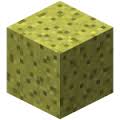
Advanced Lucky Block

Before installing, make sure that you've read all of the instructions down below and that your server version matches that of the plugin.
This plugin simply adds lucky blocks to your server. If you're not familiar with the actual lucky block mod, you may need to watch it on Youtube since it's very popular. Lucky blocks are blocks that, by default, act like sponges and spawn random drops when they are broken. Depending on the luck the block possess, it's more probable that you receive good or bad stuff. Numerous different drops can be anything from lucky armor, potions, lucky swords, chests, monsters, traps, etc.
This plugin is highly customizable which means that you can control which drops may spawn and when. Reading through files that the plugin generates on installations will give you a good idea of how the plugin works.
• How to get the block
You may notice that regular sponges won't do anything as you would expect. You can either get the block through crafting by surrounding a dropper with 8 gold ingots, which is the same recipe as in the original mod; or by simply using /lb give command which takes additional arguments allowing you to specify things like luck value.
Currently, you can have up to 1048 lucky blocks placed at the same time. Placing more will just delete the newly placed block. The reason behind this limitation is that the loading mechanism takes a considerable amount of time if you have too many lucky blocks placed which definitely causes the server to lag on reload. This is however probably going to be changed in a later version when a more effective way of loading is implemented. Suggestions about how this can be achieved are appreciated.
• Important to mention
If you're running an outdated Minecraft server, you can look up for older versions of the plugin and find the one that supports your server. Notice that different versions of the plugin may work on the same server but I'm not responsible for any eventual errors and bugs so it's always recommended to use the right version to avoid unexpected bugs and glitches.
• Features
- Highly customizable.
- Craftable.
- Option to make lucky blocks spawn naturally in the world.
- You can create and add your custom lucky blocks (a tutorial about this might be implemented later).
- All data is stored inside files, so loading the server won't cause any data loss.
- Play sounds, spawn particles when lucky blocks are placed/destroyed.
- Lucky blocks with better luck yield better drops and vice versa.
- You can add as many drops as you wish (until your server runs out of memory).
- Silk touch enchantment support.
- When the block is broken with a tool that has fortune enchantment, a dropped luck block with higher luck will spawn (consumes too much durability of the held item).
- Can be placed by dispensers.
- Can be pushed by pistons.
- Slime blocks next to pistons can push lucky blocks in the air (WIP).
- Developers can add custom drops to the plugin.
- Much more!
• Setup
- Download and install WorldEdit (recommended).
- Download Advanced Lucky Block plugin.
- Put the downloaded file in plugins folder.
- Enjoy!
• Commands
• Permissions
• Lucky Crafting Table:
Used to add or subtract luck from lucky blocks. The traditional method was to surround the lucky block with minerals and valuable items in the crafting table, but this method was replaced with another one involving an own crafting window.
Crafting recipe:
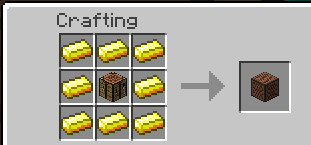
Gui:

Addons
- You can make your own lucky blocks by editing files inside Types folder.
Examples:
- Share your custom ones.
Donation
If you want to support this project and help updating it you can donate by simply clicking the below button:
%2526business%253dosama-alnori%2540outlook.com%2526bn%253dPP-DonationsBF%253abtn_donateCC_LG.gif%253aNonHosted%2526cancel_return%253dhttps%253a%252f%252fdev.bukkit.org%252fprojects%252f91188%2526lc%253dUS%2526item_name%253dAdvanced%2bLucky%2bBlock%2b(from%2bbukkit.org)%2526cmd%253d_donations%2526rm%253d1%2526no_shipping%253d1%2526currency_code%253dUSD)
• Servers
MCFeelBoy.minecraft360.de
- You can leave your server IP in the comments if you are using this plugin on your server and I'll add it to this list.
• Enchantments
- Lightning Enchantment: Strikes a lightning bolt when right-click.
• Files
• Editing drops
- Drops are stored in drops folder.
• Custom Drops
- Developers can make and add custom drops to lucky blocks.
- tutorial Here
• Todo
- Suggest ideas!
• Screenshots
- Share your screenshots.

- Credits to https://serverminer.com/
Comments


-

MCGamer199 Owner
-
View User Profile
-
Send Message
Posted Jan 21, 2016@MCstustu
Download the newest version 1.9.2. Remember to install actions plugin.
-
View User Profile
-
Send Message
Posted Jan 21, 2016@MCGamer199 I have one user who when he breaks the block, nothing happens. I see this error in the log:
[19:20:58 ERROR]: Could not pass event BlockBreakEvent to LuckyBlock v1.8 org.bukkit.event.EventException at org.bukkit.plugin.java.JavaPluginLoader$1.execute(JavaPluginLoader.java:310) [spigot.jar:git-Spigot-db6de12-07c3001] at org.bukkit.plugin.RegisteredListener.callEvent(RegisteredListener.java:62) [spigot.jar:git-Spigot-db6de12-07c3001] at org.bukkit.plugin.SimplePluginManager.fireEvent(SimplePluginManager.java:502) [spigot.jar:git-Spigot-db6de12-07c3001] at org.bukkit.plugin.SimplePluginManager.callEvent(SimplePluginManager.java:487) [spigot.jar:git-Spigot-db6de12-07c3001] at net.minecraft.server.v1_8_R3.PlayerInteractManager.breakBlock(PlayerInteractManager.java:286) [spigot.jar:git-Spigot-db6de12-07c3001] at net.minecraft.server.v1_8_R3.PlayerInteractManager.a(PlayerInteractManager.java:215) [spigot.jar:git-Spigot-db6de12-07c3001] at net.minecraft.server.v1_8_R3.PlayerConnection.a(PlayerConnection.java:637) [spigot.jar:git-Spigot-db6de12-07c3001] at net.minecraft.server.v1_8_R3.PacketPlayInBlockDig.a(SourceFile:40) [spigot.jar:git-Spigot-db6de12-07c3001] at net.minecraft.server.v1_8_R3.PacketPlayInBlockDig.a(SourceFile:10) [spigot.jar:git-Spigot-db6de12-07c3001] at net.minecraft.server.v1_8_R3.PlayerConnectionUtils$1.run(SourceFile:13) [spigot.jar:git-Spigot-db6de12-07c3001] at java.util.concurrent.Executors$RunnableAdapter.call(Executors.java:511) [?:1.8.0_66-internal] at java.util.concurrent.FutureTask.run(FutureTask.java:266) [?:1.8.0_66-internal] at net.minecraft.server.v1_8_R3.SystemUtils.a(SourceFile:44) [spigot.jar:git-Spigot-db6de12-07c3001] at net.minecraft.server.v1_8_R3.MinecraftServer.B(MinecraftServer.java:715) [spigot.jar:git-Spigot-db6de12-07c3001] at net.minecraft.server.v1_8_R3.DedicatedServer.B(DedicatedServer.java:374) [spigot.jar:git-Spigot-db6de12-07c3001] at net.minecraft.server.v1_8_R3.MinecraftServer.A(MinecraftServer.java:654) [spigot.jar:git-Spigot-db6de12-07c3001] at net.minecraft.server.v1_8_R3.MinecraftServer.run(MinecraftServer.java:557) [spigot.jar:git-Spigot-db6de12-07c3001] at java.lang.Thread.run(Thread.java:745) [?:1.8.0_66-internal] Caused by: java.lang.NullPointerException at com.LuckyBlock.Engine.LuckyBlock.spawnLB(LuckyBlock.java:3132) [?:?] at com.LuckyBlock.Events.BreakLuckyBlock.LuckyBlockEvent(BreakLuckyBlock.java:185) [?:?] at sun.reflect.GeneratedMethodAccessor45.invoke(Unknown Source) [?:?] at sun.reflect.DelegatingMethodAccessorImpl.invoke(DelegatingMethodAccessorImpl.java:43) [?:1.8.0_66-internal] at java.lang.reflect.Method.invoke(Method.java:497) [?:1.8.0_66-internal] at org.bukkit.plugin.java.JavaPluginLoader$1.execute(JavaPluginLoader.java:306) [spigot.jar:git-Spigot-db6de12-07c3001]
-
View User Profile
-
Send Message
Posted Jan 18, 2016@MysticCity
I don't think so. CraftBukkit has changed since 1.7.9.
-
View User Profile
-
Send Message
Posted Jan 17, 2016Work the last Version with 1.7.9 Servers?
-
View User Profile
-
Send Message
Posted Jan 15, 2016@MCGamer199 - I don't have a "types" folder in version 1.8. Is this 1.9/1.9.1 specific?
-
View User Profile
-
Send Message
Posted Jan 14, 2016@MCstustu
types folder stores only lucky block options like crafting recipe and type,data,etc also you can there make your one lucky block.
-
View User Profile
-
Send Message
Posted Jan 13, 2016@MCGamer199: sorry I don't understand? To be clear I am using LB1.8 as LB1.9 and higher doesn't work on the latest spigot.
If I remove the config file, where in the types folder is the config options?
-
View User Profile
-
Send Message
Posted Jan 13, 2016Same problem as CallMeLuis!
I downloaded the plugin then restarted my server and none of the features work. It says its been downloaded when i do /plugins but neither the commands nor craft recipe work. To try and look further in this problem, I tried to look in the config. Then noticed there was no config file. PLEASE HELP!
(spigot 1.8.8)
-
View User Profile
-
Send Message
Posted Jan 13, 2016@MCstustu
You can make a copy of the default config then remove it and change the options again. The new config hasn't changed alot. All luckyblock options are stored in types folder since the last version.
-
View User Profile
-
Send Message
Posted Jan 13, 2016@MCGamer199 - If I remove the config.yml I will lose my configuration options though? Eg I want to alter the crafting recipes, make the LB gold blocks not sponge.
@CallMeLuis - only LB 1.8 works on the latest spigot. 1.9 and 1.9.1 are not presently compatible.
-
View User Profile
-
Send Message
Posted Jan 12, 2016@MCstustu
I figured it out it's not a bug. You have to remove config.yml because lucky block options stored in types folder now.
-
View User Profile
-
Send Message
Posted Jan 12, 2016@CallMeLuis
Is there any error messages in the console? And yes it works with 1.8 servers.
-
View User Profile
-
Send Message
Posted Jan 12, 2016I've downloaded the plugin, put it in my plugins folder, config file has loaded up, but yet i cant craft it or do any of the commands!
Does this plugin work for 1.8.8???
Please reply ASAP,
Thanks.
-
View User Profile
-
Send Message
Posted Jan 12, 2016Just to update you:
When a Lucky Block is generated as part of chest loot, it DOES keep the user configured block type.
When a Lucky Block is generated as a straight drop, or the flying block, it does NOT keep the users configured block type.
Hope that helps :)
-
View User Profile
-
Send Message
Posted Jan 12, 2016Ok understood. To confirm, I am using 1.8 as both 1.9 and 1.9.1 will not load up on the latest Spigot version.
I don't know if that bug is fixed in your plugin's latest builds?
-
View User Profile
-
Send Message
Posted Jan 12, 2016@MCstustu
I think this is a bug.
-
View User Profile
-
Send Message
Posted Jan 11, 2016Thanks, thats great to know. One final question (for now :)
I have updated the block from sponge to gold bar in the config.yml and it works great. However, when the system grants the user their Luck Block back or generates one in a crate - it still generates as a sponge. The sponge also then doesn't work as a Lucky Block.
What file do I need to update, so any Lucky Block always generates as the gold block?
-
View User Profile
-
Send Message
Posted Jan 11, 2016@MCstustu
They are not affected by explosions.
-
View User Profile
-
Send Message
Posted Jan 10, 2016Cool thanks.
Also looking in config.yml what is the 'super lucky block' crafted with the obsidian and diamond? I crafted some but they don't seem to behave in a different way to standard lucky blocks? Except of course the different block type of glass?
-
View User Profile
-
Send Message
Posted Jan 10, 2016@MCstustu
You can just delete the line and then change chances value.