Advanced Lucky Block

Before installing, make sure that you've read all of the instructions down below and that your server version matches that of the plugin.
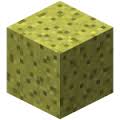
This plugin simply adds lucky blocks to your server. If you're not familiar with the actual lucky block mod, you may need to watch it on Youtube since it's very popular. Lucky blocks are blocks that, by default, act like sponges and spawn random drops when they are broken. Depending on the luck the block possess, it's more probable that you receive good or bad stuff. Numerous different drops can be anything from lucky armor, potions, lucky swords, chests, monsters, traps, etc.
This plugin is highly customizable which means that you can control which drops may spawn and when. Reading through files that the plugin generates on installations will give you a good idea of how the plugin works.
• How to get the block
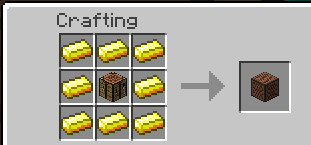
You may notice that regular sponges won't do anything as you would expect. You can either get the block through crafting by surrounding a dropper with 8 gold ingots, which is the same recipe as in the original mod; or by simply using /lb give command which takes additional arguments allowing you to specify things like luck value.
Currently, you can have up to 1048 lucky blocks placed at the same time. Placing more will just delete the newly placed block. The reason behind this limitation is that the loading mechanism takes a considerable amount of time if you have too many lucky blocks placed which definitely causes the server to lag on reload. This is however probably going to be changed in a later version when a more effective way of loading is implemented. Suggestions about how this can be achieved are appreciated.
• Important to mention
If you're running an outdated Minecraft server, you can look up for older versions of the plugin and find the one that supports your server. Notice that different versions of the plugin may work on the same server but I'm not responsible for any eventual errors and bugs so it's always recommended to use the right version to avoid unexpected bugs and glitches.
• Features
- Highly customizable.
- Craftable.
- Option to make lucky blocks spawn naturally in the world.
- You can create and add your custom lucky blocks (a tutorial about this might be implemented later).
- All data is stored inside files, so loading the server won't cause any data loss.
- Play sounds, spawn particles when lucky blocks are placed/destroyed.
- Lucky blocks with better luck yield better drops and vice versa.
- You can add as many drops as you wish (until your server runs out of memory).
- Silk touch enchantment support.
- When the block is broken with a tool that has fortune enchantment, a dropped luck block with higher luck will spawn (consumes too much durability of the held item).
- Can be placed by dispensers.
- Can be pushed by pistons.
- Slime blocks next to pistons can push lucky blocks in the air (WIP).
- Developers can add custom drops to the plugin.
- Much more!
• Setup
- Download and install WorldEdit (recommended).
- Download Advanced Lucky Block plugin.
- Put the downloaded file in plugins folder.
- Enjoy!
• Commands
• Permissions
• Lucky Crafting Table:
Used to add or subtract luck from lucky blocks. The traditional method was to surround the lucky block with minerals and valuable items in the crafting table, but this method was replaced with another one involving an own crafting window.
Crafting recipe:
Gui:

Addons
- You can make your own lucky blocks by editing files inside Types folder.
Examples:
- Share your custom ones.
Donation
If you want to support this project and help updating it you can donate by simply clicking the below button:
%2526business%253dosama-alnori%2540outlook.com%2526bn%253dPP-DonationsBF%253abtn_donateCC_LG.gif%253aNonHosted%2526cancel_return%253dhttps%253a%252f%252fdev.bukkit.org%252fprojects%252f91188%2526lc%253dUS%2526item_name%253dAdvanced%2bLucky%2bBlock%2b(from%2bbukkit.org)%2526cmd%253d_donations%2526rm%253d1%2526no_shipping%253d1%2526currency_code%253dUSD)
• Servers
MCFeelBoy.minecraft360.de
- You can leave your server IP in the comments if you are using this plugin on your server and I'll add it to this list.
• Enchantments
- Lightning Enchantment: Strikes a lightning bolt when right-click.
• Files
• Editing drops
- Drops are stored in drops folder.
• Custom Drops
- Developers can make and add custom drops to lucky blocks.
- tutorial Here
• Todo
- Suggest ideas!
• Screenshots
- Share your screenshots.

- Credits to https://serverminer.com/
Comments


-

MCGamer199 Owner
-
View User Profile
-
Send Message
Posted Oct 5, 2015@G4mingEdition
Please contact me.
-
View User Profile
-
Send Message
Posted Oct 4, 2015It's ok but i have a problem.. It doesnt regen the map after the game and players aren't teleported to the spawnpoints.
-
View User Profile
-
Send Message
Posted Oct 4, 2015@G4mingEdition
You have to set the bounds or just set LimitedArea to false in the config.
-
View User Profile
-
Send Message
Posted Oct 3, 2015Hello,
with the version "1.9 build 2" i haven't problems but when the game start i have a message "Return to the playing area or...." but i'm in the playing area. Can you help me, please ?
Thanks,
-
View User Profile
-
Send Message
Posted Oct 2, 20151.9 Build 2 has been released. Check DevBuilds above for more info.
-
View User Profile
-
Send Message
Posted Oct 2, 2015@G4mingEdition
hi MCGamer199, i've the same problem of G4mingEdition...
opened a ticket and sended you a pm, but i'm still waiting from yesterday morning.
Please can you answere?
best regards
NT
-
View User Profile
-
Send Message
Posted Sep 28, 2015@G4mingEdition
Please contact me.
-
View User Profile
-
Send Message
Posted Sep 27, 2015Hi,
I have an error with "ID" /lbw setlobby [ID]. Because when i create a game i have an error (invalid game!)
-
View User Profile
-
Send Message
Posted Sep 25, 2015@kachekos
Please contact me.
-
View User Profile
-
Send Message
Posted Sep 19, 2015Heyooo, i tried to play LBW. it was awesome! But 1 problem.. It doesnt regen map after game :( And player dropes books in arena waiting lobby when player leave it
-
View User Profile
-
Send Message
Posted Sep 11, 2015A new update is coming out very soon. create tickets about what do you want to see in the next version.
-
View User Profile
-
Send Message
Posted Sep 10, 2015@kachekos
See This small tutorial :)
-
View User Profile
-
Send Message
Posted Sep 8, 2015and... how to create LBW game?? /lbw creategame dont work for me :/
-
View User Profile
-
Send Message
Posted Sep 8, 2015Idea for LBW!!! Ability to change color of glass in pre-game (perms like lbw.glass.yellow, lwb.glass.green).. Kit system :D
-
View User Profile
-
Send Message
Posted Aug 28, 2015@MineplayerStale
Please create a ticket instead of posting it here this helps me to fix it.
-
View User Profile
-
Send Message
Posted Aug 28, 2015I have set on the config to use LuckyBlocks as normal sponges, but it doesn't work, I break a normal sponge and nothing happens, any idea?
LuckyBlock:
Block: SPONGE
UseBlockID: true
BlockID: 19
BlockData: none
Block1:
Type: SPONGE
UseBlockID: true
BlockID: 19
BlockData: none
WorksInCreative: true
UseNormalSponge: true
-
View User Profile
-
Send Message
Posted Aug 25, 2015@BillyWalker27
If you want to disable them just set the SpawnRate to 0 and to make them always spawn set SpawnRate to 200 :)
-
View User Profile
-
Send Message
Posted Aug 25, 2015@MCGamer199
I think,he means that LB randomly spawn in the world :D If its really, It's fun xD
-
View User Profile
-
Send Message
Posted Aug 22, 2015@BillyWalker27
You mean that you want the whole world made of lucky blocks or what?
-
View User Profile
-
Send Message
Posted Aug 22, 2015Hey, This might just be me being silly but how do you make the randomly generating luckyblocks always work? because majority of the luckyblocks on my server are just sponges is there a way to edit this? I tried giving them a 100 spawn rate but didn't do much?