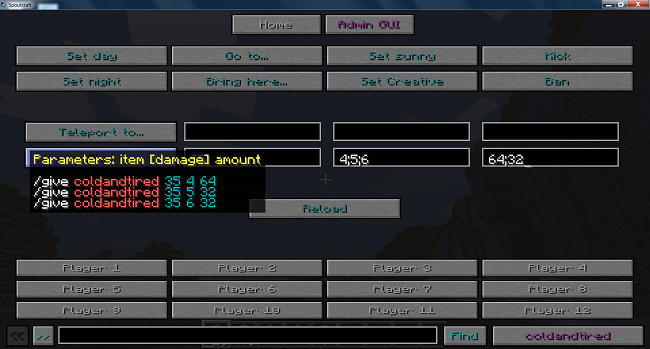
Admin GUI
Development on this plugin has stopped, and all further development is on the much better GUI Creator
Comments
-

coldandtired Owner
Development on this plugin has stopped, and all further development is on the much better GUI Creator

coldandtired Owner
-
View User Profile
-
Send Message
Posted Nov 14, 2011@zero80472 Was it working as expected before you added the new button? I copied what you put in the comment and pasted it into a file and it worked fine.
-
View User Profile
-
Send Message
Posted Nov 14, 2011hay im tryin to make new kits in the layout 1 example but nothing works
hears the code
it looks right but it wont show up in the GUI interface (sprotcraft)
-
View User Profile
-
Send Message
Posted Nov 13, 2011Updated to 1.6.7.
This is a recommended update from both 1.6.6 and 1.6.6dev as a few of the previous problems (not all :) ) in Spoutcraft are now fixed in the RB.
New config settings
Fixes
Also, added a poll to the front page.
-
View User Profile
-
Send Message
Posted Nov 12, 2011@osky2918 If you only want yourself to use it you have to not give the permission Admin_GUI.can_open_GUI. This means that even if another player tries using Spoutcraft they won't have access to the GUI.
If you install Spout it shouldn't have any negative effect on your server unless a plugin is using it. It should be pretty invisible to the users.
-
View User Profile
-
Send Message
Posted Nov 12, 2011@coldandtired
Yhea , I understod that . But I my players do not like Spout but I do , and I only want myself to use the plugin and not my player. I have use Spout before and I remove it because my player did not like it , and could not join but it. or am I wrong ?
-
View User Profile
-
Send Message
Posted Nov 11, 2011@osky2918 The GUI will only show up for players who use Spoutcraft. Additionally, you can use permissions to hide the GUI (or certain parts of it) from players even if they have Spoutcraft.
-
View User Profile
-
Send Message
Posted Nov 11, 2011Do everyone on my server need spoutcraft or just the admins that use it ?
-
View User Profile
-
Send Message
Posted Nov 10, 2011@mbk7990 You need to give yourself the permission Admin_GUI.can_open_GUI.
To do this with PermissionsBukkit, open the chat window and type
Replace YOUR_NAME with any player's name that you want to have access to the GUI.
-
View User Profile
-
Send Message
Posted Nov 10, 2011How open GUI?
config to add the open_key: KEY_O, but does not open Can not have access to..
PermissionsBukkit Use help..
-
View User Profile
-
Send Message
Posted Nov 5, 2011@coldandtired
I fixed that up (@drguild) in the markup it was right somehow when I pasteded and tried to fix those were cut.
As for that message like mentioned I test and make a ticket on it when I know the cause
-
View User Profile
-
Send Message
Posted Nov 5, 2011@drguild In the Mod screen it says 'nfo=' instead of 'info=', and in the Manager screen it says 'ermission=' instead of 'permission='.
They won't stop it loading (because it's still valid XML) but the screens won't work as expected.
-
View User Profile
-
Send Message
Posted Nov 5, 2011Yea its my blank base file I setup to work on adding stuff to it.
Updated the post below with the proper code tag.
Ok I'll test more and make a ticket on it I think with my startup etc.
Because when I change screens it shows 1 line of that message always.
-
View User Profile
-
Send Message
Posted Nov 5, 2011@drguild Is that the real file or just an example? There are two mistakes in it: a missing 'i' in the second screen and a missing 'p' in the third.
But I can't replicate the bug, not with the RBs of Spout(craft) nor with the latest dev builds.
-
View User Profile
-
Send Message
Posted Nov 4, 2011Well I have been using the 1.6.6dev zip plugin
And yea I did edit the file and tested it and have a base understanding but why the error shows when switching tabs even on today's spoutcraft client update no idea why I'll try a earlier version and see if that fixes it.
If not Ill create a ticket.
Dam file parsing the screens are correct xml btw
-
View User Profile
-
Send Message
Posted Nov 4, 2011@ShrunkenQuasar Wow, just noticed that that command somehow got left out of the page :( I'll add it now.
If you want to change the config.yml file you need to reload the whole plugin like normal with /reload. If you've changed some screen files and want them to refresh without having to reload the whole plugin, the command is /reloadscreens or /rs. They need the permission Admin_GUI.can_reload (makes no sense to give this to everyone as access to the server is required to change the files anyway).
-
View User Profile
-
Send Message
Posted Nov 4, 2011@coldandtired
Thank you. Now another question. This page says admins can reload the config. What is the proper command to do so?
-
View User Profile
-
Send Message
Posted Nov 4, 2011@drguild There is no command called when switching tabs. The error message you got is the standard Minecraft one when a command is mistyped or isn't available in the plugins installed.
If you download the 1.6.6dev zip (don't use the plugin, just check the Examples folder) it comes with all the examples in the Tutorial section above. Try taking one of them and editing it slightly to see how it works.
It's a bit hard for me to provide an example file with the permission attribute as you wouldn't even see the screen with it in!
I updated all the examples and the Tutorial section last night so if you read it earlier please read it again as a lot was added.
-
View User Profile
-
Send Message
Posted Nov 4, 2011Thjis looks good.
Going to take me ages to write screens.
All these tips and ways to do stuff etc can you put into files Ive been searching below to find the information cause its not in the documentation or is easy to read in your documentation with example in the config file etc with the : or
http://dev.bukkit.org/server-mods/admin-gui/?comment=54
I tested a second screen and I'm getting:
Unknown command. type "help" for help.
I checked my server logs nothing is being sent to the server so that message is client side when switching tabs
-
View User Profile
-
Send Message
Posted Nov 4, 2011@bearbear12345 It's supposed to be empty if using the default settings. If you want to override some settings you can find them here.
-
View User Profile
-
Send Message
Posted Nov 4, 2011@ShrunkenQuasar That's the Spout bug. You can use 1.6.4 which was before that feature was added, or use 1.6.6dev with the dev builds of Spout and Spoutcraft, which have the bug fixed.