WebAuction
WebAuction - Website based item market [1597]
Requires: An economy plugin (iConomy 4,5,6, BOSEconomy 6 & 7, EssentialsEcon, 3Co, MultiCurrency, MineConomy, eWallet, EconXP)
Requires: Vault
Requires: Web server running PHP 5.2+
Download Latest .jar:
WebAuction.jar v0.6.4 - last change 20th Jan 2012
Download Latest Web Folder:
WebInterface.zip v0.6.4 - last change 22th Jan 2012
Download Latest Development .jar:
WebAuction.jar - last change 9th Feb 2012
Download Latest Development Web Folder:
WebInterface.zip - last change 9th Feb 2012
Development Server
If you want to see a demonstration of a working (mostly) development version of this plugin, I am currently running a small server with it (not 24/7). However the website is pretty sluggish because it is not hosted on the same server as minecraft, but it should still work.
- IP: twm.servegame.com
- Website: webauction.threewisemeh.com
Source (GitHub)
WebAuction (jar) - http://bit.ly/o8vpPq
WebInterface (web files) - http://bit.ly/nPubR1
Description
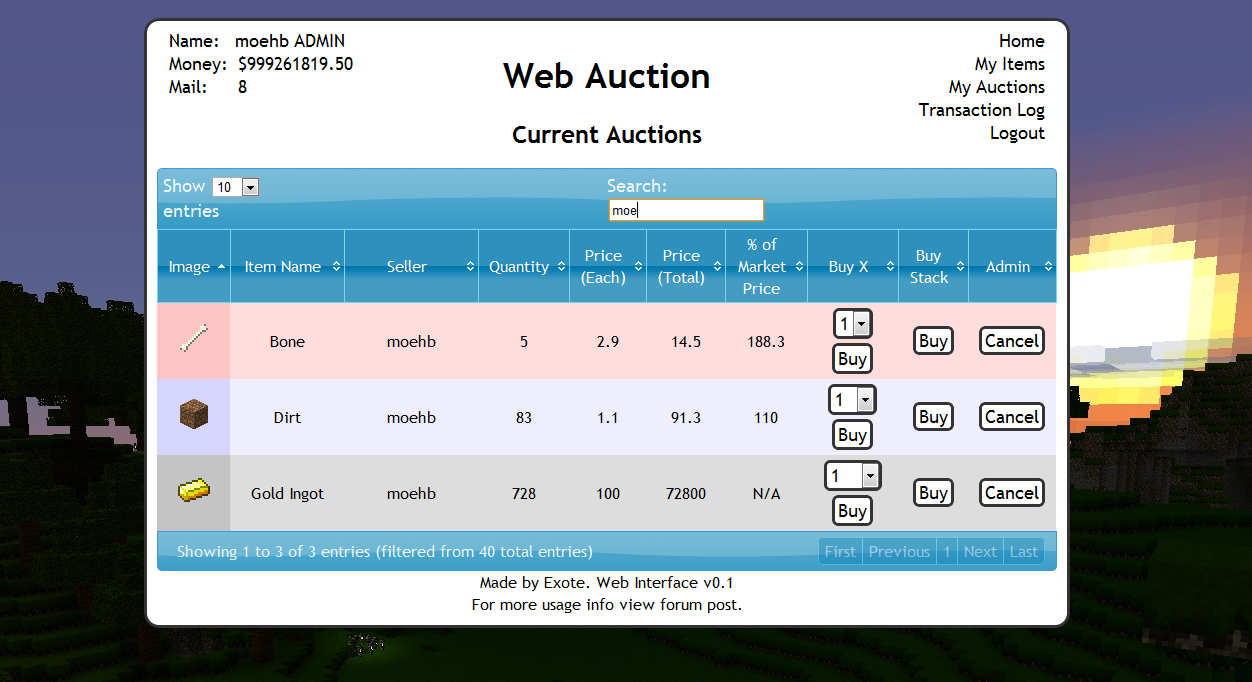
Ok, so I know there are loads of shop plugins that all do slightly different things. But because of the UI restrictions in game, I chose to make a shop plugin that links in with a website via a MySQL database to make trade easier, and even allow people to check on how their items are doing without being logged into the game. (mobile device?).
Basic idea is that admins (or players with right permissions etc) set up auction houses around the world. Players can then go there and deposit items, when they do this the items disappear from the world and get logged into the players online account. They they put money in the online account by clicking signs. Once this is done and they have set a password, they can log into the website and see all the auctions that are going on.
Using the money in the online account they can buy items, and they will be sent to the mailbox in game (a sign) and they can set up their own auctions for the items they have stored online.
One of the main features is that the website will look at all the sales and calculate a moving average for the market price of that item. Which should help players when setting a price, or buyers to see if they are getting a good deal.
Notes:
- Just added a how to edit section for info and new designs to help change the look of the website
- Works best with iConomy stored in the same MySQL database as the WebAuction tables (direct money link from game to website)
Features:
- Only members of your server can get an account
- Change password from in game
- Deposit items to be sold by right-clicking a mailbox deposit sign while holding it
- Change online balance with signs
- Get items from a sign mail box
- Moving average market price calculations
- Can link directly to the iConomy database
Overview Video:
NEW VIDEO :D
Screenshots:
will take more soon, when we have spent a while using it so that the market prices are properly calculated.


Setup:
Basics:
- Download the WebAuction.zip and extract it
- Put the WebAuction.jar in the plugins folder on your minecraft server
- Put the WebAuctionInterface folder (you can rename) on your website
- Restart server
- Look in plugins/WebAuction to find the config file add your MySQL database details
- In the interface folders on website, find the scripts/config.php file and add MySQL details again
- Be careful with mysql passwords, special characters such as {}[]() may cause the file to be incorrectly read by the yml parser.
- Make everyone create a password, make sure its different to ones they use elsewhere etc.
- Make a sign for the withdraw mail box (see screenshot) First list: "[WebAuction]" Second line: "MailBox"
- Make a sign for the deposit mail box (see screenshot) First list: "[WebAuction]" Second line: "MailBox" Third line: "Deposit"
- If you have iConomy data stored in the same database as the WebAuction data, use the web config file to point to the right table, and ignore the stuff about withdraw and deposit signs.
- Make some withdraw and deposit signs for money (again in screenshot) First line "[WebAuction]" Second: "Withdraw" or "Deposit" Third: the amount of money, or for the withdraw sign you can put "All" on the third line
- You can also make recent auction signs, to show a live feed of the new auctions: First line "[WebAuction]" Second: "Recent" Third: a number for the offset, so for the most recent auction put "1", second most recent "2" etc.
- Log into the website and start selling
Important Signs
Mailbox:
Used to deposit items and withdraw items that are in your mail
Line 1: [WebAuction]
Line 2: MailBox
Line 3: Withdraw (not actually needed but makes it neater with the other deposit sign :P)
Line 1: [WebAuction]
Line 2: MailBox
Line 3: Deposit
Deposit Money:
Used to send money to the website to be used on the WebAuction (not needed if using iconomy databases) Line 3 can be any number (100, 0.01, 55.7 etc.)
Line 1: [WebAuction]
Line 2: Deposit
Line 3: 100
Withdraw Money:
Used to get money from the website to be used on the WebAuction (not needed if using iconomy databases) Line 3 can be any number (100, 0.01, 55.7 etc.) Line 3 can also be "All".
Line 1: [WebAuction]
Line 2: Withdraw
Line 3: All
Recent Auction Feed
Used to see recent auctions people have made, you can set up as many signs as you want each looking for subsequent auctions. For example in your auction house you could have one sign to show each of the five most recent auctions. For line 3 enter the number for the offset from the most recent auction ("1" for the most recent, "2" for the second most recent... etc.)
These signs will update automatically when new auctions are made, and will display the item name, the quantity and the price.
Line 1: [WebAuction]
Line 2: Recent
Line 3: 1
There is now also another way of displaying recent auctions. If you have the SignLink plugin on your server you can display values about the auctions however you like on signs using various bits of data as variables. So far I have just got:
- Auction Name (%WAName1%)
- Auction Price (%WAPrice1%)
- Auction Quantity (%WAQuant1%)
Where you can change the number (1) for any other in the same way as in the previous auction signs, except I think 0 is actually the most recent auction.
I will soon be adding other information such as the sellers name and maybe the market price etc.
New Auction Shouting
A sign that is given a radius, when a new auction is created it will shout in it's radius about it to anyone nearby, line 3 is the radius in blocks.
Line 1: [WebAuction]
Line 2: Shout
Line 3: 10
Twitter feed
If you want to send information of new auctions and sales to a twitter account. Open up the config.php file (in the scripts folder).
Go to: https:dev.twitter.com/apps/new Input all your information. It doesnt really matter what you put for the name and things on the first page. (and you don't need to add anything for the callback)
When you have created your new app, open the settings tab, and set the application type access to "read and write". Save everything. Go back to main app info page. On that page should be the consumer key and consumer secret. Add these two values to the config file.
Near the bottom of the page is a button that says "create access token", makes sure you have set the permissions to read and write then click this button and copy the two values it gives you into the config folder.
Done (hopefully)
More Setup Information
To get more info on how to set up the plugin, along with common problems, take a look at the How to Install page
Changing the Design
To see how to change the design, or select one someone else has made: How to Edit
Commands:
- /wa password [pass] (sets your password)
Permissions:
- wa.use.withdraw.items (use mail box)
- wa.use.withdraw.money (use withdraw sign)
- wa.use.deposit.items (use deposit sign)
- wa.use.deposit.money (use deposit sign)
- wa.canbuy (can buy from auction)
- wa.cansell (can sell to the auction)
- wa.create.sign.deposit (create deposit sign)
- wa.create.sign.withdraw (create withdraw sign)
- wa.create.sign.mailbox.withdraw (create mailbox sign)
- wa.create.sign.mailbox.deposit (create mailbox sign)
- wa.create.sign.shout (create a new auction shout sign)
- wa.create.sign.recent (create a recent auction sign)
- wa.webadmin (user account is admin on the website)
- wa.remove (remove WA signs)
Donations:
Hope you guys like the plugin, keep telling me things you think would be cool to add and I will do my best. And a donation is always nice :P

Comments


-

_ForgeUser4509640 Owner
-
View User Profile
-
Send Message
Posted Nov 19, 2011@Exote
Thank you!
-
View User Profile
-
Send Message
Posted Nov 19, 2011@imaxorz
It will check x times per day (you can set x) and charges people for how much they have stored at that point.
Yup. Make sure the table name is the same as in the WA config file (some people change them)
-
View User Profile
-
Send Message
Posted Nov 19, 2011@Exote
Does it just charge once for every item that's added as they are being added? Or if it sees you have 10 items, it will charge you for those 10 items on every check it does?
Also, if I set "$useMySQLiConomy = false; you you have iConomy data in another table in the same database?" to true, that means there is no longer a need to use the deposit/withdraw signs? The money will be directly connected to the iConomy accounts?
-
View User Profile
-
Send Message
Posted Nov 19, 2011@imaxorz
Just the 10 that are in the "my items" section
-
View User Profile
-
Send Message
Posted Nov 19, 2011I got a question regarding storage charge.
Does it charge a fee for items that are currently are up for sale?
Meaning if I currently have 10 items for auction, and 10 items just laying around, will it charge me storage fee for 20 items, or for 10?
-
View User Profile
-
Send Message
Posted Nov 19, 2011@BioRage
Get the cancelAuctionAdmin.php file from GitHub it's fixed there.
-
View User Profile
-
Send Message
Posted Nov 18, 2011Random Issue, when clicking cancel of an auction I get this.
Parse error: syntax error, unexpected ')' in /home/mysite/public_html/WebInterface/scripts/cancelAuctionAdmin.php on line 41
-
View User Profile
-
Send Message
Posted Nov 17, 2011@qazzi It uses spout so highly unlikely to get rid of it, Exote has tried withou it before.
@sirmonsterslayer yes you need both in mysql how else are you going to transfer money is interwebs?
-
View User Profile
-
Send Message
Posted Nov 16, 2011Is there anyway possible to get rid of the spout requirement. Your the last plugin stopping us from abandoning SPOUT finally altogether. It's just waaaaay to unstable for large servers...
-
View User Profile
-
Send Message
Posted Nov 15, 2011Will this still work even if we use iconomy 6 in non mysql mode ?
-
View User Profile
-
Send Message
Posted Nov 15, 2011I haven't tested it yet but is it possible to have mutiple deposite chests? My goal is to have each player have their own chest or does it only have to be one chest?
-
View User Profile
-
Send Message
Posted Nov 14, 2011@vobilli
There seem to be a few people that have trouble with superperms (way I defined permissions in this plugin) when using PEX. Not sure if it is my fault of if they sort superperms in a different way (never used the plugin). But I have this working fine with permissionsBukkit if that is any use, when I have time I will do some proper testing with PEX.
-
View User Profile
-
Send Message
Posted Nov 14, 2011@Exote
(No one outside the Admin group can create auctions)
Things I've tried:
In the pastebin you'll see that I want the Baron rank to be able to create auctions. http://pastebin.com/MFa52mQa
-
View User Profile
-
Send Message
Posted Nov 14, 2011@MrBonkee
If you want to translate stuff in the table like the next and previous buttons have a look at line 970 ish of js/jquery.dataTables.js
-
View User Profile
-
Send Message
Posted Nov 14, 2011Finished, it works perfectly, thks for this awesome plugin and for help.
Thanks from France ! :p
-
View User Profile
-
Send Message
Posted Nov 14, 2011@MrBonkee
Keep a copy of the old files, the majority of the written content can be cut and pasted, with a few new columns.
-
View User Profile
-
Send Message
Posted Nov 14, 2011FUUUUUUUUUUUUUUUUUUUUUUUUUU- , so i'm going to retrad everything.. :(
-
View User Profile
-
Send Message
Posted Nov 14, 2011@MrBonkee
Most pages have changed. Sorry.
-
View User Profile
-
Send Message
Posted Nov 14, 2011i need to update the webinterface ? but do the : footer.php , graph.php , index.php , info.php , login.php , logout.php , myauctions.php , myitems.php , topBoxes.php , transactionLog.php changed ? because i've trad them in french and i don't want to make it again ..
-
View User Profile
-
Send Message
Posted Nov 14, 2011Now, when i connect there is a white screen ?!