WebAuction
WebAuction - Website based item market [1597]
Requires: An economy plugin (iConomy 4,5,6, BOSEconomy 6 & 7, EssentialsEcon, 3Co, MultiCurrency, MineConomy, eWallet, EconXP)
Requires: Vault
Requires: Web server running PHP 5.2+
Download Latest .jar:
WebAuction.jar v0.6.4 - last change 20th Jan 2012
Download Latest Web Folder:
WebInterface.zip v0.6.4 - last change 22th Jan 2012
Download Latest Development .jar:
WebAuction.jar - last change 9th Feb 2012
Download Latest Development Web Folder:
WebInterface.zip - last change 9th Feb 2012
Development Server
If you want to see a demonstration of a working (mostly) development version of this plugin, I am currently running a small server with it (not 24/7). However the website is pretty sluggish because it is not hosted on the same server as minecraft, but it should still work.
- IP: twm.servegame.com
- Website: webauction.threewisemeh.com
Source (GitHub)
WebAuction (jar) - http://bit.ly/o8vpPq
WebInterface (web files) - http://bit.ly/nPubR1
Description
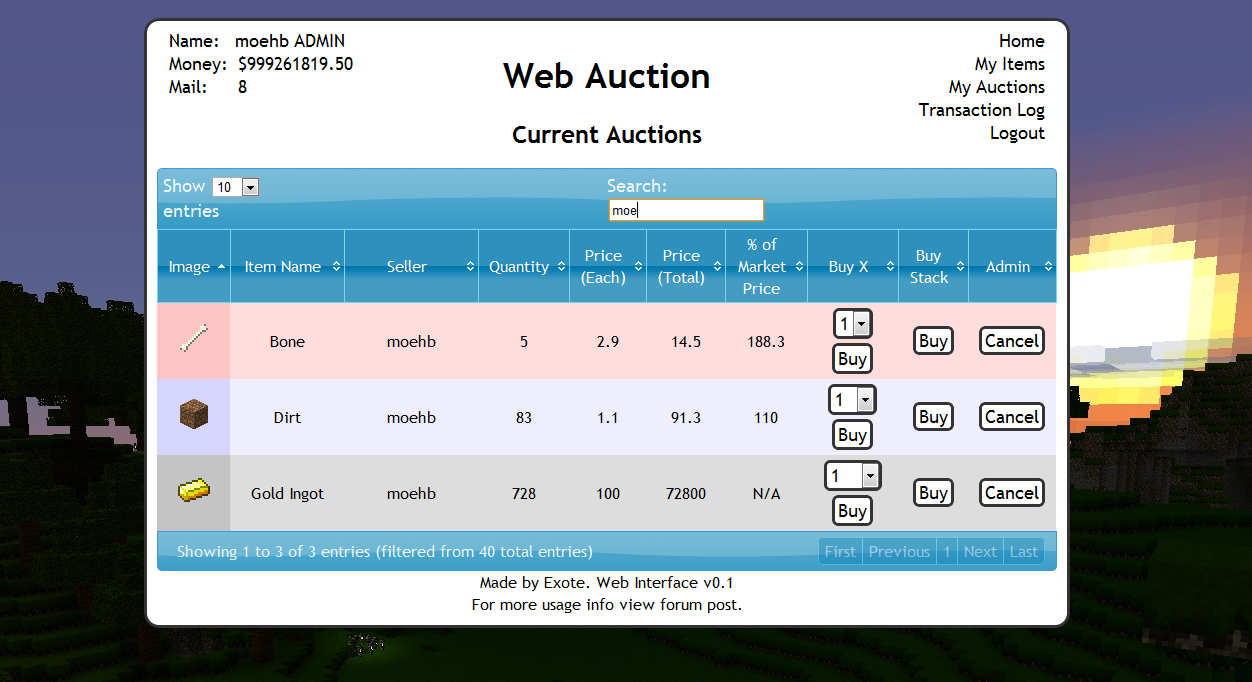
Ok, so I know there are loads of shop plugins that all do slightly different things. But because of the UI restrictions in game, I chose to make a shop plugin that links in with a website via a MySQL database to make trade easier, and even allow people to check on how their items are doing without being logged into the game. (mobile device?).
Basic idea is that admins (or players with right permissions etc) set up auction houses around the world. Players can then go there and deposit items, when they do this the items disappear from the world and get logged into the players online account. They they put money in the online account by clicking signs. Once this is done and they have set a password, they can log into the website and see all the auctions that are going on.
Using the money in the online account they can buy items, and they will be sent to the mailbox in game (a sign) and they can set up their own auctions for the items they have stored online.
One of the main features is that the website will look at all the sales and calculate a moving average for the market price of that item. Which should help players when setting a price, or buyers to see if they are getting a good deal.
Notes:
- Just added a how to edit section for info and new designs to help change the look of the website
- Works best with iConomy stored in the same MySQL database as the WebAuction tables (direct money link from game to website)
Features:
- Only members of your server can get an account
- Change password from in game
- Deposit items to be sold by right-clicking a mailbox deposit sign while holding it
- Change online balance with signs
- Get items from a sign mail box
- Moving average market price calculations
- Can link directly to the iConomy database
Overview Video:
NEW VIDEO :D
Screenshots:
will take more soon, when we have spent a while using it so that the market prices are properly calculated.


Setup:
Basics:
- Download the WebAuction.zip and extract it
- Put the WebAuction.jar in the plugins folder on your minecraft server
- Put the WebAuctionInterface folder (you can rename) on your website
- Restart server
- Look in plugins/WebAuction to find the config file add your MySQL database details
- In the interface folders on website, find the scripts/config.php file and add MySQL details again
- Be careful with mysql passwords, special characters such as {}[]() may cause the file to be incorrectly read by the yml parser.
- Make everyone create a password, make sure its different to ones they use elsewhere etc.
- Make a sign for the withdraw mail box (see screenshot) First list: "[WebAuction]" Second line: "MailBox"
- Make a sign for the deposit mail box (see screenshot) First list: "[WebAuction]" Second line: "MailBox" Third line: "Deposit"
- If you have iConomy data stored in the same database as the WebAuction data, use the web config file to point to the right table, and ignore the stuff about withdraw and deposit signs.
- Make some withdraw and deposit signs for money (again in screenshot) First line "[WebAuction]" Second: "Withdraw" or "Deposit" Third: the amount of money, or for the withdraw sign you can put "All" on the third line
- You can also make recent auction signs, to show a live feed of the new auctions: First line "[WebAuction]" Second: "Recent" Third: a number for the offset, so for the most recent auction put "1", second most recent "2" etc.
- Log into the website and start selling
Important Signs
Mailbox:
Used to deposit items and withdraw items that are in your mail
Line 1: [WebAuction]
Line 2: MailBox
Line 3: Withdraw (not actually needed but makes it neater with the other deposit sign :P)
Line 1: [WebAuction]
Line 2: MailBox
Line 3: Deposit
Deposit Money:
Used to send money to the website to be used on the WebAuction (not needed if using iconomy databases) Line 3 can be any number (100, 0.01, 55.7 etc.)
Line 1: [WebAuction]
Line 2: Deposit
Line 3: 100
Withdraw Money:
Used to get money from the website to be used on the WebAuction (not needed if using iconomy databases) Line 3 can be any number (100, 0.01, 55.7 etc.) Line 3 can also be "All".
Line 1: [WebAuction]
Line 2: Withdraw
Line 3: All
Recent Auction Feed
Used to see recent auctions people have made, you can set up as many signs as you want each looking for subsequent auctions. For example in your auction house you could have one sign to show each of the five most recent auctions. For line 3 enter the number for the offset from the most recent auction ("1" for the most recent, "2" for the second most recent... etc.)
These signs will update automatically when new auctions are made, and will display the item name, the quantity and the price.
Line 1: [WebAuction]
Line 2: Recent
Line 3: 1
There is now also another way of displaying recent auctions. If you have the SignLink plugin on your server you can display values about the auctions however you like on signs using various bits of data as variables. So far I have just got:
- Auction Name (%WAName1%)
- Auction Price (%WAPrice1%)
- Auction Quantity (%WAQuant1%)
Where you can change the number (1) for any other in the same way as in the previous auction signs, except I think 0 is actually the most recent auction.
I will soon be adding other information such as the sellers name and maybe the market price etc.
New Auction Shouting
A sign that is given a radius, when a new auction is created it will shout in it's radius about it to anyone nearby, line 3 is the radius in blocks.
Line 1: [WebAuction]
Line 2: Shout
Line 3: 10
Twitter feed
If you want to send information of new auctions and sales to a twitter account. Open up the config.php file (in the scripts folder).
Go to: https:dev.twitter.com/apps/new Input all your information. It doesnt really matter what you put for the name and things on the first page. (and you don't need to add anything for the callback)
When you have created your new app, open the settings tab, and set the application type access to "read and write". Save everything. Go back to main app info page. On that page should be the consumer key and consumer secret. Add these two values to the config file.
Near the bottom of the page is a button that says "create access token", makes sure you have set the permissions to read and write then click this button and copy the two values it gives you into the config folder.
Done (hopefully)
More Setup Information
To get more info on how to set up the plugin, along with common problems, take a look at the How to Install page
Changing the Design
To see how to change the design, or select one someone else has made: How to Edit
Commands:
- /wa password [pass] (sets your password)
Permissions:
- wa.use.withdraw.items (use mail box)
- wa.use.withdraw.money (use withdraw sign)
- wa.use.deposit.items (use deposit sign)
- wa.use.deposit.money (use deposit sign)
- wa.canbuy (can buy from auction)
- wa.cansell (can sell to the auction)
- wa.create.sign.deposit (create deposit sign)
- wa.create.sign.withdraw (create withdraw sign)
- wa.create.sign.mailbox.withdraw (create mailbox sign)
- wa.create.sign.mailbox.deposit (create mailbox sign)
- wa.create.sign.shout (create a new auction shout sign)
- wa.create.sign.recent (create a recent auction sign)
- wa.webadmin (user account is admin on the website)
- wa.remove (remove WA signs)
Donations:
Hope you guys like the plugin, keep telling me things you think would be cool to add and I will do my best. And a donation is always nice :P

Comments


-

_ForgeUser4509640 Owner
-
View User Profile
-
Send Message
Posted Nov 29, 2011@Exote
http://dev.bukkit.org/server-mods/spoutmaterials/ Comes to mind, I would just need an easier way to insert the textures/names into the db maybe something like the name of the block will be the textures name or something.
-
View User Profile
-
Send Message
Posted Nov 28, 2011Going to test this tomorrow :D way to late her!
-
View User Profile
-
Send Message
Posted Nov 28, 2011@SirMonsterSlayer
Which custom blocks do you mean? Ones from mods like industrialcraft?
-
View User Profile
-
Send Message
Posted Nov 28, 2011@Exote
Awwww really ? is there no way to fix that ? Yes and I meant db Thanks once more.
On a side note it would be cool with the upcoming custom blocks to have some easier way to insert them into webauction, if possible ^^
-
View User Profile
-
Send Message
Posted Nov 28, 2011Riiiiiight...
Think I am done with enchantments. :D
If you are feeling brave give me a hand testing with the links at the top of page. :) Get enchanting and see if it gives the results you expect.
Few things to note, I saw there was a enchantment plugin (Tim the enchanter) that I was using to speed up enchanting to test this. However Tim allows you to add any enchantment onto any item (that can be enchanted), hard to explain but not all enchantments are allowed on all enchantable items... like a sword can have sharpness but not respiration.
Anyway, this means that although you may be able to enchant an item with a enchantment, if it isnt legal (according to minecraft) then when it returns to gave via mailbox after being sold, it wont be able to be recrafted with that enchantment.
The same goes for enchantment levels higher than the max allowed.
But if you can put the enchantment on in the normal way with a enchanting table, everything should be fine.
-
View User Profile
-
Send Message
Posted Nov 28, 2011@Exote
Hey Exote I fix the problem. Sorry but could you remove all my past comments because I wasn't really using my brain. I forgot to start auction cause I though once the item got sent it would automatically start an auction for me with changeable price. Oh I was also wondering if you can add a hp bar near the item to show how much damage it took. Once again I like to state that is is one of the best plugin i ever used! XD
-
View User Profile
-
Send Message
Posted Nov 28, 2011@SirMonsterSlayer
You would put it in the same database not same table, I assume that is what you meant though. Yes just tell the web config file what the iconomy table name is, and it should sort it.
No more deposit and withdraw money, as it changes in game it changes on the auction.
-
View User Profile
-
Send Message
Posted Nov 28, 2011@Exote
Another question if I use iconomy in the same sql table with webauction, wA will directly access Iconomys money so theres no need for the deposit money signs ?
-
View User Profile
-
Send Message
Posted Nov 28, 2011@SirMonsterSlayer
Yeah they should work fine together, no idea why spout had a problem there...
-
View User Profile
-
Send Message
Posted Nov 28, 2011@Exote
Yeah, but I should be able to use it along each other right ? And it just spit out an error with spout in it ^^
-
View User Profile
-
Send Message
Posted Nov 28, 2011@SirMonsterSlayer
It looked like you were using v0.5 webauction jar, remember that doesn't use spout.
-
View User Profile
-
Send Message
Posted Nov 28, 2011@Exote
Tried using the /wa password command Anyways I updated to latest bukkit and spout now it works ^^
-
View User Profile
-
Send Message
Posted Nov 28, 2011@SirMonsterSlayer
Where were you trying to do?
-
View User Profile
-
Send Message
Posted Nov 28, 2011Don't know which error causes this, if you need more details tell me ;)
edit: spout 548 bukkit 1519
-
View User Profile
-
Send Message
Posted Nov 28, 2011@Exote
I tryd doing that, however i failed at moving the database of iconomy into the database where webauction is... so right now its like
Iconomy/iconomytables, Minecraft/WAtables
I cant figure out how to move the iconomy database :/ using linux and i dont know the commands via putty. kinda complicated...
PS: Using bukkit commet as chatbox like a boss
-
View User Profile
-
Send Message
Posted Nov 28, 2011@gamesketch
Lol I like your set up :) The classic red post boxes are cool :P
I always prefer using iConomy database to auto link the money though.
-
View User Profile
-
Send Message
Posted Nov 28, 2011@Exote
Oh did not test them! cause the "citizens plugin" had allot of issues with them ( like not working at all haha... )
-
View User Profile
-
Send Message
Posted Nov 28, 2011@gamesketch
Potions were done in 0.5,
Forgot to add images for splash potions though...
-
View User Profile
-
Send Message
Posted Nov 28, 2011@Exote
What about potions? i think there are allot of them.... xD i stopped counting at 273:700
as soon as the new version is out i gonna load it onto the server. :D
My awesome Auction House xD:
Outside: http://dl.dropbox.com/u/11398524/Screenshots/2011-11-28_17.14.44.png
Inside: http://dl.dropbox.com/u/11398524/Screenshots/2011-11-28_17.17.19.png
Mailbox hehe: http://dl.dropbox.com/u/11398524/Screenshots/2011-11-28_17.20.29.png http://dl.dropbox.com/u/11398524/Screenshots/2011-11-28_17.20.43.png
-
View User Profile
-
Send Message
Posted Nov 28, 2011@gamesketch
Almost done with enchanted items, just need to sort mailing them back to game, and updating market price