
VariableTriggers



Make your own plugin like features and more using VariableTriggers
This is a very powerful plugin that has unlimited potential. Create triggers that run lines of script when a player Clicks or Walks on a block (dirt, door, switch, trigger, torch, any block) or Create Event Triggers such as PlayerDeath , EntityDeath, BlockBreak, BlockPlaced, Join, Quit, Respawn, Interact and EntitySpawn that also run scripts. You can define Area Triggers and Command Triggers as well. You can use Dynamic Object variables and conditional IF and ELSE statements in the scripts. You can run any command that a player or OP can run and many speacial built-in commands to Teleport, Spawn Entities, Play Effects Visual or Sound, Set Blocks, Toggle Blocks, Check Players Heath and much more!. The scripts are executed on their own threads to take the strain off of the main server thread.








Comments


-

_ForgeUser8773666 Owner
-
_ForgeUser7840205 Documenter
-

Kiak Ticket Manager
-

Lyoko_Firelyte Maintainer
-
View User Profile
-
Send Message
Posted Feb 8, 2015@KyadCK
Kyad is awesome!
-
View User Profile
-
Send Message
Posted Feb 8, 2015Hey look at that, VT's documentation is updated to VT 1.3.3.1. :D
I'll work with Lyoko_Firelyte on getting VT2 it's own document section since so much has changed, as well as getting the UDL and Docs updated to support it all.
-
View User Profile
-
Send Message
Posted Feb 8, 2015You are right my advanced mod is disable, I still use vt 1.3.3.1 and advancedmode isnot in config file. I added it but server remove. I also tried /vt advanced but it wasnt work. H ow can I turn on advancedmode?
-
View User Profile
-
Send Message
Posted Feb 6, 2015@RoyPiter
You can use them by setting what you want to a variable then using "@BROADCAST $object.variable" Weird I know, I let lyoko know about it before.
You do not need the <var:>.
-
View User Profile
-
Send Message
Posted Feb 6, 2015@Lyoko_Firelyte
It works with integers but no if I use <var:$(object).(variable)>
-
View User Profile
-
Send Message
Posted Feb 6, 2015@RoyPiter
Thanks for pointing these out :) Does pause work with integers?
-
View User Profile
-
Send Message
Posted Feb 6, 2015Thanks Lyoko for the Update.
But here I have some more issues xD
I just found that @PAUSE doesn't accept decimal values, only whole numbers work
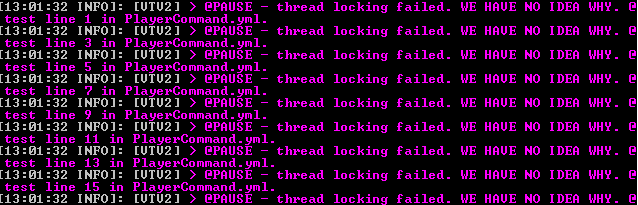
(It says "We have no Idea why")
The string returned in <cmdline> starts with a " " blank space (this breaks most of my command triggers writen in VT v1.3).
Some Script Commands like @BROADCAST, @TELL or @CMD don't read color codes with the "&" symbol.
And I can't use "/vt run scriptFile:script (player)" in Command Blocks as I could in VT v1.3.3.1
-
View User Profile
-
Send Message
Posted Feb 5, 2015Anyone is free to make a pull request if they see an issue that they would like to fix, or a feature they'd like to add. The github project is listed on the main page right below the notepad UDL download.
-
View User Profile
-
Send Message
Posted Feb 5, 2015@EDSman11
Sorry, correct syntax is /vtclick add @TP $loc.amp. I've fixed this in the latest build. If it's still not working, it is because of the different worlds, but it should not matter.
-
View User Profile
-
Send Message
Posted Feb 5, 2015@Lyoko_Firelyte
Okay so I tried running:
/vt setloc loc amp & /vtclick add main @TP $loc.amp
And nothing seems to happen when the player clicks the sign. No errors pop up in the console. Does it matter that the location and the sign are in different worlds?
Update: So for some reason all of my triggers seemed to be broken (walk, click, etc.). I decided to try regenerating the variable trigger data (deleting the variable triggers folder) and after I ran the same two commands it worked perfectly (without the main in the command). Don't know what was screwing it up but it all seems to be fixed now.
-
View User Profile
-
Send Message
Posted Feb 4, 2015@EDSman11
Try /vtclick add main @TP $loc.spawn. With VTV2 you can make multiple sections in each file, with main going off each time first. So, you need to tell it to add your script to main.
@brkdgl07
What is it doing that it should not be? And you enabled advanced mode (V2 resets your advanced mode if you upgraded and can be enabled with /vt advanced - you can find the password in the About Loops section). If you are sure your advanced mode is on, send me some error logs and I'll see what I can do!
@RoyPiter
That's my fault, when I updated it I didn't account for the correct amount of args with that. I'll add that to the upcoming(TM) bug fix build. Sorry about that!
-
View User Profile
-
Send Message
Posted Feb 4, 2015Hey its me again. I'm beginning to learn the ins and outs of the plugin. I encountered a bug though when I tried to use a click trigger on a sign with an @TP command and it produced this error: http:pastebin.com/heBu6YZr
I had gone to the location where I wanted it to tp the player and ran /vt setloc loc spawn
Then I added the trigger to the sign with /vtclick add @TP $loc.spawn
Now every time a player clicks on the sign it does nothing but give the error in console.
Thanks, EDSman11
-
View User Profile
-
Send Message
Posted Feb 4, 2015- ' @WHILE b <takeitem:<playername>:17:64> = true' - ' @AND i $<playername>.gorevsayi < 5' - ' @ADDINT $<playername>.gorevsayi +1' - ' @ENDWHILE'
why isn't this working? What is wrong?
-
View User Profile
-
Send Message
Posted Feb 2, 2015I've just created this script:
- '@MODIFYPLAYER <playername> HELDITEM:DISPLAYNAME &bH'
- '@PAUSE 0.15'
- '@MODIFYPLAYER <playername> HELDITEM:DISPLAYNAME &cHi'
- '@PAUSE 0.15'
- '@MODIFYPLAYER <playername> HELDITEM:DISPLAYNAME &cHi,'
- '@PAUSE 0.30'
- '@MODIFYPLAYER <playername> HELDITEM:DISPLAYNAME &cHi, w'
- '@PAUSE 0.15'
- '@MODIFYPLAYER <playername> HELDITEM:DISPLAYNAME &cHi, we'
- '@PAUSE 0.15'
- '@MODIFYPLAYER <playername> HELDITEM:DISPLAYNAME &cHi, wel'
...
bla bla bla
...
- '@MODIFYPLAYER <playername> HELDITEM:DISPLAYNAME &cHi, welcome to my serve'
- '@PAUSE 0.15'
- '@MODIFYPLAYER <playername> HELDITEM:DISPLAYNAME &cHi, welcome to my server'
In VT 1.3.3.1 this is what happens (gif)
http://gyazo.com/e78ebf2e6a81f58437b438e630c46cc1
(M:DISPLAYNAME is returned, and the value string ends with the first blank space)
And in VT 2.0 (gif)
http://gyazo.com/fbca3b233a1846962c5126e1507d7cf1
(HELDITEM:DISPLAYNAME is returned, and all the @PAUSE lines don't work)
-
View User Profile
-
Send Message
Posted Feb 2, 2015@brkdgl07
825 exp means they have 30 levels, you can find a conversion chart online :)
-
View User Profile
-
Send Message
Posted Feb 2, 2015@NitroFox0
Could you post a bit of your PlayerRespawn script file?
-
View User Profile
-
Send Message
Posted Feb 2, 2015@Lyoko_Firelyte
I don't think so this is answer of my question. Because I try that. Totalexp is used for looking player's exp which have been earned so far; but I want to use " if player have 30 levels now." Can I do this?
-
View User Profile
-
Send Message
Posted Feb 1, 2015@Lyoko_Firelyte
Okay, the command went thorugh but. It doesnt seem to work. whenever i die and repsawn i dont get the item .
-
View User Profile
-
Send Message
Posted Feb 1, 2015@NitroFox0
Ooh! The event name is PlayerRespawn (all events are the same as the file name) and you need to tell it to add it to the main script. Try /vtevent add PlayerRespawn main @CMDOP give <playername> diamond 1
-
View User Profile
-
Send Message
Posted Feb 1, 2015@Lyoko_Firelyte
I still get the same thing. i have add the worlds to the events file. here is how my format for the command looks like: http://i.imgur.com/P1SCoot.png