TurtleEconomy
5000 alives!
 Summary:
Ever wanted an economy that is more realistic? Are you sick of your economy over-inflating because players get paid too much? This is your solution. TurtleEconomy allows you to choose an Item that you want to use for money. By default, it is emerald, meaning players need to mine for emerald to buy things from the shops. You get to choose what the name of your currency is, be it ducks, daisies, or emeralds. You can also choose the symbol for your currency, like how the U.S.D. is the $, your currency can be anything! By default it is . You can edit every option in the config.yml and the players have their money in eco.yml. Buy, sell, and command signs are protected and cannot be created by players without the turtleeconomy.makeSign permission. They cannot be destroyed by players without the turtleeconomy.editAllSigns permission.
Usage:
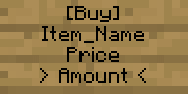
To build a shop, you only need a sign! To build a shop, build a sign like so-


Where 'Item_Name' is the name (or id) of the item being sold/bought, 'Price' is the cost of the item, 'Amount' is how much is to be sold to or bought from the player, and 'Command' is the command to be run when the sign is used. If the command requires a [player] parameter, replace it with @p. This will make the player running the command be targeted. For example, a command of "kill @p" would, when bought, kill the player that clicked the sign.
To sell a plot of land, build a sign like this-

Where 'Land_Name' is the name of your new deed.
It's a simple way to keep your economy in check! To add to your bank account, make sure you have the currency in-hand. Then type /deposit {amount} and watch as your money is put into a bank for safe keeping! If you want it back, simply type /withdraw {amount} and watch as you get your money back from the bank! In debt? No problem! Just type /deposit {amount} {player} and sit back while the player stops trying to hunt you down. If a sign shows an item id and you don't know what that is, type /findName {itemID} and you will get a message with the item's name! Players can also buy items if they have the currency in their inventory! When a player sells an item, the player receives the payment in his/her inventory. Note: When buying items, it checks the inventory before the bank. Need to know an item/block's id? Type /findID {itemName} and get the ID!
Also, a PvP mechanic is optional and configurable in the config.yml file. For now, players can kill each other, and your currency will drop!
Tips & Tricks:
- Encourage players to earn a profit! Create deeds, sell them for little money to players, and let them create an economy! They can add players to the editing lists of their deeds for a certain amount of money (rentals) and create a cooperative, progressive society.
- Create companies! Richer players could easily employ others to mine, chop wood, hunt, build for pay, and the owners could then take their labor and use it to make a profit! Just don't forget to pay your employees!
Video:
Commands:
- /deposit {amount} [player]- deposits the specified amount of emeralds, or your currency, into your bank account or the specified bank account.
- /withdraw {amount}- Withdraws the specified amount of emeralds, or your currency, from your bank account.
- /balance- Tells you your bank account balance.
- /bal- Tells you your bank account balance.
- /findName {id}- Finds the name of an item based on the parameter ID.
- /findId {name}- Finds the ID of an item based on the parameter name.
- /deed- Shows all deed commands.
- /deed help {page}- Shows deed commands on page [page].
- /deed help [command]- Shows information about command [command].
- /deed confirm- Confirms your deed's size.
- /deed cancel- Cancels your deed's size.
- /deed delete [deed]- Deletes the deed [deed].
- /deed viewall {page}- Shows all deeds.
- /deed owner [deed]- Shows [deed]'s owner.
- /deed sell [deed]- Puts [deed] on the deed market.
- /deed buy [deed]- Buys [deed] and removes it from the deed market.
- /deed takedown [deed]- Removes [deed] from the deed market.
- /deed coordinates [deed]- Shows the center coordinates for [deed].
- /deed addplayer [player] [deed]- Adds [player] to [deed]'s list of allowed players.
- /deed removeplayer [player] [deed]- Removes [player] from [deed]'s list of allowed players.
- /deed teleport [deed]- Teleports to deed. If you aren't the owner, it sends the owner a request to teleport.
- /deed allowtp [player]- Allows [player] to teleport to the deed they request.
- /deed denytp [player]- Denies [player] permission to teleport to the deed they request.
Permissions:
- turtleeconomy.*- gives a user all TurtleEconomy permissions.
- turtleeconomy.makeSign- allows user to build buy, sell, and CMD shops.
- turtleeconomy.withdraw- allows user to withdraw money from his/her bank.
- turtleeconomy.deposit- allows user to deposit money into his/her bank.
- turtleeconomy.findname- allows user to search item database for an item/block's name.
- turtleeconomy.findid- allows user to search item database for an item/block's id.
- turtleeconomy.checkbalance- allows user to check his/her balance.
- turtleeconomy.use- allows user to use buy and sell signs.
- turtleeconomy.deed- allows user to create Deeds
- turtleeconomy.cmd- allows user to use CMD signs
- turtleeconomy.editAllSigns- allows user to use edit all signs.
- turtleeconomy.editDeeds- allows user to make changes in all claimed areas without the deed owner's consent.
- turtleeconomy.deleteAnyDeed- allows user to use delete any deed without the deed owner's consent.
- turtleeconomy.takeDownAnyDeed- allows user to remove any deed from the deed market without the deed owner's consent.
- turtleeconomy.sellAnyDeed- allows user to post any deed on the deed market without the deed owner's consent.
- turtleeconomy.teleportToAnyDeed- allows user to teleport to any deed without the deed owner's consent.
Requirements:
This plugin, as of V3.1.0, requires the Vault plugin.
Vault License
GNU GPL
Compatibility:
This plugin, as of V3.1.0, has Vault! I've tested this plugin with ChestShop, and it works! Players are charged money and it is deducted from their TurtleEconomy accounts. This plugin is now compatible with most, if not all, Vault plugins!
How To Contact:
- The best place to contact me is on Twitter: @_redusk
Future Updates' Possible Features:
- Bounties: Players will be able to have reputation, which increases the amount of bounties that they can hold at one time. The more bounties they put out and see through, the more their reputation goes up. The more bounties they complete, the more their reputation goes up. However, should they decide to not pay out the bounty, not only can others put bounties on them, their reputation goes down. A lot. If you accept a bounty and someone else completes it, your reputation decreases. If you accept a bounty, and then you kill whomever put out that bounty, your reputation goes down.
- Loans: Players can ask for money, and others can loan it with a certain interest rate and payment plan. E.g. Dave asks for money, Jim loans him the money with a 3% interest rate and requires the money be paid back in full + 3% in 3 weeks. If Dave cannot pay it back, Jim can (using the bounty system) post a bounty on him.
- Deed taxes: Now owning a deed could require you to pay x percent every t days. (If you have a 10x10 deed valued at 100 of your currency with a tax of 3% every 14 days, Dave needs to pay 3 of your currency every 14 days in order to keep his deed, else it either gets deleted or listed on the Deed Market, and Dave doesn't get the money when it is sold).
- Deed rentals: Owners of deeds can put their deed up for rent. Rentals are still applicable to deed taxes and owners need to set the deed's price (x amount in t days) for rental. Renters tell the owner they're renting for x days, and if they can afford it, the owner rents out his deed.
- Capitalism: (Toggleable in the config.yml). Capitalism takes a whole new approach to the economy. Instead of server moderators or administrators creating the market using buy, sell, and cmd signs, players will be able to do so provided they have the material means to do so. E.g. Dave wants to sell some grass. Instead of finding a sell sign, Dave can open up a new market for grass (for x amount of your currency). If people buy it, great! Dave made a profit! If not, Dave loses money because Markets have both opening fees, sales tax, and maintenance fees. And he's out of grass. Opening fees are paid once, sales taxes are a percentage of your profit (if you have no sales, you pay no sales tax), and maintenance fees are static, recurring fees (say, 20 of your currency a month, which is alterable in the config.yml). Server economies are now completely run by players without the admins or mods telling them what to do (think of America in the early 1900s or Britain in the mid to late 1800s).
Donations:
If you feel TurtleEconomy has improved your server to the extent you would like to donate, feel free to do so!

Comments


-

cannibalturtle87 Owner
-
View User Profile
-
Send Message
Posted Apr 17, 2013@Moxiesan
Sounds reasonable!
-
View User Profile
-
Send Message
Posted Apr 17, 2013oh and one other thing.. also add the option to having a max amount of plots a player can have... don't want one rich tycoon buying all of minecraft lol
oh and the signs should generate on the surface in the center of the chunk
-
View User Profile
-
Send Message
Posted Apr 17, 2013@Conorserver
Maybe even have the option to just set it up to where you buy land by chunk and can set the price and it generate the signs automatically without world edit. That would be something i'd definitely use xD
-
View User Profile
-
Send Message
Posted Apr 17, 2013@Conorserver
Great suggestions! I will start work on that!
-
View User Profile
-
Send Message
Posted Apr 17, 2013Hi, Great plugin! Easy to use also :) but I have a couple of more suggestions.... Add Real Estate by using the same buy and sell signs but make it buy a house. Set the region you want to buy with WorldEdit or something :) and add Compeiting currency for different towns EG: 1 town uses Gold and the 2 town uses Emeralds.
At least try to make both additions or make it hook into other plugins that do this using Vault!
Either way I will continue to use 5/5 plugin! Well Done
-
View User Profile
-
Send Message
Posted Apr 16, 2013Submitted 1.7.0 for approval. It improves efficiency and makes Buy signs red, Sell signs green, and CMD signs purple (suggested by Moxiesan). It also sends a receipt to the player (also suggested by Moxiesan).
-
View User Profile
-
Send Message
Posted Apr 15, 2013@Moxiesan
I haven't found anything yet.
-
View User Profile
-
Send Message
Posted Apr 15, 2013@lucky0802
I don't quite understand. It takes all of their emeralds?
-
View User Profile
-
Send Message
Posted Apr 15, 2013Got 1.6 downloaded will test tonight after work to see if I still have the lag issue. Anything found on your end possibly?
Oh, and I posted on your twitter xD
-
View User Profile
-
Send Message
Posted Apr 15, 2013Hello, I have a Sever and alot of people are asking me why the reason when they go to buy 1 it it decides to buy it using all the emeralds they have? Please respond due to this amazing plugin being the economy please check out the sever if you want me to post it just say but please respond ;D
-
View User Profile
-
Send Message
Posted Apr 14, 2013Just remembered that TurtleEconomy is 1.4.7 compatible.
-
View User Profile
-
Send Message
Posted Apr 14, 2013I found a bug in 1.5. I fixed it and uploaded 1.6 for approval. :)
-
View User Profile
-
Send Message
Posted Apr 14, 2013@Moxiesan
I have that too. I will see what I can do.
-
View User Profile
-
Send Message
Posted Apr 14, 2013Yeah that's the version I have and it's only during the loading of the world. Everything else on the plugin is smooth and flawless.
I'm going to try it on my wife's minecraft tonight just to see if it's not exclusive to my PC.
-
View User Profile
-
Send Message
Posted Apr 14, 2013@Moxiesan
I shall look into that. Thanks for the heads up! It shouldn't cause considerable loading lag... I did just get 1.5 approved though, which updates to CraftBukki 1.5.1-R0.2.
-
View User Profile
-
Send Message
Posted Apr 14, 2013@mrelfire
I can make it backwards compatible if you want.
-
View User Profile
-
Send Message
Posted Apr 14, 2013First off, I love how efficient and fast and simple this plugin is. However I've noticed one thing and I'm unsure what this problem is. I get a large pause when connecting to my server now. It says: "Downloading Terrain"
1. I uninstalled TurtleEco and it got rid of the delay 2. I'm using the latest beta build for craftbukkit 3. Mods I'm currently using: a. AFK b. bpermissions c. GoogleCalculatorPlugin d. LinkedBookShelf e. MagicChest f. mcMMO g. RedstoneJukebox h. TurtleEconomy 1.5
Sooooo let me know what's up with that xD
Oh and I use Optifine HD, though I have default texture pack on
-
View User Profile
-
Send Message
Posted Apr 14, 2013is it working with MCPC & towny ? is your latest version work with 1.4.7 ? (backward compatible ?)
-
View User Profile
-
Send Message
Posted Apr 13, 2013Submitted 1.5 for approval. It improves the efficiency of the plugin, adds a findId command, and updates to CraftBukkit1.5.1-R0.2
-
View User Profile
-
Send Message
Posted Apr 12, 2013Found a bug in the 1.3 update. Fixed for now and posted 1.4 bug-fix update. I will optimize plugin more tomorrow, but I had to get the bug fixed first.