TradeCraft-AE

Inactive
I'm sorry to have to put the state of this plugin to inactive. I simply don't have the time to put into maintaining the plugin.
Some time ago I tried adding a nice feature someone suggested. Only to find out about the item id changes. That's not a big deal for simple items. But the damage bits made defining complex items like potions/enchants/different variants of some items, quite simple. If I had more time I could invest it in this plugin. But unfortunately I don't have that time.
Added to that, I have no use for the plugin myself anymore (I don't play much and it's not used on the server I play on when I do). I mostly picked up support for this plugin because it was not maintained anymore.
If someone has a good alternative I'll be happy to mention it. Also anyone is welcome to clone the project and I'll do the same.
Features
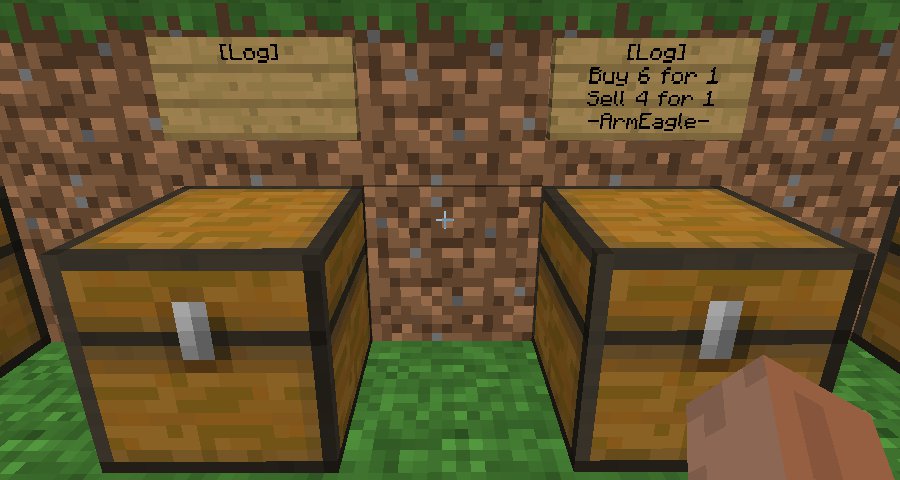
- Make infinite shops - place gold or items in the chest, right click the sign, and watch the magic happen!
- Become entrepreneurs! Have a lot of extra goods? Create a shop to let people easily buy or sell!
- Change the currency if you don't like gold ingots.
- Localization support, you can create language files, take TradeCraft.en.lang as example and configure the language in the properties file.
Continuation/mod of mjmr89 build of TradeCraft.
Credit for the core of this mod goes to the github/forum users mjmr89 and jdiamond (injektilo on the hey0 forums). mjmr89 started this port to Bukkit, but has gone inactive. At first I just maintained a working version of the plugin. But now that plugin has officially gone inactive I decided to start a new entry myself.
Old development/discussion thread
Manual
You can read the Manual here, or the Old technical manual here.
Commands
- /tc[help] Show the TradeCraft commands a player can use.
- /tcgetcurrency Get currency.
- /tcsetcurrency [id[;data]] Set currency. To set a currency, use the id number, optionally add a data value by separating with a semicolon. Limited by permissions.
- /tcshops Displays the personal shops you have and their current inventory/gold
- /tcpshops playername Displays the personal shops of a specific player
- /tcreload Reloads the plugin (and configuration files). Limited by permissions.
- /tcplayerperms playername Debugging info if there are problems with permissions.
Permissions
- TradeCraft.canBuy Permission to buy from any shop (default: true).
- TradeCraft.canSell Permission to sell to any shop (default: true).
- TradeCraft.canMakePlayerShops Permission to make a player shop (default: true).
- TradeCraft.canMakeInfShops Permission to make infinite shops (default: op).
- TradeCraft.canDestroyShops Permission to destroy infinite or other player's shops (default: op).
- TradeCraft.canSetCurrency Permission to set the currency (default: op).
- TradeCraft.canReload Permission to reload the TradeCraft plugin (default: op).
- TradeCraft.canQueryOtherShops Permission to get a list of shops owned by other players (default: op).
- TradeCraft.canQueryPlayers Permission to show the permissions of a given player (default: op).
Note: The first three permissions are given to anyone by default. If you do not want a group or person to have these permissions, you will actively have to deny them (- -TradeCraft.canBuy for PermissionsEx for example).
Configuration
- items.yml Put all the item types and default (infinite shop) trade values you want to be able to trade in here.
- By default this is a small list, but ModernDragoness provided a complete list. You can disable either buy or sell rate by writing a rate of 0:0.
- vagrant326 made this spreadsheet that can calculate balanced values for items. Though it is written for currency-based trade plugins and will not output data compatible with the items.yml file, some admins or players might find it helpful.
- TradeCraft.data Contains all player shop data (amount of items and currency stored).
- TradeCraft.properties Several settings for the plugin, read the comments in the file for more information.
- TradeCraft.[].lang Localization files. By default only English is supported. But you can make your own translation and change "language" in the .properties file to choose to use that instead.
Comments

-

_ForgeUser6802 Owner
-
View User Profile
-
Send Message
Posted Dec 7, 2011@Sabinno
I think the only place where I write an actual \n myself is in the optional shop usage log. So there I should probably indeed use the system specific newline.
Everywhere else I either wrote the config file manually in Eclipse on Windows, or it was generated by Bukkit code. Actually, for files that are shipped with the .jar I can simply not provide system specific newlines and I prefer \n myself. I don't know what the configuration classes of Bukkit actually do, feel free to look into that.
But this is all a moot point if you use a slightly decent text editor.
-
View User Profile
-
Send Message
Posted Dec 7, 2011In the config/item files... Please use BufferedWriter.newLine(); instead of writing a \n to the file. \n does *not* create a new line. P.S: I use 'Dear Notch' instead of 'Dear God'.
-
View User Profile
-
Send Message
Posted Dec 7, 2011@Sabinno
Huh what? This has nothing to do with Notch. And which of the several files this plugin uses do you mean?
-
View User Profile
-
Send Message
Posted Dec 7, 2011Dear Notch, that config is impossible to read. Ever tried BufferedWriter.newLine(); ?
-
View User Profile
-
Send Message
Posted Dec 7, 2011@lawliet555
buyAmount is the amount of items your shop buys from the customer for buyValue amount of currency (with currency set in TradeCraft.properties or with /tcsetcurrency).
-
View User Profile
-
Send Message
Posted Dec 7, 2011Ok, now version 1.2.3 : http://dev.bukkit.org/server-mods/tradecraft-ae/files/7-trade-craft-ae-v1-2-3/ should work.
-
View User Profile
-
Send Message
Posted Dec 7, 2011In your new item config there are two different values, Buy amount and Buy Value. What is the difference? and what does each one represent?
-
View User Profile
-
Send Message
Posted Dec 7, 2011I just uploaded version 1.2.2. I tested with an empty TradeCraft plugin folder and it all seems to work just fine for me in 1337.
Please create a ticket if you encounter any issues in 1337 still.
And again sorry for me not noticing your reports before!
Ignore that, totally not working, sigh
-
View User Profile
-
Send Message
Posted Dec 6, 2011@lawliet555
If the set language file does not exist, the code should notice that and fallback to the English one that is shipped. During some testing I might have kept a non-english setting in the config file by accident and I'll fix that, thanks.
I should indeed keep a new-style item file in the .jar. Don't understand how I missed that one. Currently a fresh install of the plugin won't work until you put either type of item config file in the plugin folder.
Tonight I should have time to look into it.
-
View User Profile
-
Send Message
Posted Dec 6, 20113 Requests:
• /tcreload should reload ALL config files incl. the items.
• /tcshops -> Mutiple pages and colored Text for better overview.
• 2 Itemfiles, one for the User-Shops, one for the Admin/Server-Shops.
/tcreload and my actual ticket with the itemTypeData bug, are important for me. The other requested features from Carbotanium are also very interesting, especially something with gold nuggets ;)
We're using Tradecraft since the 1st release on hmod, and we love it!
-
View User Profile
-
Send Message
Posted Dec 6, 2011Your current release is set to look for the German language file which does not naturally exist. It does also not have the item files in base download either.
If you are trying to download the current release of the plugin you have to download this file http://forums.bukkit.org/attachments/tradecraft-txt.2764/.
Update it to contain the new items using the post by Jobsti2.
After that you have to go into tradecraft.properties and change " language: "ge" " into " language: "en" " unless you download the German language file or change the name of the English one.
Other then that Love that you have taken over development of the plugin. It is by far one of the best trade plugins I have used so far :)
Sayomie
-
View User Profile
-
Send Message
Posted Dec 6, 2011We use this plugin on a very popular server, and it would be extremely convinient if you guys added an option where you can change money values
Ex. instead of 1 gold = 100 iron 1 gold = 4 iron
Coal = Pennies, Iron = Quarters, Gold = 1 Dollar, Diamond = 5 Dollars
Please consider this, and thanks
-Carbo
-
View User Profile
-
Send Message
Posted Dec 6, 2011German Translation: http://dachboden-server.de/download/TradeCraft.de.lang
-
View User Profile
-
Send Message
Posted Dec 4, 2011Sorry to all of you who had the exceptions. I looked into it and it seems that it's all a case where the item name on the sign is not in the (now) items.yml file [anymore]. Or at least I hope that is the case. Maybe the old TradeCraft.txt didn't completely get converted into items.yml?
I uploaded a new file. That should at least prevent the exceptions. Though it will see 'shops' with invalid item names as normal signs.
But there is probably a specific cause to this issue. Can you check whether the item name on the sign(s) causing the issue is in items.yml. If it isn't and it is in TradeCraft.txt.converted.to.items.yml, please let me know the old formatted row in this file. Did other items get converted correctly?
I now wish I never changed to the yaml configuration format, it is so bloated.
Please move issues like this to the ticket system (/existing tickets)
-
View User Profile
-
Send Message
Posted Dec 4, 2011@loopy5476
That depends on what you put in the items.yml (before TradeCraft.txt) file.
-
View User Profile
-
Send Message
Posted Dec 4, 2011I'm terribly sorry I haven't responded before! I assumed I would be notified of new comments and tickets by default. But apparently I had to turn that on manually.
I'll try to go through all posts as soon as I can.
-
View User Profile
-
Send Message
Posted Dec 4, 2011Hi I cant get lapis to work what name should i type in the brackets?
-
View User Profile
-
Send Message
Posted Dec 1, 2011Some new 1.0 stuff.
(Latest TC v1.2.0 works with #1537 100%)
Potions:
Discs:
Loots:
-
View User Profile
-
Send Message
Posted Nov 18, 2011Help use please! The people on my server are bugging me. They really want the plugin on this server. Please help me set it up.
MOD EDIT: Please do not spam caps and help requests.
-
View User Profile
-
Send Message
Posted Nov 17, 2011I to am getting the same error as the rest.
2011-11-17 02:53:16 [SEVERE] Could not pass event SIGN_CHANGE to TradeCraft java.lang.IllegalArgumentException: Path cannot be null at org.bukkit.configuration.MemorySection.get(MemorySection.java:201) at nl.armeagle.TradeCraft.TradeCraftConfigurationFile.get(TradeCraftConfigurationFile.java:175) at nl.armeagle.TradeCraft.TradeCraftBlockListener.onSignChange(TradeCraftBlockListener.java:108) at org.bukkit.plugin.java.JavaPluginLoader$36.execute(JavaPluginLoader.java:506) at org.bukkit.plugin.RegisteredListener.callEvent(RegisteredListener.java:58) at org.bukkit.plugin.SimplePluginManager.callEvent(SimplePluginManager.java:339) at net.minecraft.server.NetServerHandler.a(NetServerHandler.java:1046) at net.minecraft.server.Packet130UpdateSign.a(SourceFile:41) at net.minecraft.server.NetworkManager.b(NetworkManager.java:226) at net.minecraft.server.NetServerHandler.a(NetServerHandler.java:92) at net.minecraft.server.NetworkListenThread.a(SourceFile:108) at net.minecraft.server.MinecraftServer.h(MinecraftServer.java:471) at net.minecraft.server.MinecraftServer.run(MinecraftServer.java:374) at net.minecraft.server.ThreadServerApplication.run(SourceFile:417)
Any ideas?