
Shopkeepers

Set up custom villager shopkeepers that sell exactly what you want them to sell and for what price. You can set up admin shops, which have infinite supply, and you can also set up player shops, which pull supply from a chest.
It will also prevent any other trades with non-shopkeeper villagers, if you want it to.
For those who are simply looking for a convenient way to modify the trades of vanilla villagers (as an alternative to using complex Minecraft commands), the plugin also includes a graphical editor for regular villagers and wandering traders.
Basic Features
- Easily create villager shopkeepers that trade the items you want them to trade.
- Admins shops with infinite supplies.
- Player shops which pull supplies from a chest.
- Different types of player shops: selling, buying, trading, and selling books.
- Various supported mob types to represent your shopkeeper, sign shops, and Citizens (NPC) shops.
- Editor for regular villagers and wandering traders.
- Many configuration options.
- Translatable messages.
- Open source (Source code on GitHub)
Supported server versions
Shopkeepers supports the latest versions of Bukkit / Spigot.
Note that this plugin is created to work with CraftBukkit (or alternatively Spigot). Bukkit does not have an API for some of the things necessary to make this plugin work. This means that other server software (Tekkit, Forge, Cauldron, etc.) will not work with this plugin.
Other CraftBukkit or Spigot derivatives/forks might work, but are not officially supported. So if you run into issues while using those, try to reproduce your issue on a fresh and up-to-date Spigot server first.
Getting started
All documentation can be found in the wiki:
- Downloads and changelogs for all files
- Installation
- Translations
- Configuration
- Permissions
- Creating shops
- Commands
- Frequently Asked Questions
Showcase
Admin shops:
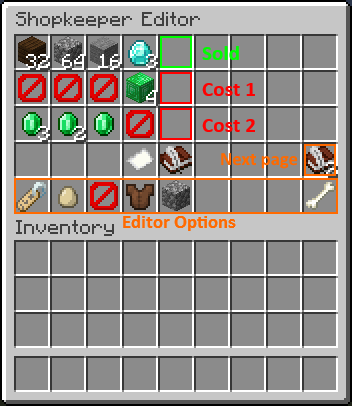
Configure the trades via the in-game inventory menu:

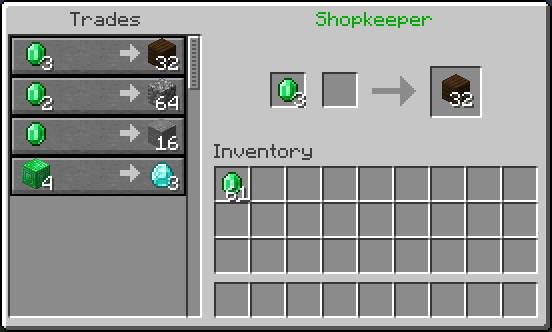
Resulting trading menu:

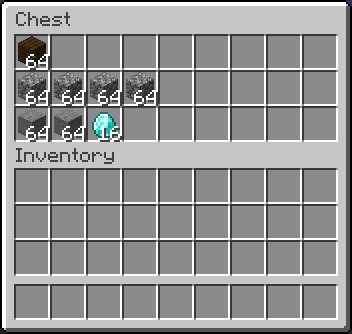
Player shops (ex. selling items):
Fill the shop chest with supplies:
Configure the trades via the in-game inventory menu:
Resulting trading menu:
Video Tutorials
More video tutorials can be found in the wiki: https://github.com/Shopkeepers/Shopkeepers-Wiki/wiki/Video-Tutorials
Tutorial by Donnie, explaining the setup of the different shop types:
Tutorial by Fan Staaff showing the setup of the different shop types in detail:
Tutorial by LastKing2X,showing the setup of the different shop types:
Spanish tutorial by Ajneb97, also mentioning placeholder items and various config options:
Statistics
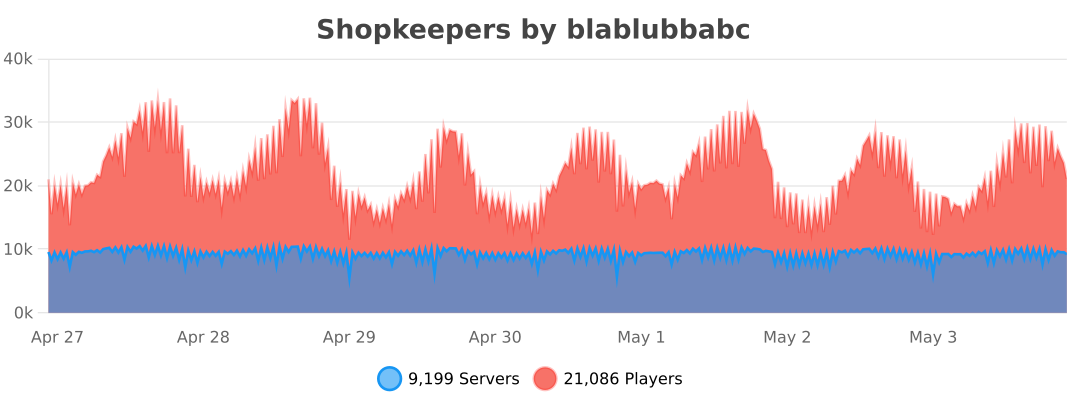
This plugin uses bStats to collect anonymous plugin usage statistics. This helps me to determine how many servers are using the plugin, which Minecraft versions it is used with the most, and to which degree the different features are used.
Here is a list of all currently tracked information:
- Common information: The number of servers using the plugin, the number of players on these servers, online mode, Minecraft version, plugin version, core count, system arch, operating system, server country, Java version.
- Shopkeepers specific information: Whether specific related plugins are used (Citizens, Towny, WorldGuard, Gringotts, other Vault economy plugins), number of shops, whether player shops are used, whether certain features are enabled in the config (ex. WorldGuard/Towny compatibility, Citizens shops, delayed saves, colored names, chest protection, removal of inactive shops, tax rate, strict item comparison, purchase logging, disabling of other villagers, ..), the number of worlds containing shops.
- All information can be publicly viewed here: https://bstats.org/plugin/bukkit/Shopkeepers/
If you want to disable bStats for all plugins on your server, edit the file plugins/bStats/config.yml, or alternatively disable it only for Shopkeepers by setting 'enable-metrics' to 'false' inside the Shopkeepers config.
Known potential issues
A list of known potential issues of the latest version of Shopkeepers can be found in the wiki: This documents differences between Minecraft/Spigot versions, and existing Minecraft/Spigot issues related to Shopkeepers.
If you run into an issue, check if this list already contains and maybe offers information on how to handle it.
Have issues or further questions?
If you have a pressing issue or simple question, you can join the discord server and ask other plugin users for help:

But submitting a ticket is the best way to get help or report a problem with the plugin.
Before submitting a ticket:
- Check if your question is already answered in:
- The documentation (wiki).
- The FAQ.
- The Known Issues.
- Check if there is already another ticket for your issue.
Before reporting an issue:
- Try to reproduce your issue when using:
- The latest versions of Spigot and Shopkeepers.
- No other plugins.
- No kinds of other server or client mods.
When reporting an issue:
- Provide the versions you are using of Minecraft, Spigot and Shopkeepers.
- Provide a detailed description of your problem and add as much information as possible which could help reproducing the issue.
- If possible, include step-by-step instructions on how to reproduce the issue on a fresh Spigot server.
Donations
If you like this plugin, consider supporting its developers by making a donation:
- To blablubbabc (current maintainer: Dec 2013 - today)
- To nisovin (former author: Aug 2012 - Dec 2013)
A big "thank you" to everybody who is keeping the motivation up through donations!
| Minecraft-Servers-Listing.com | TRS Game Servers | terminalserver.us |
| Minewind | mercurialmusic | timitimitimi |
| FatherWh0 (merchantvillages.com) | lukeeexd (tws-mc.com) | PapaJuan |
| EmeraldHaze (Ninjalette) | Espen | kbtalkin |
| Dimo (Beyond Vanilla) | RefugiaCraft | Frilioth |
| Tabletopcheese | Observant Minecraft Server | Ren B. |
| BadWolfMC | Michael M. | Alejandro A. |
| Michael B. |
Want to help?
Whether you are a programmer or not, there are many ways in which you can contribute! For example:
- Help users with issues and questions on Github, Discord, or the comment section.
- Create and update translations.
- Keep the documentation (the wiki) up-to-date with plugin updates.
- Write or maintain add-on plugins (see the open Github issues).
If you are interested or have other ideas on how you can contribute, feel free to contact me via PM.
Add-On Plugins
Sometimes, a feature is either to specific to include directly into the Shopkeepers plugin, or I did not yet have the time to add something similar myself. You can find a list of both official and third-party add-on plugins that extend the functionality of the Shopkeepers plugin in the wiki: https://github.com/Shopkeepers/Shopkeepers-Wiki/wiki/Add-On-Plugins
If you have also written an add-on plugin that you want to add to the list, let me know!
Comments


-

blablubb Owner
-

_ForgeUser8274522 Author
-
_ForgeUser9352339 Translator
-

nisovin Author
-
View User Profile
-
Send Message
Posted May 7, 2020This is great! It's the only plugin I found that allows multiple items per shop and the villager gives it a real shop feel. The setup is so easy as well. Wonderful job!
I wish I could delete individual shops though rather than all shops of a player or all admin shops at once. Did I miss that option already being available or could you add that?
-
View User Profile
-
Send Message
Posted May 7, 2020In reply to gamebuddiesempire:
The delete commands are for bulk removal of shopkeepers. You can delete individual shops with the button inside their specific editor view. You can also remotely delete individual shops by opening the editor view remotely via the respective command (/shopkeeper edit [shopName]).
-
View User Profile
-
Send Message
Posted May 7, 2020In reply to blablubb:
Thank you! I merely looked in the wrong place, but problem solved. If Bukkit allowed reviews, you'd get 5 stars now. Your plugin is uniquely amazing!
-
View User Profile
-
Send Message
Posted Apr 23, 2020The NPC cannot be the mob type villager for that command
I don't know how to fix plz help.
-
View User Profile
-
Send Message
Posted Apr 23, 2020In reply to Penguin_Zed:
I do not understand. What command are you trying to execute exactly? Which feedback message do you get in return?
-
View User Profile
-
Send Message
Posted Apr 23, 2020In reply to blablubb:
I type /npc skin
Y_Y
-
View User Profile
-
Send Message
Posted Apr 23, 2020In reply to Penguin_Zed:
This command is from the Citizens plugin. For it to work the npc probably needs to be of type 'player'. If you create a citizens shopkeeper, it will spawn a npc of type villager. So you probably first need to change the type of the citizens npc. There is a command for that (I believe it is '/npc type player'). So change it to a player npc and then the command should work.
-
View User Profile
-
Send Message
Posted Apr 23, 2020In reply to blablubb:
It works ! thank for helping me.
-
View User Profile
-
Send Message
Posted Apr 20, 2020Is it okay to have this plugin on server together with ChestShop? Thanks. :)
-
View User Profile
-
Send Message
Posted Apr 20, 2020In reply to Forge_User_65302265:
I am not aware of any incompatibilities, so it should work fine. Let me know if that is not the case.
-
View User Profile
-
Send Message
Posted Apr 12, 2020v2.9.3 for MC 1.15.2, 1.14.4
Fixed: If a trade required two matching item stacks of the same type but different sizes, it was possible to trade for less items when offering the items in reverse order.
Added: The '/shopkeeper remote' command can be used from console now and optionally accepts a player as argument. The shop will then be opened for the specified player.
Partially fixed: When a player shift double left-clicks inside the editor view, Minecraft triggers shift left-clicks on all slots containing matching items. This causes the prices of other trades to unintentionally change. We heuristically assume that any shift left-clicks occurring within 250 ms on a slot different to the previously clicked were triggered automatically and ignore those clicks now.
Unfortunately, we cannot use a lower time span, because the automatically triggered clicks may be received quite some time later (up to 150 ms on a local server and possibly more with network delay involved). This heuristic also does not work for automatic clicks on the same slot. Since the automatic clicks are received quite some time later we cannot differentiate them from regular fast clicking.
Debug: Added the current time in milliseconds to the debug output of click events.
API: UISession keeps track whether it is still valid.
Changed messages (you will have to manually update those!):
msg-command-description-remote: Adapted to the addition of the optional player argument.
msg-command-description-give: Slightly changed the german translation.
Known potential issues: See here.
v2.2.4 for MC 1.12, 1.11, 1.10, 1.9, 1.8.x
This version is only compatible with MC 1.8.x - 1.12.x!
Fixed: If a trade required two matching item stacks of the same type but different sizes, it was possible to trade for less items when offering the items in reverse order.
v2.2.3 for MC 1.12, 1.11, 1.10, 1.9, 1.8.x
Donations
If you like this plugin, consider making a donation.
Thanks!
-
View User Profile
-
Send Message
Posted Apr 10, 2020Hi.
This seems like a really good and interesting plug-in! Just one question, is it possible to create shops that use the economy's dollars, instead of physical minecraft items?
Thanks!
-
View User Profile
-
Send Message
Posted Apr 4, 2020hi Blablubb
I was wondering if you could add piglin skin in the selection of villager skins when 1.16 releases.
It would be nice if we could make a Nether themed shopkeeper, please!
-
View User Profile
-
Send Message
Posted Apr 4, 2020In reply to GrizzlyBro:
Yes, but probably not as skin for villagers, but as new mob type.
-
View User Profile
-
Send Message
Posted Apr 3, 2020Hey, is it possible to rotate them?
-
View User Profile
-
Send Message
Posted Apr 3, 2020In reply to Forge_User_60831902:
Nope. They should automatically rotate towards nearby players. If the don't then you are probably not using the latest version of the plugin.
-
View User Profile
-
Send Message
Posted Apr 2, 2020please plugin version 1.15.2-
View User Profile
-
Send Message
Posted Mar 23, 2020Hi. I need help with message "You can not access the selected chest" Interesting fact is that op and mods get this message, while players don't
-
View User Profile
-
Send Message
Posted Mar 23, 2020In reply to van_oudshoorn:
One possible cause could be: Some plugins provide a sort of 'invisible chest access' mode for admins, which works by canceling the interaction with the chest but still opening the chest manually for the player. This feature conflicts with how the Shopkeepers plugin tries to determine if the player can access the shop.
-
View User Profile
-
Send Message
Posted Mar 23, 2020In reply to blablubb:
Yes, I have such plugins, openinv for example, but interesting thing is that I don't recall changing configs or other things on server, same plugins and configs from 2019, yet now I have this issue.