
Ships
Ships
|
|
|
|
|
|
|
Source Code - Github |
JavaDocs |
Sponge version |
Discord channel |
Translate Core |
|---|




Looking for Dev builds?
Dev builds give off new features and bug fixes before they are officially released, however these features and bug fixes may not have been tested as much as a release on here
Old page:
I am testing this new page out. I am aware of some parts that are missing such as ship types, but please say if there is anything that you wish to see. I plan on making a FAQ's that includes common questions such as how to change ship requirements.
If you want to see the old page, it is here
Video tutorial
Ships 6 changes
Ships has gone through many changes, Ships 6 is the latest rewrite of the plugin. The latest rewrite fixes multiple bugs found in the root of previous versions of Ships.
Features
Moving ships
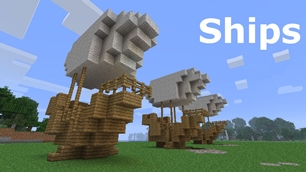
As the name of the plugin suggests, you can create your own ship and move it with just a single click.
Works with all blocks
There is a fully-fledged list where you can configure every block to react differently for the ships, including being able to add a block type to interact with Ships, detect it as a collide, and even not react at all.
Teleport to ships
There have been many requests to be able to teleport to ships for not only this plugin but others like it. This feature has been added to Ships, however, if it is something you do not wish, then you can disable to command by not adding the command.
Falling Ships
Ships will fall/sink if requirements are not met, this could be done through your own interaction such as running out of fuel, or by something else such as a TNT explosion.
Ship types
| Airship | Link |
| Ship | Link |
| Marsship | Link |
| Submarine | Link |
| Plane | Link |
| Hybridship | Coming soon |
Move the ship:
In Ships, movement is done by signs. You can see all signs here
Collide types:
| Name | ID | Description |
|---|---|---|
| Detect collide | DETECT_COLLIDE | If Ships detects this block in the way of a ship moving then the ship will not move with the error of this block being in the way |
| Material | MATERIAL | Material means that you can build a ship out of this block and the Ships block detection system will detect it as part of your ship |
| Ignore | IGNORE | If Ships detects this block in the way of a ship moving then the block will break and the ship will take its place |
Permissions
| Permission node | Description |
|---|---|
|
ships.cmd.info |
Allows the player to use the command '/ships info' |
|
ships.cmd.blockinfo |
Allows the player to use the command '/ships blockinfo' |
|
ships.cmd.shiptype.create |
Allows the player to use the command '/ships shiptype create' |
|
ships.cmd.config.set |
Allows the player to use the command '/ships config set' |
|
ships.cmd.config.view |
Allows the player to use the command '/ships config view' |
|
ships.cmd.blocklist.set |
Allows the player to use the command '/ships blocklist set' |
|
ships.cmd.blocklist.view |
Allows the player to use the command '/ships blocklist view' |
|
ships.cmd.ship.track |
Allows the player to use the command '/ships ship track' |
|
ships.cmd.ship.eot |
Allows the player to use the command '/ships ship eot' |
|
ships.cmd.ship.crew |
Allows the player to use the command '/ships ship crew' |
| ships.move.own.ships.airship | Allows a player to move own airship |
| ships.move.own.ships.watership | Allows a player to move own ship |
| ships.move.own.ships.marsship | Allows a player to move own marsship |
| ships.move.other.ships.airship | Allows a player to move anyones airship |
| ships.make.ships.airship | Allows a player to make a airship |
| ships.remove.other |
Allows a player to destroy anyones ships sign |
Developers:
Looking for a development wiki? maven/gradle dependencies? or something else relating to ships or translate core? Take a look at the getting started wiki
Comments


-

mosemister Owner
-

_ForgeUser7695435 Former Author
-
View User Profile
-
Send Message
Posted Mar 9, 2014@NEWHeroXD
even after you change that value then boot up your server?
have you got 'configcreator.jar' plugin installed as well as ships?
-
View User Profile
-
Send Message
Posted Mar 9, 2014@NEWHeroXD
The problem now, is that i cant modify it, it always resets itself to defult
-
View User Profile
-
Send Message
Posted Mar 9, 2014@ckapl
its a furnace, and if you look on the page, next to the images of the signs it tell you on the right how to make them
-
View User Profile
-
Send Message
Posted Mar 9, 2014How do you make the fuel is it a cauldron or furnace, also what do you put on the sign
-
View User Profile
-
Send Message
Posted Mar 9, 2014faction support now working
i have just tested some code from my 3.3 beta 4 that allows faction support. its a bit buggy on determining the location of the vessel however i expected that due to the code is grabbing the location of the player instead of the vessel. this will change in the future.
due to the fact 3.3 beta 4 is very buggy and im stabilising it as best as i can, im releasing a new beta to you guys that uses beta 2 code but with the faction support
-
View User Profile
-
Send Message
Posted Mar 9, 2014@NEWHeroXD
change CreateConfig to true instead of false, that should fix everything
-
View User Profile
-
Send Message
Posted Mar 9, 2014@MoseMister
i open the config but i dont see a maximum block or min written, i see:
airship: {} airship2: {} ship: {} marsship: {} plane: {} Other: ConfigVersion: 2 CreateConfig: false Debug: {} Materials: {} Dont_Touch_Unless_Tester: {}
AND every time i try to change something and load the server it just restores itself back to the defult
pls help
-
View User Profile
-
Send Message
Posted Mar 9, 2014@Nepenthesis
right heres the thing. if you have a algorithm that i have not tested before. i will gladly listen to it.
i have tried setting it so when its lower then the default water level, it classes the air blocks as part of the vessel .... problem is i can not turn the air blocks off when its above default water level ....
and btw lots of people have suggested this .... but putting the altitude sign on a water based vessel does not work... unless you dont mind flooding the whole thing.
i am currently desperately working on the most wanted thing, and thats faction support.
what im trying to say is, there are more important things that submarines, and i have ran out of ideas to create one. my friend says he has a idea (this friend told me how to update the plugin to bukkit 0.3, so he knows a few things) however i would not hold you breath.
-
View User Profile
-
Send Message
Posted Mar 9, 2014I just want to say that I used this plugin on another server and when I got my own I got it as my first plugin... BEST BUKKIT PLUGIN EVER!!
Everyone on my server has been dying for the submarine. We've been building boats that are 90% underwater, but you can't go up or down. PLEASE MAKE THE SUBMARINE BEFORE THE OTHER THINGS!! XD
-
View User Profile
-
Send Message
Posted Mar 9, 2014@Drazhar753
oh, sorry im used to talking to server owners .... thats fine.
-
View User Profile
-
Send Message
Posted Mar 9, 2014@MoseMister
I'll have to speak to the other admins about letting you on. Let me get back to you on that.
-
View User Profile
-
Send Message
Posted Mar 9, 2014@NEWHeroXD
You can check the max and min in the config. you can also use another plugin like world edit to check the amount of blocks are on your vessel
-
View User Profile
-
Send Message
Posted Mar 9, 2014@MoseMister
im using a plane idk how to check the maximum amount of blocks and i made it completly out of iron
-
View User Profile
-
Send Message
Posted Mar 9, 2014@Drazhar753
hmm ... thats should not affect the movement then ..... maybe the dispensers (not likely though).
could i have access to your server (send it over private message) to take a look at this myself
-
View User Profile
-
Send Message
Posted Mar 9, 2014@MoseMister
Yep, got a crafting table and 2 dispensers on board.
-
View User Profile
-
Send Message
Posted Mar 9, 2014@Drazhar753
that vessel looks ..... big ....
i would highly recommend that the 3000 max block limit is the max blocks any server should have .... can be lower but any bigger and a lot of servers start to have the '305 error' that relates to the vessel being too large.
can i ask, you know the blocks with a gui interface (workbench/ furnace/ dispenser/ hopper/ etc)
have you got any of them on the vessel (the code related to one of them ... i think)
-
View User Profile
-
Send Message
Posted Mar 9, 2014@MoseMister
http://s1101.photobucket.com/user/Drazhar202/media/2014-03-08_224155.png.html
here it is, but it also happens when just clicking some signs that aren't even on a ship
-
View User Profile
-
Send Message
Posted Mar 9, 2014@NEWHeroXD
what vessel type are you using?
whats your min blocks set to?
whats your max blocks set to?
-
View User Profile
-
Send Message
Posted Mar 9, 2014I dont know why but it ALWAYS say's that ship is too big pls help
-
View User Profile
-
Send Message
Posted Mar 9, 2014@Drazhar753
ive never seen a error like this.
Caused by: java.lang.StackOverflowError at Ships.ShipsMaping.MapingBlock(ShipsMaping.java:150
ill take a look at it.
--------------after a quick look at ships 3.2.4 code, i want to see the vessel you are tryng to move