
QuickSell
Description

QuickSell is a popular Shop Plugin, which is commonly used on Prison Servers.
It allows various Possibilities for your Players to sell Items to your Server
as well as a very lightweight Booster System which not only allows you to create
Sell Multipliers but also XP Boosters, mcMMO Boosters and much more!
IMPORTANT: I (mrCookieSlime/TheBusyBiscuit) have stopped working on this Plugin and now develop Video Games instead (more on my Youtube Channel). But this doesn't mean QuickSell is dead. This Plugin is available on GitHub, so if you are or know a talented Plugin Developer, consider contributing to it by making a Pull Request to keep this Project alive.
QuickSell v2.0 by mrCookieSlime [English]
QuickSell v1.10.10 by Koz4Christ [English]
Features
- Easy Shop Creation
- Easy Shop Management with the Ingame Editor
- Booster Creation and Management including Gem Boosters for PrisonGems or mcMMO Boosters!
- Old-Fashioned Sell-Signs with a lightweight GUI (Sell, Estimate, Cancel)
- Sell-All Signs and Command!
- Citizens Integration - Setup Merchants
- Nice Worth Overview
- and much, much more!
Sell (Basic)
The Sell-Utility can be accessed by doing /sell (Can be disabled in the Config)
or by using [Sell] Signs, this Utility opens up a GUI like this:
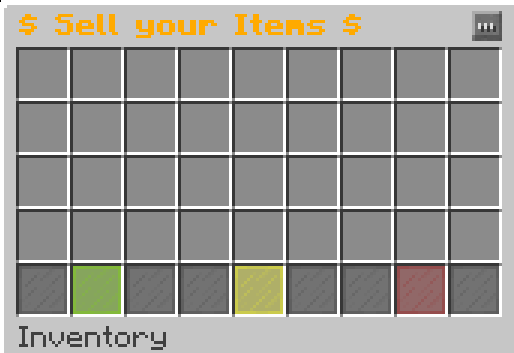
- Green Stained Glass: Confirms the Transaction and sells all Items inside that GUI
- Yellow Stained Glass: Gives you an estimated Worth of what you will be getting in return for these Items
- Red Stained Glass: Cancels the Transaction, you will be given back all Items
Just put all Items you want to sell into the GUI and you are done - simple as that!
Sell-All (Basic)
The Sell-All-Utility can be accessed by doing /sellall (Can be disabled in the Config)
or by using [Sell All] Signs, this Utility does not open any GUIs, instead it
scans your Inventory for any Items that could be sold to the Shop you are selling to
and sells those Items
If you are using PrisonUtils your Backpacks will also be scanned through!
Auto-Selling (Moderate)
Note that this Feature requires PrisonUtils to be installed!
The Auto-Selling-Utility can be toggled by doing /autosell
This Utility basically sells or at least attempts to sell all Blocks you mine!
You will not get a Message that this occured to prevent a spammed Chat Window.
However every X Blocks it will give you a little Summary of all recently sold Blocks.
Worth Info (Moderate)
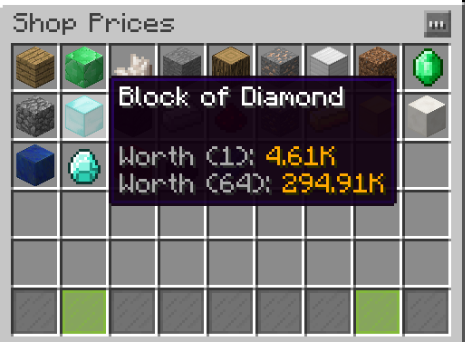
You can access this Utility by doing /prices <Shop>
or by Left-Clicking
Sell-Signs,
Sell-All-Signs,
or NPC-Merchants
This Utility gives you a nice Overview of what Items can be sold to a certain Shop
and more importantly, for how much ;)
NPC-Merchants (Advanced)
Note that this Feature requires Citizens to be installed!
You can link any Citizens NPC to a Shop using
/quicksell linknpc <Shop> <sell/sellall>
This will make this NPC act like a Sell or a Sell-All Sign when you Right-Click him.
Addons and Extensions
- PrisonUtils by mrCookieSlime - Allows you to use Backpacks for SELL-ALL Signs and Command as well as the ability to sell as you mine
- PrisonGems by mrCookieSlime - Allows you to make Gem Boosters
- mcMMO by drtshock, t00thpick1, TfT_02 - Allows you to make mcMMO XP Boosters
- Citizens by fullwall - Allows you to setup NPC Merchants
- PickaxeSell by TOX1C - Allows you to sell all your Items upon Right-Clicking your Pickaxe
- QS Permission Boosters by MrEminent42 - Allows you to give a QuickSell Booster to Players based on their Permissions (Rank)
- QS Sell-Command Permissions by MrEminent42 - Adds a Permission to be required for /sell and /sellall
Commands/Permissions
| Command | Description | Permission | ||||
| /sell [Shopname] | Opens up the Inventory to sell Items | The Command itself has no permission but Shops do! Check the Config Section | ||||
| /sellall [Shopname] | Allows you to sell all your Items in your Inventory to that Shop | The Command itself has no permission but Shops do! Check the Config Section | ||||
| /booster <Type/all> <Name of the Player> <Multiplier> <Duration in Minutes> | Example: /booster mrCookieSlime 2 1 -> Now the whole Server has got a 2x Multiplier on every Transaction they make. You can hook it up to Buycraft in order to earn Money without violating the EULA! | QuickSell.booster | ||||
| /pbooster <Type/all> <Name of the Player> <Multiplier> <Duration in Minutes> | Example: /booster mrCookieSlime 2 1 -> Now ONLY mrCookieSlime has got a 2x Multiplier on every Transaction. You can hook it up to Votifier or something.! | QuickSell.booster | ||||
| /boosters | Lists all active Boosters | No Permission required. | ||||
| /quicksell | Displays a Help Message | QuickSell.manage | ||||
| /quicksell reload | Allows you to reload the Config | QuickSell.manage | ||||
| /quicksell editor | Opens up the Ingame Shop Editor | QuickSell.manage | ||||
| /quicksell stopboosters [Player] | Stops all global Boosters, add a Player argument to make it stop all private Boosters of the specified Player | quicksell.manage | ||||
| /prices <Shopname> | Allows you to see which Items can be sold in the specified Shop | QuickSell.prices |
To create Signs you also need the Permission QuickSell.sign.create !
Signs
Note: All empty lines can be replaced with a text of your Choice. Example: "$32.5/ea" / "Click to open" / ...


This one will open up the Shop GUI as if you were doing /sell


This one will open the specified Shop.


This one will try to sell all your items to the specified Shop.


This one will sell all Items of the specified Type to the specified Shop.
If you have the config option "open-only-shop-with-permission" set to true, you can also just write Sell All on its own, no matter what is on the other lines. This will then open the highest Tier shop you have access to.
Configuration
options:
  auto-update: true ## Specify whether the Plugin should Auto-Update
  sell-gui-rows: 3 ## Specify how many rows the Sell-GUI has
  locked-item: STAINED_GLASS_PANE-14 ## The Item which will be used if the Shop is unaccessable.
  sign-prefix: '&7[&eSell&7]' ## The Prefix which Sell Signs will have. Changing it to e.g. "Sell Me" requires you to make the first line "Sell Me" as well in order to create a Sell Sign.
  sellall-sign-prefix: '&a&oSell All' ## Same rules apply for the Sell all Signs
  pregenerate-all-item-prices: false ## Turning this on will pregenerate all Item Values in the Config
  enable-menu-line: false ## Enabling the Menu line will add 3 nifty Buttons to the GUI: Sell, Estimate and Cancel
  enable-commands: true ## You can toggle whether /sell and /sellall can be used.
boosters:
  extension-mode: false ## Enabling this means if you activate a 2x Booster while another 2x Booster is already active it will increase the active Booster's time instead of stacking it
  refresh-every: 10 ## The Interval in Seconds when it checks whether a Booster wore off
commands-on-sell: ## Commands which will be executed on selling something. Supports the Variables {PLAYER} and {MONEY}
- say {PLAYER} just sold something and got ${MONEY}
- title {PLAYER} title {text:"+ ",color:green,bold:true,underlined:false,italic:false,strikethrough:false,obfuscated:false,extra:[{text:"${MONEY}",color:gold,bold:true,underlined:false,italic:false,strikethrough:false,obfuscated:false}]}
sound:
  enabled: true ## Whether it should play a Sound when you sell something
  sound: ORB_PICKUP ## The Sound which will be played

- Don't Mess with the stuff below, this is deprecated! Use /quicksell editor instead!

list:
- A ## Add all new Shops to this List, it will then generate a Section like the one below
- '' ## Just add '' if you want to create an empty Space in the GUI to seperate your Shops
shops:
  A: ## The Config Section of a Shop
    name: '&aA - Shop' ## The Name of a Shop
    itemtype: CHEST ## What Item will be displayed for the Shop
    amount: 64 ## All Prices in this Shop will be divided by this number. (Example: If you sell 1 Cobblestone for a price of $64, you will only get $1)
    lore:
    - ''
    - '&aYou can also add a little description to your Shop here' ## Color Codes supported!
    permission: QuickSell.shop.A ## The Permission required to use this Shop, set it to '' to make this shop no longer require a permission.
    price: ## The Prices for this Shop
      STONE: 0.0 ## 0.0 means its unsellable.
      GRASS: 10.2 ## You can specify the Amount of Money people will get per Item they sell if it has this Material
      STAINED_CLAY-2: 3.5 ## By attaching -{META-ID} you can set a price for items with a specific Meta-ID.
      DIAMOND_SWORD-&cSoulbound Sword: 100.32 ## You can also specify a Display Name with support for Color Codes
  C: ## Another Shop
    name: '&aC is awesome' ## Just some random Settings which have been explained above
    itemtype: SPONGE
    amount: 1
    lore: []
    permission: ''
    price:
      SPONGE: 10.0
    inheritance: ## This will import all Prices from the below listed Shops. Note here: The priority of these Prices will decrease as this List goes down
    - A ## Has a lower priority than C
    - B ## Has a lower priority than A
Source Code

Check out QuickSell's Source Code, if you want to keep this Project alive, maybe even consider contributing to it by making a Pull Request!
Developer API
QuickSell allows a lightweight API for Developers to be used in order to create custom Addons for QuickSell.
QuickSell does offer a lot of Methods, however I am only going to explain some of them right here:
API Documentation
Plugin statistics

Auto-Updater and Metrics
All my Plugins are using an Auto-Updater to make sure, you're always
using the latest and hopefully most bug free version of my Plugin.
If you don't want this Plugin to be auto-updated, you can turn it off
in the config file at "options -> auto-update: true/false"
They also use a Metrics-System which collects the following Informations:
A unique identifier
The server's version of Java
Whether the server is in offline or online mode
The plugin's version
The server's version
The OS version/name and architecture
The core count for the CPU
The number of players online
The Metrics version
Opting out of this service can be done by editing
plugins/Plugin Metrics/config.yml and changing opt-out to true.
Comments

-

TheBusyBiscuit Owner
-
View User Profile
-
Send Message
Posted Jan 6, 2015Love the plugin couldnt ask for anything better
-
View User Profile
-
Send Message
Posted Jan 6, 2015@TrialCrafter
Please post your Config and a Screenshot of your Sign. If you are using 1.8 this might be a Spigot related issue, try to update once in a while.
-
View User Profile
-
Send Message
Posted Jan 6, 2015@mrCookieSlime I can't make the the sell all sign it don't transform into the sellall sign pls help
-
View User Profile
-
Send Message
Posted Jan 5, 2015@TheBusyBiscuit
Thank you for the very fast reply! Great plugin! Keep up the good work! :)
-
View User Profile
-
Send Message
Posted Jan 5, 2015@Qaisar101
Its LOG-1 and not LOG:1 and if you enter LOG, this already includes all subtypes. If you want a differernt price for each LOG, youd have to use LOG-0
-
View User Profile
-
Send Message
Posted Jan 5, 2015@mrCookieSlime » I need help with SellAll shops. I made a shop called ALL. I want you to be able to sell all logs. So, for oak, I do "/quicksell edit ALL Log 15" and when I want to do spruce logs, I do the same thing but with "Log:1" yet it doesn't work! Please help!
Thanks for reading! Please help! Also a suggestion: "/sellall <shopname> <specific item>"
-
View User Profile
-
Send Message
Posted Jan 5, 2015@TheBusyBiscuit
Thanks for your help!
For all who want permissions download this plugin CommandOverride, then in the config put /sell: - '&4You Do Not Have Access' /sellall: - '&4You Do Not Have Access'
-
View User Profile
-
Send Message
Posted Jan 5, 2015@TheBusyBiscuit
Thanks :S
-
View User Profile
-
Send Message
Posted Jan 5, 2015@MrEminent42
Ah, yes I was going to add those as well. Just be patient.
-
View User Profile
-
Send Message
Posted Jan 5, 2015@TheBusyBiscuit
Oops sorry I've been using the wrong word :p I've been meaning arguments. /sell {args}
-
View User Profile
-
Send Message
Posted Jan 5, 2015@MrEminent42
Yes I know that and I thought I added it :? Well, my memory...
And there already is variable support for CommandOverride... Look at the Variables Section, there are several ones.
-
View User Profile
-
Send Message
Posted Jan 5, 2015@TheBusyBiscuit
Yes that is enabled. I think you mentioned before that it's not supported yet but you were going to add it?
@TheBusyBiscuit
Could you please add variable support to CommandOverride? So I can make
EDIT: Don't need variables if you'll just help me solve this ^
-
View User Profile
-
Send Message
Posted Jan 5, 2015@Perkulator_Time
Hmmm that is weird I will take a look at it.
@Perkulator_Time
Oh right, said that as well. Sorry for my rage, it was just early in the morning and I just didnt feel like being polite.
And sure, you can use CommandOverride to restrict commands to a certain permission.
Its as easy as that:
/sell:
- [permission: permission.something]command:/quicksell:sell
However I will add an even easier way for that in an upcoming update since this way currently does not support arguments.
-
View User Profile
-
Send Message
Posted Jan 5, 2015@TheBusyBiscuit
"Are you even reading the comments? I already said a thousands time that there are permissions for the comments indirectly since you can restrict your shops with permissions. And you can disable the Commands in the config if you dont want them."
You said use your plugin "CommandOverride" but i see no where in that plugin you can disable permissions. Can you help?
-
View User Profile
-
Send Message
Posted Jan 5, 2015@TheBusyBiscuit
I added /pbooster <Name of the Player> <Multiplier> <Duration in Minutes> to voting, and every time a player votes it says they get the booster, but when they sell they dont have the actual boost in income
When I added the permission QuickSell.booster to my group it works, however then players can activate their own boosters.
what do I do here?
-
View User Profile
-
Send Message
Posted Jan 5, 2015@MrEminent42
Did you also enable the Config Option "open-only-shop-with-permission" in the Config?
And I know, but imagine what would happen if there is no shop you have permission for. The command would be pointless then since you cant use it anyway. But as I said you can disable the commands in the Config.
-
View User Profile
-
Send Message
Posted Jan 5, 2015@TheBusyBiscuit
When I do /sellall it says Error: /sellall <shop>
P.S we are asking for permission for the actual command, not the shop.
-
View User Profile
-
Send Message
Posted Jan 4, 2015@MrEminent42
It already does if Im not mistaking.
@Perkulator_Time
And thats what I did... I list all Commands/Permissions. If you are here to argue about you not reading the description and saying its my fault then youre at the wrong place. If you dont have anything to contribute to the discussion then just leave or Ill delete any incoming comments.
Are you even reading the comments? I already said a thousands time that there are permissions for the comments indirectly since you can restrict your shops with permissions.
And you can disable the Commands in the config if you dont want them.
-
View User Profile
-
Send Message
Posted Jan 4, 2015@TheBusyBiscuit
Typically when a developer lists Commands / Permissions, they list ALL permissions in that list.
Also I tried to use PerWorldPlugin to prevent the /sell or /sellall working from my plotworld, however it still allowed my players to use /sell or /sellall to bring up the selling chest, but then they just didnt get anymoney.
You say to downloaded a supplemental plugin to block the command, I dont see how that is better than just adding the permission to the plugin. You have multiple people asking for it, and im pretty sure lots of prison servers run into the same issue as I do, and It is going to lead me to just remove it, which is sad because it is a great plugin, except for that is a very important thing to add permissions to /sell and /sellall.
Or maybe you can make a plugin for just Sell all signs. So just remove the code for /sell and /sellall all together. I believe /sell or /sellall is way to OP, but having /sellall signs at the actual mines just good. Because most prison servers have player shops and if you dont have to leave your player shop to sell, then it will allow ranking up way to fast.
These are my thoughts, thanks for listening
-Perk
-
View User Profile
-
Send Message
Posted Jan 4, 2015@TheBusyBiscuit
Dosent have variables, for /sellall <shop>... Or if you could make this plugin so when the player does /sellall it auto sells to the highest price?