
PortableTent





With PortableTent you can now place a tent anywere you go. Just keep the tent in your inventory, and when you need it, just place it! Then a tent will be build, for you to stay in, and survive your night!
Features
- 1-Click tent creation
- Customizable Tents. [You can build your own tent, and allow players to build it]
- Pickup Tents [Shift & Right-Click to pick up a tent if you are op or the owner of the tent]
- Destroy all placed tents with 1 command
- Create Tents Blueprints
- Limit tents per player
- WorldGuard Support
- Factions Support
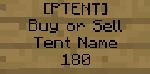
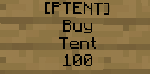
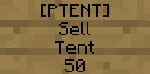
- Sign Support [Create Buy/Sell signs]
Installation & Usage
- Installation
- Download the plugin.
- Place it on your plugins folder
- Open or Restart your server.
- Edit the configuration to your needs.
- Restart 1 more time
- You are done with installation!
- Usage
- Get the tent by using the command, or by crafting it
- Place the tent on an flat surface
- Survive the night! <3
Quick Sign Tutorial!
Bugs & Suggestions
Feel free to submit any bug you find, or suggest ideas:)
<3 Give me a small boost <3
Quote from vasil7112:Building, maintaining, and hosting takes a lot of time and financial resources. This is completely optional, but even a small donation can help us alot.


Comments


-

Forge_User_85151896 Owner
-
View User Profile
-
Send Message
Posted Oct 21, 2013@MikeGold
Alright thanks alot, i will fix that glitch as soon as possible! I will have a glithc fix today probably:)
EDIT: Just uploaded a quick fix:) Everything will be good now! Thank alot for reporting this bug:)
-
View User Profile
-
Send Message
Posted Oct 21, 2013So I was checking your plugin for a while. Loads and loads of tents placed and removed.
You remember when I told you that some regions were not deleted when the tent was being removed? I know how it happened. Normal user cannot remove tent belonging to someone else. But when admin removes somebody's tent, region stays there. Another thing that I'm not able to replicate is that one of my users was using tent a lot. But after one night she was not able to pick it up. She tried to click it but it only worked as a crafting table. I've checked the region and it was there. So I came up, clicked on the tent and it closed as it should have. Then I had to manually remove the region and give her tent back. She is using it now and it works fine again. You might want to keep an eye on that glitch.
-
View User Profile
-
Send Message
Posted Oct 20, 2013@notcam45
I had imported te version 5.8 of worldguard. Are you using the same or another version?
-
View User Profile
-
Send Message
Posted Oct 20, 2013Portable Tent is not recognizing WorldGuard!
Pastebin: http://pastebin.com/5x8eKM0F
There is no new WorldGuard for 1.6.4 could that be it?
-
View User Profile
-
Send Message
Posted Oct 18, 2013@Tunix2
You are using the wrong type of wand! WorldEdit wand is for WorldEdit only. There is a portableTent wand :) Just type /portabletent wand , and you get the diamond_hoe wand! :)
-
View User Profile
-
Send Message
Posted Oct 18, 2013I build a tent, select the points with my WorldEdit wand and then type: /portabletents save Test and I get "Please setup the points correctly". How do I save my tent with world edit?
-
View User Profile
-
Send Message
Posted Oct 16, 2013@vasil7112
Well, I'm pretty sure that I did everything as it should have been. Maybe those protected spots were leftovers from the older version of the plugin. I've removed all glitched regions and I'll let you know in a few days if the problem reoccurred. Hopefully it won't.
-
View User Profile
-
Send Message
Posted Oct 15, 2013@MikeGold
Well, that is really weird. I tried it my self by placing tents all over the place. After placing 50 tents, i picked up each one, but the protection wasn't there.Are you sure you are picking up the tents, and not destroying them?
-
View User Profile
-
Send Message
Posted Oct 15, 2013Still got the problem with areas being protected after placing the tent. I'm not sure if it might be the reason, but the place where I created one of my tents stayed protected after. How can I unprotect it anyway?
Ok, now I know how to remove protection:
/region list and /remove region all regions starting with number and player's name ;].
At least I can sort it out easily.
-
View User Profile
-
Send Message
Posted Oct 14, 2013@MikeGold
That is probably because you are operator. Normal players cannot add signs there, they can only use chest, furnace e.t.c, but not build or destroy. so when you actually destroy the tent, it doesn't create a new blueprint with the sign you typed on it
-
View User Profile
-
Send Message
Posted Oct 14, 2013Nope. Everything works smoothly. I'm happy as can be with a current state of the plugin. Just an interesting trivia:
My friend put the tent on the ground, so I tried to do the old trick that worked in the old version of the plugin and steal his tent while he's still in it. It didn't worked (which is good) so I put a sign on his tent telling him how much I appreciate it that he put his tent in front of my house. When he left his tent and didn't even realized that the sign is on the back wall, he picked it up and the sign disappeared as well.
I'm not saying it's a bad thing, but just letting you know... In case you might want to know...
-
View User Profile
-
Send Message
Posted Oct 14, 2013@MikeGold
Mike, are you still having this bug? Thanks alot for your feedback!
Kind regards
-
View User Profile
-
Send Message
Posted Oct 13, 2013@IngrownPenguin
Yes, op can override the protection
-
View User Profile
-
Send Message
Posted Oct 13, 2013I found that if I brake the tent, I can keep the wool and still get my tent, Therefore I can just harvest free wool! might be because im op don't know^
-
View User Profile
-
Send Message
Posted Oct 12, 2013@MikeGold
I will check this error, and find a good solution:)
I know how to fix it, it will be done in 1.4:)
-
View User Profile
-
Send Message
Posted Oct 12, 2013My console is getting spammed with this code:
Craftbukkit 2894; Portable Tent 1.3
-
View User Profile
-
Send Message
Posted Oct 12, 2013@vasil7112
Okay!
-
View User Profile
-
Send Message
Posted Oct 12, 2013@Yisewalton
Yes, i've fixed it, but you will have it available at the next version(1.4), with some new updates:)
-
View User Profile
-
Send Message
Posted Oct 12, 2013@vasil7112
By the way, Is it fixed now?
-
View User Profile
-
Send Message
Posted Oct 12, 2013@vasil7112
Happy to help!