Physix
Physix V0.5.5 Beta [works on: 1.2.5-R4.0 - 1.8]
Description
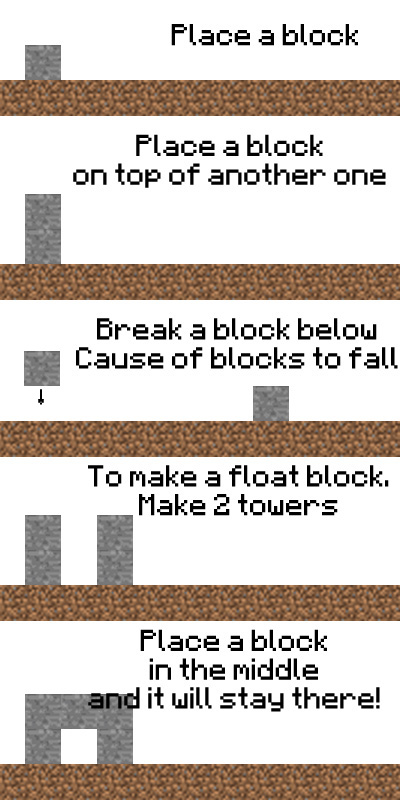
Physix provide a simple gravity system that affect to whole server or selected area. By place and break a block it will check for any block around them and take a gravity to it, make it fall to the ground. You can build a house (with roof :D) by see a instruction on how to place a float block or you can watch a demonstrate video...
Features
- A simple gravity for all blocks
- TreeCut - Cut whole tree by break a tree's log
- AutoPlant - Plant by drop seed on soil
- GlueBlock - Make a float block/area by attach to glue block
How to install
Just put the .jar file in Plugins folder and run the server...
How to use
Place or break some blocks and feels the power of gravity!


TreeCut feature
TreeCut make you easy to cut a whole tree by cut only 1 log
A plugin will define as tree with following condition:
- A block under lowest log block must be dirt
- A block above highest log block must be leaf
- Between lowest and highest log block must be log only
You can cut whole tree by break a log at any part of tree
When tree was cut all leaves in 5x5 area around tree will be disappear and no sapling drop
You can gather sapling by cut leaves before cut a log
AutoPlant feature
AutoPlant make you feel more real on farming by drop a seed of Wheat, Melon, Pumpkin on soil, it will auto plant for you.
AutoPlant has a delay to plant. If you stand on high ground and drop a seed down to soil below, it is possible that sometimes seed will not plant due to long delay while seed stay in the air.
GlueBlock feature
GlueBlock is a block which attach another block to it. A block place near glue block (3x3x3 area, center at block you placed) will be attach and stay in the air, make a float area/land possible to create.
Commands

/physix instant area = Apply physic instantly on selected area
/physix instant around [Radius in number] = Apply physic instantly within radius
Please note that only OP can create, view and delete area.
Configurations
| Main | Options | Result | |
|---|---|---|---|
| Physix: | |||
| MinimumBlockConnected: 2 | A block will stay in the air if block adjacent up to this number of blocks near by | ||
| CheckRadius: 15 | Checking distance from currently place/break location | ||
| CheckEntity: false | Check physic if entity pickup a block (BETA) | ||
| GlueBlock: 30 | Block id of glue block (default is Cob Web) | ||
| TreeCut: true | Enable TreeCut feature | ||
| AutoPlant: true | Enable AutoPlant feature | ||
| PlantDelay: 10 | Delay before plant a seed (20 ticks equal 1 second) | ||
| ApplyWorlds: | Enable physic to affect in selected world | ||
| WorldName: true | Enable physic on WorldName | ||
| WorldName_nether: true | Enable physic on WorldName's nether | ||
| WorldName_the_end: true | Enable physic on WorldName's the end | ||
| WorldName2: true | Enable physic on WorldName2 | ||
| WorldName2_nether: true | Enable physic on WorldName2's nether | ||
| WorldName2_the_end: true | Enable physic on WorldName2's the end |
A new world will be added when start a plugin.
Physic applied area will force enable physic to selected area (despite you disable world physic) make possible to create a physic applied room!
Video
[In Spanish] Thanks to Indeleble
Changelog
[A] = Add
[F] = Fix
[I] = Improve
[R] = Remove
v0.5.5 [#1.2.5-R4.0]
[A] Supported for 1.2.5-R4.0
v0.5.4 [#1.2.5-R1.0]
[A] Supported for 1.2.5-R1.0
[F] Sapling should AutoPlant on dirt now
[F] Duplication glitch
[F] All drops should not disappear
v0.5.3 [#1.2.4-R1.0]
[A] Supported for 1.2.4-R1.0
[A] Instant Physix [Beta]
[A] Sapling now added into AutoPlant feature
[I] TreeCut feature now break a tree naturally instead of removing it (possible for sapling to drop)
[I] Block will be check if it not cancelled from another plugin (prevent block duplication)
v0.5.2 [#1.1-R6]
[A] Supported for 1.1-R6
v0.5.1 [#1.1-R4]
[I] Supported for 1.1-R4
[I] Enderman physic now change to entity physic
v0.5 [#1.0.1-R1]
[A] Block list configuration
[F] Fixed null pointer exception
v0.4 [#1.0.1-R1]
[A] Per world physic
[A] Apply physic on selected area
[A] GlueBlock added
[A] AutoPlant - Plant by drop seed on soil (Wheat, Melon, Pumpkin only)
[A] Option to turn off enderman pickup block cause of checking physic
[A] Block fall to small objects (Torch, Button, Lever, etc.) will cause of objects to pop out of attached block
[F] No-physic-apply blocks bug (Torch, Button, Lever, etc. fall by gravity if attach to a block)
[F] Physix bug when a block connected with no-physic-apply blocks, it will float (Another block attach to torch, button, lever, etc. will float)
[F] Block fall to no-physic-apply block will still float (Another block fall to torch, button, lever, etc. must break them and fall to the ground)
[F] Skip all dropped-block without break and drop them (Block fall from high area did not break a torch, button, lever, etc. in their way)
v0.3.1 [#1.0.1-R1]
[F] Fixed showing text when use bucket
v0.3 [#1.0.1-R1]
[A] Tree Cut - Cut whole tree by breaking log (drop only log)
[A] Physix now can be configured
[I] Rewrite whole physix calculation system (more stable and easy to edit :D)
v0.2 [#1.0.1-R1]
[I] Supported for 1.0.1-R1
[F] Physix applied block are actual block now (contain block data)
v0.1 [#1561]
Initial release
Comments


-

briantheinsane4 Owner
-

_ForgeUser7620087 Former Author
-
View User Profile
-
Send Message
Posted Mar 14, 2012Can you add saplings to the autoplant feature?
-
View User Profile
-
Send Message
Posted Mar 6, 2012@Indeleble
Are you places it on protected area? If yes, that's might working properly. Sine, Physix will apply physic to a block when you place or break a block whatever its already cancelled or not...
Thanks for report this BTW. I will fixed it in the next version.
-
View User Profile
-
Send Message
Posted Mar 6, 2012Hi again Spy,
I have a problem. Using physix duplicate items, for example:
I have 1 dirt in hand, I place the dirt and the dirt falls. Now I have 1 dirt on my hand and 1 dirt on the floor.
Using v0.5.1 on CB 1.1-R4.
Thx.
-
View User Profile
-
Send Message
Posted Mar 5, 2012@Indeleble
Thanks for the video :)
For translation... It's up to you if you want to make an English translation...
-
View User Profile
-
Send Message
Posted Mar 5, 2012Hello Spywhere,
First of all, I love you and your plugin! Good job!
I have installed it on my server and we have done a video with our configuration. Fell free to use it if you want and requets an english traslation if you want.
Thx!
http://www.youtube.com/watch?v=O6Ep8ZJrA68
-
View User Profile
-
Send Message
Posted Mar 2, 2012@Chaznuts
I just planning about instant physic apply to selected area. You just select a cuboid area then type command and all block which not match to the rule will fall to the ground...
BTW, I feel like I'm start to forget some improvement on my plugin now, LOL. But I already add all requests to my plugin file. :)
PS. It's take a time for plugin to be updated (with improvements). Since, I'm working on 4 plugins... so, update might take a time. Sorry for that :(
-
View User Profile
-
Send Message
Posted Mar 2, 2012@Chaznuts
I think like you, that's the reason why i'm not using this. I would like a different algorithm like "all block with no path to bedrock will fall" or "all block with a path higher than X number to Y block will fall"
-
View User Profile
-
Send Message
Posted Mar 2, 2012-
View User Profile
-
Send Message
Posted Feb 26, 2012@Nilinking
OK, I'll send you a link in your PM...
-
View User Profile
-
Send Message
Posted Feb 25, 2012Hi again bro! youve made nice improvements on this plugin! im adding it to my server... Btw can you post the source? i would like to take a look at the code :)
-
View User Profile
-
Send Message
Posted Feb 25, 2012@Joager
I already planned for the disabled physic apply world from started. But I just forgot that when I update to R4... Sorry for that :(
Anyway, if you found any other bugs you can report it to me again...
Thanks for let's me know this BTW :)
@Edit Plugin now disable physic by default now... Next version will be first version with this turn off.
-
View User Profile
-
Send Message
Posted Feb 25, 2012great. starts enabled.
result: my no-physix world FUCKED UP.
change that bullshit default config please.
-
View User Profile
-
Send Message
Posted Feb 9, 2012Thanks for the support.
-
View User Profile
-
Send Message
Posted Feb 6, 2012@tallfrogte
Thanks for report this. This might cause of currently version is 1.0.1-R1. I'll update it to 1.1-R3 but it's take some time.
-
View User Profile
-
Send Message
Posted Feb 6, 2012I had some duplicate issues since the Minecraft update. Not certain if its client side or Bukkit. Uninstalling Physix removed the issue.
-
View User Profile
-
Send Message
Posted Jan 24, 2012@tallfrogte
You're welcome and also thanks for using my plugin :D
I'll check about null pointer exception again. Hope it's work properly :P
-
View User Profile
-
Send Message
Posted Jan 24, 2012I had the nonphysixblocklist figured out after I sent the message.
I've reduced the radius to 5 and did a few tweaks with blocks to give us a better experience. So far, I'm stoked on this plug-in and greatly encourage you to continue forward.
Thanks for the quick replies.
-
View User Profile
-
Send Message
Posted Jan 24, 2012@tallfrogte
DroppedBlockList is a list of blocks that will pop out as item when another block drop on it just like when you place a torch and another block drop into torch, torch will be pop out as item. So, Torch is one of dropped block list
IgnoredBlockList is a list of blocks (or a kind of block) which another block can drop into it. Just like water, lava, air
NonPhysixBlockList is a list of blocks that will not affect by physic. Just like button, sign, lever.
Each option has it own effect. You can add the same block id into any list as you want.
Example of preset block id:
69 Lever = DroppedBlockList, NonPhysixBlockList
Effect = It will pop out when another block drop into it and it will stay in the air when placed.
6 Sapling = IgnoredBlockList, DroppedBlockList
Effect = It will pop out when another block drop into it but it will fall if you (can) place them in the air (or break a dirt below them)
78 Snow (Layer) = IgnoredBlockList
Effect = It will disappear when another block drop into it.
-
View User Profile
-
Send Message
Posted Jan 24, 2012I meant, what's the difference between these options? DroppedBlockList: IgnoredBlockList: NonPhysixBlockList:
-
View User Profile
-
Send Message
Posted Jan 24, 2012@spywhere
I am using the most recent version, v0.5. I installed the mod yesterday so yes, the error messages still appeared in the console. What are the difference between the block options in the config files? (like exclude etc...)
I'll try to reduce the radius.
Thanks for the quick answer.