Orebfuscator
Orebfuscator - Anti X-RAY:
For all releases of 1.9/1.9.1/1.9.2/1.9.4/1.10/1.11/1.12.x/1.13.x: Version 4.4.3
Now with support for CraftBukkit 1.9/1.9.1/1.9.2/1.9.4/1.10/1.11/1.12.x/1.13.x!
This plugin is used to counter X-RAY Client mods.
It modifies data that are sent to clients to hide blocks of your choice, such as Ore, chests, dungeons, etc.
It does not manipulate blocks in the world file, thus is safe to use.
ProximityHider is a feature that hides chests that are far from players.
As of 4.3.3, Proximity Hider has been enhanced to use line-of-sight checks, not just proximity! Upgrade today.
Configuration Guide
https://github.com/lishid/Orebfuscator/wiki/How-to-properly-configure-Orebfuscator
https://github.com/lishid/Orebfuscator/wiki/Configuration-File
FAQ
https://github.com/lishid/Orebfuscator/wiki/FAQ
DOWNLOAD
Please read compatibility information before downloading as not all releases work with all versions of CraftBukkit.
Latest version should be on BukkitDev, or as a release on the Github page: https://github.com/lishid/Orebfuscator/releases
Please also download ProtocolLib and install it in the plugins folder.
- Is compatible only with version 4.0.0 or newer.
- For 1.9.4 support, you must use build 277 or newer of Protocollib 4.0
- For 1.10 support, you must use build 293 or newer of Protocollib 4.0
- For 1.11 support, please use latest stable builds of ProtocolLib for 1.11.
- For 1.12 support, please use ProtocolLib 4.3.0 or newer.
- For 1.13 support, please use ProtocolLib 4.4.0 or newer.
- Download link: https://www.spigotmc.org/resources/protocollib.1997/
- Legacy Link: http://dev.bukkit.org/server-mods/protocollib/
Features
- Advanced algorithm that hides ore, chest and and anything you specify in the configuration
- Spout compatible, but optional
- No modifications to CraftBukkit.jar is needed
- Customize the blocks you want to hide
- HIDES DUNGEONS and other blocks that are in the dark
- Different hiding mode, or scrambling.
- Extensive configuration. Change updating methods depending on your bandwidth and processing speed.
- Hide hidden chests and furnaces until a player is close to it.
- Hide hidden chests and furnaces until a player can see it.
Usage
Install:
- Copy "orebfuscator-4.4.3.jar" to your plugins folder
- If you're upgrading from Orebfuscator.jar, move the contents of the "Orebfuscator3" folder to the "Orebfuscator4" folder
- Restart your server.
Configuration
See this: https://github.com/lishid/Orebfuscator/wiki
Commands
See this: https://github.com/lishid/Orebfuscator/wiki
Permissions
See this: https://github.com/lishid/Orebfuscator/wiki
Source Code
Here you go! (Hosted on Github) - please post issues and requests for help there
Metrics
- This plugin utilizes Hidendra's plugin metrics system, which means that anonymous information of your OS and setup will be collected and sent to mcstats.org
- Opting out of this service can be done by editing plugins/Plugin Metrics/config.yml and changing opt-out to true.
Thanks!
- Aleksey_Terzi, single-handedly updating to CraftBukkit 1.9, 1.11, and 1.12!
- DevotedMC for taking over management of the project
- AFFORESS, major help on code optimization and spout support!
- Lishid, for years(!) of maintaining this plugin, and MarioG1 for recent patch support
- raphfrk, helped with packet processing
- Many donators!
Bugs
- See the issues page for any outstanding problems.
TODO
- A command that generates the world cache for the existing chunks.
Changelog
Version 4.4.3
- Support for Minecraft 1.13.2 latest builds (CraftBukkit/Spigot/etc)
Version 4.4.2
- Fixes for reported issues during use -- please update
Version 4.4.1
- Support for Minecraft 1.13 and 1.13x (CraftBukkit/Spigot/etc)
- Some enhancements under the covers, including better support for tile entity hiding and state management
Version 4.3.3
- Includes fixes for portions of #164
- NEW FEATURE: Gaze based proximity hiding. If you can't see it due to blocks in the way, it stays proximity hid, regardless of your physical closeness! For full details, read here: PR#16
- New example configs! Find them here: https://github.com/lishid/Orebfuscator/tree/master/Plugin/src/main/resources/resources
Version 4.3.0
- Support for Minecraft 1.12 (CraftBukkit/Spigot/etc)
Version 4.2.1
- #135 : Resolved issue that plugin doesn't work unless you delete the config and force reload and clear cache after startup
Version 4.2.0
- Support for Minecraft 1.11 (CraftBukkit/Spigot/etc)
- Remove ChunkReloader due to performance issues at scale.
- Addressed #66. Limit Cache retention configuration options added.
- Proximity Hider blocks are by default orebfuscated, if both are active.
- Implemented #62. Per World Configuration -- have unique configurations per world.
- Addressed DevotedMC#8. Allow for unique proximity Y height per material hidden.
- Fixed #113. Item frames sometime disappeared.
- Fixed #124. Glitches when used FastAsyncWorldEdit.
- Fixed #125. Prevent obfuscation for NPC, for ex. NPC from plugin Citizens.
- Fixed #128. EntityChangeBlockEvent was not causing block updates.
Version 4.1.4
- Fixing ChunkLoader error: https://github.com/lishid/Orebfuscator/issues/110
- Improving performance of ChunkReloader
Version 4.1.2
- It is now possible to use Worlds list either as blacklist (i.e. all worlds are subject for obfuscation excluding listed) or as whitelist (i.e. only listed worlds are subject for obfuscation)
- Fixed bug with using ProximityHider and Signs. It is now possible to add WALL_SIGN and SIGN_POST to ProximityHider obfuscation.
- Updated wiki so commands and configuration pages are matching to the current Orebfuscator.
Version 4.1.1
- Various Small fixes
- Fix which might resolves problem described in https://github.com/lishid/Orebfuscator/issues/100
- Config file now supports block names additionally to IDs
Version 4.1.0
- Support for CB 1.10 - thanks Asgarioth!
Version 4.0.14
- Single jar supports all releases of 1.9.x now!
- Some chunk reload issues are corrected (on teleport, etc.)
Version 4.0.12.1
- Add support for 1.9.4 - this release does not support prior versions.
Version 4.0.12
- Fixed entity list reload issue
Version 4.0.11
- Fixed failure to deobfuscate along chunk boundaries under specific conditions.
Version 4.0.10
- Fixed crash for PaperSpigot servers
Version 4.0.9
- Fixed crash when chunk section (16 x 16 x 16) has more than 127 different block types
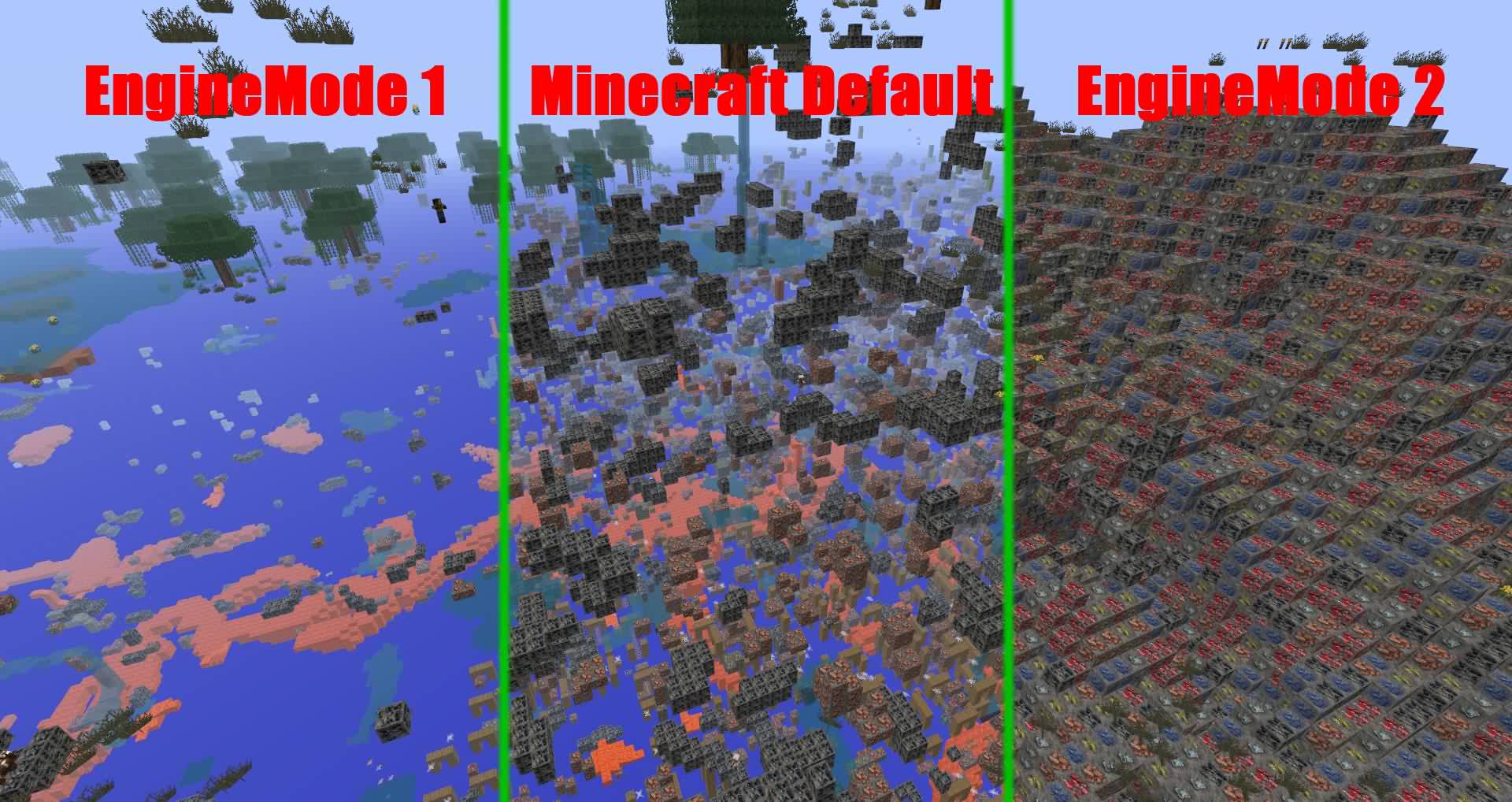
- Implemented different "transparent block" lists for Engine Mode 1 and Engine Mode 2. For now only difference is with lava block, for mode 1 it is non-transparent, for mode 2 it is transparent.
- Implemented possibility to specify which blocks are transparent and not in the config file, sections: TransparentBlocks and NonTransparentBlocks.
- Fix which may have solved java.util.ConcurrentModificationException
- Fix for phantom blocks (visible after chunk reloaded) when player is digging straight line on the chunk border.
Version 4.0.7-beta
- Corrected transparent block list. For example, lava blocks marked as transparent and therefore adjacent blocks are not obfuscating anymore
- Improved performance of ProximityHider function
Version 4.0.5-alpha
- Fixes teleport / join in the End causing client-side crashes.
- Fixes failure to deobfuscate immediately on join.
Version 4.0.3-alpha
- Updated to MC1.9.
Full release notes: In Github Release
Version 3.0.5
- Updated to MC1.8.3.
Full history: https:github.com/lishd/Orebfuscator/wiki/Version-History
A quick donation is always appreciated :D
Devoted Patreon or General Inquiry
Legacy versions Forum link
Comments


-

_ForgeUser7455464 Owner
-

devotedmc Author
-
View User Profile
-
Send Message
Posted Jun 23, 2013@lishid
I think Tritek is using Libigot, which recently broke in 7u25.
They've used a few crazy hacks to implement the class remapper in Libigot, so it's perhaps not entirely unexpected. :P
-
View User Profile
-
Send Message
Posted Jun 22, 2013@rfsantos1996
Engine 1 is less impacting to players (they don't see fake ores), but offers less protection. There are some ways to find some rare exposed ores.
@Tritek
Does it not run on 7u25? Java is supposed to be backwards compatible... How does it fail?
@xQuinlan102x
Try doing a clear cache and a server restart.
-
View User Profile
-
Send Message
Posted Jun 21, 2013i cant change it to engine 1
-
View User Profile
-
Send Message
Posted Jun 20, 2013PLEASE ADD SUPPORT FOR JAVA 7 UPDATE 25 :)
-
View User Profile
-
Send Message
Posted Jun 17, 2013@lishid
Engine 1 is efficient or theres a Xray hack that pass the Orebfuscator? I am finding some strange caves in there, and dont know if they are xraying or just randonly mining
-
View User Profile
-
Send Message
Posted Jun 16, 2013@rfsantos1996
Seeing fake ores is usually caused when the connection has a high latency or a low bandwidth. See if you can get a better network, otherwise, it's up to your players for that.
-
View User Profile
-
Send Message
Posted Jun 16, 2013@lishid
Hey, some players are complaining about seing fake ores, and my initial radius is 3 O.o, is any config or anything I can do?
-
View User Profile
-
Send Message
Posted Jun 16, 2013@Thor89
That's pretty much the only one that would affect player FPS as far as I know. Basically, by increasing the value, there are less pockets of air generated inside the world, thus less faces to be rendered.
-
View User Profile
-
Send Message
Posted Jun 16, 2013@Thor89
No, I tested here and only this affect Clients performance, I set my AirGenChance to 90 and no players complain
-
View User Profile
-
Send Message
Posted Jun 16, 2013@lishid
Changed the AirGenChance to 80 now and reloaded the config plus cleared cache.
I really cannot compare my FPS as it is stable 60 no matter how fast I am flying over the world. My computer is very powerful and a huge leap above the average one. I could try it on my laptop when I get it back tough.
Are there other settings that affects the players fps?
-
View User Profile
-
Send Message
Posted Jun 16, 2013@Thor89
This plugin affects FPS with the anti texturepack feature, depending on how much you configured the generation chances. Try increasing AirGenChance to 80 or so, then /ofc reload" and "/ofc clearcache". Then the FPS impact should be much lower.
Otherwise, your players might be using social engineering to try to cheat. Try logging in yourself and see your FPS with the F3 debug screen.
-
View User Profile
-
Send Message
Posted Jun 16, 2013@parsonswy
So you're saying people get FPS lag because of the way this plugin updates the chunks around them?
-
View User Profile
-
Send Message
Posted Jun 16, 2013@Thor89
I have the plugin on my server as well and uninstalled it temporarily and noticed a massive increase in FPS. I think that the plugin doesn't lag the server is just causes FPS lag because of how it works.
-
View User Profile
-
Send Message
Posted Jun 16, 2013After noticing that all my users were cheating with xray texture packs and mods I installed this plugin.
And now, they are complaining that the server lags noticeably more. When I look at the CPU and memory graphs none of them peaks during normal server use. And my own experience is that the server is running fine when I test with /ping and block breaking/placing, opening chests etc..
Are they complaining just to make me disable the plugin or is there a probability that the server actually lags noticeably more with this plugin enabled?
-
View User Profile
-
Send Message
Posted Jun 11, 2013@rfsantos1996
Cache is written to disk fairly often. This may degrade your SSD lifespan by a bit.
@Dan7heMan
Try clearing cache. If that doesn't help, check your startup log, there might be an error with the config file (like if you're saving it in a different encoding)
-
View User Profile
-
Send Message
Posted Jun 11, 2013Its stuck in engine mode two, even though i set it to one. Please help.
-
View User Profile
-
Send Message
Posted Jun 11, 2013@lishid
What about SSDs? I remember you saying something about it, but dont found on Wiki or in Bukkit Dev page, is there a problem with using SSD and Cache?
-
View User Profile
-
Send Message
Posted Jun 4, 2013@DerekZil
There's no definitive fix for that since that is how it works and showing up ores are either caused by using cache or latency/bandwidth (something the plugin has no control of).
@howy7214
Will be fixed in the next version, meanwhile you need to reset the random blocks section of your config.
@NemesisMate
Yes I see tickets... Might have forgotten individual ones from time to time.
That's definitely something I want to do, though am quite short on time on my hands...
Also, per-world config would have to be implemented too.
@mattgehring123
Weird... did you actually allocate the memory to Java? (50% available from inside the JVM, i.e. from a plugin telling you?)
Also, does restart fix the problem? How frequent does it happen?
-
View User Profile
-
Send Message
Posted Jun 4, 2013The world keeps on not loading when I use this :( Originally I got an OutOfMemory error when this happened, however in my latest test, I still had 50% memory available, using engine 1, and the world still didn't load. Any ideas to fix this?
-
View User Profile
-
Send Message
Posted Jun 4, 2013Do you take a look to tickets?, I posted some a long time ago and I have even no review: http://dev.bukkit.org/bukkit-mods/orebfuscator/tickets/94-enable-disable-per-region/