Orebfuscator
Orebfuscator - Anti X-RAY:
For all releases of 1.9/1.9.1/1.9.2/1.9.4/1.10/1.11/1.12.x/1.13.x: Version 4.4.3
Now with support for CraftBukkit 1.9/1.9.1/1.9.2/1.9.4/1.10/1.11/1.12.x/1.13.x!
This plugin is used to counter X-RAY Client mods.
It modifies data that are sent to clients to hide blocks of your choice, such as Ore, chests, dungeons, etc.
It does not manipulate blocks in the world file, thus is safe to use.
ProximityHider is a feature that hides chests that are far from players.
As of 4.3.3, Proximity Hider has been enhanced to use line-of-sight checks, not just proximity! Upgrade today.
Configuration Guide
https://github.com/lishid/Orebfuscator/wiki/How-to-properly-configure-Orebfuscator
https://github.com/lishid/Orebfuscator/wiki/Configuration-File
FAQ
https://github.com/lishid/Orebfuscator/wiki/FAQ
DOWNLOAD
Please read compatibility information before downloading as not all releases work with all versions of CraftBukkit.
Latest version should be on BukkitDev, or as a release on the Github page: https://github.com/lishid/Orebfuscator/releases
Please also download ProtocolLib and install it in the plugins folder.
- Is compatible only with version 4.0.0 or newer.
- For 1.9.4 support, you must use build 277 or newer of Protocollib 4.0
- For 1.10 support, you must use build 293 or newer of Protocollib 4.0
- For 1.11 support, please use latest stable builds of ProtocolLib for 1.11.
- For 1.12 support, please use ProtocolLib 4.3.0 or newer.
- For 1.13 support, please use ProtocolLib 4.4.0 or newer.
- Download link: https://www.spigotmc.org/resources/protocollib.1997/
- Legacy Link: http://dev.bukkit.org/server-mods/protocollib/
Features
- Advanced algorithm that hides ore, chest and and anything you specify in the configuration
- Spout compatible, but optional
- No modifications to CraftBukkit.jar is needed
- Customize the blocks you want to hide
- HIDES DUNGEONS and other blocks that are in the dark
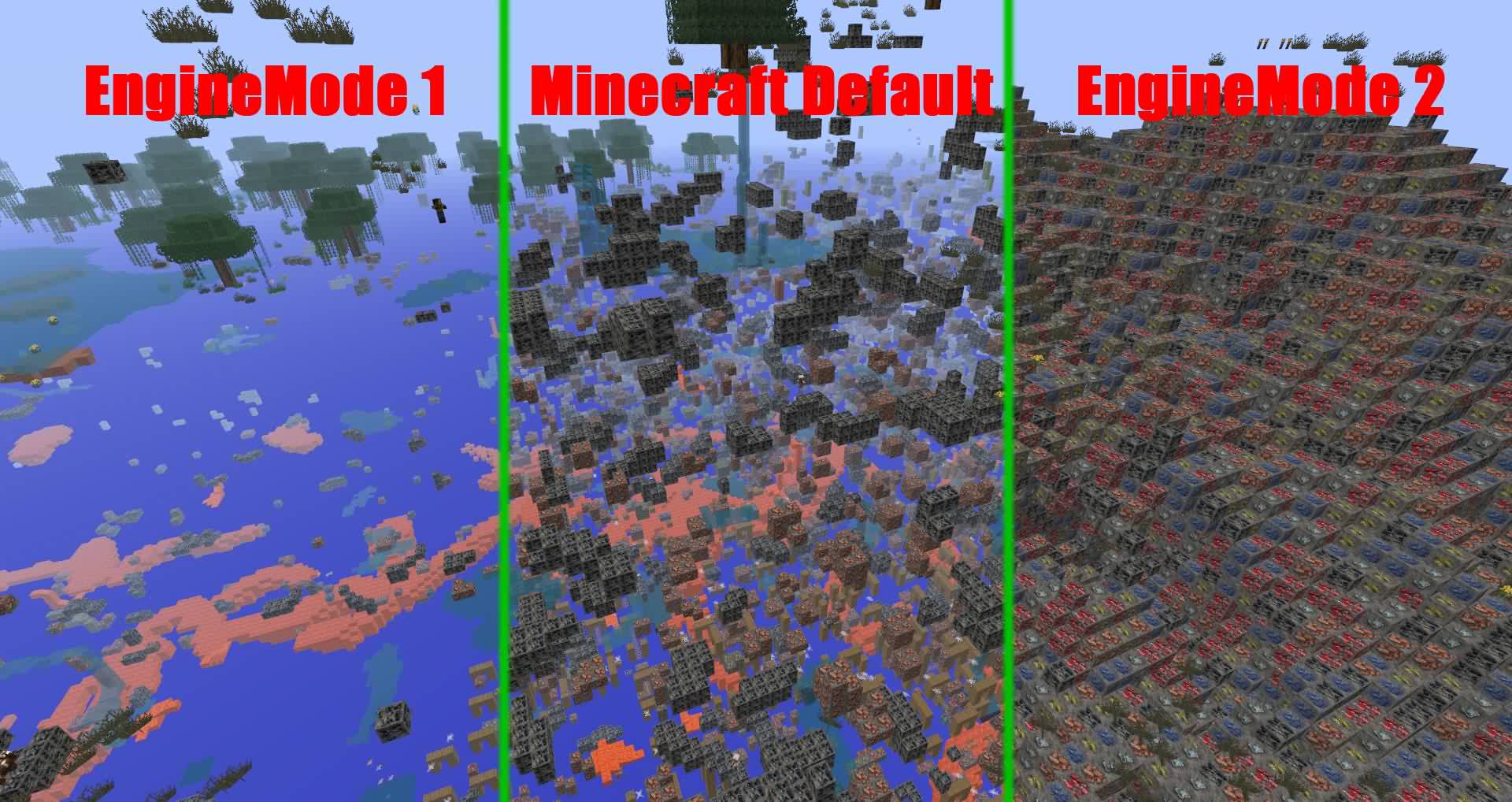
- Different hiding mode, or scrambling.
- Extensive configuration. Change updating methods depending on your bandwidth and processing speed.
- Hide hidden chests and furnaces until a player is close to it.
- Hide hidden chests and furnaces until a player can see it.
Usage
Install:
- Copy "orebfuscator-4.4.3.jar" to your plugins folder
- If you're upgrading from Orebfuscator.jar, move the contents of the "Orebfuscator3" folder to the "Orebfuscator4" folder
- Restart your server.
Configuration
See this: https://github.com/lishid/Orebfuscator/wiki
Commands
See this: https://github.com/lishid/Orebfuscator/wiki
Permissions
See this: https://github.com/lishid/Orebfuscator/wiki
Source Code
Here you go! (Hosted on Github) - please post issues and requests for help there
Metrics
- This plugin utilizes Hidendra's plugin metrics system, which means that anonymous information of your OS and setup will be collected and sent to mcstats.org
- Opting out of this service can be done by editing plugins/Plugin Metrics/config.yml and changing opt-out to true.
Thanks!
- Aleksey_Terzi, single-handedly updating to CraftBukkit 1.9, 1.11, and 1.12!
- DevotedMC for taking over management of the project
- AFFORESS, major help on code optimization and spout support!
- Lishid, for years(!) of maintaining this plugin, and MarioG1 for recent patch support
- raphfrk, helped with packet processing
- Many donators!
Bugs
- See the issues page for any outstanding problems.
TODO
- A command that generates the world cache for the existing chunks.
Changelog
Version 4.4.3
- Support for Minecraft 1.13.2 latest builds (CraftBukkit/Spigot/etc)
Version 4.4.2
- Fixes for reported issues during use -- please update
Version 4.4.1
- Support for Minecraft 1.13 and 1.13x (CraftBukkit/Spigot/etc)
- Some enhancements under the covers, including better support for tile entity hiding and state management
Version 4.3.3
- Includes fixes for portions of #164
- NEW FEATURE: Gaze based proximity hiding. If you can't see it due to blocks in the way, it stays proximity hid, regardless of your physical closeness! For full details, read here: PR#16
- New example configs! Find them here: https://github.com/lishid/Orebfuscator/tree/master/Plugin/src/main/resources/resources
Version 4.3.0
- Support for Minecraft 1.12 (CraftBukkit/Spigot/etc)
Version 4.2.1
- #135 : Resolved issue that plugin doesn't work unless you delete the config and force reload and clear cache after startup
Version 4.2.0
- Support for Minecraft 1.11 (CraftBukkit/Spigot/etc)
- Remove ChunkReloader due to performance issues at scale.
- Addressed #66. Limit Cache retention configuration options added.
- Proximity Hider blocks are by default orebfuscated, if both are active.
- Implemented #62. Per World Configuration -- have unique configurations per world.
- Addressed DevotedMC#8. Allow for unique proximity Y height per material hidden.
- Fixed #113. Item frames sometime disappeared.
- Fixed #124. Glitches when used FastAsyncWorldEdit.
- Fixed #125. Prevent obfuscation for NPC, for ex. NPC from plugin Citizens.
- Fixed #128. EntityChangeBlockEvent was not causing block updates.
Version 4.1.4
- Fixing ChunkLoader error: https://github.com/lishid/Orebfuscator/issues/110
- Improving performance of ChunkReloader
Version 4.1.2
- It is now possible to use Worlds list either as blacklist (i.e. all worlds are subject for obfuscation excluding listed) or as whitelist (i.e. only listed worlds are subject for obfuscation)
- Fixed bug with using ProximityHider and Signs. It is now possible to add WALL_SIGN and SIGN_POST to ProximityHider obfuscation.
- Updated wiki so commands and configuration pages are matching to the current Orebfuscator.
Version 4.1.1
- Various Small fixes
- Fix which might resolves problem described in https://github.com/lishid/Orebfuscator/issues/100
- Config file now supports block names additionally to IDs
Version 4.1.0
- Support for CB 1.10 - thanks Asgarioth!
Version 4.0.14
- Single jar supports all releases of 1.9.x now!
- Some chunk reload issues are corrected (on teleport, etc.)
Version 4.0.12.1
- Add support for 1.9.4 - this release does not support prior versions.
Version 4.0.12
- Fixed entity list reload issue
Version 4.0.11
- Fixed failure to deobfuscate along chunk boundaries under specific conditions.
Version 4.0.10
- Fixed crash for PaperSpigot servers
Version 4.0.9
- Fixed crash when chunk section (16 x 16 x 16) has more than 127 different block types
- Implemented different "transparent block" lists for Engine Mode 1 and Engine Mode 2. For now only difference is with lava block, for mode 1 it is non-transparent, for mode 2 it is transparent.
- Implemented possibility to specify which blocks are transparent and not in the config file, sections: TransparentBlocks and NonTransparentBlocks.
- Fix which may have solved java.util.ConcurrentModificationException
- Fix for phantom blocks (visible after chunk reloaded) when player is digging straight line on the chunk border.
Version 4.0.7-beta
- Corrected transparent block list. For example, lava blocks marked as transparent and therefore adjacent blocks are not obfuscating anymore
- Improved performance of ProximityHider function
Version 4.0.5-alpha
- Fixes teleport / join in the End causing client-side crashes.
- Fixes failure to deobfuscate immediately on join.
Version 4.0.3-alpha
- Updated to MC1.9.
Full release notes: In Github Release
Version 3.0.5
- Updated to MC1.8.3.
Full history: https:github.com/lishd/Orebfuscator/wiki/Version-History
A quick donation is always appreciated :D
Devoted Patreon or General Inquiry
Legacy versions Forum link
Comments


-

_ForgeUser7455464 Owner
-

devotedmc Author
-
View User Profile
-
Send Message
Posted Feb 20, 2014@X00LA
Send a screenshot?
@AT_HE
Yeah, this is done by the client already. As long as you don't send too many air blocks, minecraft fill omit the faces of blocks hidden inside other blocks.
By not sending the chunk data, players might mine downwards and fall into the void too.
-
View User Profile
-
Send Message
Posted Feb 20, 2014@lishid
yea but maybe is cheaper that sending "obfuscated chunks" and then deobfuscate block by block as the player are breaking things
in other 3d games, computer spends time calculating edges on what is visible as the player moves rather than reading and render the full map
-
View User Profile
-
Send Message
Posted Feb 20, 2014I´m an OP, but my second Account isn't. When I'm on the server as OP and joined with my second accound and use the x-ray Texture-pack there's no message comin up.
-
View User Profile
-
Send Message
Posted Feb 19, 2014@X00LA
Are you an OP or have the * permissions? It should give you a message a login by default.
-
View User Profile
-
Send Message
Posted Feb 19, 2014Hi,
I downloaded version 2.1.0 and tested it on my server with 2 different x-ray texture packs. All 2 packs works without any problem and Orebfuscator doesn't make his job. I use the standard config.yml. Did I make anything wrong or is that a problem from Orebfuscator?
Regards,
X00LA
-
View User Profile
-
Send Message
Posted Feb 18, 2014@AT_HE
Well, you forgot to consider that players constantly move and break things. When you break things if stuff behind the wall isn't sent to you, the server will have to take time searching for blocks to send to you, and then send them. This not only add extra things to server load, but adds considerable networking data. Which means if the player has a bad internet connection, and they break stuff, they'll wait up to seconds sometimes to see the blocks behind.
-
View User Profile
-
Send Message
Posted Feb 18, 2014i think the way minecraft server (and bukkit) manage and sends chunks to client are wrong
server just send complete chunks around player, even with many blocks that player wont see .. i think it would send only visible blocks, that way x-rays would be impossible (you will see only void), and server will read and send fewer data
is there any way orebfuscator "correct" this? .. that way also will turn minecraft faster
-
View User Profile
-
Send Message
Posted Feb 17, 2014@rocky123xo
It doesn't "explode"... it just makes the world get downloaded, but whenever someone tries to mine, they would encounter random weird blocks.
Maybe you broke the config file. Look for a console error in the log when you start the server, yaml is pretty picky about syntax.
-
View User Profile
-
Send Message
Posted Feb 17, 2014Hi there, I've been having a problem lately with people downloading my server's world. I was told I could add TNT and redstone blocks to the Engine Mode 2 block replace list, so that it would explode the downloaded world, etc. When I tried adding TNT to the block replace list, it seemed to break engine mode 2. It now looks like engine mode 1, it has almost every block hidden, and the world doesn't explode like it was supposed to. I hope that makes sense.
-
View User Profile
-
Send Message
Posted Feb 16, 2014@guruserver
The spigot one is basically a copy of Orebfuscator plugin, but stripped to the most basic feature. This one also blocks out freecam and texturepack, also has proximity hider, where chests and other stuff are hidden until players are close by.
-
View User Profile
-
Send Message
Posted Feb 16, 2014Is this the same plugin as the one built into Spigot or would this offer more functions if i turned spigot one off?
-
View User Profile
-
Send Message
Posted Feb 13, 2014@Eljoex
NoLagg chunk sending sets some critical variables to null, which breaks Orebfuscator.
Disabling nolagg's chunk sending probably fixes the issue.
-
View User Profile
-
Send Message
Posted Feb 13, 2014@lishid
Yes, why?
-
View User Profile
-
Send Message
Posted Feb 13, 2014@Eljoex
Are you using NoLagg?
-
View User Profile
-
Send Message
Posted Feb 13, 2014@lishid
http://pastebin.com/aGJzZ3Ff
After that it just spam repeats
13.02 06:39:08 [Server] ERROR java.lang.NullPointerException
13.02 06:39:08 [Server] WARN java.lang.NullPointerException
-
View User Profile
-
Send Message
Posted Feb 12, 2014@ZeEye
Initial radius means technically for each block that can be obfuscated, how many blocks around it to search for in a radius to see if it is close to a wall touching the air that players can see. This basically means how thick the layer of exposed real blocks are on the wall of caves, etc. Usually you take 1, rarely you take 2. Probably needless for 3+
Compression means how much to compress the chunks. Higher compression takes more CPU but saves some network bandwidth, whereas lower compression takes little CPU but more network. Good value here is 1 in most cases. Don't try 0 as it is like 10-20 times larger data size. Don't try 9 either since it will lag your CPU so much the main thread will be affected.
Priority is the orebfuscator's thread OS-level priority. Higher priority means that orebfuscator will perform better under load (players gets their chunks really quickly when logging in), whereas lower priority means players might wait a while before getting chunks sent to them, but you will get little impact to the main game thread (that does block updates, entity movement, etc). Usually low is good enough. This option doesn't have much of an impact if your server isn't under constant CPU load.
-
View User Profile
-
Send Message
Posted Feb 12, 2014Just gonna repeat that here, can anybody give me the info?
The wiki has not much info about what exactly some of the config settings do. Can you enlighten me?
What exactly does that mean?
What exactly are the down/upsides of either a low compression or high? I get that high compression sends small files thus less bandwidth used but whats the tradeoff?
Same here, what is the effect of setting the priority to high? Less fake ores? Higher performance hit?
-
View User Profile
-
Send Message
Posted Feb 12, 2014@NoHoPeLess
This should have been fixed with version 2.1.0. Is that what you are running?
@Eljoex
Can you post a small piece of it to PasteBin and link it here?
-
View User Profile
-
Send Message
Posted Feb 12, 2014Getting a huge list of errors atm, too many to even copy/paste (reïnstalled already, default settings same output).
-
View User Profile
-
Send Message
Posted Feb 12, 2014whats this?