MoneyManager
MoneyManager
Download MoneyManager: v2.1
Source Code: GitHub
Make sure you have Vault installed!
Description And Features
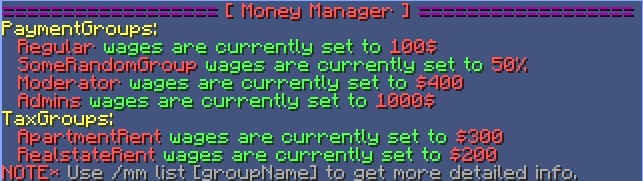
Money Manager allows admins to set up groups, put people in those groups, and set the wage or tax for that group. They can pay everyone, or just one group with one simple command. These groups that you make DO NOT have to align with your current permissions groups. You can make whatever groups you want and put whoever you want in them and set the payment to whatever you want.
Economies/Permissions
By using Vault, Im able to link into most permissions systems.
- Permissions 3
- bPermissions
- PEX
- GroupManager
- PermissionsBukkit
- zPermissions
Vault is required for this plugin to work. Check out their page and download vault with the link below.
Dev Page: Vault Dev Page
Screen Shots


Commands and Permissions
<> - Optional command [] – Required command
| Command | Perm Node | Description |
|---|---|---|
| /mm | moneymanager.welcome | This brings up all the general info. |
| /mm help <command> | moneymanager.help | Brings up the help menu, which has all the commands |
| /mm list <group> | moneymanager.list | Will bring up a list of all payments and taxes. If you choose a specific group, it will bring up payments or taxes for that group and all players in the group |
| /mm pay <group> | moneymanager.pay | Pays either everyone or pays a specific group if you type the group name |
| /mm tax <group> | moneymanager.tax | Taxes either everyone or taxes a specific group if you type the group name |
| /mm set [group] a:[amount] | moneymanager.set | Will set the amount of the specified group. |
| /mm set [group] t:[flatrate/percent] | moneymanager.set | Will set the type of payment/tax the specified group. |
| /mm sync [PermsGroup] [mmGroup] | moneymanager.sync | Takes the members of the PermissionsGroup, and puts them into the mmGroup, overwriting whatever was in the mmGroup to start with. ONLY WORKS WITH PERMISSIONSBUKKIT. |
| /mm add [group] [player1,player2,player3...] | moneymanager.add | Will add players to a specific group |
| /mm remove [group] [player1,player2,player3...] | moneymanager.remove | Removes a player from the specified group. |
| /mm create [group] [pay/tax] [amount] [type] [player1,player2,player3...] | moneymanager.create | Create a new group with the specified wage/tax. |
| /mm delete [group] | moneymanager.delete | Deletes a group and everything in it. |
Video
OUTDATED, BUT STILL, LIKE, 75% RELEVANT
Donate?
Like what I do? Buy me a beer!
I put a lot of time into coding, testing, and updating my plugins. I even do specialized plugins for people when they PM me (For free). If you love my plugins, this is a way to say thank you.

Change Log
Version 2.0 (September 15th, 2012)
- Added /mm sync command to sync a perms group with mmGroup.
- Added an update check feature, to check when there is an update available.
Version 2.0
- Updated to current bukkit.
- Complete rewrite of code. From ground up.
- Changed syntax of most commands.
Version 1.0 (12/20/11) download
- Came out with first release.
Comments


-

_ForgeUser8012932 Owner
-
View User Profile
-
Send Message
Posted Dec 28, 2011@retricide
Coming out in next release :)
-
View User Profile
-
Send Message
Posted Dec 28, 2011@JoneKone
Taxes take money from the players. I saw it as an easy way to do, for example, rent. If you have a renting system, you could you taxes for that. Like I rent an apartment in minecraft for 100 coins a week, so you could create a group in TaxGroups called apartmentRent, set the tax to 100$ and add my name to it. :)
-
View User Profile
-
Send Message
Posted Dec 28, 2011Hi, just saw your video + read the introduction for your plugin (Sorry for bad English)
Great plugin you have here..
Taxes are currently set to do what exactly? I mean does it just take the money from the player if a period of time has happened?
Could it be possible to Tax from etch money transaction?
Player1 -> Pays -> Player2 == Tax X %
-
View User Profile
-
Send Message
Posted Dec 24, 2011Could you add automated payments?
For example, you create a group that will pay XX% every XXseconds/days.