
Magic Chest
Nobody enjoys rummaging through inventories to organize the contents. Why not hand that job down to the gremlins? Magic Chest auto-sorts your inventories while you have them closed, so that when you open them they are completely sorted and it's easy to find your stuff.
How It Works
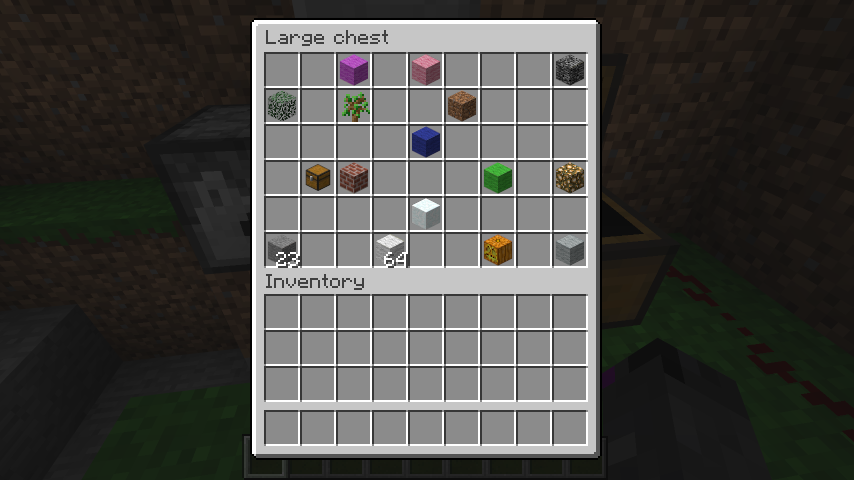
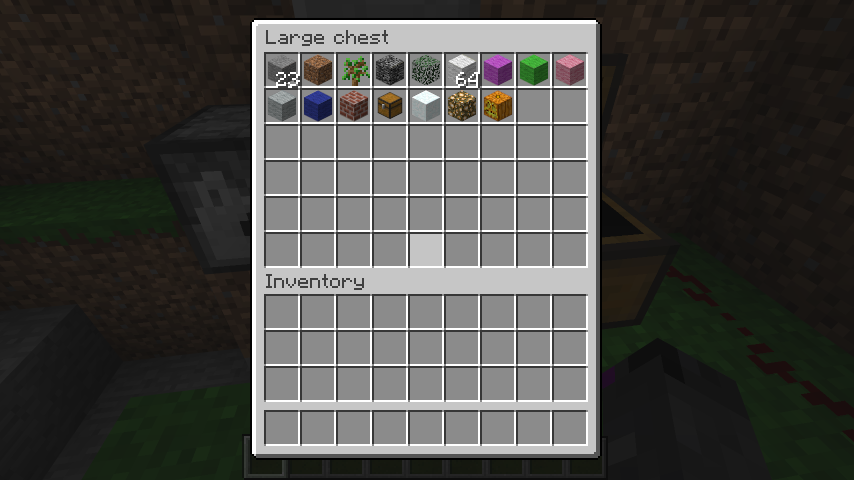
1. Stacks of the same material are combined.
2. Stacks are sorted by item name.
3. Stacks of the same item name are sorted by Data (i.e. Wool Color)
4. Stacks with the same name and Data are sorted by Quantity (So the incomplete stack will be last)
- Note: Chests that are renamed in an anvil or that do not have the default Minecraft inventory title are excluded from sorting.
Before
After
Commands
/mgcs help: shows a command usage help page.
/mgcs on: turns auto-sorting on for the player that ran the command.
/mgcs off: turns auto-sorting off for the player that ran the command.
/mgcs invon: turns auto-sorting on for the players inventory when an item is picked up. (v1.2.4 and above)
/mgcs invoff: turns auto-sorting off for the players inventory. (v1.2.4 and above)
/mgcs reload: reloads all of MagicChest's config.
Permissions
magicchest.sort: Sorts all inventories that this player opens.
magicchest.sort.chest: Sorts chests that this player opens.
magicchest.sort.dispenser: Sorts dispensers that this player opens.
magicchest.sort.enderchest: Sorts ender chests that this player opens.
magicchest.sort.shulkerbox: Sorts a shulker box that this player opens.
magicchest.help: Shows a usage help.
magicchest.reload: Reloads all of MagicChest's config.
Reviews
cobwebster's (aka. ShinyTinselWorm) overview of MagicChest
Plugin Stats

Plugin Compatibility
dtlTraders- Avoids sorting TNPC inventories.
ChestCommands- Ignores sorting ChestCommands inventories.
FastCraft- Avoids sorting FastCraft menu.
AShops- Avoids sorting AShops inventories.
SkillAPI- Avoids sorting SkillTrees and other menus.
- If you have a problem with MagicChest sorting another plugins inventory or something like that please do not hesitate to leave a comment and let me know.
InventorySortEvent API (for plugin devs)
If you need to cancel MagicChest sorting an inventory, this is for you. Github Wiki
Massive shoutout & thanks to:
dandielo - making dtlTraders compatibility possible! Couldn't have helped folks without you!
timsavage - dtlTraders plugin compatibility request!
filoghost - author of the awesome ChestCommands plugin and the help and support of MagicChest! Couldn't have done it without your suggestion! :)
lecraeman - for requesting support of ChestCommands!
Kepler_ - author of FastCraft and supporter of MagicChest. Thanks for letting me know and working with me!
Metrics Information
Quote:This plugin utilises Hidendra's plugin metrics system, which means that the following information is collected and sent to mcstats.org:
A unique identifier The server's version of Java Whether the server is in offline or online mode The plugin's version The server's version The OS version/name and architecture The core count for the CPU The number of players online The Metrics version Opting out of this service can be done by editing plugins/Plugin Metrics/config.yml and changing opt-out to true.
Comments


-

_ForgeUser7307234 Owner
-

uvbeenzaned Author
-
View User Profile
-
Send Message
Posted Aug 13, 2013@filoghost
How would you recommend I check your chests name? Or would it be better to use a method exposed in your plugin?
-
View User Profile
-
Send Message
Posted Aug 13, 2013@uvbeenzaned Thank you for doing this. You should only check if the chest name starts with §r (no one uses that, since it's useless using a reset in front of the name)
-
View User Profile
-
Send Message
Posted Aug 11, 2013@uvbeenzaned
Thank God DUDE!
Do you have a skype? I would love if you could let me know as soon as it's done!
-
View User Profile
-
Send Message
Posted Aug 11, 2013@lecraeman
I will work on that for you as soon as possible!
-
View User Profile
-
Send Message
Posted Aug 11, 2013I am having a problem with this plugin. I recently got this plugin to make item menus:
http://dev.bukkit.org/bukkit-plugins/chest-commands/
Whenever I have this plugin on, and it opens a menu...it then sorts that menu. So, the items are out of order, and execute the wrong commands!
Is there anyway you can add compatibility with that plugin?
-
View User Profile
-
Send Message
Posted Jul 29, 2013Well seeing as the Bukkit Staff hasn't yet approved the plugin, all of you can grab the latest here at anytime: dw.networkery.co/bukkitdev/MagicChest/
-
View User Profile
-
Send Message
Posted Jul 28, 2013@mormaii2
Hey! Good news for you! I've fixed the OpenInv problem and a release will be able available as soon as its approved.
-
View User Profile
-
Send Message
Posted Jul 25, 2013@mormaii2
I am working on your OpenInv support as we speak! :) I am talking things over the the dev of OpenInv.
-
View User Profile
-
Send Message
Posted Jun 7, 2013@mormaii2
No problem. You are fine. I will look into it soon! :) Have a good day!
-
View User Profile
-
Send Message
Posted Jun 7, 2013@uvbeenzaned
No problem, sorry to sound like an asshole on the first post but I was having lots of issues with lots of players and what i want is for them to enjoy, they loved this plugin because their chests were so neatly organized. What could you try is try to at least make it compatible with openinv seeing as it's a chest handling plugin which is super popular.
-
View User Profile
-
Send Message
Posted Jun 5, 2013@mormaii2
I understand that people are having these problems. It's hard to work on all of these at once because I would have to somehow make this plugin compatible with every plugin that has something to do with any kind of inventory. I will continue working to figure out some easy solution to this problem. For the moment, just tell your players to run /mgcs off for games and the like and then use /mgcs on to turn it back on. Thanks for your post and time!
-
View User Profile
-
Send Message
Posted Jun 5, 2013I'm having lots of issues with this plugin. It deletes player's chests with openinv, It also bugged chests on players playing survival games.
-
View User Profile
-
Send Message
Posted May 31, 2013@DekuHero
Drag and drop and then give your users the permissions to use it. Open the configuration file for advanced options. :)
-
View User Profile
-
Send Message
Posted May 31, 2013just drag and drop jar file and this will work?
or do I need to do signs or something?
If it is a simple drag and drop...I have been looking for something like this for a while and I am really happy you made this :D
-
View User Profile
-
Send Message
Posted May 30, 2013@timsavage
Just committed and uploaded MagicChest 1.1.6. Will be available soon to download with brand new dtlTraders support! :)
-
View User Profile
-
Send Message
Posted May 30, 2013@malhagor
Glad to hear it!
-
View User Profile
-
Send Message
Posted May 30, 2013@donsavage1
Not at the moment it automatically takes any random size stacks and makes them into 64 stacks. That kind of compatibility would come with a lot more research on my part.
-
View User Profile
-
Send Message
Posted May 30, 2013@malhagor
nevermind, got it working ... forgot to reload the plugin
-
View User Profile
-
Send Message
Posted May 30, 2013@uvbeenzaned
I am really sorry to bother you again, but I tried many things, setting override and sorting to true and all other combinations, and it doesn't seem to work ... I'm not the best with permissions but I got a few plugins working with no problem. Would you mind assisting me a little bit or if anyone wants to do it ?
Thank you
-
View User Profile
-
Send Message
Posted May 29, 2013Will this plugin work with StackableItems? It allows admins to change the amount of an item that can be in a single stack.