GUIShop
This plugin simply adds one command for your players; /shop.
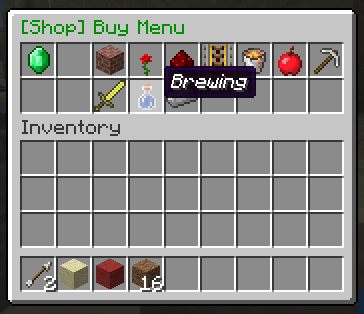
This command will open a clickable GUI with the shop on top and your inventory on the bottom.
Simply navigate to the item you want, and click on it to buy or sell it.
Please read the whole thread if you can.
Features:
1. Easy to use click GUI.
2. Buy or sell any item at a configurable price.
3. Sell enchantments books with any enchantment.
4. Sort item into categories for ease of use.
5. Hooks into vault for economy.
Permissions:
shop.buy:
description: Gives access to buying menu.
shop.sell:
description: Gives access to selling menu.
shop.enchantments:
description: Gives access to the enchantment menu.
shop.tab.<tabID>:
description: Gives access to the specified tab.
shop.tab.* to give permission for all tabs.
shop.creative:
description: Gives access to shopping in creative mode.
shop.admin:
description: Gives access to admin commands like /reloadshop.
Commands:
/shop opens the shop GUI.
/reloadshop reload prices and config for the plugin. *working in v1.3.
Download:
Direct download:
(Use the files button)
You will also need to install vault and a economy plugin like BOSEconomy or iConomy.
Images:


Configuration:
There are four configuration files, Options, Tabs, Prices and EnchantmentPrices.
Options
There are five options:
SHOP_TITLE=§2[Shop]
DONATE_MESSAGE_ON=true
DONATE_MESSAGE=§cDonate to gain access!
ALLOW_BROWSE=false
PRICE_MULTIPLIER=1.0
SHOP_TITLE will change the prefix of all messages and GUIs made by the shop plugin. This must be under 20 characters long.
DONATE_MESSAGE_ON turns the message about donating on.
DONATE_MESSAGE lets you set the message that will ask people to donate.
ALLOW_BROWSE lets players look through tabs that they do not have permission for, but they can not buy/sell anything in those tabs.
PRICE_MULTIPLIER all the prices will be multiplied by this number, good for quickly scaling up the prices to suit your server.
Tabs
tabID=0 tabName=Building_Blocks IconID=45
Each tab must have a unique ID (tabID=0 in this case). This is used to identify which tab each item goes into.
The second part (tabName=Building_Blocks) is to set what this group of items is called, in this example "Building Blocks". Instead of spaces use underscores, '_', in the name of the tab.
The last part (IconID=45) is to change the icon of the tab. It is the item ID of the icon, eg 45 is the ID for bricks. You can find the icon IDs of items on minecraft wiki.
Example:
tabID=0 tabName=Building_Blocks IconID=45
tabID=1 tabName=Decorations IconID=38
tabID=2 tabName=Redstone IconID=331
tabID=3 tabName=Transportation IconID=27
Prices
WOOD_BIRCH itemID=5:2 buyPrice=4.0 sellPrice=0.5 tabID=0
The first part (WOOD_BIRCH) is not important, just for you to remember what item the configuration is for and it is not interpreted by the plugin at all.
The second part (itemID=5:2) is the minecraft ID of an item. You can find these on minecraft wiki or just google it.
To get a different version of an item (eg birch wood instead of Oak wood) just add a semicolon (:) and the appropriate data for the alternative version (also available on minecraft wiki).
The third and fourth part (buyPrice=4.0 sellPrice=0.5) is the price of a single item, eg one wood.
The plugin will automatically generate a list of possible block for you to use, and it will set a default price for these blocks. You can always add or remove any block you want to the list, and I recommend you modify the prices o suit your server
The last part (ItemTAB=0) is which tab (group of items) in the shop GUI the item will appear in.
0 is Building Blocks, 1 is Decorations, 2 is Redstone, 3 is Transportation, 4 is Misc, 5 is Foodstuffs, 6 is Tools, 7 is Combat, 8 is Brewing and 9 is Materials, you can change these in the tabs config.
Example:
SAND itemID=12 buyPrice=4.0 sellPrice=0.5 tabID=0
GRAVEL itemID=13 buyPrice=4.0 sellPrice=2.0 tabID=0
GOLD_ORE itemID=14 buyPrice=45.0 sellPrice=22.5 tabID=0
DIRT itemID=3 buyPrice=4.0 sellPrice=0.5 tabID=0
COBBLESTONE itemID=4 buyPrice=4.0 sellPrice=0.5 tabID=0
WOOD_BIRCH itemID=5:2 buyPrice=4.0 sellPrice=0.5 tabID=0
WOOD_DARK itemID=5:1 buyPrice=4.0 sellPrice=0.5 tabID=0
Enchantments
DURABILITY enchantmentID=34 enchantmentLevel=3 enchantmentPrice=10
Again the first part (DURABILITY) is just for you; not used by the plugin.
The second part is the enchanment ID for the enchantment type, these can be found here:
http://www.minecraftforum.net/topic/1711629-enchantment-id-list/
The third part is pretty simple, just how strong the enchantment is. This one (enchantmentLevel=3) will get you unbreaking level III.
The last bit (enchantmentPrice=10) is simple as well, just the price to buy one enchantment book.
Example:
LOOT_BONUS_BLOCKS enchantmentID=35 enchantmentLevel=3 enchantmentPrice=40
PROTECTION_FIRE enchantmentID=1 enchantmentLevel=4 enchantmentPrice=30
DIG_SPEED enchantmentID=32 enchantmentLevel=5 enchantmentPrice=50
PROTECTION_FALL enchantmentID=2 enchantmentLevel=4 enchantmentPrice=50
SILK_TOUCH enchantmentID=33 enchantmentLevel=1 enchantmentPrice=100
Please comment if you use the plugin or would like to make a suggestion.
Videos
English:
http://youtu.be/bJyvUOLr33g
Credits: SimplyAussieGamer
Portuguese:
https://www.youtube.com/watch?v=u5r01sSCE-I
Credits: AbsintoJ
Metrics

Thanks for taking time to read this,
~ Waffles
Comments

-

waffu_ Owner
-

_ForgeUser11052188 Maintainer
-

Neil51298 Maintainer
-
View User Profile
-
Send Message
Posted Nov 18, 2017In reply to gbrigando:
-
View User Profile
-
Send Message
Posted Jun 11, 2016jordogod what would you want in it
-
View User Profile
-
Send Message
Posted May 14, 2016Hey! Does someone have a customized config file i could use for this? That would be amazing! Thank you :)
-
View User Profile
-
Send Message
Posted May 13, 2016Hay guys The plugin maker didnt put the main permission node in if you dont have this deoped players cant use the /shop command Permission: Shop.open
-
View User Profile
-
Send Message
Posted Apr 28, 2017In reply to korbynullevig:
-
View User Profile
-
Send Message
Posted May 2, 2017In reply to memo609memo:
-
View User Profile
-
Send Message
Posted May 4, 2016Can I use Essentials Eco with this plugin. I was having issues with the /sell command when using essentials eco
-
View User Profile
-
Send Message
Posted May 1, 2016How to edit the main menu? i could of swore you could in the other versions?
I want to change the look of the buy / sell & get rid of the enchantment tab as i do not want players to buy enchantments.
running on 1.8.8 server
-
View User Profile
-
Send Message
Posted Apr 7, 2016For some reason my non op players cant use /shop. I added the permissions but they still cant. What do i do?
-
View User Profile
-
Send Message
Posted Apr 6, 2016It would not work. I raise the permissiont the default group and you can not buy nor sell it . What can be wrong ?
-
View User Profile
-
Send Message
Posted Mar 31, 2016Fix some Errors and Updated to 1.9.2 Link Removed: http://www.mediafire.com/download/5uko2kf40hhqiq8/GUIshop1.9.2.jar
I updated the plugin for you guys until he update the plugin keep in mind this is not an Official update from the original developer
-
View User Profile
-
Send Message
Posted Mar 31, 2016@deitnerb
There is no way with this type of plugin sorry,
-
View User Profile
-
Send Message
Posted Mar 31, 2016@CNIAngel
Can you give me a full Server log with GUIShop i updated
-
View User Profile
-
Send Message
Posted Mar 31, 2016Is there any way to make this run a command when people buy things? I'm wanting to make a rank shop.
-
View User Profile
-
Send Message
Posted Mar 31, 2016@jon100567
Gave this build a go and it's not working. Not sure what I'm doing wrong. All I did was replace the old GUIShop jar file with this one.
If anyone else is giving it a go at maintaining this plugin I'd love to hear about it.
-
View User Profile
-
Send Message
Posted Mar 25, 2016@jon100567
Thank you so much. I was about to do this when I saw your comment and you saved me a sleepless night xD
-
View User Profile
-
Send Message
Posted Mar 24, 2016@dangerORclose
@TheSuperAtia
I think the developer left so I updated the plugin for you guys until he update the plugin keep in mind this is not an Official update from the original developer
Update to 1.9 Link Removed: http://www.mediafire.com/download/w686hhov3h97vcc/guishop1.9.jar
-
View User Profile
-
Send Message
Posted Mar 23, 2016i have a little problem my default users can not access the buy sell and enchantments shop becouse of they have to donate first i cant find how to turn this off and my permissions config looks like this:
groups:
Default:
default: true
permissions:
- shop.buy
- shop.sell
- shop.enchantments
- shop.tab.*
- shop.creative
can someone please help me
(me as op can use the shop) if you are not opped you cant use it
please help me out
-
View User Profile
-
Send Message
Posted Mar 12, 2016Please 1.9 version
-
View User Profile
-
Send Message
Posted Mar 8, 2016Is there like any way to create a spawner shop?
I tried it myself, and I only could make a new tab, but I couldn't add new items (different kind of spawners) into it. Example: Pig spawner, Cow spawner, Creeper spawner, Iron Golem spawner,...