
DoOdy Duty
DoOdy
Separate Admin/Mod Duties so everyone can enjoy the game
- Are you tired of arguing with upset players that complain about Mod/Admin staff are abusing their Creative powers?
- Want a way to minimize the impact on your server's economy from Mod/Admins abusing Creative mode?
- Want a way to stop Mod/Admin killing players while in Creative mode?
- Want to limit the amount of OP players?
DoOdy makes these possible by limiting the power of Creative gamemode. It's a tool that allows admins/mods that wish to play as honestly as possible in survival mode to do so but still have the ability to go into creative mode without being tempted to cheat the server's ingame economy &/or PVP integrity by abusing Minecraft's 'Standard Creative Mode'. Meaning server owners can limit the amount of players with unnecessary OP level access.
Newly added Moderator Features
- Spectator mode, allows players to enter spectator mode.
- Save creative inventory, pick up where you left off.
Features
- Saving of player's inventory, armour, location & xp before they enter duty (creative mode).
- Once they leave duty (creative mode) their inventory & armour are restored & the player is teleported to their original location.
- Disable PVP while on duty (creative mode).
- Disable all/specific items/blocks from being able to be dropped.
- Disable all/specific storage access eg. Chests/Dispensers/Furnace/Storage Minecarts.
- Control what they cannot break/place through a blacklist.
- On the event of their death all their drops are removed.
Commands | Permissions | Tickets
Commands
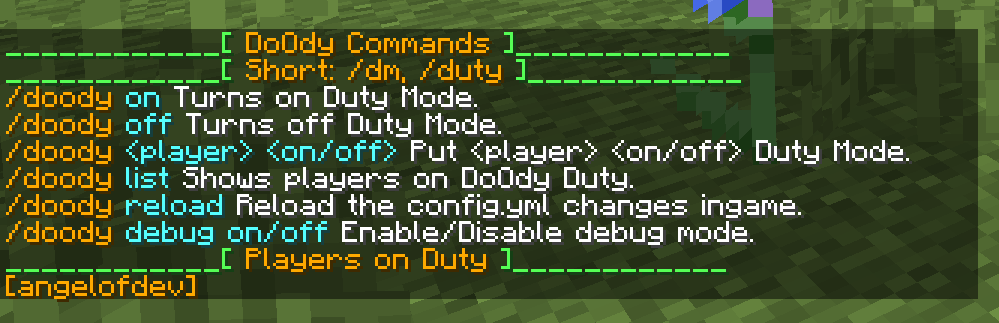
- /doody Shows available commands.
- /doody [on/off] Enter/Leave duty mode.
- /doody [player] [on/off] Put another player on/off duty.
- /doody spectate Enter spectator mode (no clip version).
- /doody spectate [player] Start spectating specified player (restricted version).
- /doody back Teleport back to last known duty location.
- /doody list Lists current players on duty.
- /doody reload Ingame command to reload config.yml file.
- /doody debug [on/off] Enable/disable Debug Mode.
Permissions
doody.*allows access to all commands and abilitiesdoody.dutyallows access to duty modedoody.spectateallows access to /doody spectate [player]doody.spectate.noclipallows access to /doody spectate NOTE This is the noclip versiondoody.reloadallows access to reload configdoody.allowplaceallows players to place blocks on blacklistdoody.allowbreakallows players to break blocks on blacklistdoody.dropitemsallows players to drop items while on dutydoody.storageallows players to use storage while on dutydoody.pvpallows pvp while on duty, regardless of config setting.doody.othersallows player to put other players on/off dutydoody.failsafe.bypassallows fail-safe bypass for players with access to /gamemode or /gm commands (very optional permission node)doody.debugallows players to access /doody debug [on/off]doody.worlds.[worldName]allows players to enter duty mode in restricted worlds example: doody.worlds.survivalWorld
Comments


-

angelofdev Owner
-
View User Profile
-
Send Message
Posted Jun 29, 2012@jcasale1
Ahh I see what's happening now. Thank you for the reply. Yes, it is intended.
Since doody actually gives players creative mode I made a few fail-safes to ensure no player gets away with full creative powers.
On player joining events, doody checks to see if the player is in Creative mode.
If the player is in creative mode it then checks to see if the player is either an OP or on Duty.
If the player is none of those it then proceeds to remove the player from creative mode & clears their inventory.
The way I see it is if the player has the ability to use the command /gamemode 1 or /gm they're already OP.
I guess I can add a permission node that also allows the bypass of the fail-safe.
-
View User Profile
-
Send Message
Posted Jun 29, 2012@angelofdev
OK here is whats happening i log in to the game i go into normal creative mode by /gamemode 1 i have do0ty restricted to certain items so sometime i use normal creative. I build a few things and leave the material in my inventory log out while i am in creative and when i log back in my inventory is empty and i am kicked from creative. Is this as intended?
-
View User Profile
-
Send Message
Posted Jun 28, 2012@jcasale1
Your non-duty inventory is saved to inventory.yml file in the directory plugins/DoOdy.
When you use /doody off your inventory will be restored.
DoOdy also restores your non-duty inventory on logout so you wouldn't/shouldn't be losing it when you log out.
If the above is not what you're experiencing can you please tell me to steps to reproduce the issue you're having so I can solve this.
-
View User Profile
-
Send Message
Posted Jun 28, 2012Anyone having issues with non Duty inventory disappearing when you are an OP and using Do0ty. It seems every time I log out I loose both inventories .
-
View User Profile
-
Send Message
Posted Jun 26, 2012I Love This Plugin! I recomend it to everyone!
-
View User Profile
-
Send Message
Posted Jun 24, 2012Update:
Version 0.4.6 has been uploaded & waiting for approval. I strongly suggest you update to this version.
Version 0.4.6: Fix for items from duty mode remaining in inventory for players on duty when plugin is unloaded.
<sub>Version 0.4.5 has been uploaded & waiting for approval.
I strongly suggest you update to this version.</sub><sub>Version 0.4.5: Fixes Issues with player inventory & location being lost for players who are on duty when the plugin is unloaded or server is shut down.</sub>
-
View User Profile
-
Send Message
Posted Jun 23, 2012@Zurimaxicata
DoOdy doesn't stop players who are OP and/or have 'doody.dropitems' and 'doody.storage' permission nodes from dropping items or opening chests.
If you're using PermissionsEx(PEX) to test it out on yourself you can remove the permission node from yourself by doing this command:
/pex user <playername> add -doody.dropitems
/pex user <playername> add -doody.storage
To give yourself the permission nodes again do this:
/pex user <playername> remove -doody.dropitems
/pex user <playername> add -doody.storage
-
View User Profile
-
Send Message
Posted Jun 23, 2012EXELENT , EXELENT IDEA! but dont work for me :S i can open the chests and i can drops everything (im in /duty on)
-
View User Profile
-
Send Message
Posted Jun 23, 2012@Apecengo
Thanks, and also done. Waiting for Version 0.4.3 to get approved.
Version 0.4.3:
-
View User Profile
-
Send Message
Posted Jun 23, 2012Great plugin! You should add another command: /doody <player> <on/off>
-
View User Profile
-
Send Message
Posted Jun 20, 2012@gibbly96
No it's not a stupid question. I just didn't explain what it does correctly. This was a private plugin that I only decided to make public yesterday.
I made this plugin for my pvp server for two reasons:
But I understand not many people are as restrictive as that, that's why I've made almost all of the features optional via the config. Or you can keep it restrictive but allow a few to bypass via the permissions.
Players who are OP should not be affected by this plugin, as it already show's you trust them enough.
Hopefully I have explained to you what is possible through this plugin.
-
View User Profile
-
Send Message
Posted Jun 19, 2012Hey. Sorry for this stupid question. My english is not that bad and i read everything. But i dont understand what i can exactly do with that.. ^^
-Gabriel