DeityAPI
This plugin is designed to make the tedious tasks such as chat/config/command handling simple and unified. Think of it like the borg for bukkit.
What does this plugin allow me to do?
For Server Admins: This plugin will not do anything for you, unless you are developer and using its API. Otherwise it will sit in the background. For Developers: Plugin contains multiple api functions available to the developer, dealing with MySQL interaction, Player handling, Inventory handling, Chat handling, Econ handling (provided vault is installed), WorldEdit, WorldGuard, Mob handling, File Management, String Management, Time Management, and various others.
Benefits:
- The simplicity. Even if you do not use the Plugin and Command framework we provide, you still have access to a persistant MySQL Connection instantly, without having the Server admin configure the database multiple times.
- Within the Plugin framework, if the admin decides to enable it, it will profile the load times of all the plugins registered.
- Getting sick of building help files/pages, to go along with the plugin? The Command framework will take care of all that including all sub-command handling out of the box.
- Annoying at having to check permissions/check if its a player running the command? The Command framework will also do all of this for you.
Configuration?
deityapi:
  should_profile: true # Whether or not you would like to see load times on plugins
  inform_on_plugin_update: true # Whether or not you would like plugins to notify you if they update
  mysql:
    server:
      address: localhost # Change me to the address of your database server
      port: 3306  # Change me to the port of your database server
    database:
      name: kingdoms  # Change me to the name of your database
      username: root  # Change me to the username for your database
      password: root # Change me to the password for your database
Commands?
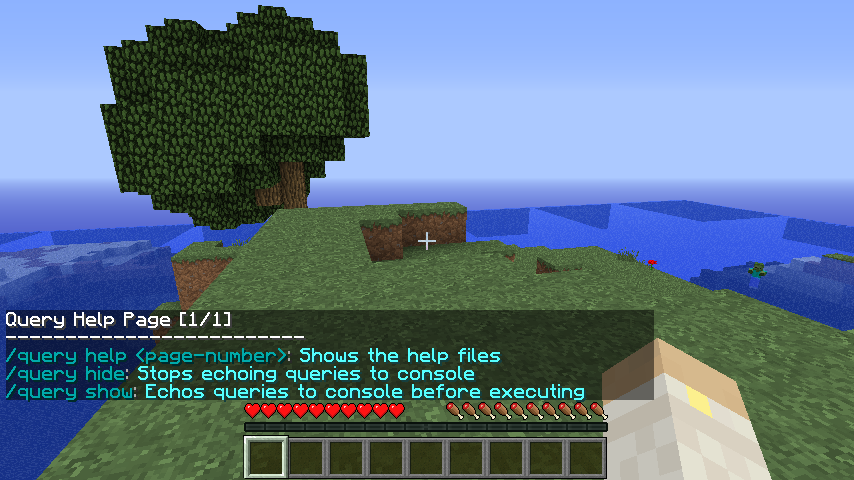
- /Query [show/hide]: This command will show/hide console logging of all database queries. Can be used by anyone who is Op/players with the permission node "DeityAPI.query" or from console itself
Plugins that use this plugin
If your using the API for a plugin and it wont load or throw a ClassNotFoundException. Please message me with your plugin name and ill add it to the list
Extra Links
Javadocs: GitHub

Comments

-

_ForgeUser6866240 Owner
-
View User Profile
-
Send Message
Posted Aug 26, 2014I have the same Issue as jprules10, how can I solve it? Can't find a plugin.yml
-
View User Profile
-
Send Message
Posted Jun 29, 2014@jprules10 try and make a depend on this plugin in your plugin.yml
-
View User Profile
-
Send Message
Posted Mar 29, 2014-
View User Profile
-
Send Message
Posted Sep 5, 2013@Rmarmorstein
DeityAPI has a proprietary license, so I'm not able to release the updated source. The authors source is on GitHub, so if you search for it you can update it in the future yourself.
1.6.2-R0.2: Download
This build also removes the automatic updater for obvious reasons.
This is not a BukkitDev approved build, and has not been approved by the author. Use it at your own risk.
-
View User Profile
-
Send Message
Posted Jul 1, 2013@laCourj
are you releasing the source to your custom version? I just want to look through it if you dont mind.
-
View User Profile
-
Send Message
Posted May 6, 2013@laCourj
Thank you again! I'll do it properly this time xD
-
View User Profile
-
Send Message
Posted May 4, 2013Custom build for 1.5.2-R0.1: Download.
This is not a BukkitDev approved build, and has not been approved by the author. Use it at your own risk.
-
View User Profile
-
Send Message
Posted Apr 7, 2013This was actually just my fault in the end - Just posting this so users know ;) (My FTP didn't replace the file since it was in a different name)
-
View User Profile
-
Send Message
Posted Apr 7, 2013@harryjamesuk
Hi! I've already responded to your private message but I'll post the reason here incase anyone else encounters the same issue.
After looking at your paste, it seems that for whatever reason your DeityAPI.jar file wasn't replaced with the one you downloaded.
When the new one loads it will say "[DeityAPI] Enabling DeityAPI CUSTOM" rather than "[DeityAPI] Enabling DeityAPI v12.08.19".
-
View User Profile
-
Send Message
Posted Apr 7, 2013@laCourj
Spoke too soon though, It didn't work for me:
http://pastebin.com/MqUTJiYF
-
View User Profile
-
Send Message
Posted Apr 6, 2013@laCourj
And thank you too.
-
View User Profile
-
Send Message
Posted Mar 25, 2013Custom build for 1.5.1-R0.1: Download.
-
View User Profile
-
Send Message
Posted Feb 19, 2013@MysteriooN
Ah, yes, thank you very muchly
-
View User Profile
-
Send Message
Posted Feb 16, 2013@MysteriooN
Thanks again.
-
View User Profile
-
Send Message
Posted Jan 18, 2013Updated for 1.4.7-R0.1 #2602: Download.
-
View User Profile
-
Send Message
Posted Dec 24, 2012@MysteriooN
Thanks!
-
View User Profile
-
Send Message
Posted Dec 22, 2012I made an unofficial update for this plugin.
Download for CB 1.4.5-R1.0
Download for CB 1.4.6-R0.1
-
View User Profile
-
Send Message
Posted Dec 22, 2012This will be not updated... this project is inactive....
-
View User Profile
-
Send Message
Posted Dec 21, 2012This needs to be updated for 1.4.6.
-
View User Profile
-
Send Message
Posted Oct 24, 2012@killa1279
You have to fill the config with the information of your MySQL database, At default settings the adress have to be an ip adress or localhost if you running the database at the same system. Port is your database port, at default settings it is 3306. Then you have to set your database name and a user which has access to the database. If you don't have mysql installed look here: http://mysql.com