
DeadChest



%2526business%253darthur.pavarino%2540gmail.com%2526bn%253dPP-DonationsBF%253abtn_donateCC_LG.gif%253aNonHosted%2526cancel_return%253dhttps%253a%252f%252fdev.bukkit.org%252fprojects%252f322434%253fgameCategorySlug%253dbukkit-plugins%2526projectSlug%253ddeadchest%2526lc%253dUS%2526item_name%253dDeadChest%2b(from%2bbukkit.org)%2526cmd%253d_donations%2526rm%253d1%2526no_shipping%253d1%2526currency_code%253dUSD)
The ultimate solution to protect player inventories on death
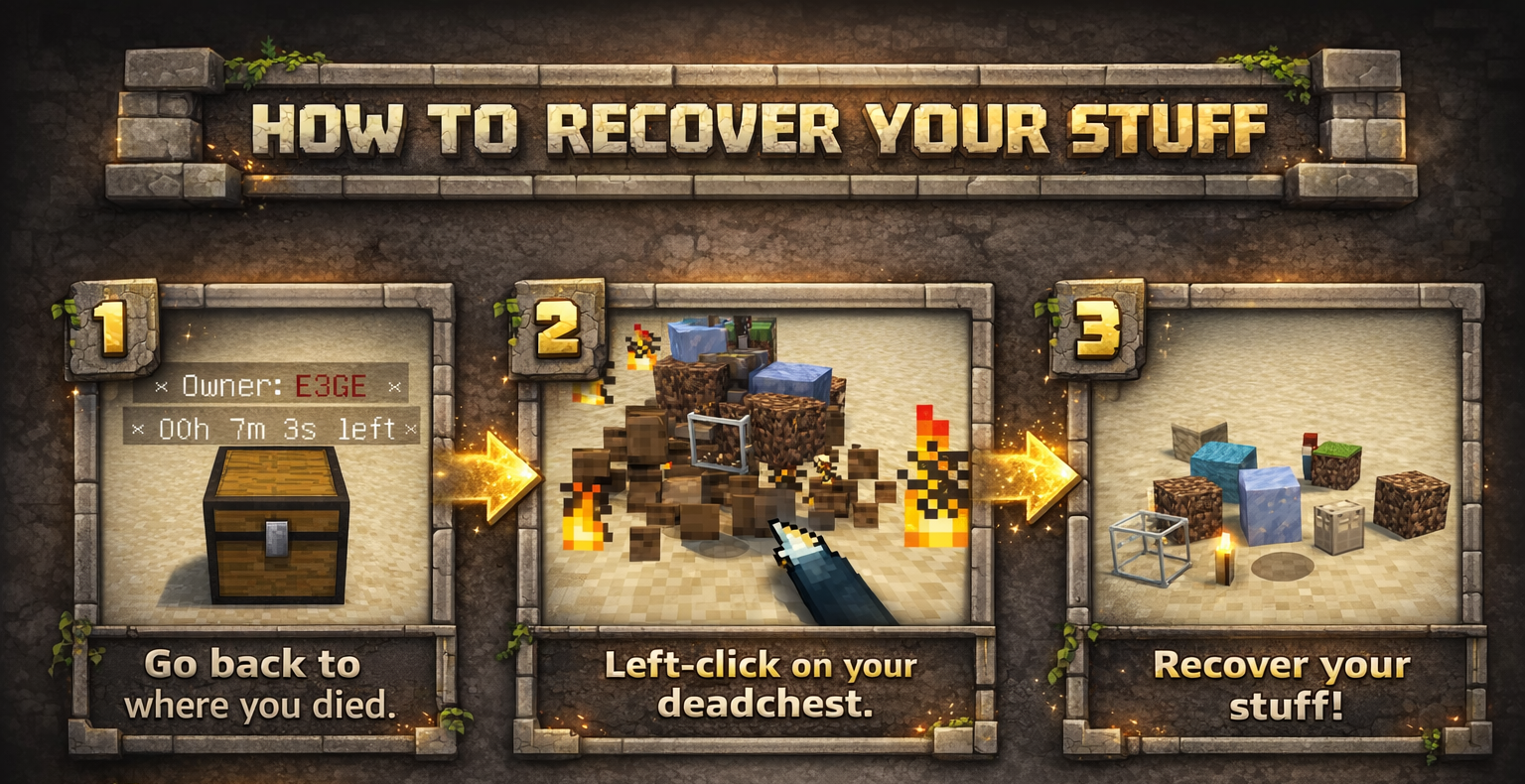
DeadChest automatically converts a player's dropped inventory into a secure chest at the exact location of death.
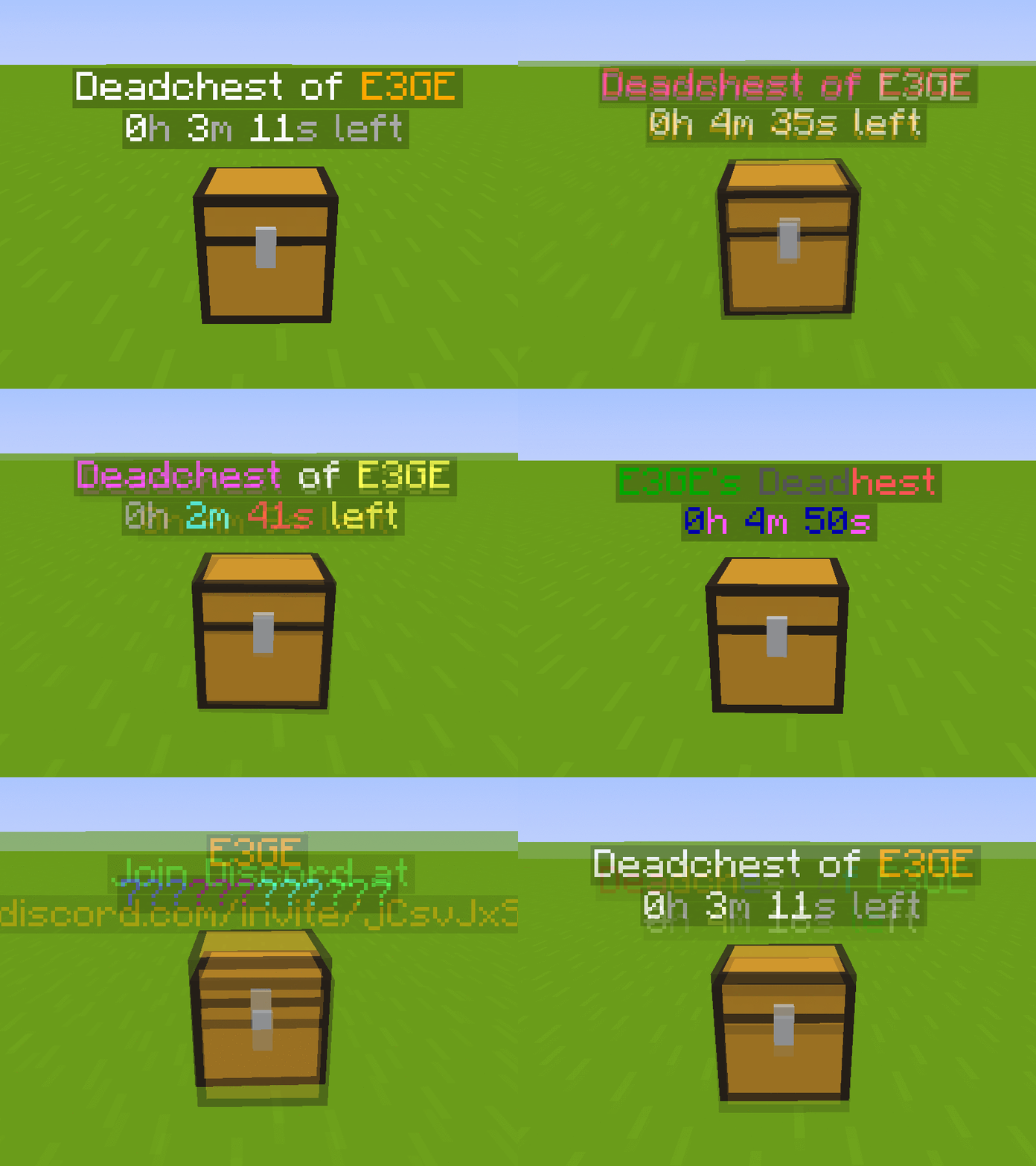
Each chest displays a hologram with the owner's name and a configurable countdown timer.
When the timer expires, the chest and its contents are permanently removed.
Fully customizable: define custom durations, create infinite chests, and choose between private (owner/admin only) or public access.

Key Features
- Automatically stores the entire player inventory on death (including armor)
- Chest spawns at the exact death location
- Holographic display showing owner and remaining time
- Private or public chest access
- Optional XP storage
- Grief protection (explosion and destruction control)
- WorldGuard integration
- Fully compatible with Minecraft 1.13.2 – 26.3.x
- Folia support !
Advanced Features
- Unlimited players and unlimited chests
- Per-world configuration
- Gamemode-based management
- Item filtering and management
- Choose between chest or player head container
- Citizens 2 compatibility
- Detailed logging system for every DeadChest event (no more player disputes)
- Advanced permission system
Fully Customizable
- Chest duration
- Chest access (private/public)
- Hologram content
- Text colors
- Griefable chests (enable/disable destruction)
- Maximum number of chests per player
- Multi-language support
- Drop behavior customization
- And much more
Documention link
Since version 4.5.0, DeadChest uses bStats to collect anonymous usage statistics to help improve the plugin.

DeadChests are FULLY customizable!

| Command | Description | Permission |
|
/dc reload |
Reload the plugin |
deadchest.admin |
|
/dc remove |
Remove all deadchests of the current player |
deadchest.remove.own |
|
/dc remove (PlayerName) |
Remove all deadchests of a player |
deadchest.remove.other |
|
/dc removeinfinite |
Remove all infiny chest |
deadchest.admin |
|
/dc removeall |
Remove all deadchests |
deadchest.admin |
|
/dc list |
List all deadchest of the current player |
deadchest.list.own |
|
/dc list all |
List all deadchest |
deadchest.list.other |
|
/dc list (PlayerName) |
List all deadchest of a player |
deadchest.list.other |
|
/dc giveBack (PlayerName) |
Return the oldest deadchest inventory of a player to him |
deadchest.giveBack |
|
/dc ignore |
Opens the ignore list inventory to add items Deadchest should ignore. |
deadchest.admin |
deadchest.generate : Allow a player to generate deadchests
deadchest.chestPass : Allow a player to get all deadchests
deadchest.infinityChest : Allow a player to have a infinity chest

First Installation
-
Download DeadChest.jar
-
Place it in your server’s
/pluginsfolder -
Restart or start your server
The plugin will automatically generate its configuration files inside:
/plugins/DeadChest/
Generated Files
config.yml
Main configuration file.
Use this file to customize plugin settings and behavior.
locale.yml
Language file (English by default).
You can edit this file to translate messages into your preferred language.
deadchest.log
Contains a detailed log of all DeadChest events.


Please read the FAQ if you have any trouble. If you find any issue, please report it on Github or Discord

You will find below the list of all my plugins. They are all updated with the latest version and try to offer you the best experience possible.
- SpawnerSilk : Mine spawners with silk touch.
- DeadChest : Keep your inventory in a chest when you die
- Cryweather : Manage time easily
- RedStoneMe : Activate redstone with your presence
- MendingEnchant : Allow you to have mending with your enchant table
- MobsManager : Manage which mobs can spawn on your server or not
- CreatureCapture : Capture any creatures you see with a special bow
Comments


-

crylonz Owner
-
View User Profile
-
Send Message
Posted Sep 7, 2019In reply to crylonz:
Hello,
I put version 2.1 (I stayed on version 2.0, you update often, it's cool, I also had the duplication bug before)
I have disabled all plugins except DeadChest
I reactivated the plugins one by one by restarting the server each time and testing DeadChest....
EVERYTHING WORKS CORRECTLY
No idea where the problem was coming from, so :/
Have a good day
-
View User Profile
-
Send Message
Posted Sep 7, 2019In reply to ixeygrek:
Yes I'm very active to patch bugs when someone make a report, so there is a lot of update. Version2.1 seems to be very stable, no bug report on 2 weeks. Thanks to taked time to test the plugin, and happy to know that all work fine now. Have a good day too !
-
View User Profile
-
Send Message
Posted Sep 7, 2019In reply to crylonz:
However, I still don't lose XP when I die :/
-
View User Profile
-
Send Message
Posted Sep 7, 2019In reply to ixeygrek:
I don't touch to the experience system on my plugin. So it can't override the default Minecraft system and can't keep your XP on death. I juste made some tests on my dev server. All work fine, I loose my XP on death. Try to test it like you do before without other plugin.
-
View User Profile
-
Send Message
Posted Sep 1, 2019I love this plugin, i was just wondering is there a way to make it so after the timer for the chest runs out the items drop on the ground (for example if someone has a hopper trap built and someone falls on it and the chest appears, and he doesn't come back in time, the chest dissapears and all the items in it fall to the ground and go into the hopper as they would normally). Plus the option for op's to be able to open the chest to look into it without it being destroyed, that could also be a nice little feature, other than that, no complaints. :)
-
View User Profile
-
Send Message
Posted Sep 1, 2019In reply to CrazyClash:
Thanks for your feedback ! Yes, it's a nice idea, I put your ideas on the to-do list of the plugin. Just be patient for the update ! :)
-
View User Profile
-
Send Message
Posted Sep 1, 2019I've been having issues recently as I was running an older version of DeadChest (pre 2.0) and can't seem to remove this floating text.
Tried removing Deadchest, Add the new version
dc/repair don't work
dc/reload don't work
tried dying all around it and placing deadchests (worked to some extent, only removed the timer that was frozen
tried using WorldEdit to forcefully place blocks on the text 3x3, still won't budge.
the ground underneath can't be mined and 2-3 blocks about the text can't be placed any block.
Any suggestions?
Broken Text
https://imgur.com/RkvzeDphttps://imgur.com/RkvzeDphttps://imgur.com/RkvzeDphttps://imgur.com/RkvzeDphttps://imgur.com/RkvzeDp
-
View User Profile
-
Send Message
Posted Sep 1, 2019In reply to Forge_User_77603480:
Hi,
I'm sorry that you encoutered issue. /dc repair only work with 2.0+ holographic display, so it's normal that it dosn't work for this one (under 2.0). /dc reload just reload the plugin so, that's not going to suppress the holographic display.
To clean the holographic, just make this command next to it :
/kill @e[type=minecraft:armor_stand]
Hope I help you !
-
View User Profile
-
Send Message
Posted Sep 1, 2019In reply to crylonz:
Hi again,
You solved my issue! Thank you so much <3
Maybe wrong place to add Suggestions, but is there a way for upon dying to add a location message? Would make our lives easier. Thanks again!
-
View User Profile
-
Send Message
Posted Aug 23, 2019Thats a good idea! Thanks you for waste your time at a ass (me). ^^
-
View User Profile
-
Send Message
Posted Aug 23, 2019its not working anymore already reinstalled it many times stopped and restarted server tried the other versions and nothing chest wont spawn... was working before changing to recent version.
-
View User Profile
-
Send Message
Posted Aug 23, 2019In reply to eshadows94:
To make it work, you must use permissions. Only players with permission deadchest.keepInventory will have a dead chest at their death. No permission, no deadchest. On olders version of the plugin, this permission was enable by default. In the 2.0, I change it to false by default. I think I will restablish this to true in 2.1, because some of people seem to don't use any permission system. Hope I help you.
-
View User Profile
-
Send Message
Posted Aug 21, 2019typed up /help deadchest and it said "/dc "null". not sure if ive installed this wrong or if something isn't acting properly
-
View User Profile
-
Send Message
Posted Aug 21, 2019In reply to Zaddist:
Hum work for me. Have you reload your server ? If yes, maybe try to restart it
-
View User Profile
-
Send Message
Posted Aug 22, 2019In reply to Zaddist:
I had the same problem. Stop your server and delete the plugins/DeadChest folder, then restart the server. That fixed the bug for me.
-
View User Profile
-
Send Message
Posted Aug 22, 2019In reply to Keldor:
Yes this is the way to update from an old version, I forgot to mention that server need to restart after deleting the deadchest folder.
-
View User Profile
-
Send Message
Posted Aug 21, 2019Update is broken. It dont work anymore.
-
View User Profile
-
Send Message
Posted Aug 21, 2019In reply to Forge_User_93887454:
I think not. You probabely miss something. Check the FAQ for more details. What is the problem ?
I think that your forget to add the deadchest.keepInventory permission.
-
View User Profile
-
Send Message
Posted Aug 22, 2019In reply to crylonz:
I dont use any Permissions!
-
View User Profile
-
Send Message
Posted Aug 23, 2019In reply to Forge_User_93887454:
That's why it does not work, you must use permissions. Only players with permission deadchest.keepInventory will have a dead chest at their death. No permission, no deadchest. On olders version of the plugin, this permission was enable by default. In the 2.0, I change it to false by default. I think I will restablish this to true in 2.1, because some of people seem to don't use any permission system. Hope I help you.